Anti-DDoS Pro
다운로드
포커스 모드
폰트 크기
Anti-DDoS Pro provides Tencent Cloud public IPs with higher anti-DDoS capability. It supports Tencent Cloud services such as CVM, CLB, NAT, and WAF. It is easy to connect and requires no IP changes.
Prerequisite
You need to purchase an Anti-DDoS Pro (Standard) instance first before you can bind it to the IP address you want to protect.
Directions
1. Log in to the new Anti-DDoS console and click Anti-DDoS Instances on the left sidebar.
2. On the Anti-DDoS Instances page, select a target Anti-DDoS Pro instance and click Protected Resource in the Operation column.

3. In the Protected Resource window, select a device type and a resource instance as needed.
Note:
Anti-DDoS Pro supports Tencent Cloud managed IPs, which is currently available for beta users. If you want to use this feature, please call 4009100100 ext. 1 (Monday–Friday, 9:00–18:00) or submit a ticket.
Device type: Support public cloud resources (such as CVM, CLB, and WAF) with public IPs.
Select instance: You can select one or more instances. The maximum instances selected cannot exceed the number of bound IPs.
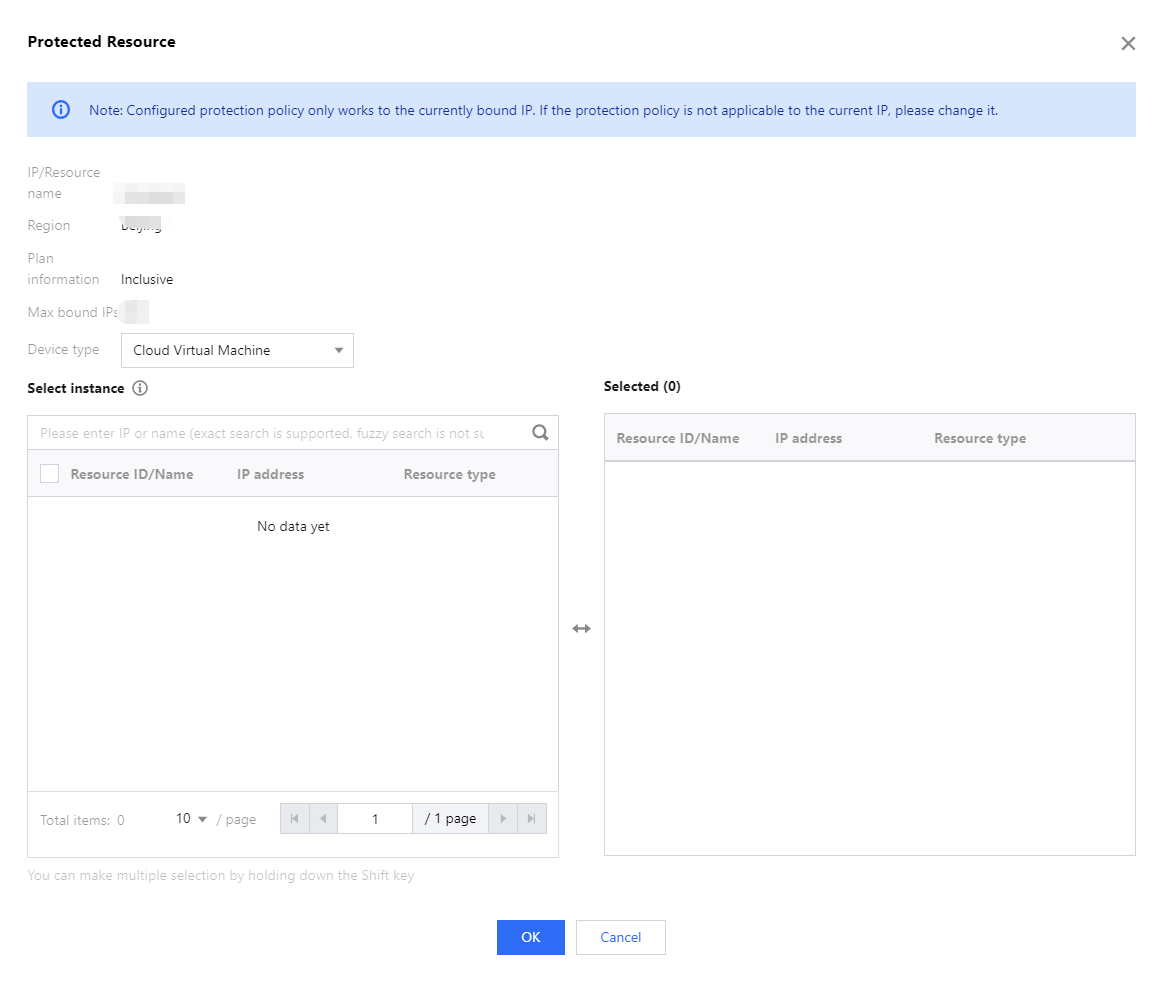
4. Click OK.
Note:
After you have connected to the service, you can customize your protection settings on the Configurations page. For more information, see Protection Configuration.
피드백