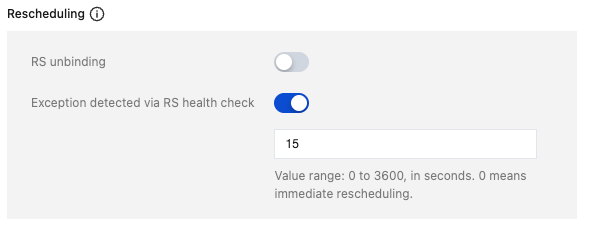
When a GWLB backend service is unbound or a health check exception occurs on the backend service, new traffic is forwarded to other normal real servers. The forwarding of existing traffic to the backend service continues, which may result in packet loss. At this point, you can enable rescheduling. After it is enabled, when a backend service is unbound or a health check exception occurs on the backend service, the system proactively interrupts existing connections within the specified interval and reschedules them to other normal real servers. If it is not enabled, the system will not proactively interrupt existing connections with the same 5-tuple until long-lived connections time out.
Rescheduling Impact on Traffic Forwarding
When a GWLB backend service is unbound or a health check exception occurs on the backend service:
New traffic will be forwarded to other normal real servers.
The processing method for existing traffic varies with customers' configurations.
Scenario
Whether to Enable Rescheduling
Processing Method for Existing Traffic
Backend service unbinding
No
The system continues forwarding existing traffic to the unbound backend service, which may result in packet loss.
Yes
Within the specified interval, the system continues forwarding traffic to the unbound backend service.
The system proactively interrupts existing connections when the specified interval times out and reschedules them to other normal real servers.
When the interval is 0, existing connections are interrupted immediately.
Health check exception of the backend service
No
The system continues forwarding existing traffic to the abnormal backend service, which may result in packet loss.
Yes
Within the specified interval, the system continues forwarding traffic to the abnormal backend service.
The system proactively interrupts existing connections when the specified interval times out and reschedules them to other normal real servers.
When the interval is 0, existing connections are interrupted immediately.
Rescheduling Configuration
Configuration During Target Group Creation
1. Log in to the GWLB console. In the left sidebar of GWLB, choose Target Group Management.
2. In the Target Group Management window, select the specified region next to the Region drop-down list.
3. At the top of the list page, click Create. In the pop-up window, click Display Advanced Options and configure as required.
1. Log in to the GWLB console. In the left sidebar of GWLB, choose Target Group Management.
2. In the Target Group Management window, select the specified region next to the Region drop-down list.
3. Click the ID of the specified target group on the list page.
4. On the Basic Information tab, click the Edit icon and configure as required.
Additional Information
If the workload traffic is stateful protocol traffic, a third-party virtual device (such as a firewall) in the real server is required.
Take the Transmission Control Protocol (TCP) protocol as an example. The firewall must allow TCP session establishment without an initial SYN (short for "synchronize") packet.
Principle:
TCP three-way handshake: The TCP protocol typically requires the three-way handshake to establish a connection between a client and a server. The client sends a SYN packet, the server responds with the SYN-ACK message, and the client sends an acknowledgement (ACK). Then, the connection is established.
When GWLB performs rescheduling, it may move existing connections from one real server to another (a different firewall device). This operation may lead to TCP sessions being transferred to a new third-party virtual device without complete three-way handshake initiation. If the new third-party virtual device does not support establishing TCP sessions without an initial SYN packet, the connections are interrupted. In this case, it is required that the third-party virtual device accept connections without an SYN packet to prevent connection interruption.
Configuration example: Taking FortiGate firewall as an example, you can enable tcp-session-without-syn in the firewall policy. For details, refer to the official documentation of the firewall provider.