Modifying Account Permissions
Download
포커스 모드
폰트 크기
This document describes how to manage authorization for regular accounts in the TDSQL Boundless console, including granting global privileges, granting object-level privileges, and revoking authorization.
Note:
dbaadmin is a system-predefined high-privilege account. Its permissions are fixed upon instance creation and cannot be modified on this page. To reset the dbaadmin password, see Resetting Password.
Regular accounts have no permissions by default after creation and require authorization on this page to access business data. It is recommended to follow the principle of least privilege and grant only the permissions actually required by the business.
Account Permissions Overview
The following database privileges are supported for TDSQL Boundless regular accounts and can be selected as needed during authorization.
Permission name | Description |
ALTER | Modify the structure of tables in the database, including permissions for altering table fields, adding table fields, deleting table fields, as well as creating and removing table indexes. |
ALTER ROUTINE | Privileges to alter routines such as stored procedures and functions. |
CREATE | Privileges to create new objects such as databases, tables, views, stored procedures, and functions. |
CREATE ROUTINE | Privileges to create routine objects such as stored procedures and functions. |
CREATE TEMPORARY TABLES | Privilege to create temporary tables. |
CREATE VIEW | Privilege to create view objects. |
DELETE | Privilege to delete data from specified tables. |
DROP | Privilege to drop objects such as databases, tables, views, stored procedures, and functions. |
EVENT | Privilege to create, modify, and delete events. |
EXECUTE | Privilege to execute existing objects such as stored procedures and functions. |
INDEX | Privilege to create and delete indexes. |
INSERT | Privilege to insert/write new data into tables. |
LOCK TABLES | Privilege to lock specified data tables for read/write operations. |
REFERENCES | Privilege to create or drop foreign key constraints within the current database. |
RELOAD | Privilege to reload some configuration files of the system, restart or shutdown the database, and perform other operations. |
REPLICATION CLIENT | Privilege to view and manage the status and parameters of replication processes. |
REPLICATION SLAVE | Privilege to replicate data from the MASTER server. |
SELECT | Privilege to query data from specified tables. |
SHOW DATABASES | Privilege to display all databases within the current database server. |
SHOW VIEW | Privilege to view view definitions. |
SYSTEM_VARIABLES_ADMIN | Privilege to modify system variables. |
TRIGGER | Privilege to create and manage triggers. |
UPDATE | Privilege to update data in specified tables. |
Authorization scope
During authorization, you can select one of the following two authorization scopes based on your business needs.
Global Privileges: The account will have the selected permissions for all databases under the instance, which is suitable for Ops or cross-database access scenarios.
Object-Level Privileges: The account will have the selected permissions only for specified databases. This is suitable for authorization scenarios based on business isolation and is the recommended least-privilege authorization method.
Operation Steps
1. Log in to the TDSQL Boundless console. In the Instance List, click the Instance ID to go to the Instance Details page.
2. Select the Account Management tab. In the row of the target account, click Modify Permissions in the Operation column.
3. On the Modify Account Permissions page, select the database permissions. You can click Preview Modification. After the modifications are confirmed to be correct, click Modify.
Global Privileges: Select the required permissions in the Global Privileges area. The account will then obtain the corresponding permissions for all databases under the instance.
Object-Level Privilege: In the Object-Level Privilege area, select the target database and then select the required permissions. The account will then obtain the corresponding permissions only for that database.
4. (Optional) Click Preview Modification to confirm the permission differences before and after this authorization.
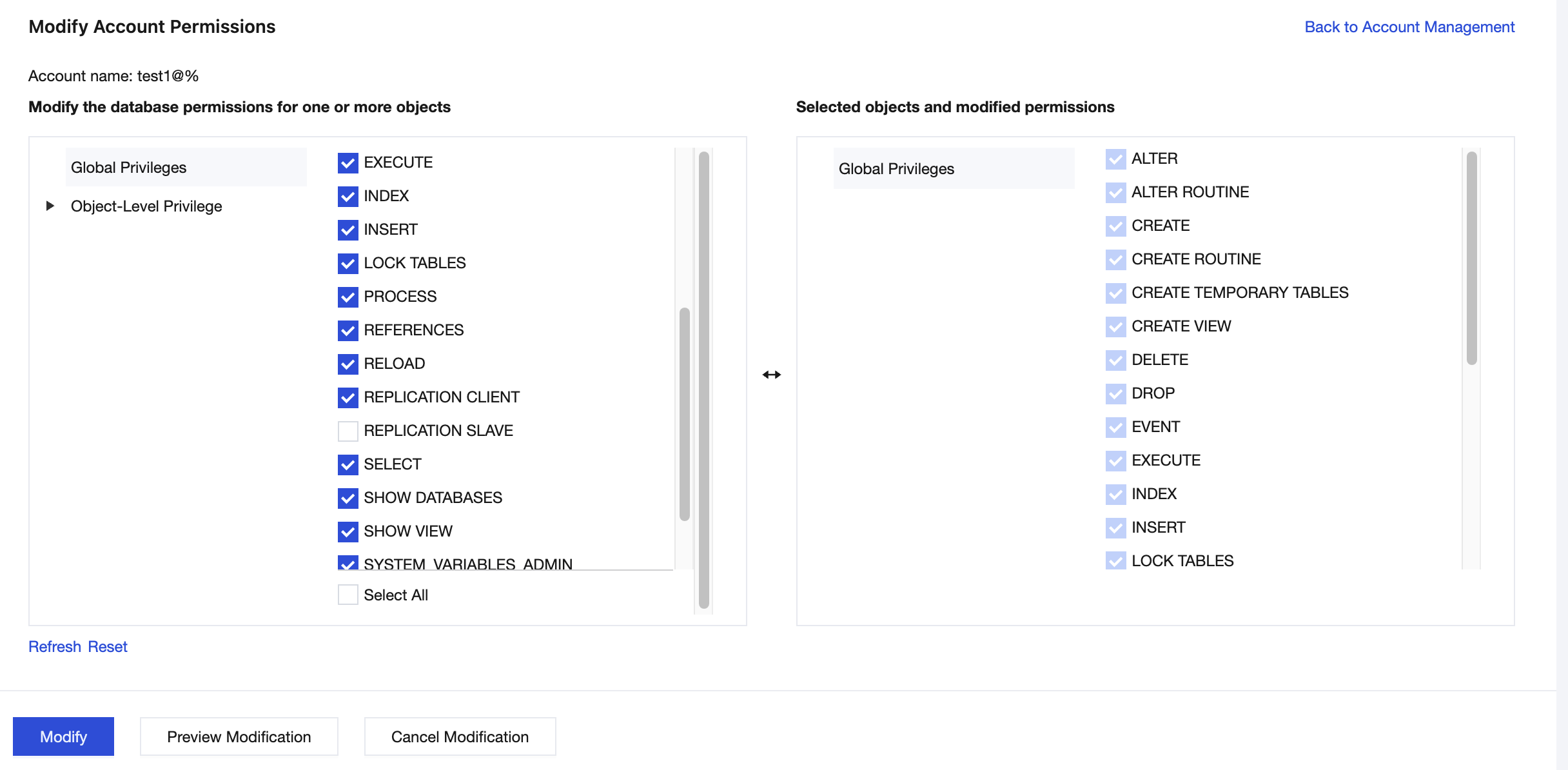
5. After confirming that everything is correct, click Modify to complete the authorization.
Note:
Permission changes take effect in real time. Accounts can use the new permissions in new connections. For established connections, the new permissions take effect only after reconnection.
Canceling Authorization
To revoke permissions from an account, go to the Modify Account Permissions page, deselect the corresponding permission items, and then save the changes:
Deselect the items in Global Privileges. This will revoke the corresponding permissions for the account across all databases under the instance.
Deselect the items under a specific database in Object-Level Privilege. This will revoke the corresponding permissions only for that database.
Note:
Revoking permissions immediately impacts business access. Before making changes, confirm that the relevant services have no dependencies. If necessary, perform the operation during off-peak hours.
피드백