Enabling Transparent Data Encryption
Download
포커스 모드
폰트 크기
Scenarios
TDSQL Boundless provides the Transparent Data Encryption (TDE) feature. Transparent encryption means that data encryption and decryption operations are transparent to users. It supports real-time I/O encryption and decryption for data files, encrypting data before it is written to disk and decrypting it when read from disk into memory. This can meet the compliance requirements for data-at-rest encryption.
Key Management Description
TDSQL Boundless does not provide the keys and certificates required for encryption. The keys used by the Transparent Data Encryption feature are generated and managed by KMS. Details regarding the keys are described below.
The Transparent Data Encryption feature incurs no additional charge. However, using the Key Management System (KMS) will generate additional fees. For details, see Billing Overview.
The current version only supports using keys automatically generated by Tencent Cloud. It does not yet support using custom keys.
KMS only supports the prepaid billing mode. For users who have newly purchased KMS (prepaid edition), when their account is in an overdue payment state, obtaining KMS keys will not be affected within the prepaid period because KMS has already been prepaid for a certain cycle. Migration, upgrade, and other tasks will not be affected either. Please note the renewal time of your KMS keys. If a KMS key is not renewed after expiration, the use of the Transparent Data Encryption feature will also be affected. To manage your KMS keys, go to the KMS console.
TDSQL Boundless instances and KMS support different regions. When creating a key, if the corresponding Mainland China region is not available on KMS, you can create it in the Guangzhou region. If the corresponding region outside Mainland China is not available, you can create it in the Hong Kong (China) region.
Prerequisites
The instance type must be provisioned resource. The database mode must be compatible with MySQL 8.0. The kernel version must be V21.6.2.0 or later.
Transparent Data Encryption can only be enabled during instance creation. It cannot be enabled or disabled after the instance is created.
The current version only supports the AES encryption algorithm.
KMS service has been activated. If it has not been activated, you can activate KMS during instance creation by following the guide.
Permissions for the KMS key have been granted. If they have not been granted, you can grant the permissions during instance creation by following the guide.
The operating account must have the permission to grant the service-related role
TDMYSQL_QCSLinkedRoleInKMS. If this permission has not been granted, you can grant it during instance creation by following the guide.Limitations
When using the Transparent Data Encryption feature, ensure that the selected KMS key is in a normal, usable state. Otherwise, the key cannot be obtained from KMS, which may cause tasks such as migration and upgrade to fail.
After KMS authorization is revoked, if the instance is restarted, the database will become unavailable due to the inability to obtain the key. Therefore, you must retain the authorization relationship.
The TDE encryption feature cannot be disabled after it is enabled.
Enabling the TDE encryption feature enhances the security of static data but also impacts the read/write performance when the encrypted database is accessed. Please decide whether to enable TDE encryption based on your actual requirements.
When you create a disaster recovery instance, if TDE is enabled on the primary instance, encryption is automatically enabled on the disaster recovery instance. No separate action is required.
Enabling the TDE encryption feature increases CPU resource consumption. The expected performance overhead is within 5%.
After the TDE encryption feature is enabled, applications and users authenticated by the database can transparently access application data.
After the TDE encryption feature is enabled, the backup compression efficiency may be reduced.
After Transparent Data Encryption is enabled for an instance, the data flushed to disk and backup files for that instance are automatically encrypted.
Steps
Enabling TDE When an Instance is Created
1. Log in to the TDSQL Boundless console, go to the instance purchase page, and enable TDE. For more details, see Creating a Pre-configured Resource Instance.
2. Enable the KMS service. The KMS service status includes the following two types:
Not enabled: First-time enabling KMS service. You can click Enable and then enable the KMS service on the new page that opens.
Enabled: No action is required.
3. Authorize the KMS key service. The authorization status of the KMS key service includes the following two types:
Not authorized: For first-time authorization of the KMS key service, click Service Authorization to grant TDSQL Boundless access permissions to the KMS key service. The encryption keys for Transparent Data Encryption are managed by KMS. When encrypting/decrypting data, an instance needs to call KMS APIs to obtain or create keys. Therefore, cross-service access authorization must be established. The service role TDMYSQL_QCSLinkedRoleInKMS (service-linked role) and the preset policy QcloudAccessForTDMYSQLLinkedRoleInKMS are only effective when TDSQL Boundless accesses KMS. They will not be used to access your other cloud resources.
Authorized: No action is required.
4. Select a key: By default, a key automatically generated by Tencent Cloud is used.
Note:
Currently, Transparent Data Encryption only supports keys automatically generated by Tencent Cloud. Support for custom keys will be available in the future. Please stay tuned for updates.
Viewing Encryption Status and Key Information
1. Log in to the TDSQL Boundless console. In the instance list, click the target Instance ID to go to the Instance Management page.
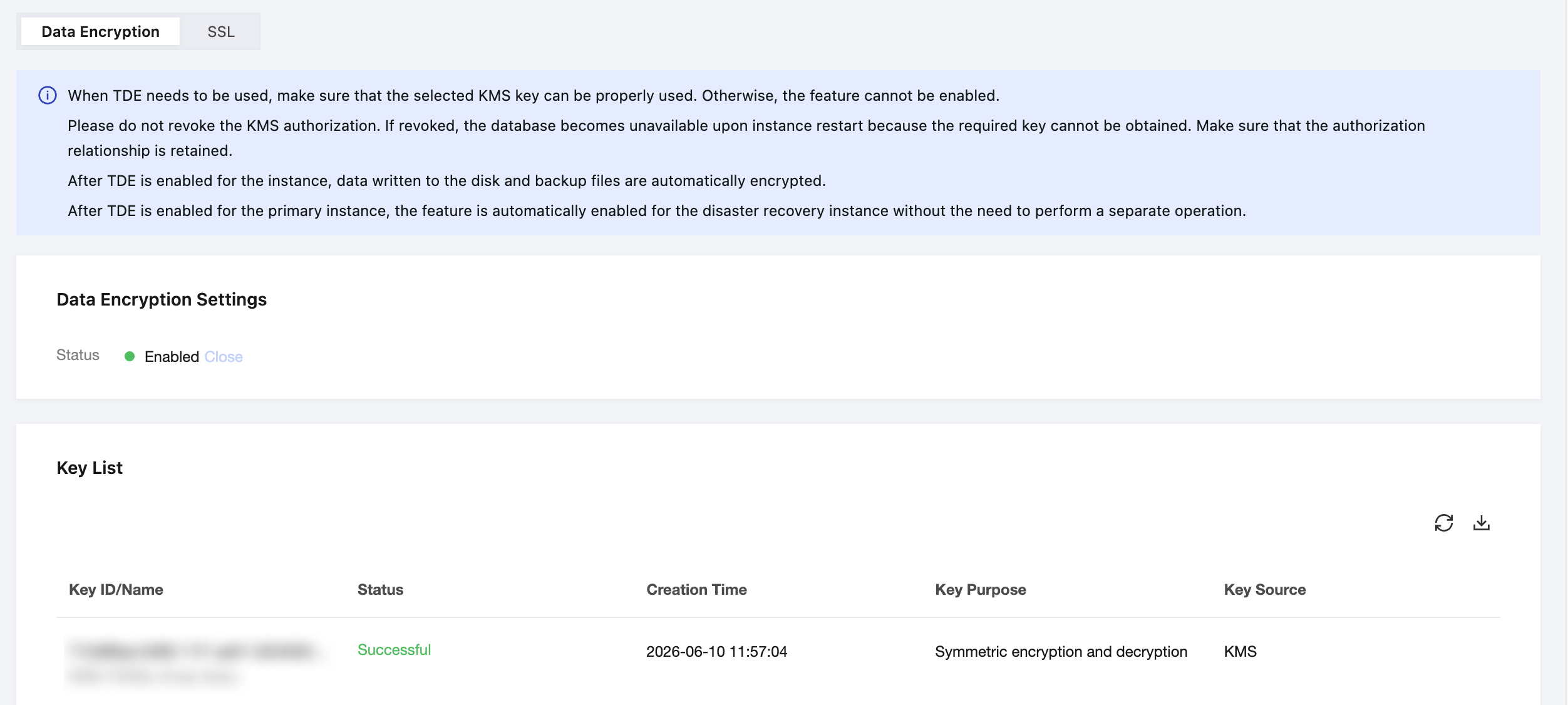
2. Choose the Data Security > Data Encryption tab to go to the Data Encryption page.
3. In the Data Encryption Settings section, you can view the encryption status of the current instance.
4. In the Key List section, you can view key information, including the key ID/name, status, creation time, key usage, and key source.
Key Status Description
CMK Key Status
The Status field in the key list reflects the real-time operational status of the KMS key. Details are as follows.
Status | Description | Impact |
Normal | The KMS key is in the Enabled state and can be used normally. | Encryption, decryption, migration, upgrade, and other tasks proceed normally. |
Key inaccessible | The KMS key is Disabled, or the CAM role authorization is revoked. | The instance can still run normally, but tasks such as migration and upgrade cannot be performed normally. |
Key pending deletion | The KMS key is in the PendingDelete state and will be terminated soon. | The instance can still run normally, but tasks such as migration and upgrade cannot be performed normally. |
Key Inaccessible Retention Period
When a key enters the Key Inaccessible or Key Pending Deletion state, the system initiates a retention period mechanism.
The retention period is 7 days, calculated from the time the key status changes.
During the retention period, the instance can still run normally. However, tasks that depend on the KMS key, such as migration and upgrade, cannot be performed.
After the retention period expires, the instance will become unavailable. Please restore the key status or back up your data promptly within the retention period.
FAQs
Why Is There No Key Information in the Key List After TDE Encryption Is Enabled?
Check the KMS service status and account balance. Possible reasons are as follows:
The KMS service has not been properly activated or is in an abnormal state.
The account has an overdue payment, which prevents access to the KMS service.
The TDSQL Boundless instance or KMS has an overdue payment.
After confirming that all the above conditions are normal, refresh the page and try again.
Why Does the Key Status Show as Abnormal After TDE Encryption Is Enabled?
When the key status shows as Key Inaccessible or Key Pending Deletion, follow the steps below to troubleshoot.
Go to the KMS console and confirm that the corresponding KMS key is not disabled or scheduled for deletion.
Confirm that the account has no overdue payment and that the KMS service is available.
Confirm that the authorization for the CAM role
TDMYSQL_QCSLinkedRoleInKMS has not been revoked.After the process is completed, the key status will be automatically restored to Normal.
피드백