Configuring Propagation Attributes
다운로드
포커스 모드
폰트 크기
Feature Description
Users can configure propagation attributes for devices/clients through the device identity registry. When a matched client publishes a message, an additional user property list containing propagation attributes is appended, achieving the goal of adding metadata without modifying the device code.
Scenarios
1. OTA upgrade is not supported for the device;
2. Gray release, A/B testing, and similar scenarios require assigning environment tags to devices.
Implementation Principles
Registering a Device Identity
MQTT provides a device identity registry for each instance, allowing users to configure additional settings for specific devices/clients to enable features such as "one-device-one-secret" and "propagation attributes". The device identity registry exposes a set of management interfaces via CAPI to enable management of device identity, including creation, update, and deletion.
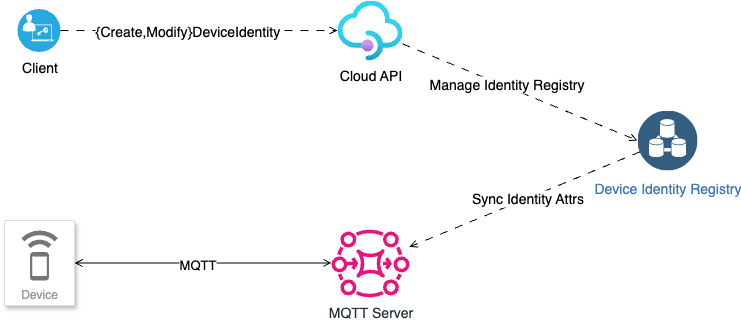
The device identity currently contains the following fields:
Field | Description | Remarks |
DeviceID | Device ID, equivalent to Client ID. | Associate the device configuration with MQTT Client Session. |
Status | Device identity status | When Status is Disabled, ignore this configuration. |
PropagatingProperties | Propagation attributes | |
PrimaryKey | Primary keys | |
SecondaryKey | Secondary keys | |
CreateTime | Device identity record creation time | - |
Configuring Propagation Attributes
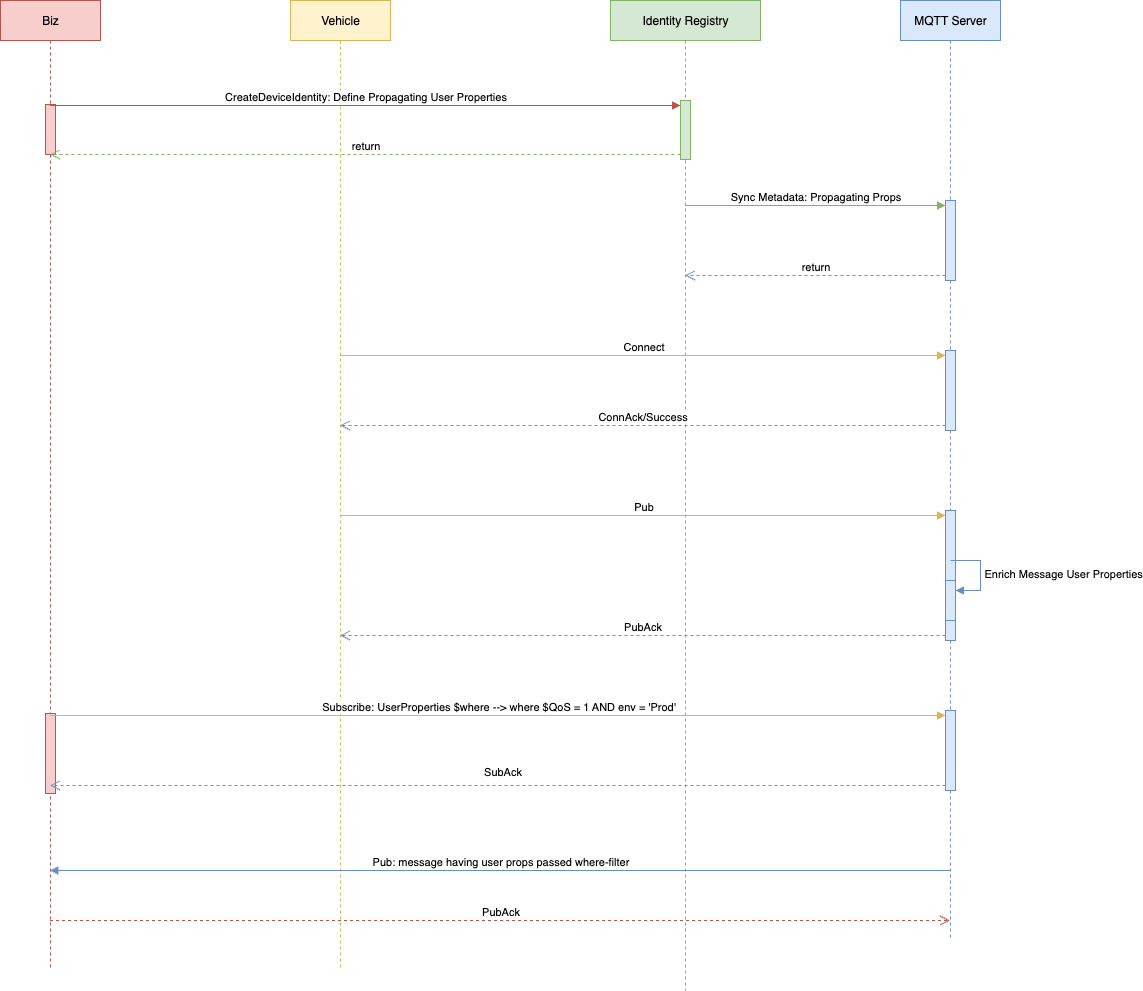
As shown in the sequence diagram above:
1. Users can define propagation attributes by creating a device identity via Cloud API.
2. Device identity configuration information is synchronized to the MQTT Server node.
3. When a matched client publishes a message, the MQTT Server appends the user property list defined by the propagation properties to the message based on device identity metadata.
4. When subscribing to the message, MQTT 5.0 subscribers receive user properties containing the propagation attributes.
Viewing Propagation Attributes
1. Log in to the TDMQ for MQTT console. Choose Resource > Cluster > Client Name to view client details.
2. As shown in the figure, when the feature is enabled, you can view the propagation attributes in the cluster's basic information.
피드백