Viewing Operation Logs of Sub-Accounts
다운로드
포커스 모드
폰트 크기
To view information such as which resources employees have accessed, modification records of resource configurations, and whether access occurred within restricted environments when employees log in to the ISS console using sub-accounts or access resources under the root account through TencentCloud API, you can use CloudAudit to view and track operation records. CloudAudit supports online viewing of console operations and TencentCloud API call records within the last 90 days.
Operation Steps
1. Log in to the CloudAudit console, select Operation Records, choose ISS (Intelligent Surveillance System) as the resource type in Event Name, and click Query.
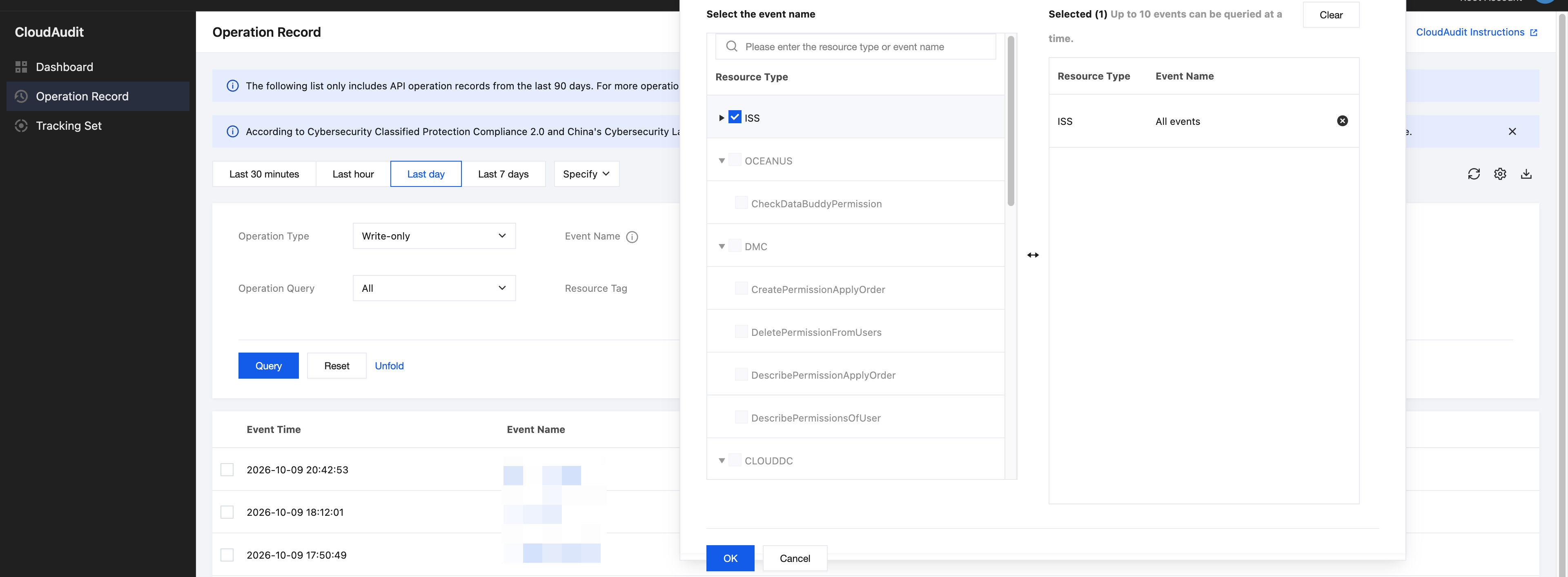
2. Enter the sub-account ID in the Operator filter box, and then click the query icon to filter out the operation records of that sub-account.
3. Click the name of the target event to view information such as the source IP address, sub-account ID, and event time of the operation on the Event Details tab.
Shipping Logs by Using a Tracking Set
To retain operation records for more than 90 days, you can use the trail feature of CloudAudit to deliver logs to a COS bucket or CLS. After logs are delivered to CLS, you can configure alarm policies for sensitive operations. For detailed operations, see Delivering Logs Using Trails.
피드백