Isolating, Recovering, and Terminating Instances
Download
포커스 모드
폰트 크기
Isolating Instances
When you no longer use an instance, you can isolate it to make it unavailable without terminating or deleting it. An isolated instance cannot be accessed and will be placed in the recycle bin, where you can restore it or terminate it permanently. After isolation, resource space will not be released and the most basic data copies will be retained. When the isolation period expires, the instance will be terminated permanently.
For pay-as-you-go instances, you can manually return them by selecting the Terminate/Return feature in the console. After the instance is returned, its status changes to Isolated, and it is retained for 3 days, during which the instance cannot be accessed. If you want to restore the instance, you can restore it in the recycle bin.
For dedicated cluster instances, you can manually return them by selecting the Terminate/Return feature in the console. After the instance is returned, its status changes to Isolated, and it is retained for 3 days, during which the instance cannot be accessed. If you want to restore the instance, you can restore it in the recycle bin.
Once the instance status changes to Isolated after the return, no further fees related to the instance will be incurred.
Attention:
After an instance is isolated, its IP will be released, but you may not be able to obtain the original IP when you restore it.
After an instance is isolated, modification operations such as upgrading, modifying parameters, creating or modifying accounts, rolling back, and changing the instance name cannot be performed.
Operation Steps
1. Log in to the MariaDB console, select an instance in the instance list, and choose More Operations > Terminate/Return at the top.
2. In the pop-up dialog box, select the consent option and click Confirm.
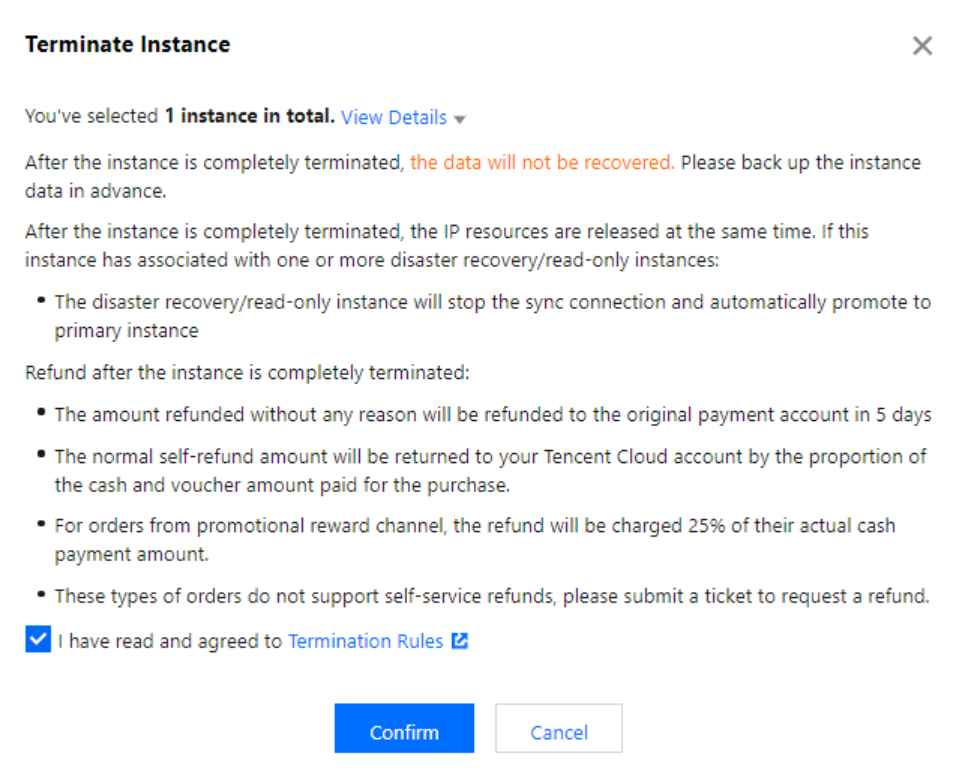
3. After you enter the recycle bin, you can see that the instance status changes to Isolated.
Restoring Instances
Restoring is to restore an instance to normal running after it has been isolated. Recovery may take several minutes, and the restored instance may be reassigned to an IP address other than the one before isolation.
Operation Steps
1. Log in to the MariaDB console, select an instance in the instance list, and click Restore/Start Up.
2. In the pop-up dialog box, click OK.
Terminating an instance
When you no longer need an instance, you can return it. After the instance is returned, its status changes to "Isolated". An isolated instance will be terminated permanently after the isolation period expires. You can also go to the recycle bin and perform Take Offline Now to permanently delete the instance.
Must-Knows
After the instance is terminated, all its data will be cleared and cannot be recovered. Be sure to back up your data first before submitting a termination task.
After the instance is completely terminated, the IP resources will be released at the same time. If the instance has a related disaster recovery read-only instance, it will disconnect from the synchronous connection and automatically upgrade to the primary instance.
After the instance is completely terminated, the refund will be processed:
The common self-service refund is returned to your Tencent Cloud account based on the proportion of cash and free credits used for the purchase.
For promotion channel orders, 25% of the actually paid order amount will be charged as the refund fee. Such orders do not support self-service refunds. You can submit a ticket to apply for a refund.
피드백