Switching Instance Network
다운로드
포커스 모드
폰트 크기
Scenarios
Switching the instance network refers to changing the VPC environment in which your TencentDB for MongoDB instance resides. This operation changes the instance's private IP address and is a key step in network architecture adjustments.
Unify the network environment and optimize access performance.
When a CVM instance and a database instance reside in different VPCs, cross-network access introduces high latency. By switching the database instance to the same VPC as the CVM, you can leverage the high-speed private network link for communication, significantly reducing network latency and improving business response speed.
Network architecture optimization and isolation.
As your business grows, you may need to isolate different business groups on the network based on security or management requirements. For example, you can allocate resources in the test environment and production environment to different VPCs. By switching the instance network, you can move the database to the target network, achieving more granular network planning and security isolation.
Impact of Operations
Impact and Constraint | Description |
Impact on services and connections | Connection Address Change: After you successfully switch the network, your instance will be assigned a new private IP address. The original old IP address will become invalid after the system release time expires. Be sure to promptly update the connection configuration in your client application to point to the new private IP address. Otherwise, the connection cannot be established. Associated Instance Description: If the primary instance for which you are switching the network has mounted read-only instances or DR instances, the mounted read-only instances or DR instances will not automatically switch networks along with the primary instance. You need to manually switch their networks. |
Billing Impact | Switching the database instance network does not incur additional charges. |
Prerequisites
The status of the replica set instance or sharded instance of TencentDB for MongoDB is Running.
Directions
1. Log in to the TencentDB for MongoDB console.
2. In the MongoDB drop-down list on the left sidebar, select Replica Set Instance or Shard Instance. The directions for replica set instances and sharded cluster instances are similar.
3. Select a region at the top of the instance list page.
4. In the instance list, find the target instance.
5. Click the target instance ID to enter the Instance Details page and click Change Network on the right of Network.
6. In the Change Network pop-up window, select a VPC and subnet in the current region in the drop-down list next to Network.
If the current network does not meet your requirements, you can click Create VPCs or Create Subnets to create a network and select it.
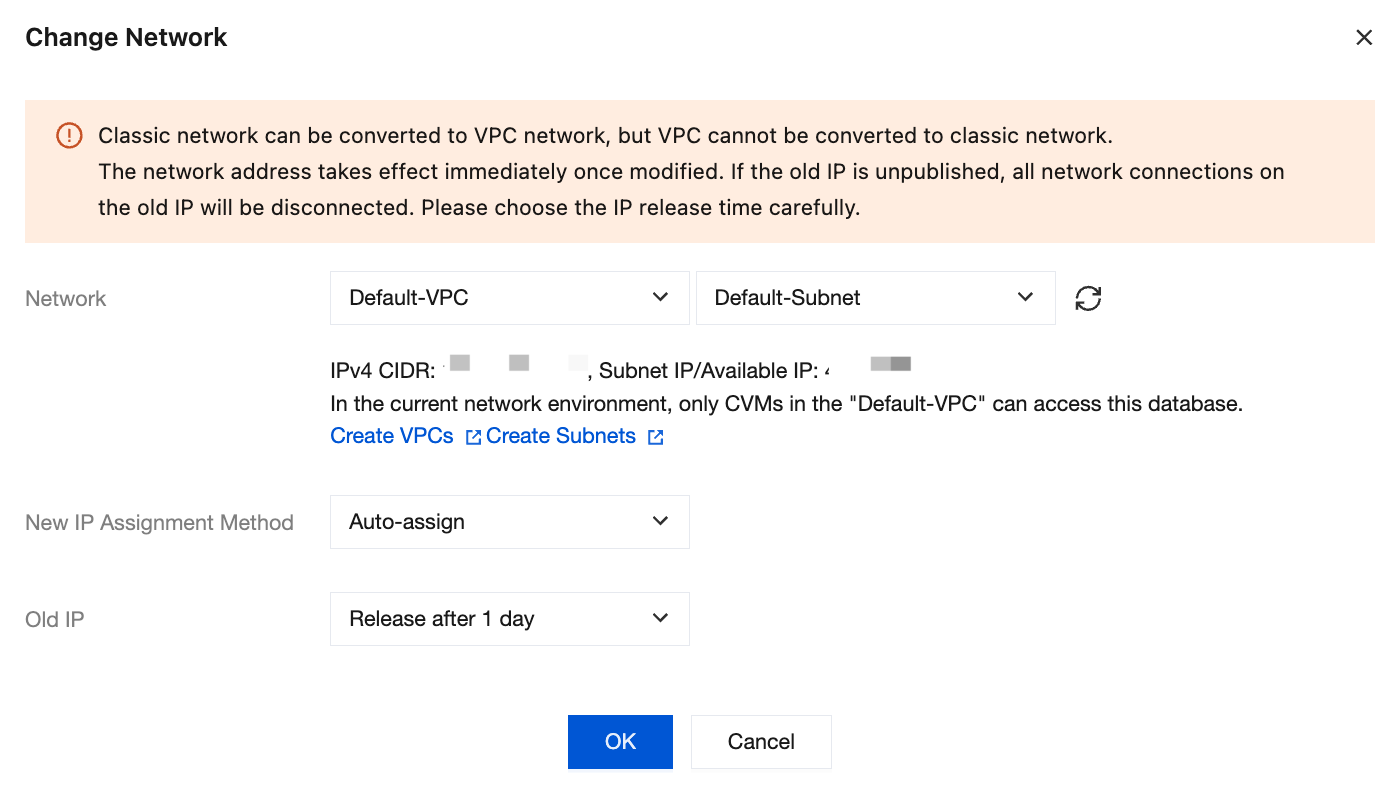
New IP Assignment Method: Select Auto Assign or Specify Address.
Auto Assign: The system will automatically assign an available IP address based on the currently selected network environment.
Specify Address: You can specify a specific IP address in the New IPv4 Address input box. To specify an IP address, check the CIDR block of the VPC and specify an IP address within that block that is not occupied.
Description
The target VPC can only be a VPC in the region where the MongoDB instance resides.
It is recommended to select the VPC where the CVM resides; otherwise, the CVM cannot access MongoDB over the private network (unless CCN is established between the two VPCs).
Old IP Address: Select the release time for the old IP address from the drop-down list.
Replica set instance: Only Release Now is supported. This means that after the task configuration is completed, the system will immediately perform the network switch. The old IP address will be released directly, so be sure to update the client configuration in advance.
Shard instance: Supports selecting Release Now, Release after 1 day, Release after 2 days, Release after 3 days, or Release after 7 days. This means you can choose to release the old address 1, 2, 3, or 7 days after the switch. During this period, the IP address will be retained and automatically released upon expiration.
Note:
Transition state: During the delayed release period, the new and old private IPs of the instance will work in parallel, and the business can connect through both addresses simultaneously.
Actions upon expiration: When the delay time expires, the system will perform the following actions:
Reclaim the old IP address.
Clean up all configuration records related to the old IP.
Immediately and forcibly disconnect all network connections on the old IP.
Important Reminder: Since connections on the old IP will be forcibly interrupted, please carefully choose the release time based on your business deployment.
7. Confirm the network switch and click OK. Wait until the task is completed, then return to the instance details page to view the new network of the instance.
Related APIs
API Name | Capability Description |
Modifying the network information of a cloud database instance |
피드백