Automatic Backup
Download
포커스 모드
폰트 크기
Scenarios
The automatic backup feature of TencentDB for MongoDB can back up data regularly based on a preset policy, providing reliable data for data recovery in key scenarios, such as data recovery, disaster recovery (DR) switch, development testing, and compliance audit.
Note:
During instance creation, an automatic backup operation is triggered based on the default backup policy of the instance.
After specification scaling or cross-AZ migration is completed, a new auto-backup operation is triggered.
The automatic backup policy is enabled by default. After the policy is modified, the new policy applies only to newly generated backup sets.
Note:
The backup service for TencentDB for MongoDB Local Disk will be officially commercialized starting from 00:00:00, November 20, 2025 (UTC+8). Advanced backup features (such as customizing the backup retention period, incremental backup downloading, full backup set deletion, and backup alarm reporting) will be launched. The storage capacity occupied by backup data that exceeds the free backup storage quota will be billed in pay-as-you-go mode.
Prerequisites
The status of the TencentDB for MongoDB instance is Running.
Setting an Auto-Backup Policy for Local Disks
1. Log in to the TencentDB for MongoDB console.
2. In the left sidebar, choose MongoDB > Replica Set Instance or Shard Instance. The operations for replica set instances and sharded cluster instances are similar.
3. At the top of the instance list page on the right, select a region. In the instance list, locate the target instance.
4. Click the target instance ID to go to the Instance Details page, switch to the Backup and Rollback page, and select the Auto-Backup Settings tab.
5. (Optional) Click Enable Advanced Backup in the upper-right corner. In the pop-up window, you can view the main features and billing policy of Advanced Backup. Select I have read and confirmed the backup billing policy and agree to enable Advanced Backup. Click Enable Advanced Backup to go to the backup policy editing page.
Note:
Advanced Backup cannot be disabled once it is enabled. Please confirm the operation.
Advanced Backup cannot be enabled for TencentDB for MongoDB instances of the cloud disk edition.
6. Click Edit to configure the specific backup policy. For detailed configuration methods, see the following table.
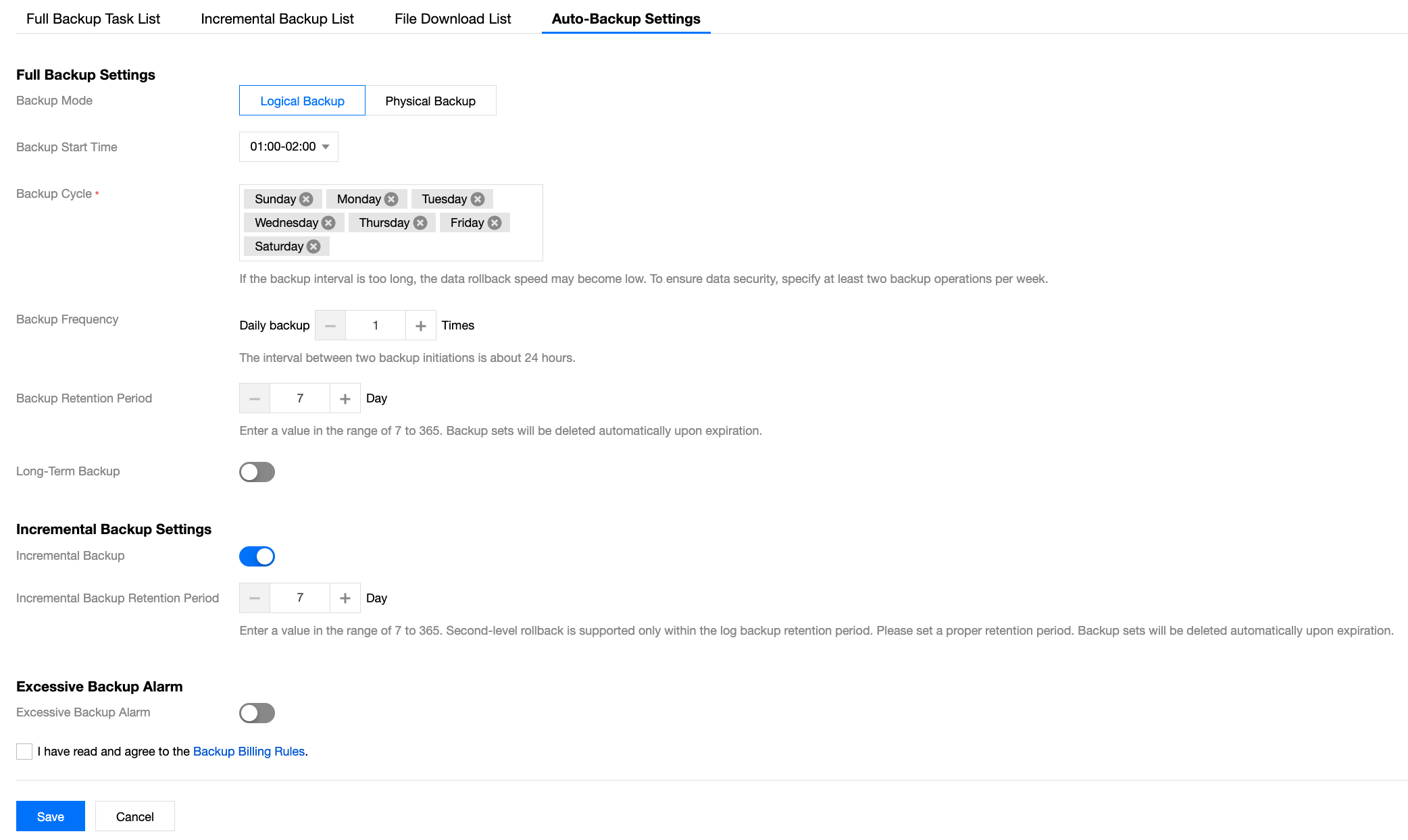
Area | Parameter | Parameter Description | Remarks |
Full Backup Settings | Backup Mode | The options include Logical Backup and Physical Backup, and the default value is Logical Backup. | |
| Backup Start Time | Sets the start time for automatic backup tasks. Backup window: After the backup start time is configured, a one-hour backup window starting from this time point is displayed on the page. Default rule: In the range of 00:00 to 04:00 (UTC+8), a full-hour backup time (such as 02:00) is assigned to each new instance randomly. | Note: The start time of backup tasks may be delayed from the preset time point due to the system resource scheduling policy. |
| Backup Cycle | Sets the specific date for automatic backup tasks by week. By default, the full cycle (Monday to Sunday) is selected, and backups are automatically performed. You can flexibly select any day from Monday to Sunday as the backup execution day from the drop-down list. You can select one day or multiple days (such as only Wednesday or Monday + Wednesday + Friday). | Note: A too long backup interval may cause a slow data rollback speed. To ensure data security, specify at least two backup operations per week. |
| Backup Frequency | Sets the number of daily backup executions (N), with a valid range of 1 or 2. Backup frequency is 1: A backup is performed every 24 hours based on the backup start time selected by the user. Backup frequency is 2: A backup is performed every 12 hours based on the backup start time selected by the user. | - |
| Backup Retention Period | Sets the retention period for full backup files. The files are deleted upon expiration. Second-level rollback is supported only within the backup retention period. Default value: 7 days Value range: 7–365 | Note: Backup files are stored in Cloud Object Storage (COS) and do not occupy the storage space of the TencentDB for MongoDB instance. For details about COS, see Cloud Object Storage. |
| Long-Term Backup | Click  Long-Term Backup Cycle: In the input box, select a specific long-term backup date by week or month. As shown in the following figure, set the long-term backup cycle by month. 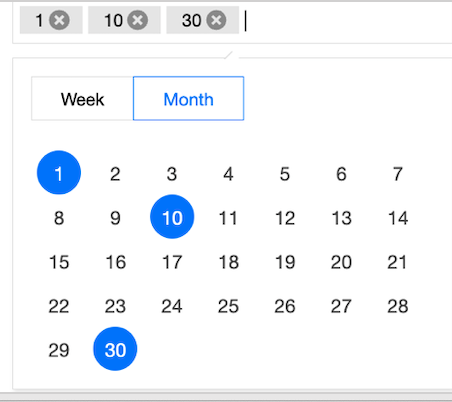 Long-Term Backup Retention Period: sets the retention period for long-term backup data. The value range is 30 to 1075. | Note: The value of Long-Term Backup Retention Period should be greater than that of Backup Retention Period. The selected backup sets are automatically deleted upon expiration. |
Incremental Backup Settings | Incremental Backup | Click  | Second-level rollback is supported only within the backup retention period. |
| Incremental Backup Retention Period | Sets the retention period for incremental backup files. They are deleted upon expiration. Default value: 7 days Value range: 7–365 | - |
Excessive Backup Alarm | Excessive Backup Alarm | Click  | - |
| Backup Alarm Quota | Sets the alarm threshold for the storage space utilization of the backup dataset. By default, an alarm is triggered when the backup data volume reaches 100% of the storage capacity. Value range: 50%–300%. | Note: Backup Alarm Quota only serves as an alarm threshold. To report an excessive backup alarm, configure event alarms on Tencent Cloud Observability Platform (TCOP). |
7. Select I have read and agree to the Backup Billing Rules and click Save. The automatic backup policy is set.
Setting a Backup Policy for Cloud Disks
1. Log in to the TencentDB for MongoDB console.
2. In the left sidebar, choose MongoDB > Replica Set Instance or Shard Instance. The operations for replica set instances and sharded cluster instances are similar.
3. At the top of the instance list page on the right, select a region.
4. In the instance list, locate the target instance.
5. Click the target instance ID to go to the Instance Details page.
6. Select the Backup and Rollback tab to go to the Backup Task List page.
7. Select the Auto-Backup Settings tab, click Edit, and specify Backup Mode and Backup Start Time, as shown in the following figure.
Note:
An instance of the cloud disk edition is used as an example in the following figure, and Logical backup is unavailable for Backup Method.
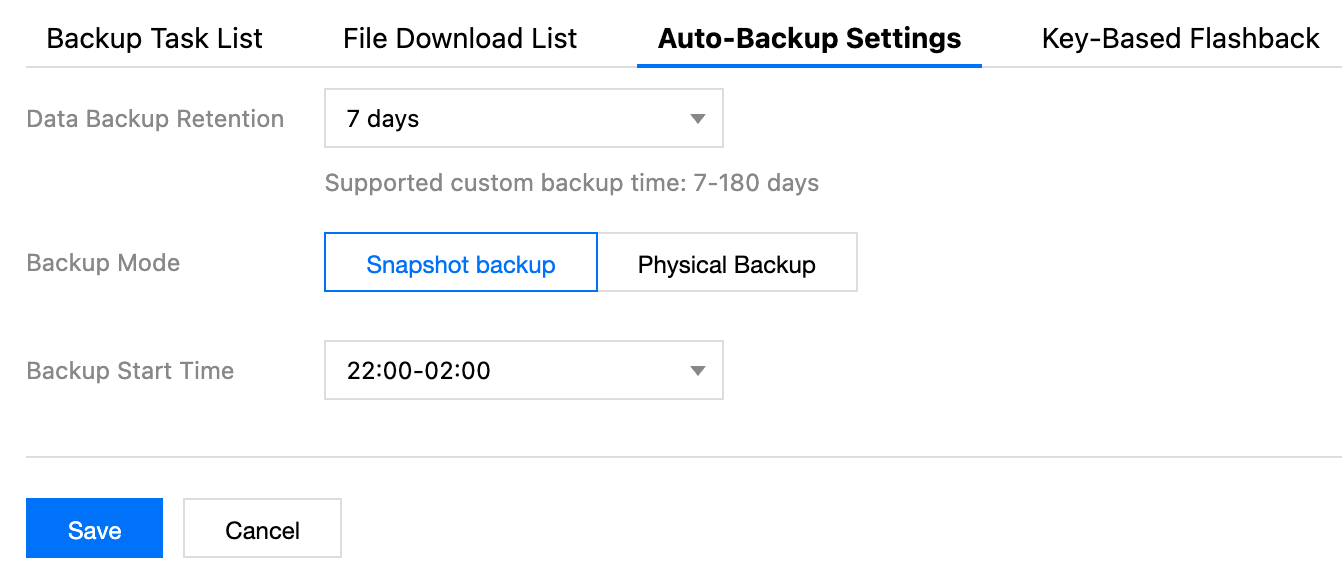
Parameter | Description |
Data Backup Retention | By default, backup data is retained for 7 days. In the drop-down list, you can customize a backup retention period. The value range is 7 to 180 days. |
Backup Mode | Selects a backup method. The options include Physical backup and Snapshot backup. For details on how to select a backup policy, see the description in Backup Introduction and select a policy that meets your requirements. The supported backup methods vary depending on the version. For details, see Version Description. |
Backup Start Time | The default start time is 22:00 to 02:00. That is, the system starts backup tasks in the range of 22:00 to 02:00 every day. You can select different time periods to start data backup based on the actual business situation. The specific start time varies depending on backup task scheduling. |
8. Click Save to save the settings. Subsequent backup tasks are performed automatically based on the set backup rules.
Related APIs
API | Description |
DescribeDBBackups | |
CreateBackupDBInstance | |
DescribeBackupDownloadTask | |
CreateBackupDownloadTask |
피드백