Viewing Subscription Relationships of a Topic
Download
포커스 모드
폰트 크기
The subscription relationships of a topic display the subscription status of all current consumer groups, including the list of consumer groups, online status, and partition assignment. By viewing the information, you can confirm whether messages are being consumed normally, promptly identify abnormal topics with no consumer subscription, and assess the impact scope of business changes. This document describes the operation steps to view subscription relationships of a topic in the TDMQ for CKafka (CKafka) console.
Operation Steps
1. Log in to the CKafka console.
2. In the left sidebar, click Instance List, and click ID/Name of the target instance to go to the instance details page.
3. On the instance details page, click the Topic List tab. On the topic list page, click More > Subscription in the Operation column to view information about the consumer group subscribed to this topic, and configure consumer group offsets or view consumer group details.
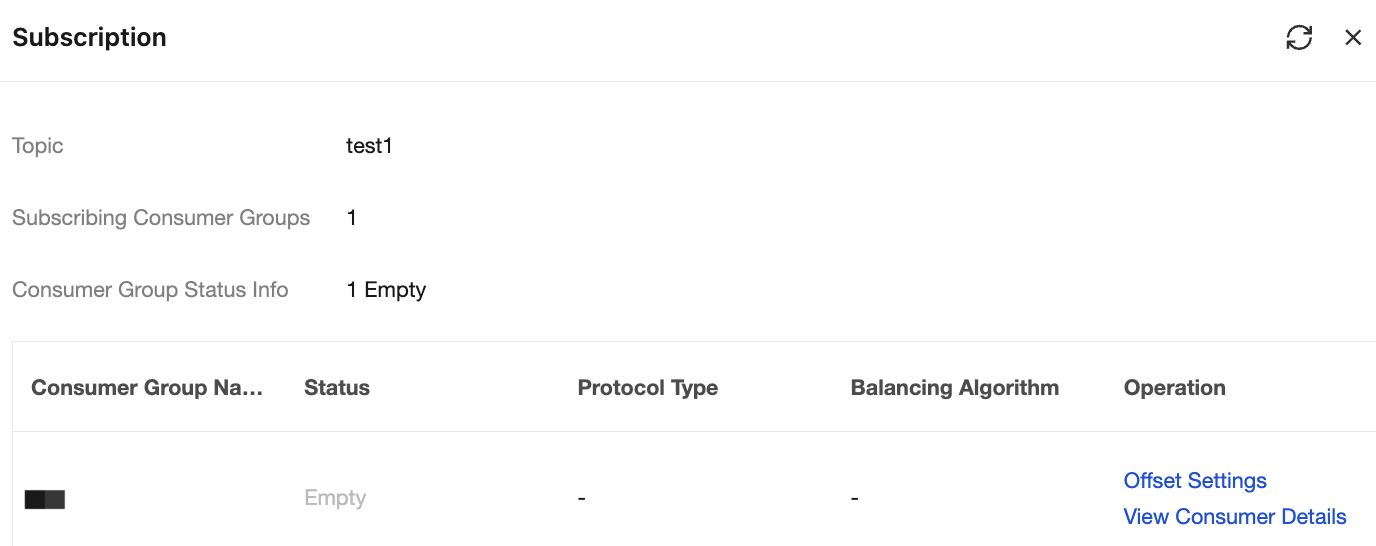
Parameter | Description |
Consumer Group Name | The name of the consumer group subscribed to this topic. |
Status | Current status of the consumer group. Dead: No members exist in the consumer group and no metadata is present. Empty: No members exist in the consumer group, but metadata is present. If all offsets in the group have expired, the consumer group will become Dead. Generally, a newly created group is in the Empty status by default. Note: If all consumers in the consumer group are client types committed by self-managed offsets such as Flink or Spark, the status may be displayed as Empty. PreparingRebalance: Prepare to enable a rebalance (for example, a consumer joins/exits). CompletingRebalance: All members have joined the consumer group. Stable: Members in the consumer group can consume normally. |
Protocol Type | Consumer: indicates that the consumer is a regular consumer. Consumption records are stored on the server, and subscription relationships are displayed normally on the console. Note: If a consumer uses Flink or Spark for consumption with the assign mode, consumption records are maintained by the client and are not submitted to the server; therefore, subscription relationships will not be displayed in the console. |
Balancing Algorithm | Partition assignment policy for consumer groups: Range: assigns partitions in sequential order by partition numbers, assigning consecutive partitions to each consumer. RoundRobin: assigns all partitions and consumers in a sequential round-robin fashion to achieve as even a distribution as possible. Sticky: strives to preserve the existing assignment, adjusting only when necessary (such as when consumers are added or removed), to minimize the cost of partition migration. |
Operation | On the Subscription Relationship page, you can perform the following operations: Offset Settings: Reset the consumption offset of a consumer group. For detailed information, see Viewing and Manually Resetting a Consumption Offset. View Consumer Details: View details of all consumers in a consumer group. For detailed information, see Viewing Consumer Group Details. |
피드백