Configuring Retention Period for Empty Consumer Groups
Download
포커스 모드
폰트 크기
After a consumer group remains in the Empty status (with no members) for more than 7 days, the system will automatically delete it. To enhance the flexibility of resource management, the custom configuration feature in the instance dimension is supported in the TDMQ for CKafka (CKafka) console. This allows users to autonomously set a retention period for empty consumer groups based on business requirements and compliance requirements.
Constraints and Limitations
The retention period for empty consumer groups is 7 days by default. If it is set to a shorter period (for example, 5 days), expired empty consumer groups may be deleted immediately.
This feature requires the kernel minor version to be no earlier than any of the following. For the Pro Edition instances, upgrading the kernel minor version of instances in the console is supported.
2.4.2_1.2.6
2.8.1_1.1.9
3.2.3_1.0.9
Operation Steps
1. Log in to the CKafka console.
2. In the left sidebar, select Instance List, select the target region, and click the ID of the target instance to go to the basic instance information page.
3. In the Consumer Group Configuration module, click Configuration in the upper-right corner. After enabling automatic creation of consumer groups, set a retention period.
The retention period for a consumer group is 7 days by default, with a configurable range of 1 day to 7 days.
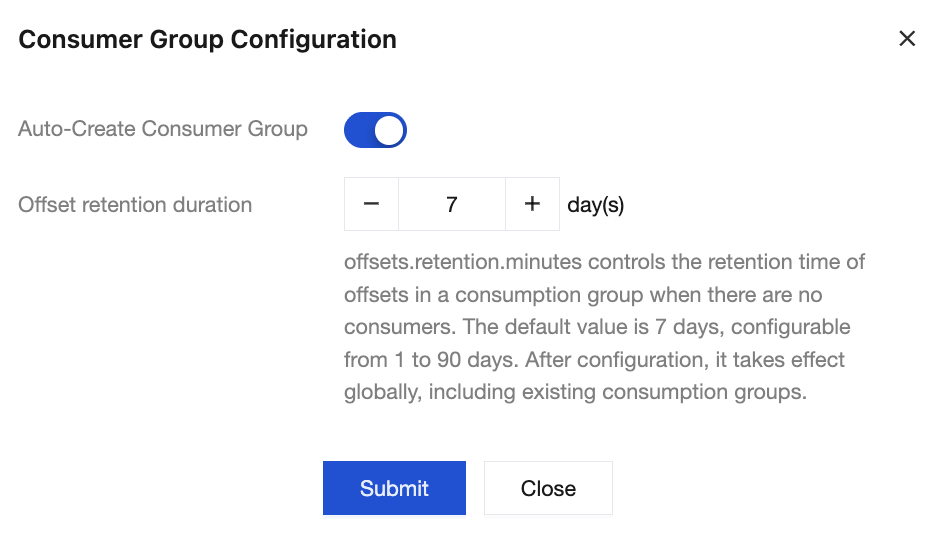
4. Click Submit to complete the modification.
피드백