tencent cloud

TDMQ for CKafka

문서TDMQ for CKafkaUser GuideManaging Consumer GroupDeleting the Subscription Relationship Between Consumer Groups and Topics

Deleting the Subscription Relationship Between Consumer Groups and Topics

Download
포커스 모드
폰트 크기
마지막 업데이트 시간: 2026-01-20 16:52:41
This document describes how to delete the subscription relationship between consumer groups and topics in the console.

Constraints and Limitations

When a consumer group was empty, the subscription relationship of the associated topic could be deleted.

Operation Steps

2. In the left sidebar, select Instance List, select the target region, and click the ID of the target instance to go to the basic instance information page.
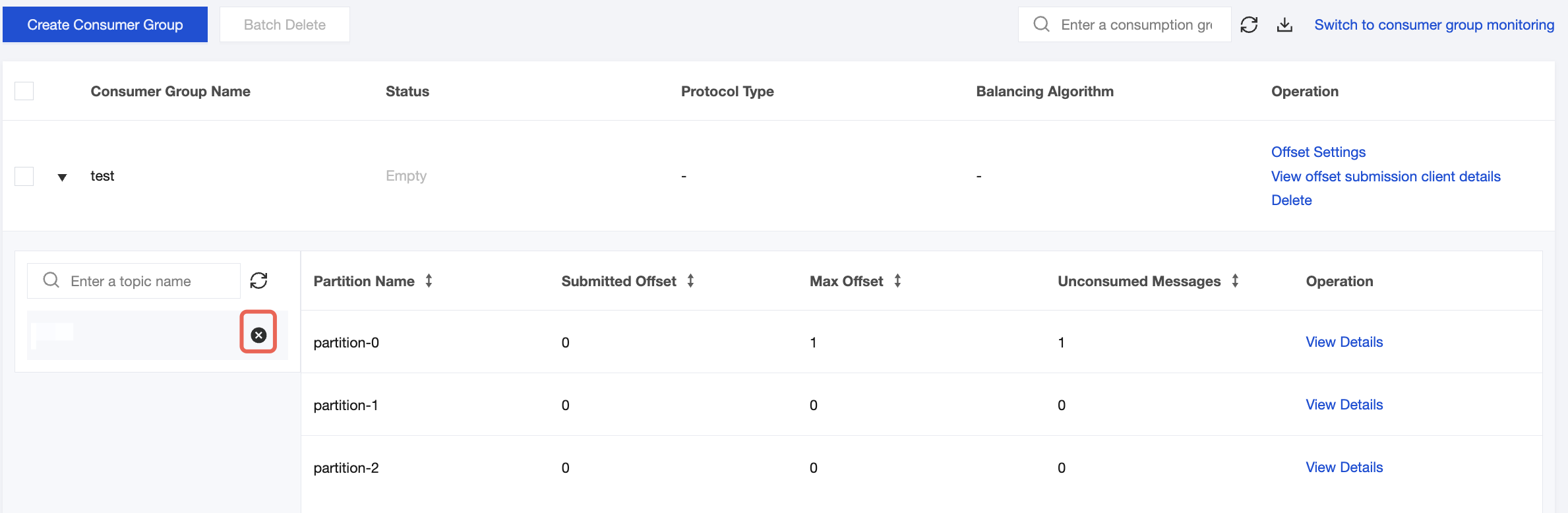
3. On the basic instance information page, select the Consumer Group tab. On the consumer group list page, click the

icon next to the subscription relationship to be deleted. After confirmation, you can delete the subscription relationship of the associated topic.


도움말 및 지원

문제 해결에 도움이 되었나요?

피드백