Uploading Logs Anonymously
Download
포커스 모드
폰트 크기
CLS supports uploading logs to CLS without authentication via the JS, HTTP and Kafka protocols.
Use cases
Browsers, operating systems, and resolutions used by users.
Users' browsing behavior, such as clicks and purchases, on a website.
The time users spend in an app and whether they are active.
Directions
Step 1. Enable Anonymous write
Note:
Enabling Anonymous upload grants anonymous internet users the write access to the target log topic. This may generate dirty data because authentication is not performed.
1. Log in to the CLS console.
2. Click Log Topic on the left sidebar. On the log topic management page, click Create Log Topic, or click Edit for an existing log topic.
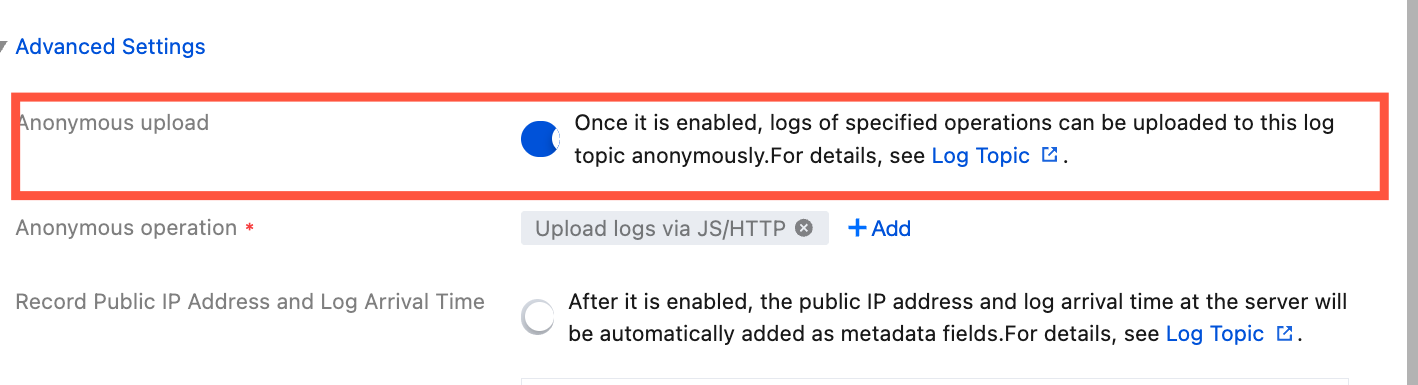
3. In the log topic creation or editing popup, find the Anonymous upload configuration item in Advanced Settings and turn on the switch.
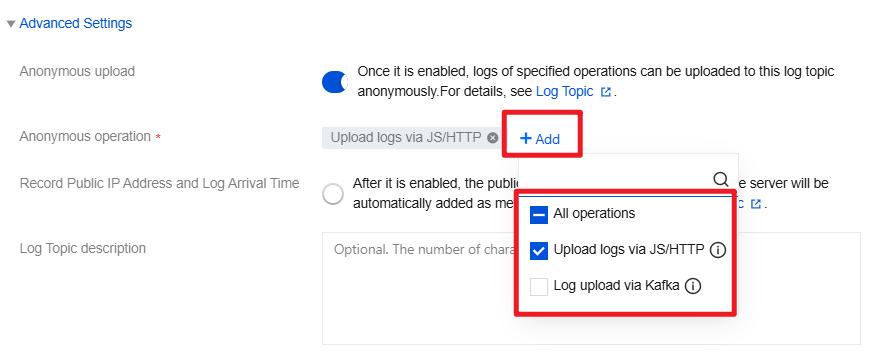
4. After enabling the switch, select the log anonymous upload method in Anonymous Operations. The currently supported anonymous upload operations are: JS/HTTP Log Upload and Kafka Protocol Upload.
Step 2. Upload logs
After enabling Anonymous upload, based on the Anonymous operation in procedure 1 log topic configuration, you can upload logs to log topic through following steps.
Method 1: Use browser JavaScript SDK
Method 2: Use Weixin Mini Programs JavaScript SDK
Method 3: Upload logs through HTTP GET request
# Supports httpscurl --request GET 'http://${region}.cls.tencentcs.com/track?topic_id=${topic_id}&key1=val1&key2=val2'
Parameter | Required | Description |
${host} | Yes | |
${topic_id} | Yes | Log topic ID. |
key1=val1&key2=val2 | Yes | The key-value pairs to be uploaded to CLS. Multiple key-value pairs are supported, separated by &. Ensure the total length is less than 16 KB. |
Method 4: Upload logs through HTTP POST request
When a GET request is used to upload logs, a single request can only write one log entry. If the amount of data in a request is large, you can use the POST method to upload data.
Notes
This method applies to collection of webpage or client logs.
This API supports combining multiple logs into a single request.
This API does not support writing log data of multiple topics at the same time.
Request headers
Request syntax
# Supports httpsPOST http://${region}.cls.tencentcs.com/tracklog?topic_id=${topic_id} HTTP/1.1
Parameter | Required | Note |
${host} | Yes | |
${topic_id} | Yes | Log topic ID. |
Example
POST /tracklog?topic_id={topic_id} HTTP/1.1Host:ap-guangzhou.cls.tencentcs.comContent-Type:application/json# Do not modify the JSON structure; only modify the TODO fields{"logs": [{# TODO: Define the key-value to be uploaded"contents": {"key1": "value1","key2": "value2"},# TODO: Define the upload timestamp"time": 123456789}],# TODO: Define the source IP address"source": "127.0.0.1"}
Method 5: Upload Logs via the Kafka Protocol
Note:
For anonymous upload via the Kafka protocol, the password must be written in the format
topic_id#${log topic ID} in the producer configuration, for example: topic_id#76c63473-c496-466b-XXXX-XXXX.
피드백