Associate With External Data
Download
포커스 모드
폰트 크기
Overview
When performing statistical analysis on logs, it is sometimes necessary to associate logs with external data to complete business statistics. For example, in the following scenarios:
The logs only save the user ID. During log analysis, it is necessary to query the user's level, region, and type in the user information database based on the user ID. For example, count the number of user visits by gender.
The logs only save the business system ID. It is difficult to quickly map the ID to the business name. It is necessary to translate the business system ID to the business name based on the mapping relationship between the ID and the name.
In addition to viewing log data in the dashboard, it is also necessary to view other data stored in the database.
CLS supports associating CSV files in MySQL and COS as database tables to log topics, and then using SQL statements to perform associative analysis on the two parts of the data.
Prerequisites
The log service has been activated and log topics have been created. The log topics must be standard storage, as IA storage does not support statistical analysis using SQL.
Must-Knows
When associating MySQL, please pay attention to network/data security and MySQL database performance:
Network security: It is recommended to use the intranet address to access MySQL. When the data source type is TencentDB for MySQL and TDSQL-C MySQL, CLS will automatically use the intranet method to access.
Data security: It is recommended to create a dedicated database account for CLS to access MySQL, minimizing the resources and operation permissions corresponding to the account. CLS only requires query permission and does not need edit or delete permissions. For configuration, see TencentDB for MySQL Account Permission Modification. Please keep the account information properly and do not disclose it.
Performance: If the data volume in MySQL is large, it is recommended not to directly associate the primary database in the production environment with CLS to avoid complex SQL queries that may affect the stability of the production environment. It is recommended to use a read-only instance.
When associating COS CSV files, it is recommended to use a bucket in the same region as the log topic. Cross-region access to files in the bucket will generate outbound traffic and corresponding costs on the COS side. It is recommended to use "private read and write" for COS access privileges to prevent data from being accessed by third parties.
Operation Steps
1. Log in to the CLS console.
2. In the left sidebar, click Log Topic to enter the log management page.
3. Click the log topic ID/name that needs to associate external data to go to the log topic management page.
4. Select the Associate external data tab, click Add External Data, and configure the relevant parameters in the pop-up dialog box.
Use this configuration method when using TencentDB for MySQL / TDSQL-C for MySQL.
Parameter Name | Description |
Name | Used as the table name in CLS SQL, supports lowercase letters, numbers, and _, cannot start or end with _, length is 3 - 60 characters, and the name must be unique within the region. |
Remarks | Optional, no more than 255 characters. |
Data Source Type | TencentDB for MySQL or TDSQL-C for MySQL. |
Region | Select the region where the TencentDB instance is located. |
MySQL Instance | Select the TencentDB instance. |
Account name | Username for accessing MySQL. |
Password | Password for accessing MySQL. |
Database Name | Name of the MySQL database to be associated. |
Table Name | Name of the table in the MySQL database to be associated. |
Applicable Scope | Only the current log topic is accessible: Only the current log topic can access the MySQL data via SQL. Log topics within the current logset are accessible: All log topics within the logset to which the current log topic belongs can access the MySQL data via SQL. |
Click Verify access configuration to verify if the above configuration is correct. After verification, click OK to complete the addition.
Configure the following parameters when adding COS (CSV Format File):
Parameter Name | Description |
Name | Used as the table name in CLS SQL, supports lowercase letters, numbers, and _, cannot start or end with _, length is 3 to 60 characters, and the name must be unique within the region. |
Remarks | Optional, no more than 255 characters. |
Data Source Type | COS (CSV files). |
Bucket Region | Select the region of the COS file. |
COS Bucket | Select the bucket of the COS file. |
File name | Enter the COS file name. |
Compression mode | Only No Compression is supported for now. |
You can click Preview Data to verify whether the above configuration is correct. At the same time, obtain the first 5 rows of data (including the header) from the CSV file as a sample to further configure the following parameters:
Parameter Name | Description |
Field Type | Supports text, long, and double. Select based on the actual data type. |
Access Scope | Only the current log topic is accessible: Only the current log topic can access the MySQL data via SQL. Log topics within the current logset are accessible: All log topics within the logset to which the current log topic belongs can access the MySQL data via SQL. |
Click OK to complete the addition.
Use this configuration method when MySQL is directly deployed on a CVM or other platform:
Parameter Name | Description |
Name | Used as the table name in CLS SQL, supports lowercase letters, numbers, and _, cannot start or end with _, length is 3 - 60 characters, and the name must be unique within the region. |
Remarks | Optional, no more than 255 characters. |
Data Source Type | Self-built MySQL |
Access mode | Private network address or public network address |
Region | Required when a private network address is used. Select the region where the MySQL instance is located. |
Network | Required when a private network address is used. Select the VPC where the MySQL instance is located. |
Network service type | Required when a private network address is used: If your MySQL needs to be accessed via CLB, select CLB. If your MySQL server allows direct access, select CVM. |
Access Address | For example, gz-cdb-xxxxx.sql.tencentcdb.com |
MySQL Port | Database port, for example, 3306 |
Account name | Username for accessing MySQL. |
Password | Password for accessing MySQL. |
Database Name | Name of the MySQL database to be associated. |
Table Name | Name of the table in the MySQL database to be associated. |
Applicable Scope | Only the current log topic is accessible: Only the current log topic can access the MySQL data via SQL. Log topics within the current logset are accessible: All log topics within the logset to which the current log topic belongs can access the MySQL data via SQL. |
Click Verify access configuration to verify whether the above configuration is correct. After verification, click OK to complete the addition.
Querying External Data and Log Data with SQL
From an SQL perspective, log data within a log topic and external data are both database tables. The table name for log data is `log`, and the table name for external data is the name set when adding the external data. Therefore, you can use the following SQL statements to query log data and external data separately:
Log data:
* | select * from log. The from log clause can be omitted, resulting in * | select *. When both log data and external data are queried, it is recommended that you do not omit the clause to improve SQL readability.External data: If the external data is named
userinfo, the corresponding SQL is * | select * from userinfo.To query both log data and external data simultaneously, you need to use syntax such as JOIN and UNION, for example:
* | select * from log left join userinfo on log.user_id=userinfo.id
Note:
When external data is queried, the search conditions before
| and the time range specified for this query do not apply to the external data. They only apply to the log data in the current log topic.Use Case
A log topic is a request log and contains the following fields:
"status_code": "404""local_time": "2023-06-05 19:59:01""refer": "_","user_id": "15""ip": "66.131.53.125""url": "\\"GET /class/111.html HTTP/1.1\\""
When analyzing this log, it is expected to count the number of accesses by user gender, but the access log does not have a user gender field. Therefore, it is necessary to query the user information database (MySQL) based on the user ID (user_id).
The user information database table is as follows:
id | Name | Gender | Age | Email | Phone | Address |
1 | John Doe | Male | 32 | johndoe@example.com | 1234567890 | 123 Main St |
2 | Jane Smith | Female | 28 | janesmith@example.com | 9876543210 | 456 Elm St |
3 | Michael Johnson | Male | 45 | michaeljohnson@example.com | 5551234567 | 789 Oak St |
4 | Sarah Davis | Female | 38 | sarahdavis@example.com | 7894561230 | 321 Pine St |
5 | David Wilson | Male | 51 | davidwilson@example.com | 1237894560 | 654 Maple St |
6 | Emily Anderson | Female | 29 | emilyanderson@example.com | 4567890123 | 987 Cherry St |
7 | Matthew Thompson | Male | 37 | matthewthompson@example.com | 7890123456 | 321 Plum St |
8 | Olivia Martinez | Female | 26 | oliviamartinez@example.com | 2345678901 | 654 Orange St |
9 | Alexander Taylor | Male | 42 | alexandertaylor@example.com | 9012345678 | 987 Grape St |
10 | Emma Clark | Female | 31 | emmaclark@example.com | 3456789012 | 123 Lemon St |
After associating the database table with the log topic, you can use the following statement to convert the
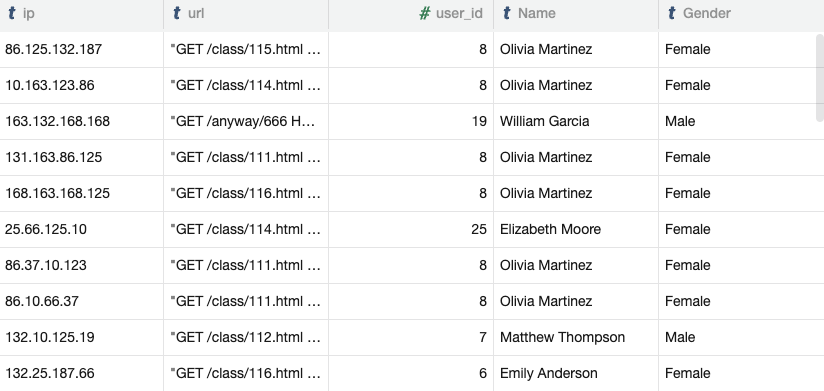
user_id in the log to the user's gender Gender:* | select ip,url,user_id,Name,Gender from log left join userinfo on log.user_id=userinfo.id
The query results are shown below, where ip, url, and user_id come from the log, and Name and Gender come from the user information table.
Based on this, further write SQL to count the number of accesses by user gender:
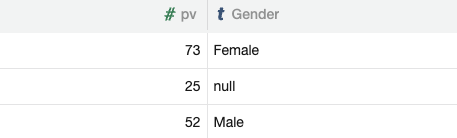
* | select count(*) as pv,Gender from (select ip,url,user_id,Name,Gender from log left join userinfo on log.user_id=userinfo.id) group by Gender
The query results are shown below, where null in the Gender column indicates that some logs did not find the user's gender, possibly because the log does not contain user_id or the user_id has no record in the user information table.
Specifications and Limitations
For the specifications and limitations of associating external databases, please refer to Specifications and Limitations.
Fee Description
When associating a CSV file in object storage, if the object storage bucket and the log topic are not in the same region, each query of the data will generate outbound public network traffic and corresponding costs on the COS side, with no costs on the CLS side.
When associating with MySQL, if using an public network connection, each query of the data will generate public network access traffic on the corresponding resource side (such as TencentDB for MySQL or CVM), which may incur corresponding costs (depending on your purchased instance configuration), with no costs on the CLS side.
피드백