제품 업데이트
Tencent Cloud 오디오/비디오 단말 SDK 재생 업그레이드 및 권한 부여 인증 추가
TRTC 월간 구독 패키지 출시 관련 안내
Caller | Callee |
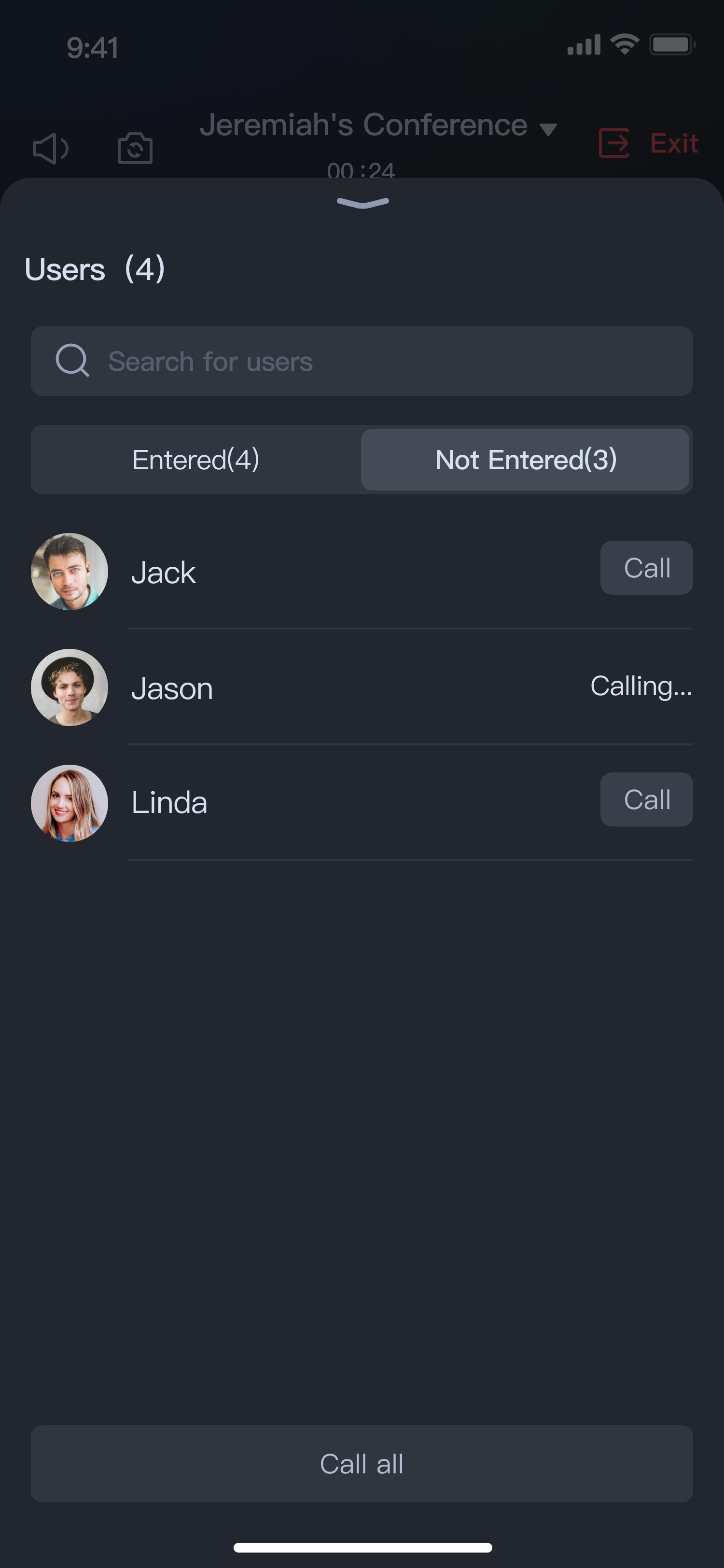 |  |
// Replace SelectParticipantActivity.class with the custom contact list activityConferenceSession.sharedInstance().setContactsViewProvider(SelectParticipantActivity.class);
// Replace SelectParticipantActivity.class with the custom contact list activityConferenceSession.sharedInstance().setContactsViewProvider(SelectParticipantActivity::class.java)
SelectParticipantActivity is an example code for the custom contact list. You can view it in the Demo project (directory: app/src/main/java/com/tencent/liteav/demo/SelectParticipants).Intent intent = new Intent();// participants is the list of selected users, must be of type ArrayList<User>.ConferenceParticipants participants = new ConferenceParticipants();// Add your members...intent.putExtra(SELECTED_PARTICIPANTS, participants);setResult(3, intent);finish();
val intent = Intent()// participants is the list of selected users, must be of type ArrayList<User>.intent.putExtra(SELECTED_PARTICIPANTS, participants)setResult(3, intent)finish()
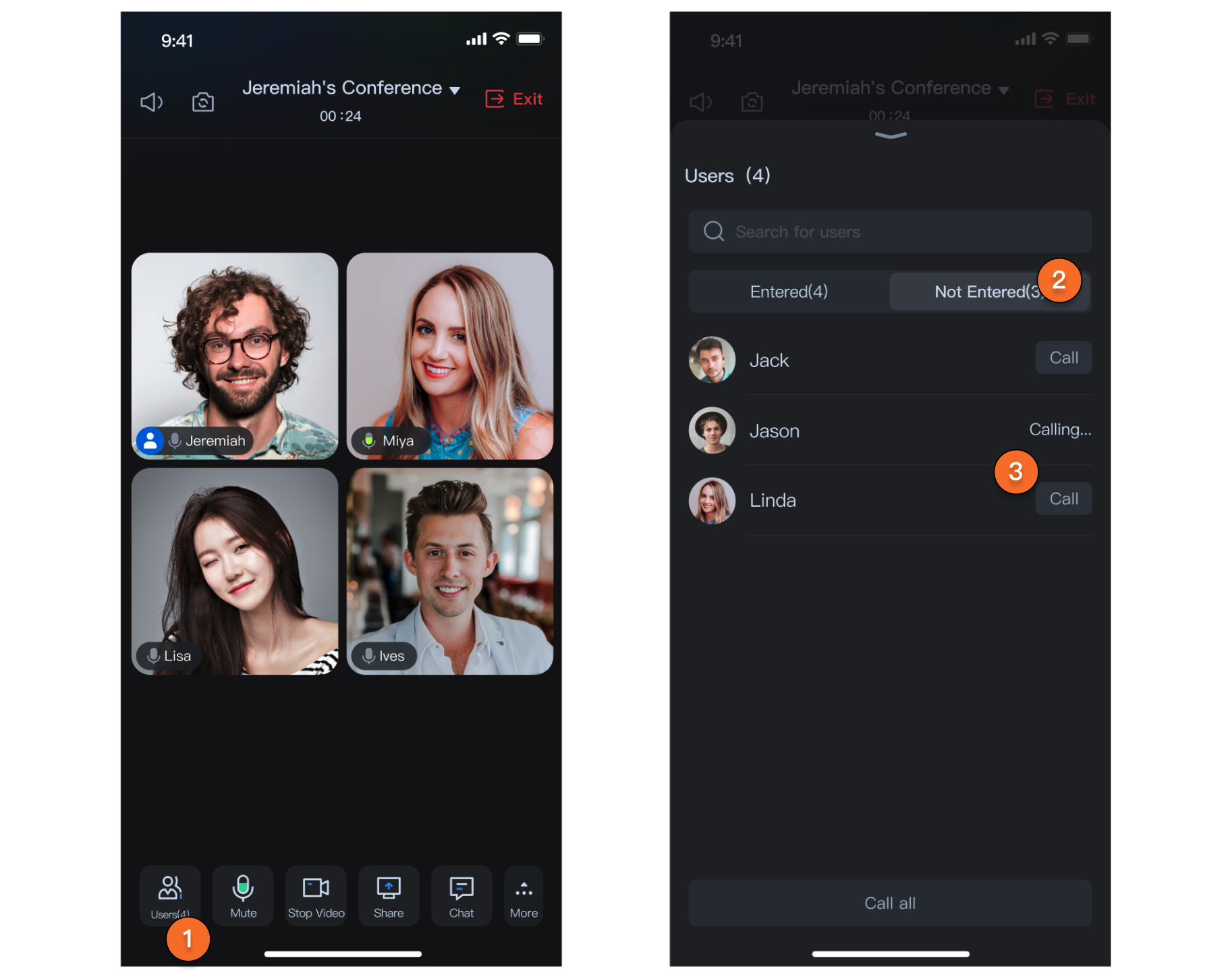
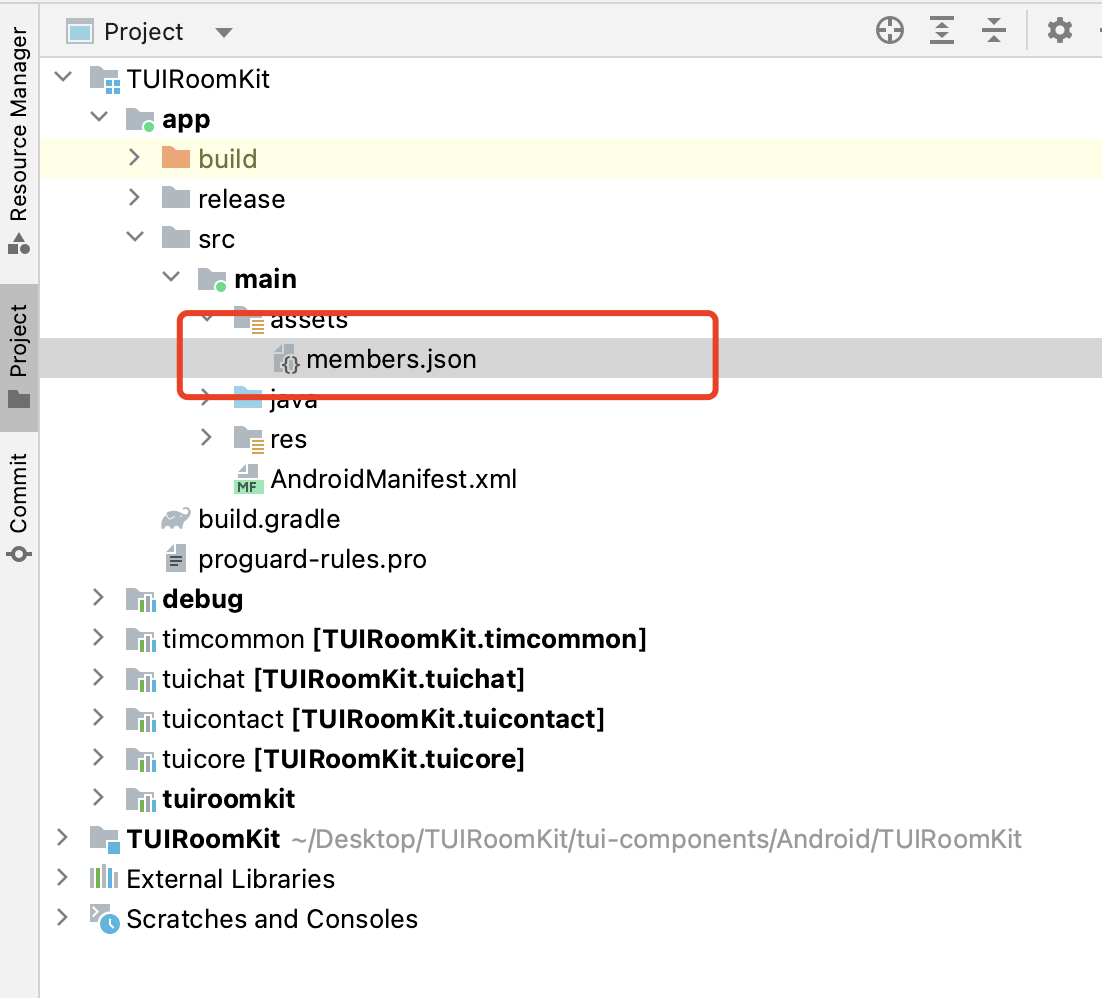
members.json file of the demo project, we have pre-configured some test user information. You can choose two accounts, log in on two phones respectively using the configured userId, and then in the conference click Invite in the bottom bar > Add Members to bring up the contact list. Select another user from the contact list and click Confirm to make a call. This way, the other user will receive your call.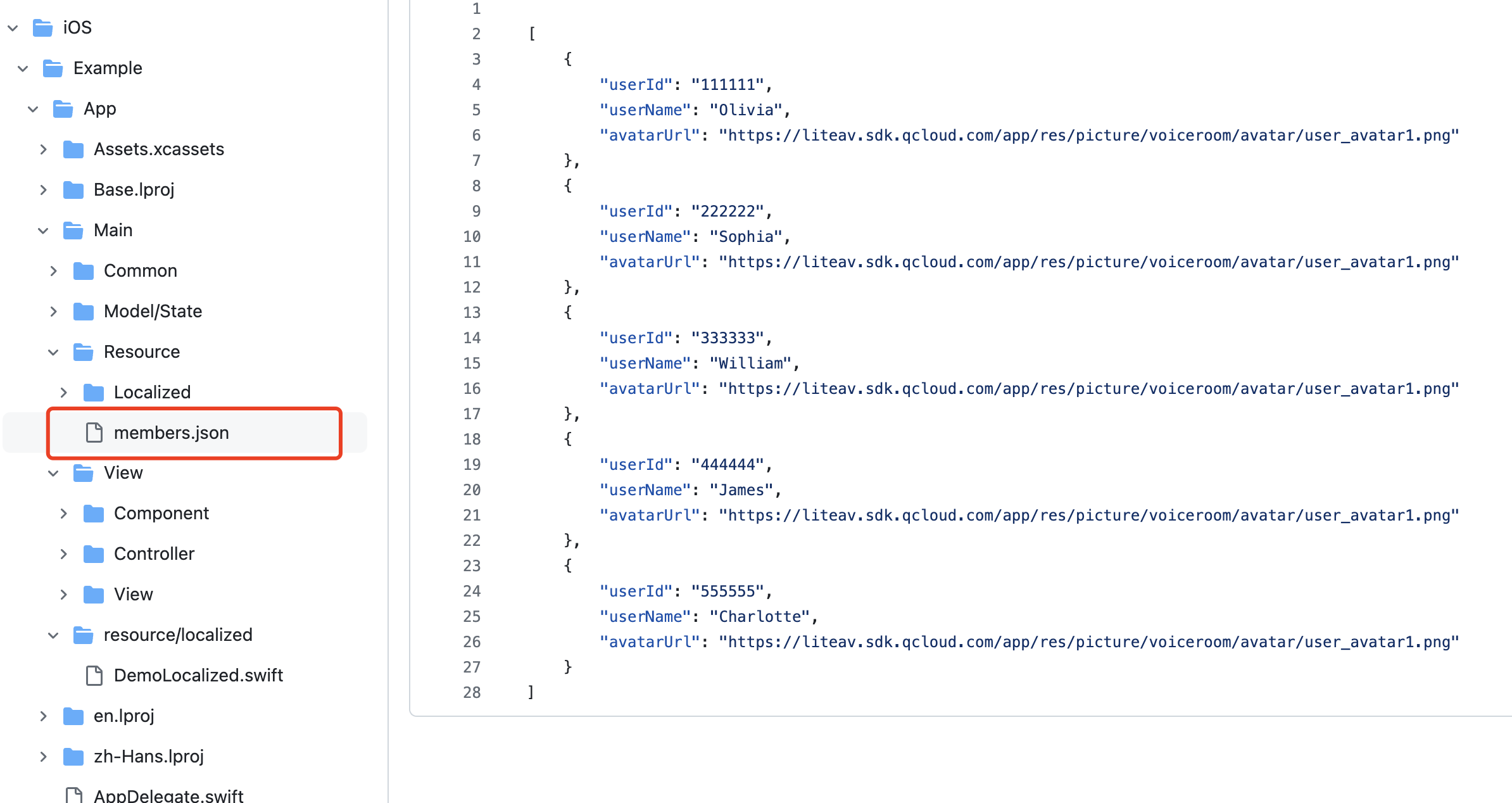
ContactViewProtocol protocol.// Sample Codeclass SelectMemberViewController: UIViewController, ContactViewProtocol {weak var delegate: ContactViewSelectDelegate?var selectedList: [User]func didSelectFinished() {// Through the delegate, call back the selected members to RoomKit in the method where the selection isdelegate?.onMemberSelected(self, invitees: selectedMembers)}}
ConferenceParticipants object in the constructor parameters of your Address Book Page, with data sources mentioned in the code of the second step.ConferenceParticipants class has two members:ConferenceSession.sharedInstance.setContactsViewProvider { participants inreturn SelectMemberViewController(participants: participants)}
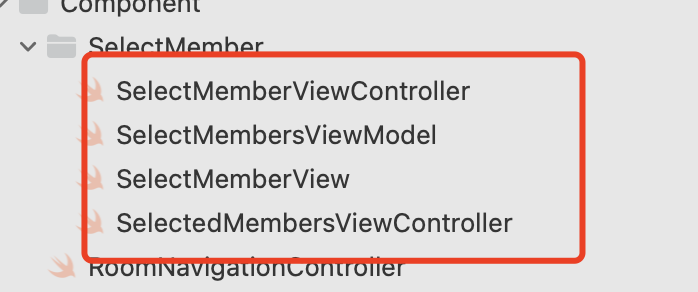
SelectMembersViewModel class, you can load your member list data (or directly fetch Chat relationship chain data) using the loadMembers method.
// File Location: Android/tuiroomkit/src/main/java/com/tencent/cloud/tuikit/roomkit/view/component/component└──InvitationReceivedView.java
// File Location: iOS/TUIRoomKit/Source/View/ConferenceOptions/ConferenceInvitationConferenceInvitation└── ConferenceInvitationViewController.swift // Called Page View
// File Location: Android/tuiroomkit/src/main/java/com/tencent/cloud/tuikit/roomkit/view/page/widget/UserControlPanel/UserControlPanel└── CallUserView.java // Call button in member list
// File Location: iOS/TUIRoomKit/Source/Page/Widget/UserControlPanelUserControlPanel // Directory of Views Related to Member List└── UserListCell.swift // Individual Member View in Member List, Including User Call Status
// File Location: TUIRoomKit/blob/main/Android/tuiroomkit/src/main/java/com/tencent/cloud/tuikit/roomkit/model/controller/InvitationController.javapublic void inviteUsers(List<UserState.UserInfo> userInfoList, TUIConferenceInvitationManager.InviteUsersCallback callback) {Log.d(TAG, "inviteUsers");if (userInfoList.isEmpty()) {return;}RoomToast.toastShortMessageCenter(TUILogin.getAppContext().getString(R.string.tuiroomkit_invitation_has_been_sent));mConferenceInvitationManager.inviteUsers(mRoomState.roomId.get(), getUserIdListFromUserList(userInfoList), INVITE_TIME_OUT_SECONDS, "", new TUIConferenceInvitationManager.InviteUsersCallback() {@Overridepublic void onSuccess(Map<String, TUIConferenceInvitationManager.InvitationCode> invitationResultMap) {Log.d(TAG, "inviteUsers success");if (callback != null) {callback.onSuccess(invitationResultMap);}}@Overridepublic void onError(TUICommonDefine.Error error, String message) {Log.d(TAG, "inviteUsers error=" + error + " message=" + message);if (callback != null) {callback.onError(error, message);}}});}
// File Location: TUIRoomKit/iOS/TUIRoomKit/Source/Service/ConferenceInvitationService.swiftfunc inviteUsers(roomId: String, userIdList: [String]) -> AnyPublisher<InviteUsersResult, RoomError> {return Future<InviteUsersResult, RoomError> { [weak self] promise inguard let self = self else { return }self.invitationManager?.inviteUsers(roomId, userIdList: userIdList, timeout: timeout, extensionInfo: "") {dic inpromise(.success((dic)))} onError: { error, message inpromise(.failure(RoomError(error: error, message: message)))}}.eraseToAnyPublisher()}
// File Location: TUIRoomKit/blob/main/Android/tuiroomkit/src/main/java/com/tencent/cloud/tuikit/roomkit/model/controller/InvitationController.javapublic void accept(String roomId, TUIRoomDefine.ActionCallback callback) {Log.d(TAG, "accept");mConferenceInvitationManager.accept(roomId, new TUIRoomDefine.ActionCallback() {@Overridepublic void onSuccess() {Log.d(TAG, "accept success");if (callback != null) {callback.onSuccess();}}@Overridepublic void onError(TUICommonDefine.Error error, String message) {Log.d(TAG, "accept error=" + error + " message=" + message);if (callback != null) {callback.onError(error, message);}}});}
// File Location: TUIRoomKit/iOS/TUIRoomKit/Source/Service/ConferenceInvitationService.swiftfunc accept(roomId: String) -> AnyPublisher<String, RoomError> {return Future<String, RoomError> { [weak self] promise inguard let self = self else { return }self.invitationManager?.accept(roomId) {promise(.success(roomId))} onError: { error, message inpromise(.failure(RoomError(error: error, message: message)))}}.eraseToAnyPublisher()}
// File Location: TUIRoomKit/Android/tuiroomkit/src/main/java/com/tencent/cloud/tuikit/roomkit/model/controller/InvitationController.javapublic void reject(String roomId, TUIConferenceInvitationManager.RejectedReason reason, TUIRoomDefine.ActionCallback callback) {Log.d(TAG, "reject roomId= " + roomId + " reason=" + reason);mConferenceInvitationManager.reject(roomId, reason, new TUIRoomDefine.ActionCallback() {@Overridepublic void onSuccess() {Log.d(TAG, "reject success");if (callback != null) {callback.onSuccess();}}@Overridepublic void onError(TUICommonDefine.Error error, String message) {Log.d(TAG, "reject error=" + error + " message=" + message);if (callback != null) {callback.onError(error, message);}}});}
// File Location: TUIRoomKit/iOS/TUIRoomKit/Source/Service/ConferenceInvitationService.swiftfunc reject(roomId: String, reason: TUIInvitationRejectedReason) -> AnyPublisher<String, RoomError> {return Future<String, RoomError> { [weak self] promise inguard let self = self else { return }self.invitationManager?.reject(roomId, reason: reason) {promise(.success(roomId))} onError: { error, message inpromise(.failure(RoomError(error: error, message: message)))}}.eraseToAnyPublisher()}
// File Location: TUIRoomKit/Android/tuiroomkit/src/main/java/com/tencent/cloud/tuikit/roomkit/model/controller/InvitationController.javaprivate void getInvitationList() {Log.d(TAG, "getInvitationList");mConferenceInvitationManager.getInvitationList(mRoomState.roomId.get(), getAttendeeListCursor, SINGLE_FETCH_COUNT, new TUIConferenceInvitationManager.GetInvitationListCallback() {@Overridepublic void onSuccess(TUIConferenceInvitationManager.InvitationListResult invitationListResult) {Log.d(TAG, "getInvitationList");for (TUIConferenceInvitationManager.Invitation invitation : invitationListResult.invitationList) {InvitationState.Invitation invitationState = new InvitationState.Invitation();invitationState.invitee = new UserState.UserInfo(invitation.invitee);invitationState.inviter = new UserState.UserInfo(invitation.inviter);invitationState.invitationStatus = invitation.status;mInvitationState.invitationList.add(invitationState);}getInvitationListCursor = invitationListResult.cursor;if (!"".equals(getInvitationListCursor)) {getInvitationList();}}@Overridepublic void onError(TUICommonDefine.Error error, String message) {Log.d(TAG, "getInvitationList onError error=" + error + " message=" + message);}});}
// File Location: TUIRoomKit/iOS/TUIRoomKit/Source/Service/ConferenceInvitationService.swiftfunc getInvitationList(roomId: String, cursor: String, count: Int = 20) -> AnyPublisher<InvitationfetchResult, RoomError> {return Future<InvitationfetchResult, RoomError> { [weak self] promise inguard let self = self else { return }self.invitationManager?.getInvitationList(roomId, cursor: cursor, count: count) {invitations, cursor inpromise(.success((invitations, cursor)))} onError: { error, message inpromise(.failure(RoomError(error: error, message: message)))}}.eraseToAnyPublisher()}
// File Location: TUIRoomKit/Android/tuiroomkit/src/main/java/com/tencent/cloud/tuikit/roomkit/model/ConferenceServiceInitializer.javaprivate void initConferenceInvitationObserver() {TUIConferenceInvitationManager invitationManager = (TUIConferenceInvitationManager) TUIRoomEngine.sharedInstance().getExtension(TUICommonDefine.ExtensionType.CONFERENCE_INVITATION_MANAGER);invitationManager.addObserver(new TUIConferenceInvitationManager.Observer() {@Overridepublic void onReceiveInvitation(TUIRoomDefine.RoomInfo roomInfo, TUIConferenceInvitationManager.Invitation invitation, String extensionInfo) {if (ConferenceController.sharedInstance().getViewState().isInvitationPending.get()) {ConferenceController.sharedInstance().getInvitationController().reject(roomInfo.roomId, REJECT_TO_ENTER, null);return;}if (ConferenceController.sharedInstance().getRoomController().isInRoom()) {ConferenceController.sharedInstance().getInvitationController().reject(roomInfo.roomId, IN_OTHER_CONFERENCE, null);return;}Bundle bundle = new Bundle();bundle.putString("roomId", roomInfo.roomId);bundle.putString("conferenceName", roomInfo.name);bundle.putString("ownerName", roomInfo.ownerName);bundle.putString("inviterName", invitation.inviter.userName);bundle.putString("inviterAvatarUrl", roomInfo.ownerAvatarUrl);bundle.putInt("memberCount", roomInfo.memberCount);TUICore.startActivity("InvitationReceivedActivity", bundle);}});}
// File Location: TUIRoomKit/iOS/TUIRoomKit/Source/Service/InvitationObserverService.swiftfunc onReceiveInvitation(roomInfo: TUIRoomInfo, invitation: TUIInvitation, extensionInfo: String) {let store = Container.shared.conferenceStore()store.dispatch(action: ConferenceInvitationActions.onReceiveInvitation(payload: (roomInfo, invitation)))}
피드백