Solution Overview
Baixar
Modo Foco
Tamanho da Fonte
Note:
VPN gateway IP address belongs to the tenant's VPC.
VPN currently only supports the VPC-type VPN. The CCN-type VPN gateway is not supported at the moment.
VPN does not currently support the dynamic BGP.
If you need to use a VPN, please submit a ticket for consultation.
Scenario Description
After the communication through private network is established between the local IDC and the VPC on the cloud via a connection, the VPN gateway can establish an encrypted communication tunnel with the local gateway device through the existing private network connection. You can steer the traffic between the local IDC and VPC that needs to communicate with each other into the encrypted communication tunnel through the relevant route configuration, achieving the encrypted communication of private network traffic.
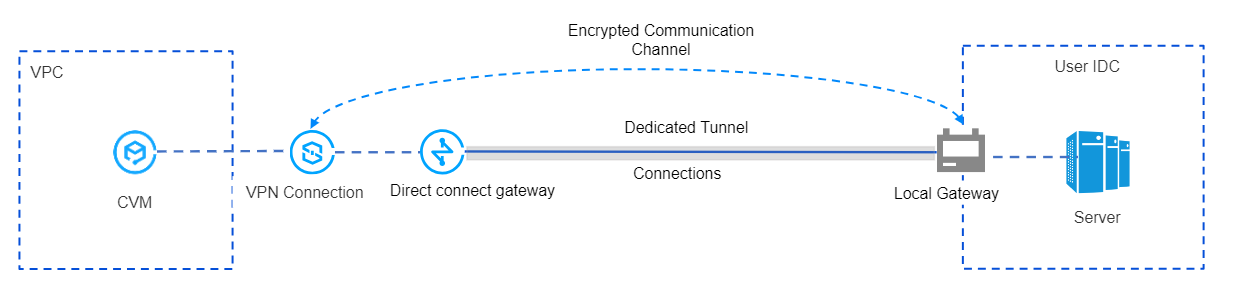
Principles of Encrypted Private Network Traffic Communication
For your convenience, the following specific instance illustrates the process of encrypted VPN traffic communication.
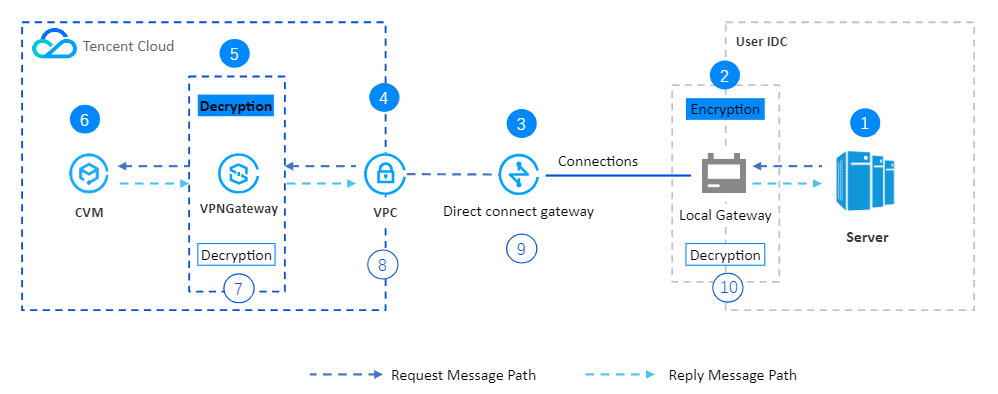
Serial Number | Forwarding Object | Description |
① | User IDC Server | The client initiates an access request, and the request message is routed to the IDC local gateway. |
② | IDC Local Gateway | The local gateway encrypts and encapsulates the request message. After encapsulation, it forwards the request message to the direct connect gateway on the cloud based on the configured route. |
③ | Direct Connect Gateway | After receiving the encapsulated request message, the direct connect gateway forwards it to the VPC. |
④ | VPC | After receiving the encapsulated request message, the VPC forwards the request message to the VPN gateway. |
⑤ | VPN Gateway | 1. The VPN gateway receives the encapsulated request message and decrypts it. 2. After decrypting the request message, the VPN gateway traverses the route table based on the destination IP address in the request message, then forwards the request message to the CVM. |
⑥ | CVM | 1. After receiving the decrypted request message, the CVM responds by sending a response message to the client. 2. The CVM queries the route table based on the destination IP address of the response message and forwards the response message to the VPN gateway. |
⑦ | VPN Gateway | 1. After receiving the response message, the VPN gateway encrypts it. 2. Based on the encrypted destination IP address of the response message, the VPN gateway queries the routing table and forwards the response message to the VPC. |
⑧ | VPC | After receiving the encrypted response message, the VPC queries the route table and forwards the encrypted response message to the direct connect gateway. |
⑨ | Direct Connect Gateway | After receiving the encrypted response message, the direct connect gateway queries the route table and forwards the encrypted response message to the IDC local gateway. |
⑩ | IDC Local Gateway | 1. After receiving the response message, the IDC local gateway decrypts it. 2. The local gateway device queries the routing table based on the destination IP address decrypted from the response message and forwards the response message to the server. |
Ajuda e Suporte
Esta página foi útil?
Você também pode entrar em contato com a Equipe de vendas ou Enviar um tíquete em caso de ajuda.
comentários