Calling Client on Web Page
Download
Modo Foco
Tamanho da Fonte
Scenarios
Users access and operate hosts through BH. The following section details how to access hosts.
Prerequisites
The administrator has informed Ops personnel of the login address.
The administrator has granted Ops personnel access permissions to the host.
Ops personnel have completed account activation.
Operation Steps
1. Enter the Ops page login address in the browser to open the BH Ops page; enter your mobile number and password to log in to BH; or click Account Password to switch to logging in with account name and password.
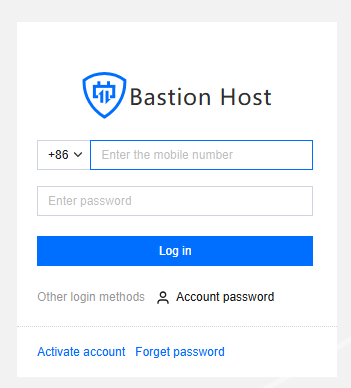
2. After going to BH, in the left navigation, select Host Assets > Asset List.
3. On the asset list page, click the Access on the right side of the corresponding host.

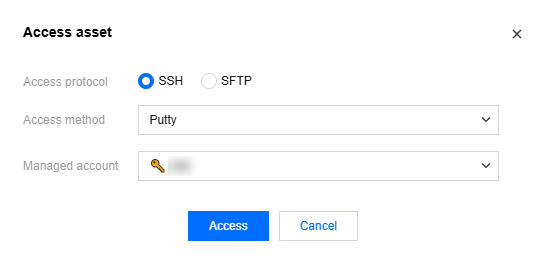
4. In the host access pop-up window, after selecting the access protocol, access method, and host account, click Access to invoke the corresponding client tool to access the host.
Note:
All operations for accessing hosts through BH are logged.
When large files are uploaded or downloaded, it is recommended to use the SFTP method.
Recommended Client Tool Version
Platform | Type | Tools | Recommended Version |
Windows | Character | PuTTY | Release 0.76 |
| | SecureCRT | 8.3.4 |
| | Xshell | Xshell |
| Graphics | MSTSC | 10.0.19041.746 |
| File Transfer | FileZilla | 3.55.1 |
| | WinSCP | 5.17.10.0 |
| | Xftp | 7.0.0054 |
macOS | Character | SecureCRT | 9.1 |
| | iTerm | 3.4.8 |
| | Terminal | 2.9.5 |
| Graphics | Microsoft Remote Desktop Beta | 10.7.0 |
| File Transfer | FileZilla | 3.55.1 |
| | Transmit | 5.7.6 |
Ajuda e Suporte
Esta página foi útil?
Você também pode entrar em contato com a Equipe de vendas ou Enviar um tíquete em caso de ajuda.
comentários