Scheduling Cycle
Baixar
Modo Foco
Tamanho da Fonte
A scheduling cycle refers to the time interval at which nodes automatically execute code logic in a production environment scheduling system. Based on the scheduling type and number of cycles, scheduling tasks generate Cycle instances and automatically run periodic tasks through these instances.
WeData supports daily, hourly, minute, weekly, monthly, yearly, and one-time scheduling. For configuration and runtime details of each scheduling type, refer to the following content.
Configuration Example
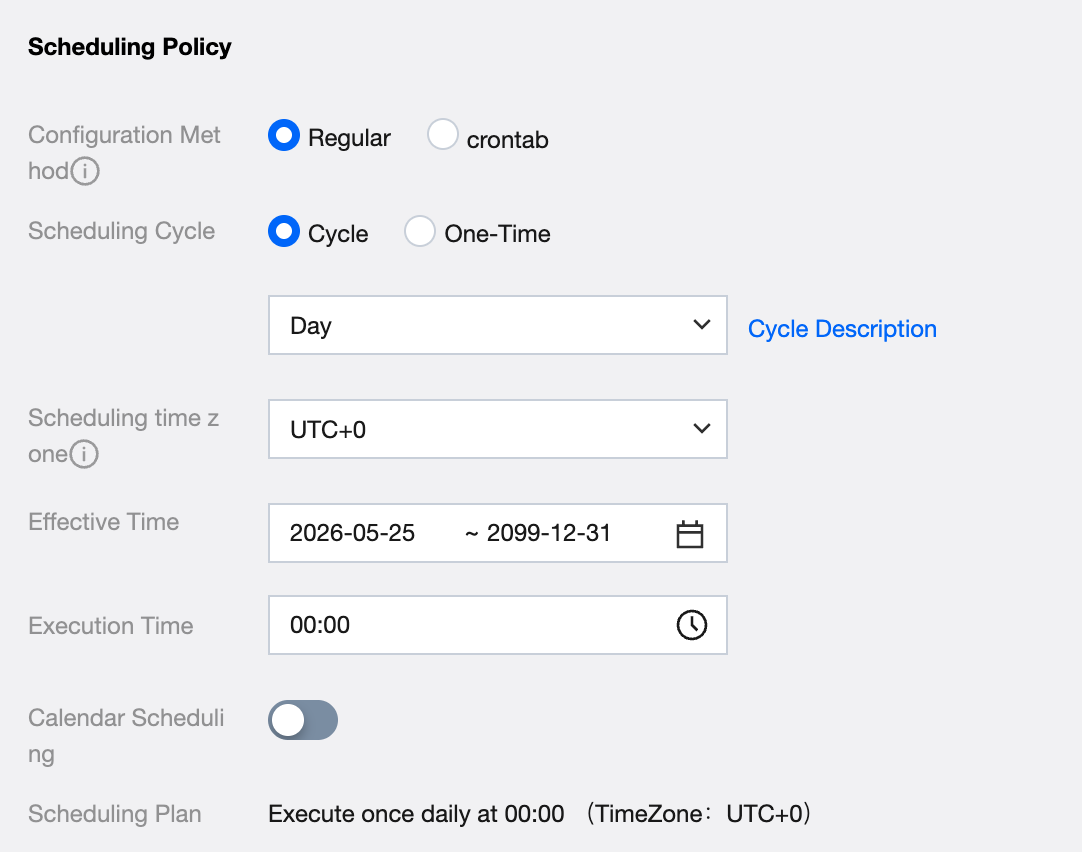
Parameter | Description |
Configuration Method - Scheduling Period | Select Regular for the configuration method, and select Day for the scheduling period. |
Effective Time | The effective time period of the scheduling time configuration. The system will perform auto-scheduling within this time range according to the time configuration. It will not auto-schedule after exceeding the validity period. Only select a start date after the current date. By default, it displays the current date to 2099-12-31. |
Execution Time | Daily task execution time is selectable in Hour:Minute format. Instances start execution when reaching the execution time. |
Calendar Scheduling | Use the configuration in the scheduling calendar to arrange task running or pause running on the specified date. |
Scheduling Plan | Automatically generated based on the configured period and execution time. |
Scheduling type | Supports selection of normal scheduling and dry-run scheduling. Dry-run scheduling means that when the task is scheduled, the system directly sets the instance to success without actually executing the task. Normal scheduling means normally executing the task code. |
Configuration Example
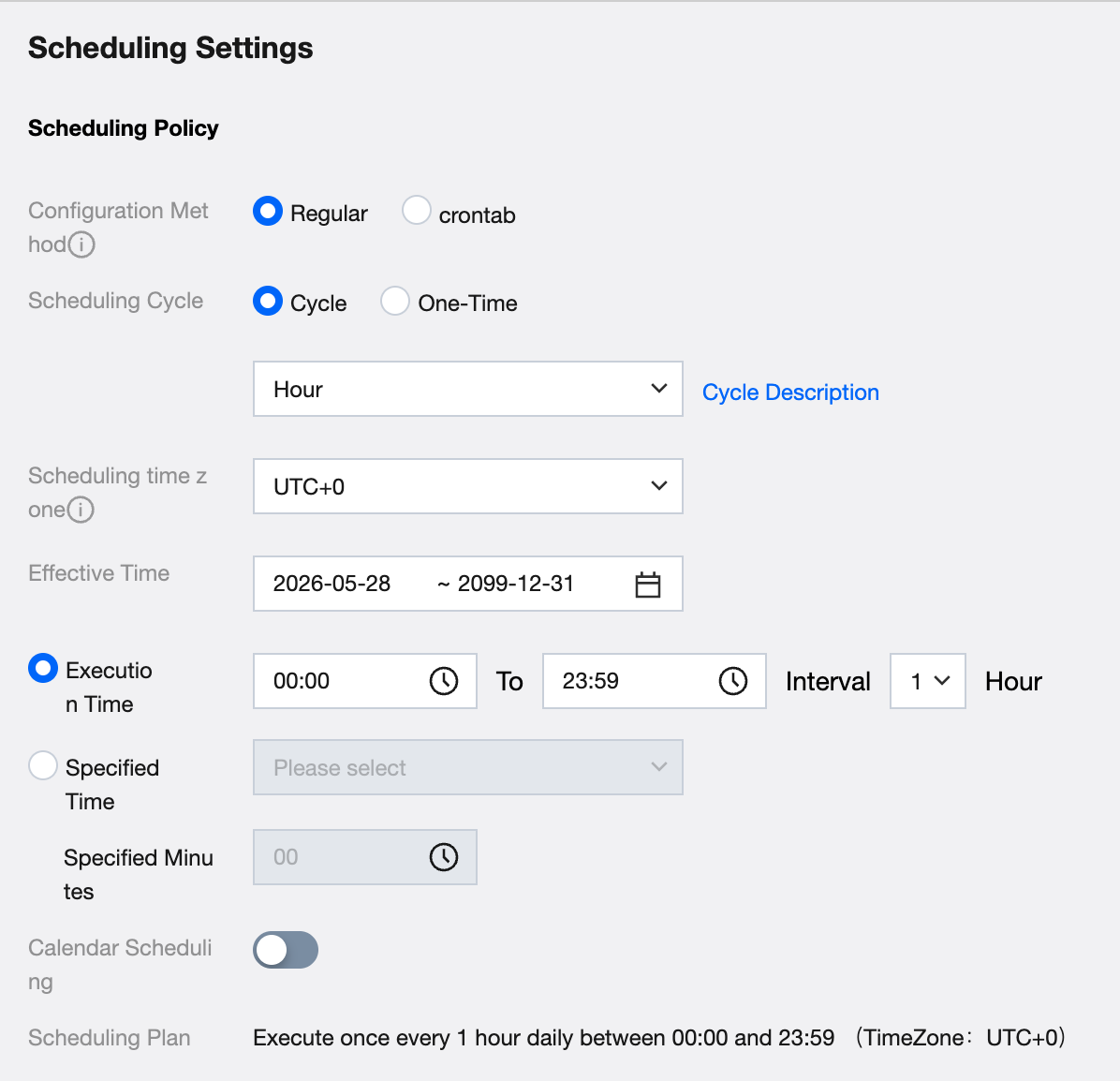
Parameter | Description |
Configuration Method - Scheduling Period | Select Regular for the configuration method, and select Hour for the scheduling period. |
Effective Time | The effective time period of the scheduling time configuration. The system will perform auto-scheduling within this time range according to the time configuration. It will not auto-schedule after exceeding the validity period. Only select a start date after the current date. By default, it displays the current date to 2099-12-31. |
Execution Time (choose one with the specified time) | Execution Time For hourly tasks, the execution time can be selected down to the hour and minute. Interval range: 1 - 12 hours. Tasks generate instances for scheduling based on the execution time. Interval Time Set the interval time as the measurement unit to control the generation frequency of instance of tasks within the designated execution time interval. |
Specified Time (choose one with the execution time) | Specified Time Specify a time range from 0 to 23, support multiple selections. Hourly tasks generate instances and execute based on the specified time. Specified Minute Specify the exact minutes to generate an instance after the specified time. |
Calendar Scheduling | Use the configuration in the scheduling calendar to arrange task running or pause running on the specified date. |
Scheduling Plan | Automatically generated based on the configured period and execution time. |
Scheduling type | Supports selection of normal scheduling and dry-run scheduling. Dry-run scheduling means that when the task is scheduled, the system directly sets the instance to success without actually executing the task. Normal scheduling means normally executing the task code. |
Configuration Example
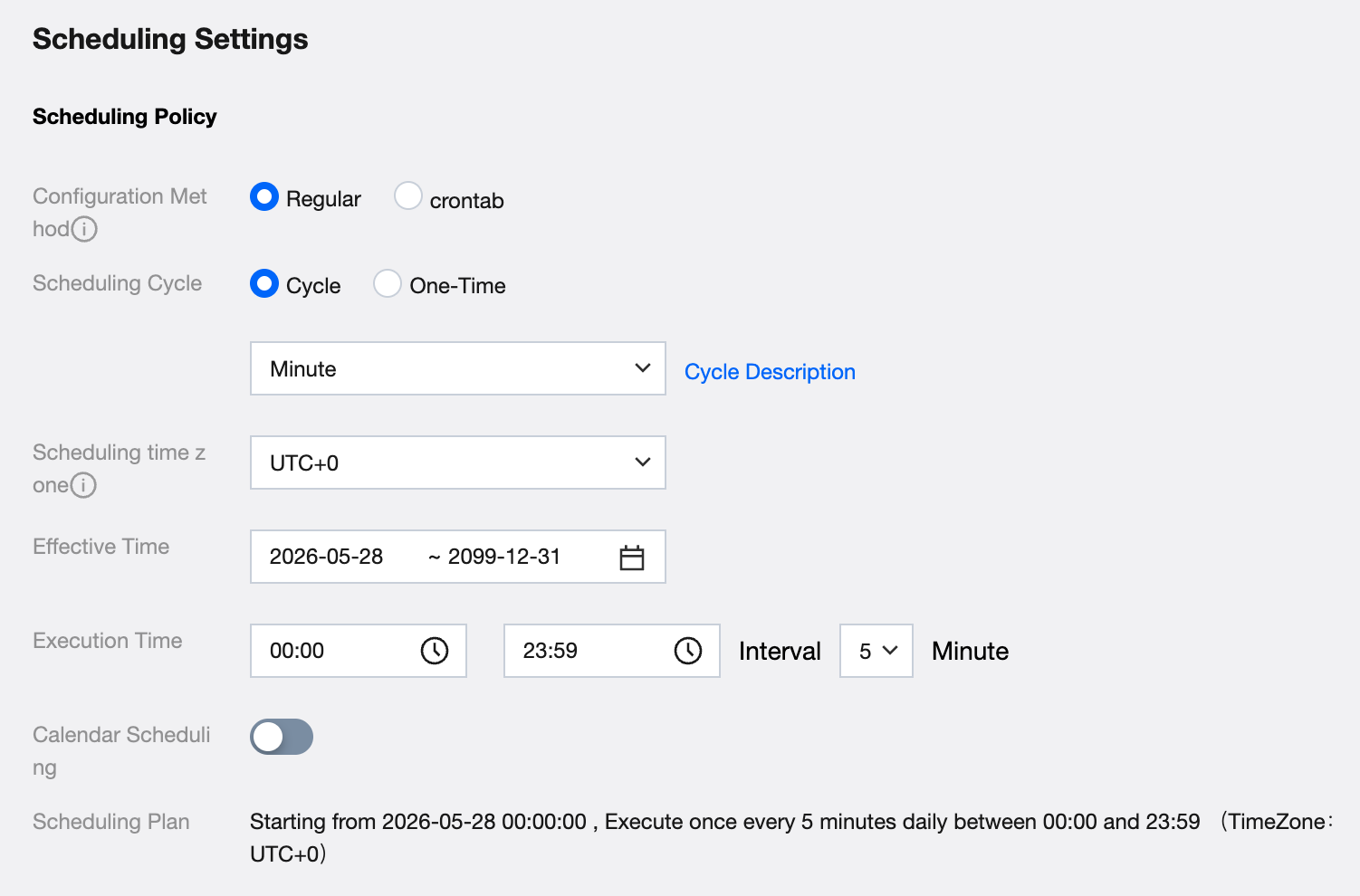
Parameter | Description |
Configuration Method - Scheduling Period | Select Regular for the configuration method, and select Period-Minute for the scheduling period. |
Effective Time | The effective time period of the scheduling time configuration. The system will perform auto-scheduling within this time range according to the time configuration. It will not auto-schedule after exceeding the validity period. Only select a start date after the current date. By default, it displays the current date to 2099-12-31. |
Execution Time | The execution time for minute-based tasks can only be selected on the hour, with interval ranges: 5, 10, 15, 20, 30 minutes. Minute-based tasks generate instances for scheduling based on the execution time. |
Calendar Scheduling | Use the configuration in the scheduling calendar to arrange task running or pause running on the specified date. |
Scheduling Plan | Automatically generated based on the configured period and execution time. |
Scheduling type | Supports selection of normal scheduling and dry-run scheduling. Dry-run scheduling means that when the task is scheduled, the system directly sets the instance to success without actually executing the task. Normal scheduling means normally executing the task code. |
Configuration Example
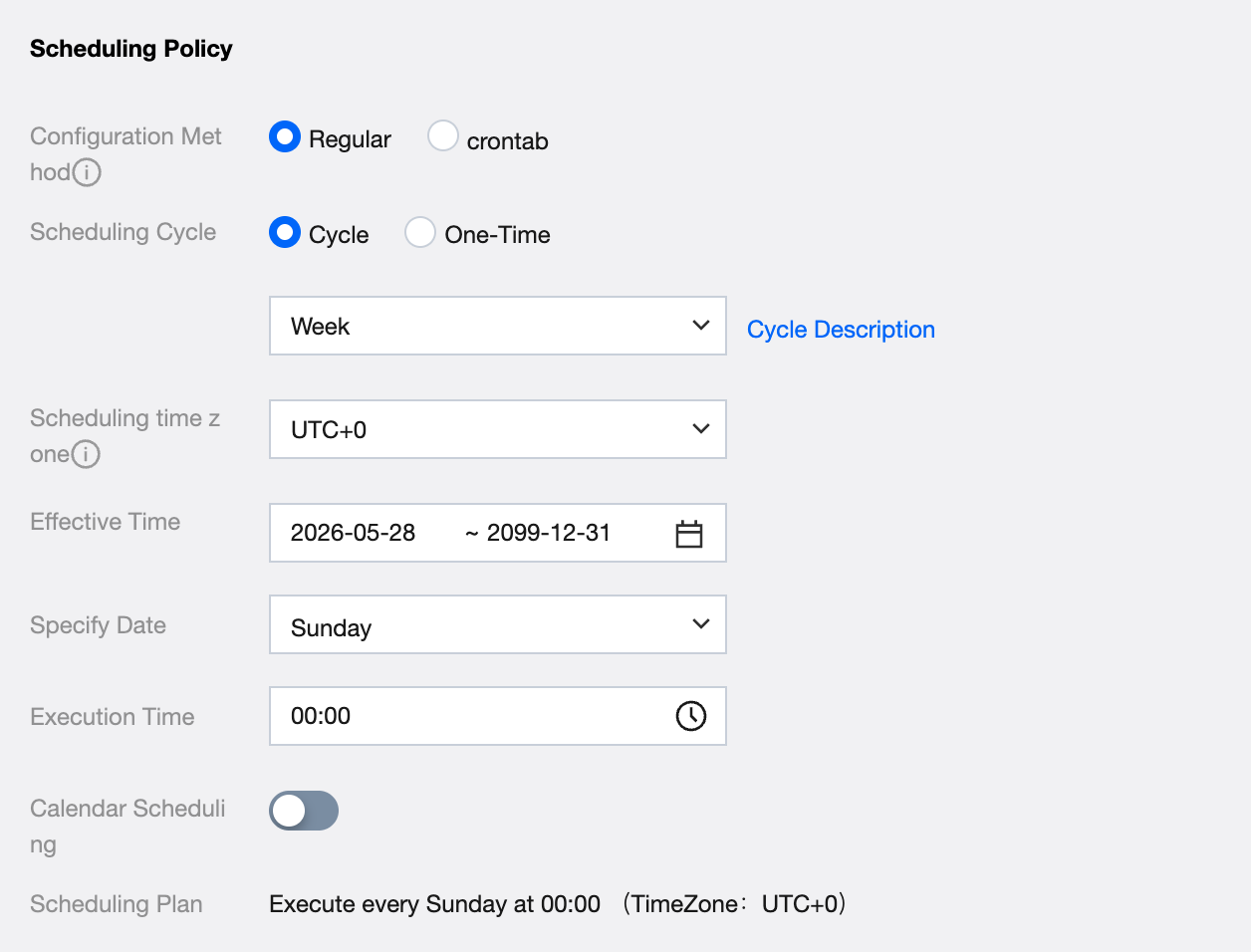
Parameter | Description |
Configuration Method - Scheduling Period | Select Regular for the configuration method, and select Week for the scheduling period. |
Effective Time | The effective time period of the scheduling time configuration. The system will perform auto-scheduling within this time range according to the time configuration. It will not auto-schedule after exceeding the validity period. Only select a start date after the current date. By default, it displays the current date to 2099-12-31. |
Specify Date | The specified date range for weekly tasks is Monday to Sunday, supporting multiple selections. |
Execution Time | Weekly task execution time is selectable in Hour:Minute format. Instances start execution when reaching the execution time on the specified date. |
Calendar Scheduling | Use the configuration in the scheduling calendar to arrange task running or pause running on the specified date. |
Scheduling Plan | Automatically generated based on the configured period and execution time. |
Scheduling type | Supports selection of normal scheduling and dry-run scheduling. Dry-run scheduling means that when the task is scheduled, the system directly sets the instance to success without actually executing the task. Normal scheduling means normally executing the task code. |
Configuration Example
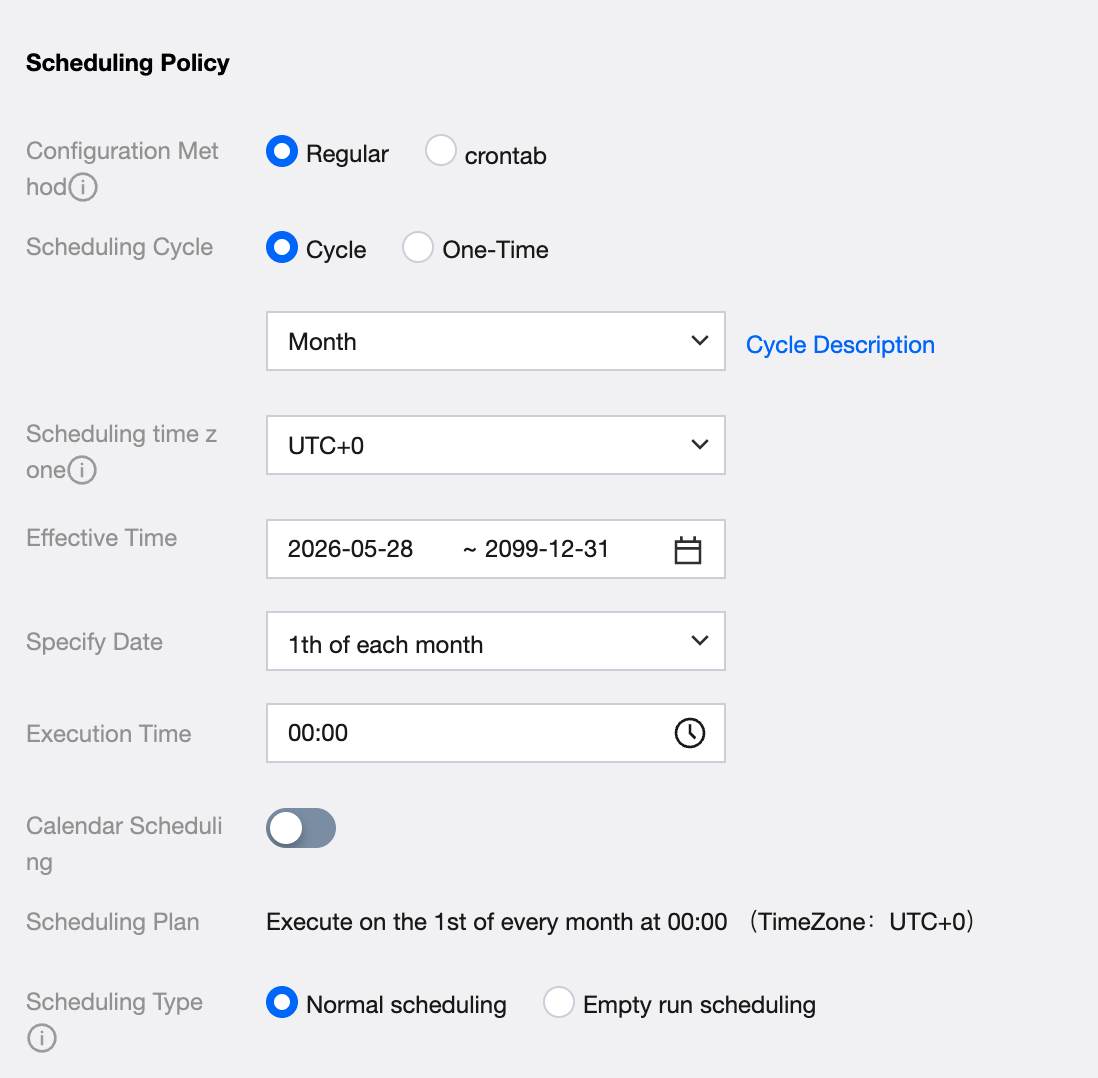
Parameter | Description |
Configuration Method - Scheduling Period | Select Regular for the configuration method, and select Month for the scheduling period. |
Effective Time | The effective time period of the scheduling time configuration. The system will perform auto-scheduling within this time range according to the time configuration. It will not auto-schedule after exceeding the validity period. Only select a start date after the current date. By default, it displays the current date to 2099-12-31. |
Specify Date | The specified date range for monthly tasks is from the 1st to the 31st of each month, supporting multiple selections. Note: the end of month option is mutually exclusive with other dates. |
Execution Time | Monthly task execution time is selectable in Hour:Minute format. Instances start execution when reaching the execution time on the specified date. |
Calendar Scheduling | Use the configuration in the scheduling calendar to arrange task running or pause running on the specified date. |
Scheduling Plan | Automatically generated based on the configured period and execution time. |
Scheduling type | Supports selection of normal scheduling and dry-run scheduling. Dry-run scheduling means that when the task is scheduled, the system directly sets the instance to success without actually executing the task. Normal scheduling means normally executing the task code. |
Configuration Example
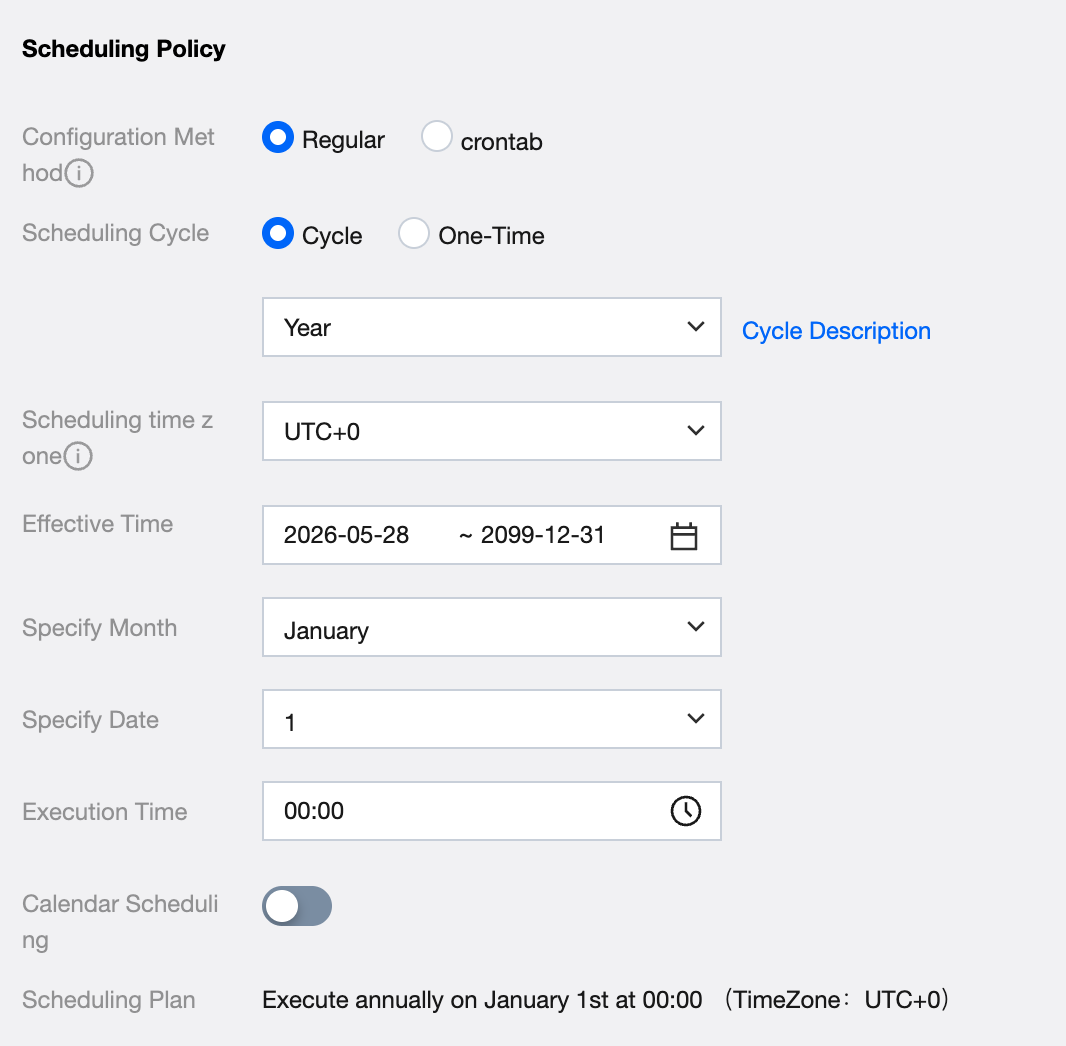
Parameter | Description |
Configuration Method - Scheduling Period | Select Regular for the configuration method, and select Year for the scheduling period. |
Effective Time | The effective time period of the scheduling time configuration. The system will perform auto-scheduling within this time range according to the time configuration. It will not auto-schedule after exceeding the validity period. Only select a start date after the current date. By default, it displays the current date to 2099-12-31. |
Specify Month | The specified month range for annual tasks is from January to December, supporting multiple selections. |
Specify Date | The specified date range for annual tasks is from the 1st to the 31st, supporting multiple selections. Note: the end of month option is mutually exclusive with other dates. |
Execution Time | Annual task execution time is selectable in Hour:Minute format. Instances start execution when reaching the execution time on the specified date in the specified month. |
Calendar Scheduling | Use the configuration in the scheduling calendar to arrange task running or pause running on the specified date. |
Scheduling Plan | Automatically generated based on the configured period and execution time. |
Scheduling type | Supports selection of normal scheduling and dry-run scheduling. Dry-run scheduling means that when the task is scheduled, the system directly sets the instance to success without actually executing the task. Normal scheduling means normally executing the task code. |
Configuration Example
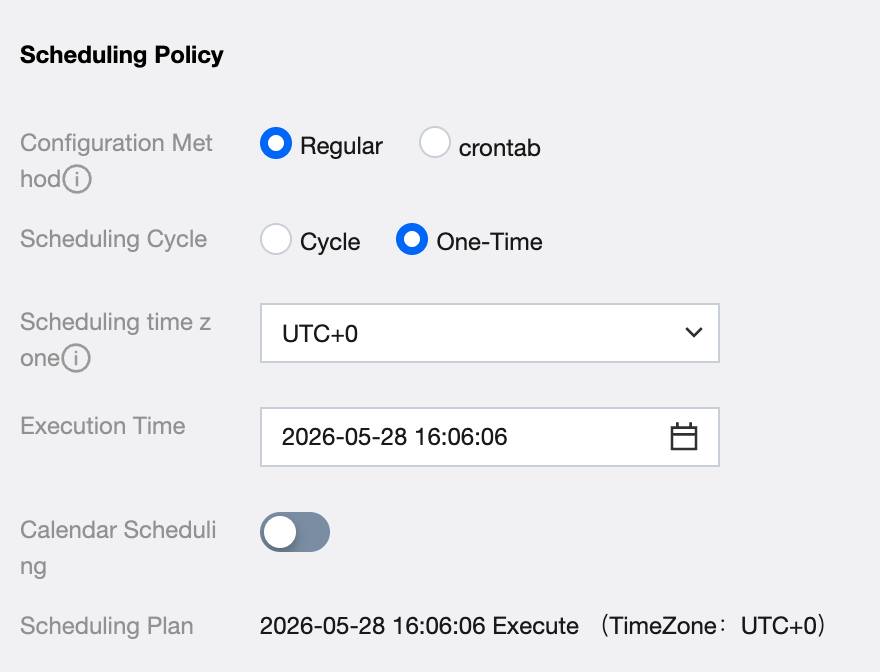
Parameter description:
Parameter | Description |
Configuration Method - Scheduling Period | Select Regular for the configuration method, and select One-time for the scheduling period. |
Execution Time | One-time tasks support specifying the year, month, day, hour, minute, and second. |
Calendar Scheduling | Use the configuration in the scheduling calendar to arrange task running or pause running on the specified date. Note: The scheduling calendar feature is provided in the enterprise edition. For detailed information, refer to product version purchase instructions. |
Scheduling Plan | Automatically generated based on the configured period and execution time. |
Note:
A one-off task cannot be used to generate new instances via resubmission after completion. You need to create a new task to repeat execution.
Ajuda e Suporte
Esta página foi útil?
Você também pode entrar em contato com a Equipe de vendas ou Enviar um tíquete em caso de ajuda.
comentários