Purchase Directions
Baixar
Modo Foco
Tamanho da Fonte
Prerequisites
Purchasing an Anti-DDoS Pro instance
Anti-DDoS Pro (Standard Edition 2.0)
1. Go to the Anti-DDoS Pro purchase page and select the Standard Edition 2.0 package.
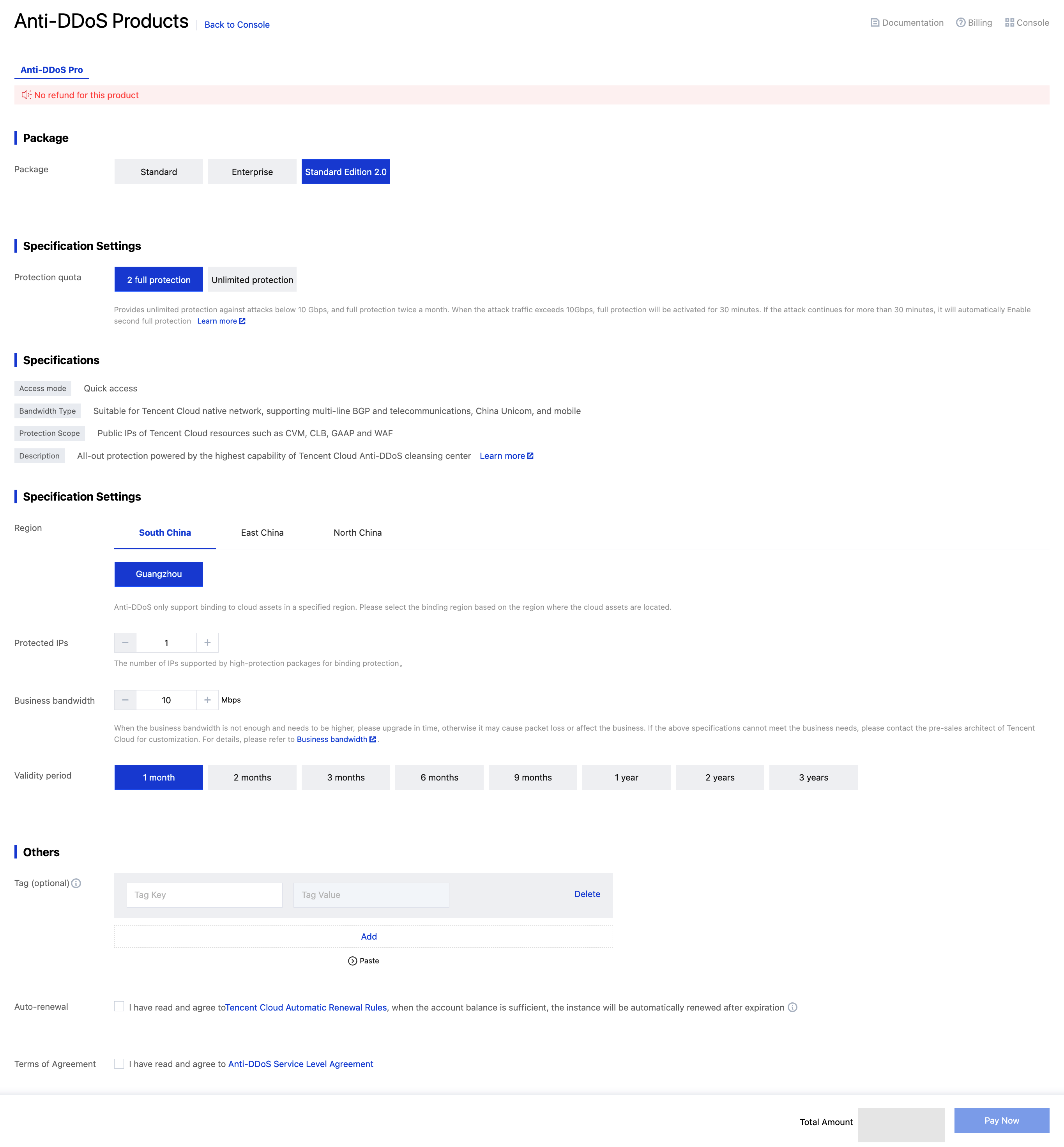
2. Configure the following parameters as needed:
Parameter | Description |
Mitigation sessions | Choose between 2 best-effort mitigations or unlimited mitigations. |
Region | Select the region where your Tencent Cloud public IP resources are located. DDoS protection currently only supports IPs in the same region. |
Protected IP count | Number of public IPs to protect, default is 1. Maximum varies by version: • 2 best-effort mitigations version: up to 10 IPs • Unlimited mitigations version: up to 2,000 IPs |
Business scale | Normal business scale measured by bandwidth (95th percentile of monthly inbound/outbound traffic). Maximum varies by version: • 2 best-effort mitigations version: up to 10,000 Mbps • Unlimited mitigations version: up to 150,000 Mbps |
Validity period | Subscription duration to purchase. |
Auto-renewal | Optional. If enabled, service will auto-renew monthly when account balance is sufficient. |
Note:
You can upgrade or enable elastic business bandwidth when the business bandwidth is insufficient. After elastic business bandwidth is enabled, you will be charged for the amount of bandwidth beyond the specified amount. For billing details, see Billing Overview (Standard). Please select a specification after reasonably assessing your business bandwidth.
Anti-DDoS Pro allows you to exceed your plan's limit, but all-out protection will become unavailable and only base protection remains when the limit is exceeded for a total of 36 hours in a month.
3. Click Pay Now to complete your purchase.
Anti-DDoS Pro (Enterprise)
1. Go to the Anti-DDoS Pro purchase page and select the Enterprise package.
2. Configure the following parameters as needed:
Parameter | Description |
Region | Select the region of the public IP of the Tencent Cloud resource. Currently, Anti-DDoS Pro can only provide DDoS protection for Tencent Cloud public IPs in the same region. |
Protected IPs | Set the number of public IPs to be protected by the Anti-DDoS Pro instance. Available specifications: 10 IPs (default), 50 IPs, and 100 IPs. |
Base protection bandwidth | We recommend you select a base protection bandwidth slightly higher than the average value of historical attack traffic, which will allow you to handle normal attacks. |
Elastic protection bandwidth | Billed based on the actual protection bandwidth by day. We recommend you select an elastic protection bandwidth slightly higher than the largest attack traffic in history to defend against surges in attack traffic, reducing the possibility of IP blocking caused by traffic exceeding the protection bandwidth limit. |
Business bandwidth | Normal bandwidth of your service. It is billed based on the monthly 95th percentile of either the incoming or outgoing traffic (whichever is higher). |
Validity period | Select for how long you want to purchase the instance. The fees are prepaid and calculated based on the base protection bandwidth, business bandwidth, and validity period. |
(Optional) Auto-renewal | Automatically renew your subscription monthly upon expiration if your Tencent Cloud account has sufficient balance. |
Note:
You can upgrade or enable elastic business bandwidth when the business bandwidth is insufficient. After elastic business bandwidth is enabled, you will be charged for the amount of bandwidth beyond the specified amount. For billing details, see Billing Overview (Enterprise). Please select a specification after reasonably assessing your business bandwidth.
Anti-DDoS Pro allows you to exceed your plan's limit, but all-out protection will become unavailable and only base protection remains when the limit is exceeded for a total of 36 hours in a month.
This product is billed monthly in arrears. The minimum purchase duration is 1 month; instance termination is not supported during this period. After expiration, it will auto-renew. To suspend service or destroy resources, please contact customer support.
3. Click Pay Now to complete your purchase.
Ajuda e Suporte
Esta página foi útil?
Você também pode entrar em contato com a Equipe de vendas ou Enviar um tíquete em caso de ajuda.
comentários