Retail E-commerce Solution and Live Integration Guide
Baixar
Modo Foco
Tamanho da Fonte
Solution Overview
Live e-commerce is a new E-commerce model that combines real-time audio and video interaction with online trading. Hosts display and explain products in real time through live streaming rooms, and interact with users via bullet screens, private chat with store customer service, and other methods, thereby improving user engagement and purchase conversion rates. In retail e-commerce scenarios, a live streaming platform typically needs to simultaneously possess low-delay audio and video capability, high-concurrency real-time communication capability, and various interactive and business message synchronization capabilities to meet complex requirements such as product display, user interaction, order messages, and marketing activities.
This solution, based on Tencent RTC related products (Live, Chat), outlines common needs and solutions for building an e-commerce live streaming system, helping developers quickly build an e-commerce live streaming system while maintaining highly customizable capabilities. The solution also provides an Beauty AR integration guide for advanced beauty effects, supporting beauty effects, filters, and animated stickers, meeting the high requirements of retail e-commerce live streaming for anchor avatars and interaction experience. It is suitable for various business scenarios such as self-operated e-commerce, private domain live streaming, cross-border e-commerce, and built-in mall live streaming.
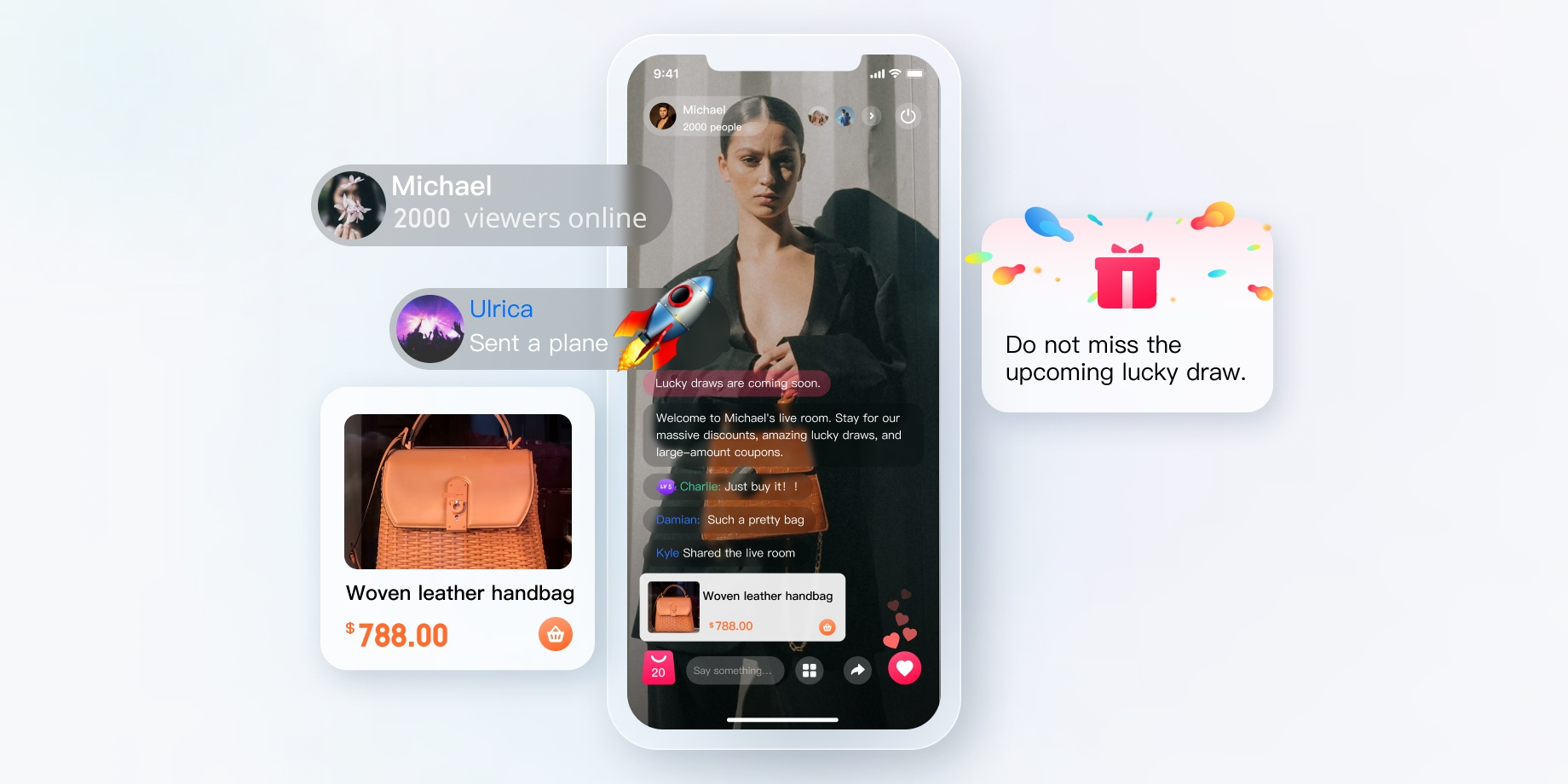
Overall Architecture Design
An e-commerce live streaming system is not merely a "live streaming room with shopping features," but a compound business platform composed of multiple standalone subsystems working in collaboration. This chapter starts from a global perspective, first sorting out the complete system boundary and core subsystems, then delving into the internal architecture of the Live UI-less Integration Solution AtomicXCore SDK, helping developers establish a clear global understanding before coding.
System Panorama Architecture
A complete e-commerce live streaming system involves at least five business domains, each with an independent technology stack and data model, but close collaboration is required in live streaming scenarios.
Business Domain | Core Responsibility | Technology Base | Provider |
Live Streaming Domain | Audio and video streaming, real-time interaction, room management | AtomicXCore SDK | Tencent Cloud |
E-commerce Transaction Domain | Product management, inventory control, order processing, payment settlement, after-sales support circulation | Business self-created (e-commerce middle platform, payment platform) | Customer Side |
Marketing Domain | Event orchestration, discount delivery, traffic operation | Business self-created (marketing platform) | Customer Side |
Customer Service Domain | User inquiry, smart routing, multi-end response | Tencent Cloud Intelligent Customer Service (Desk) | Tencent Cloud |
User Domain | Account system, fan operation, private community | Live / Chat SDK | Tencent Cloud |
Client Layered Architecture
From the client perspective, the entire ecommerce live stream App is generally organized into the following five levels:
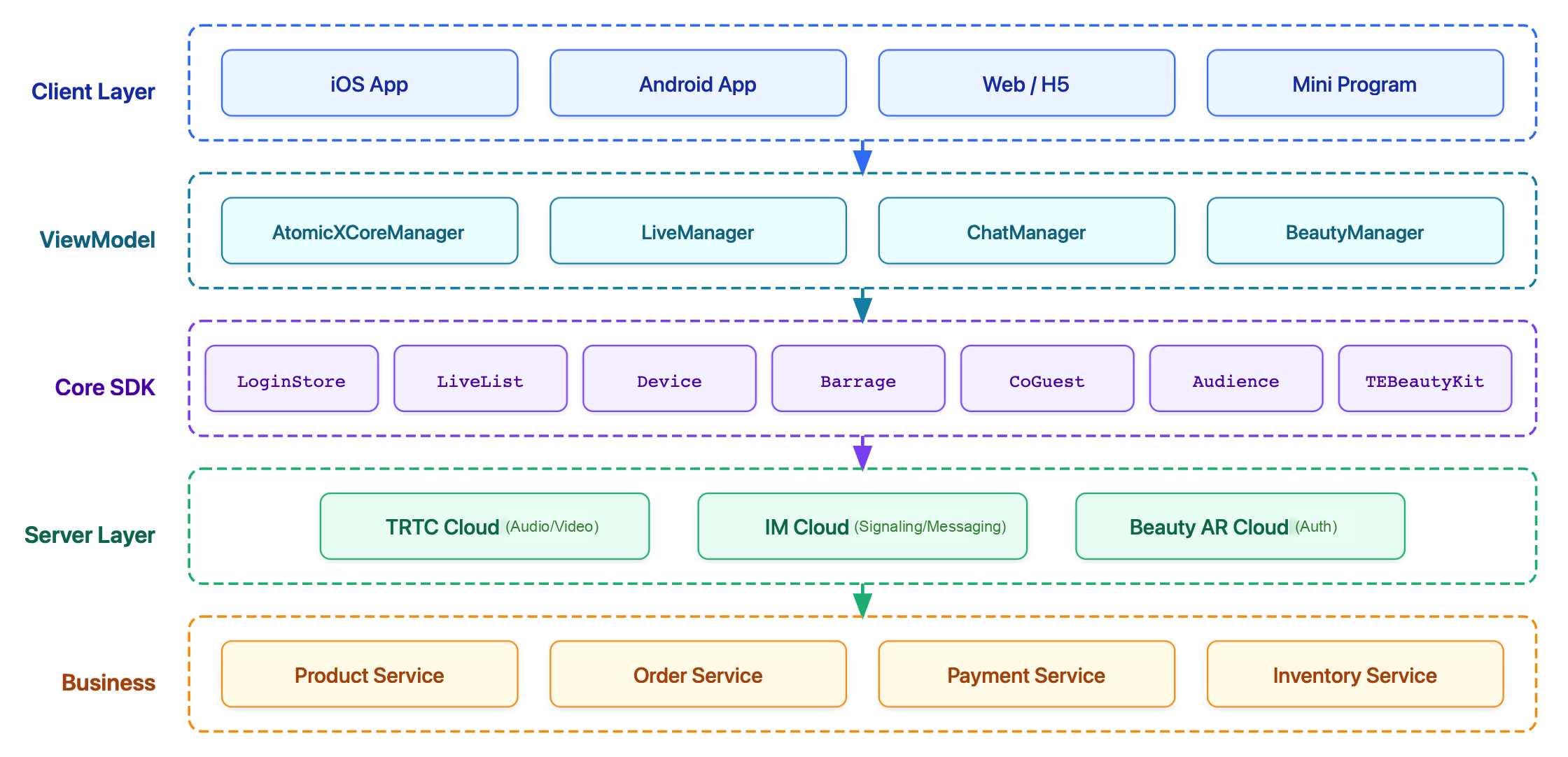
Description of responsibilities at each level:
Client Layer: Built on declarative frameworks (for example, Jetpack Compose for Android and SwiftUI for iOS), responsible for responsive rendering of ALL pages. The live streaming room page is the most complicated UI scenario, requiring multiple interactive layers such as bullet screens, product pop-ups, gift animations, and call floating windows to be overlaid on the video stream.
ViewModel: Following the MVVM architecture, each page corresponds to an independent ViewModel. The core work of ViewModel is to composite state from data sources, such as the live streaming room ViewModel requiring simultaneous subscription to AtomicXCore Store's live status (room information, call status, bullet screen list) and business Repository's e-commerce data (current product being explained, shopping cart quantity).
Core SDK: Live streaming capability is provided by the Store system of AtomicXCore SDK (such as LoginStore, DeviceStore, BarrageStore). Business capability is provided by the self-built Repository layer of developers. Each Repository encapsulates network calls, data caching, and error handling for corresponding server APIs (for example, ProductRepository encapsulates the product query API).
Server Layer: Integrates Tencent Cloud's underlying layer capabilities such as Tencent Real-Time Communication (TRTC), instant messaging (Tencent Chat), and beauty effect (TEBeautyKit), as well as third-party SDKs like payment. Developers usually do not need to directly operate this layer but indirectly call it through L3's Store and Repository.
Business: Handles all server-side business logic. Clients communicate with it via REST API or WebSocket.
Server-side Architecture Overview
The server side is recommended to be organized by microservice or modularization method. Core services are split as follows:
Service | Core Responsibility | External API | Cloud Capability |
Live Streaming Service | Room management, room member management, Mic Connection Management, message management | REST API | Live server API |
Authentication Service | UserSig generation and refresh, credential management | REST API | RTC/Chat Authentication Service |
Product Service | Product CRUD, inventory management, pricing strategy | REST API | Workload database |
Order Service | Place order, payment callback, refund, commission settlement | REST API + async messaging | payment platform |
Marketing Services | Coupon, flash sale, lucky draw, event orchestration | REST API | Workload database |
Customer Service | Session routing, robot reception, intelligent response | REST API + Webhook | Intelligent Customer Service Desk |
User Service | Account system, membership level, fan relationship | REST API | Live/Chat share account system |
Push Service | Go live reminder, marketing push (discount/flash sales/promotion preheating), transaction notification, offline reach. | REST API | TIMPush |
Data Service | Live Broadcast Data Statistics, Conversion Analysis, User Profile | Asynchronous messages + Batch processing | Data Warehouse |
Core Subsystem Deconstruction
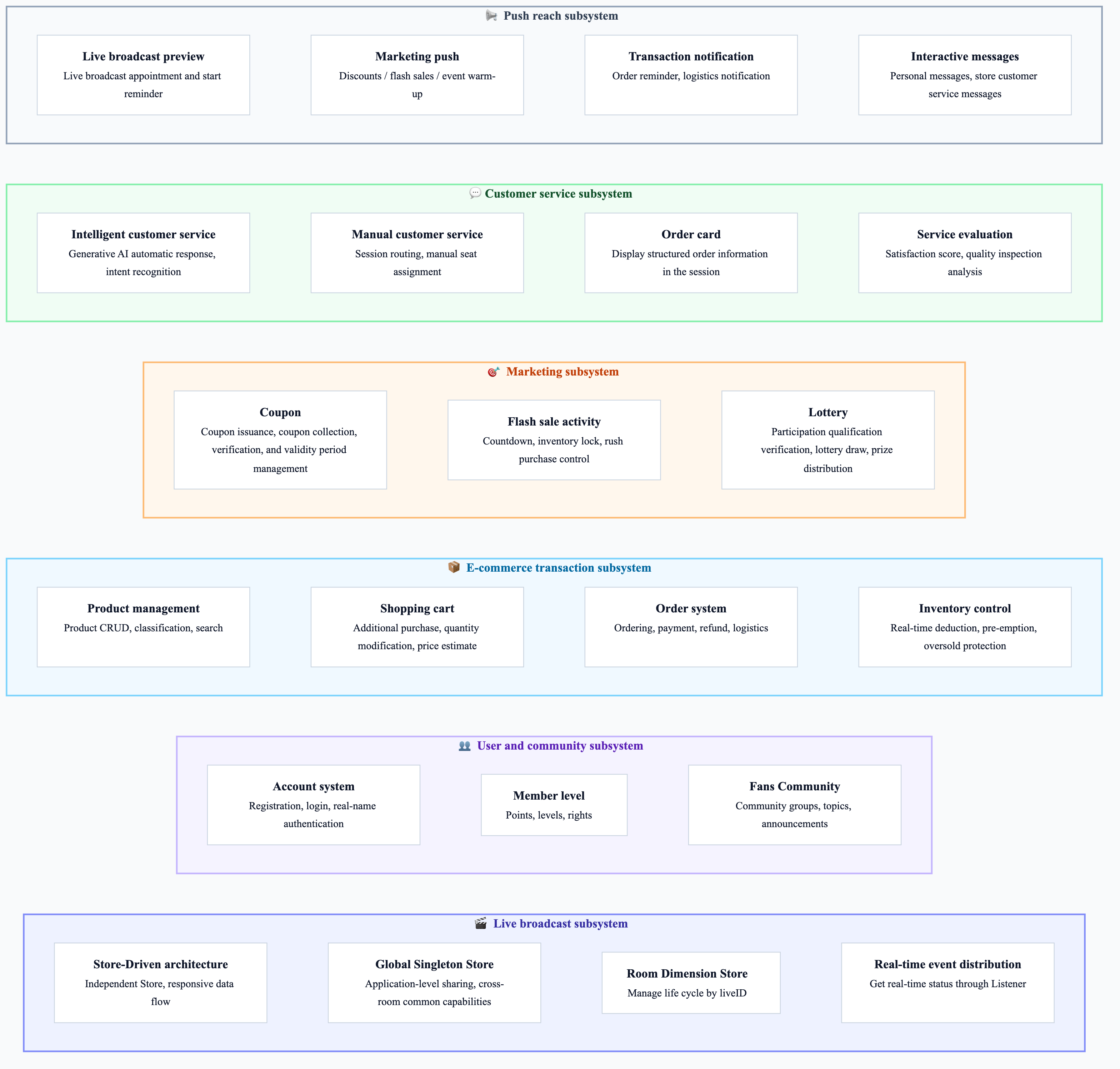
Live Stream Subsystem
The live streaming subsystem is the technical foundation of the entire ecommerce live stream, with core capability provided by AtomicXCore SDK. Understanding the internal design of the SDK is the premise for live streaming capability integration.
Store-Driven Architecture
AtomicXCore SDK implements Store-Driven architecture. Each feature provides status and operation APIs in standalone Store form, exposes business status to the public through responsive data streams, and distributes real-time events via Listener. Developers can call corresponding Stores as needed. Global Stores are shared at application-level, while room-level Stores manage lifecycle by liveID. Listeners and resources must be released proactively when leaving the room.
Store Module Classification
The Store module in the SDK can be divided into two types by lifecycle: Global Singleton Store and room dimensions Store. The Global Singleton Store is shared during the application lifecycle, suitable for cross-room general capability management. The room dimensions Store is obtained via
create(liveID), with its internal implementation returning the same instance for identical liveID.Store/Component | Feature Description | API Reference |
LiveCoreView | Core view component for live video streaming display and interaction: Responsible for video stream rendering and view widget processing, supporting scenarios such as anchor live streaming, audience mic connection, and cross-room connection with other anchors. | |
LiveListStore | Full lifecycle management of live streaming rooms: Create/join/leave/terminate rooms, query room lists, modify live information (name, notice), and listen to live streaming status (such as being kicked out, ended). | |
DeviceStore | Audio/video device control: Microphone (on/off, volume), camera (on/off, switchover, video quality), screen sharing, and monitor device status in real time. | |
CoGuestStore | Audience Mic Connection Management: Mic connection request/invite/consent/deny, member permission control (microphone/camera), state synchronization. | |
CoHostStore | Cross-room host connection: supports multiple layout templates (dynamic grid, etc.), initiate/accept/reject connection, interactive management for connected hosts. | |
BattleStore | Host PK battle: trigger PK (duration configuration/competitor), manage PK status (start/end), sync score, listen to battle results. | |
GiftStore | Gift interaction: get gift list, send/receive gifts, listen to gift event (sender, gift details). | |
BarrageStore | Danmaku function: send text/custom barrage item, maintain bullet screen list, monitor in real time. | |
LikeStore | Like interaction: send likes, listen to like events, sync total likes. | |
LiveAudienceStore | Audience management: obtain real-time audience list (ID/name/avatar), check audience size, listen to Enter/Exit Event. | |
AudioEffectStore | Audio effects: voice-changing (child voice/male voice), reverb (KTV), ear monitoring adjustment, switch special effects in real time. | |
BaseBeautyStore | Basic beauty filter: adjust skin smoothing/whitening/ruddy (0-9 levels), reset beauty effect status, sync effect parameters. |
E-commerce Transaction Subsystem
The e-commerce transaction subsystem is normally self-built at the business layer, and the AtomicXCore SDK does not provide a corresponding exclusive Store. However, you can still reuse the custom metadata (
MetaData) capacity of AtomicXCore to store and synchronize any business-related information in the room; reuse the custom message (CustomMessage) capacity to broadcast any business-related messages in the room.Functional Module | Core Capabilities | Live Streaming Room Integration Method |
Product Management | Product CRUD, SKU, category, search | Fetch the product list when entering the room; broadcast via custom message when the host switches the product being explained. |
Shopping Cart | Add to cart, quantity modification, price estimation | Lightweight add-to-cart in the live streaming room without forcing users to leave |
Order System | Place order, payment, refund, logistics | The order carries liveId, anchorId for conversion attribution. |
Inventory Control | Real-time deduct, reserve, oversell protection | Flash sales/limited-time activities need to sync with the live stream pace. |
Marketing Subsystem
Functional Module | Core Capabilities | Live Streaming Room Integration Method |
Coupon | Issue, claim, write-off, and manage valid period. | Broadcast coupon delivery notifications in the live streaming room via custom messages. |
Flash Sale Activity | Countdown, inventory lock, flash sales control | Integrate with the product listing popup to sync countdown and inventory status |
Lottery | Eligibility verification, draw, prize delivery | Show the lucky draw portal and winning result in the live streaming room |
Customer Service Subsystem
Functional Module | Core Capabilities | Live Streaming Room Integration Method |
Intelligent Customer Service | Generative AI auto-answer, intent recognition | The live streaming room product card has a built-in "Consult" portal that redirects to a customer service session. |
Manual Customer Service | Session routing, agent assignment | Carry product/order context into customer service session |
Order Card | Display structured order information in the session | Reduce customer service and user's repetition confirmation cost |
Service Evaluation | Satisfaction rating, quality inspection analysis | Session end closed-loop collection |
User and Community Group Subsystem
Functional Module | Core Capabilities | Live Streaming Room Integration Method |
Account System | Register, sign in, verify identity | Provide identity basis for live streaming and transaction behavior. |
Member Level | Points, level, rights and interests | Impact the priority of the customer service, discount strength, and eligibility for co-streaming. |
Fans Community | Community group, topic, announcement | Live stream preheating, benefit delivery, user accumulation |
Push Reach Subsystem
Functional Module | Core Capabilities | Live Streaming Room Integration Method |
Live Broadcast Preview | Live stream reservation, live streaming reminder | Reach follow users through offline push service |
Marketing Push | Promo/flash sale/preheating | Push inactive users through campaigns to boost conversion |
Transaction Notification | Order reminder, logistics notification | Real-time notifications on product updates and order messages for user orders in the live streaming room |
Interactive Messages | Personal messages, store customer service messages | Real-time notifications for personal messages, product store customer service, and interactive messages. |
Live Streaming Room Feature Development Guide
This chapter provides a development guide for common features in live streaming rooms to help you quickly find the corresponding function documentation.
Basic usage: go live and watch.
Live interactive: Danmu Message, gift sending, single room mic connection, cross-room connection/PK.
Member management: user level, mute and ban/remove user, audience list, number of online users.
Live streaming room management: live room list, live room review, live stream monitoring, live room notice, live stream statistics.
Scenario guide: ecommerce scenario, lucky draw with danmakus in live rooms, red packet flash sale/lucky bag.
Preparations
Before starting, you need to complete preparations such as activating the service, importing AtomicXCore, and implementing login logic.
Activate service: Log in to the Tencent RTC console, create an interactive Live streaming application, and claim the experience version or buy the official version.
Import AtomicXCore: Import AtomicXCore in the project and add AtomicXCore SDK dependency.
Implement login logic: Call
LoginStore in your project to complete login. This is the key premise for using AtomicXCore all functions.Note:
For preparations about feature development in live streaming rooms, see Preparations for more guidelines.
Complete Implementation on the Host Side
The anchor starts live streaming process as follows. You just need to perform the following steps to quickly realize video live streaming.
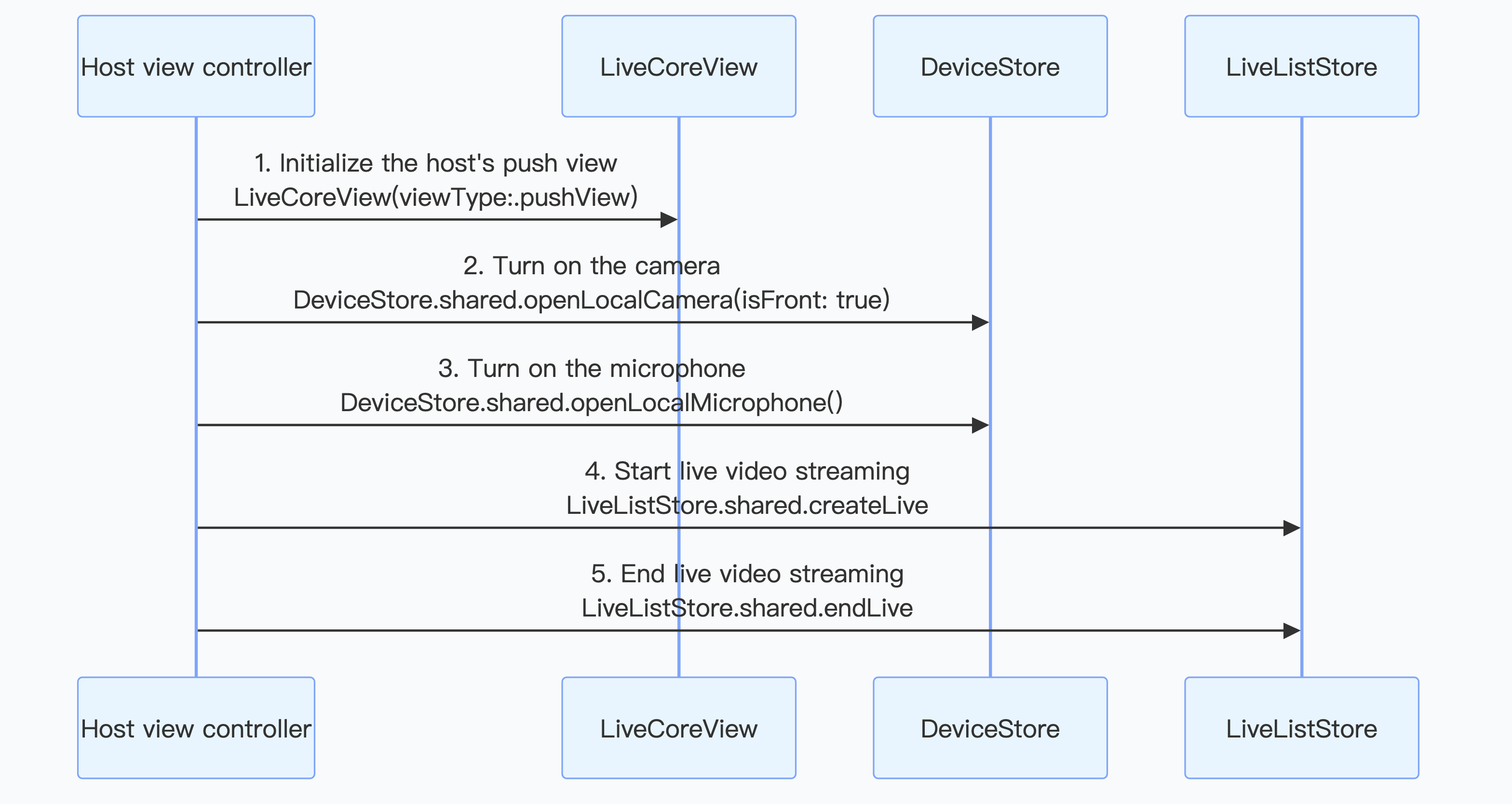
Note:
For more implementation details about the anchor side, see Implement Video Live Broadcast for Anchors.
LiveCoreView Integration
LiveCoreView is the core rendering container shared by anchors and audience, which can be understood as the "live stream hosting layer". Clarifying its hierarchy and lifecycle on the page is key.Layer | Feature | Description |
underlying | LiveCoreView | host local preview or remote video |
middle layer | Anchor information, product card, number of online users | Resident light interaction information |
upper | Bullet screen, gift, popup for co-streaming | High-frequency dynamic interaction |
top-level | End live stream confirm, exception prompt | Block operations and fallback prompt |
Device management
DeviceStore provides a comprehensive set of APIs for audio/video management, enabling hosts to maintain consistent device status management during live streaming, switching to background, and recovery from exception.Management Item | Description |
mic management | Turn on/off the microphone, set capture volume and output volume |
camera management | Turn on/off the camera, switch between front and rear cameras, set the image and video quality |
audio routing | Switch between speaker and earpiece |
Screen Sharing | Enable and disable the screen-sharing feature |
Network Status | Real-time monitoring of network quality information |
Create Live Streaming Room
Mode 1: Client creation room
The anchor client directly calls
LiveListStore.shared().createLive to createRoom and automatically proceed to start streaming.This mode is suitable for lightweight verification or scenarios with less operational control, featuring fast integration and short links, but the business system has relatively weak unified constraints on room metadata.
Mode 2: Create a room on the server
The server invokes the REST API
create_room to create an empty room. The anchor client requires calling LiveListStore.shared().joinLive to enter the room and start streaming.The core values of this mode are not "an extra API call", but to unify room lifecycle, product binding, anchor permission, and active status to the server for management.
End Live Streaming Room
Mode 1: The client ends the live stream
This mode is suitable for general live-streaming scenarios where the client can independently end the live action without the need for server involvement.
Mode 2: Server-side room termination
The anchor client triggers the end action, and the server invokes the REST API
destroy_room to dismiss the room.This mode is suitable for complex live-streaming scenarios where the server can control the live streaming room lifecycle and settle associated business when ending the live stream.
Complete Implementation on the Audience End
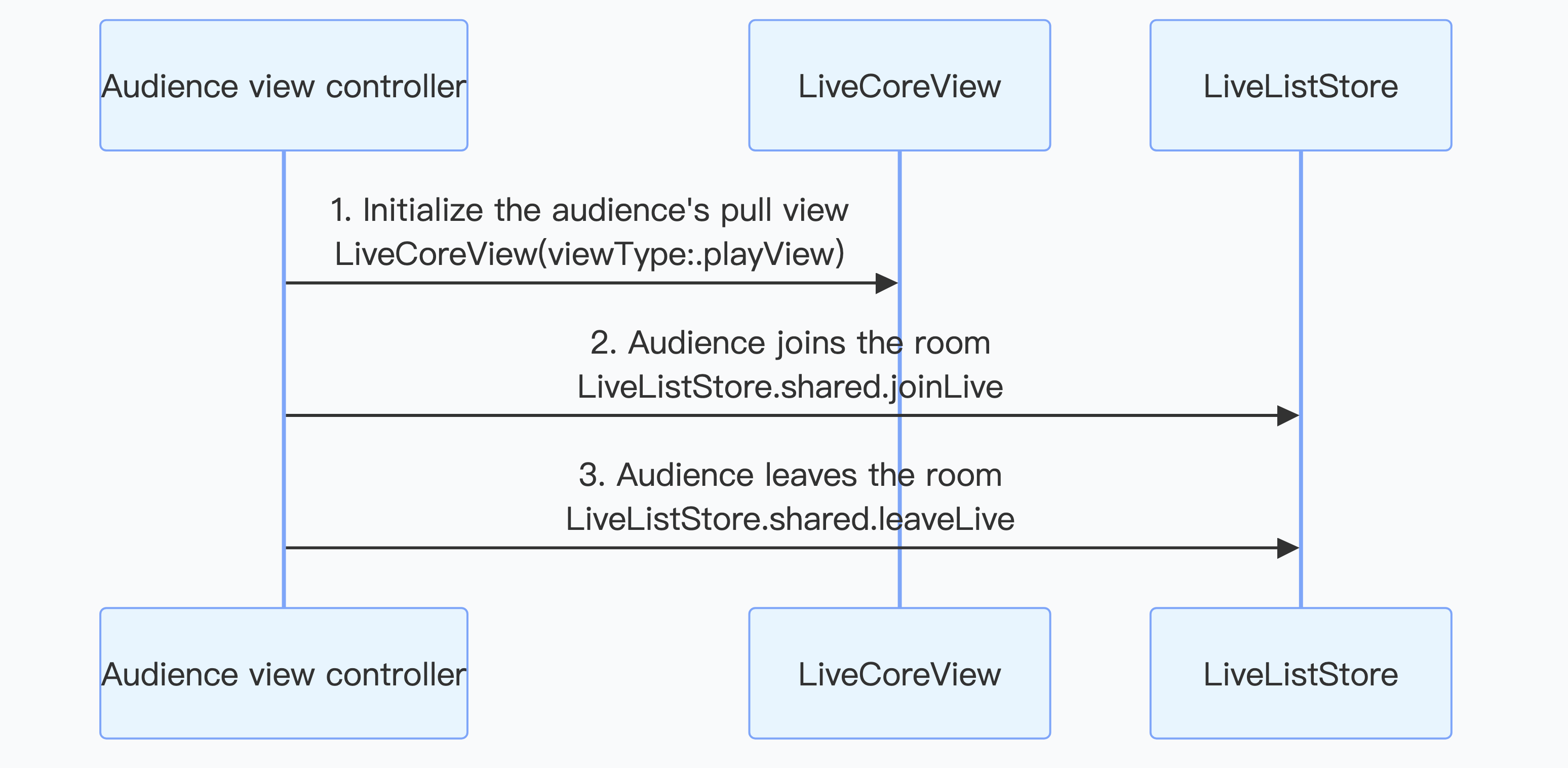
The audience viewing process is as follows. In just a few simple steps, you can watch live stream.
Note:
For more implementation details about the audience end, see Implement Audience Entering the Room for Viewing.
Enter Live Room
The audience client calls
LiveListStore.shared().joinLive to enter the room, and LiveCoreView will autoplay the current room's video stream.Upon entering the live room, pay attention to business data synchronization such as bullet screen area, product card and customer service portal.
Exit Live Streaming Room
The audience client calls
LiveListStore.shared().leaveLive to leave the room, and the SDK will automatically stop pulling the stream and exit the room.After successfully exiting the live room, stop room-related listening and message subscription, clean up the room-level Store, and return to the live stream list or recommend page.
Audience Interact via Mic Implementation
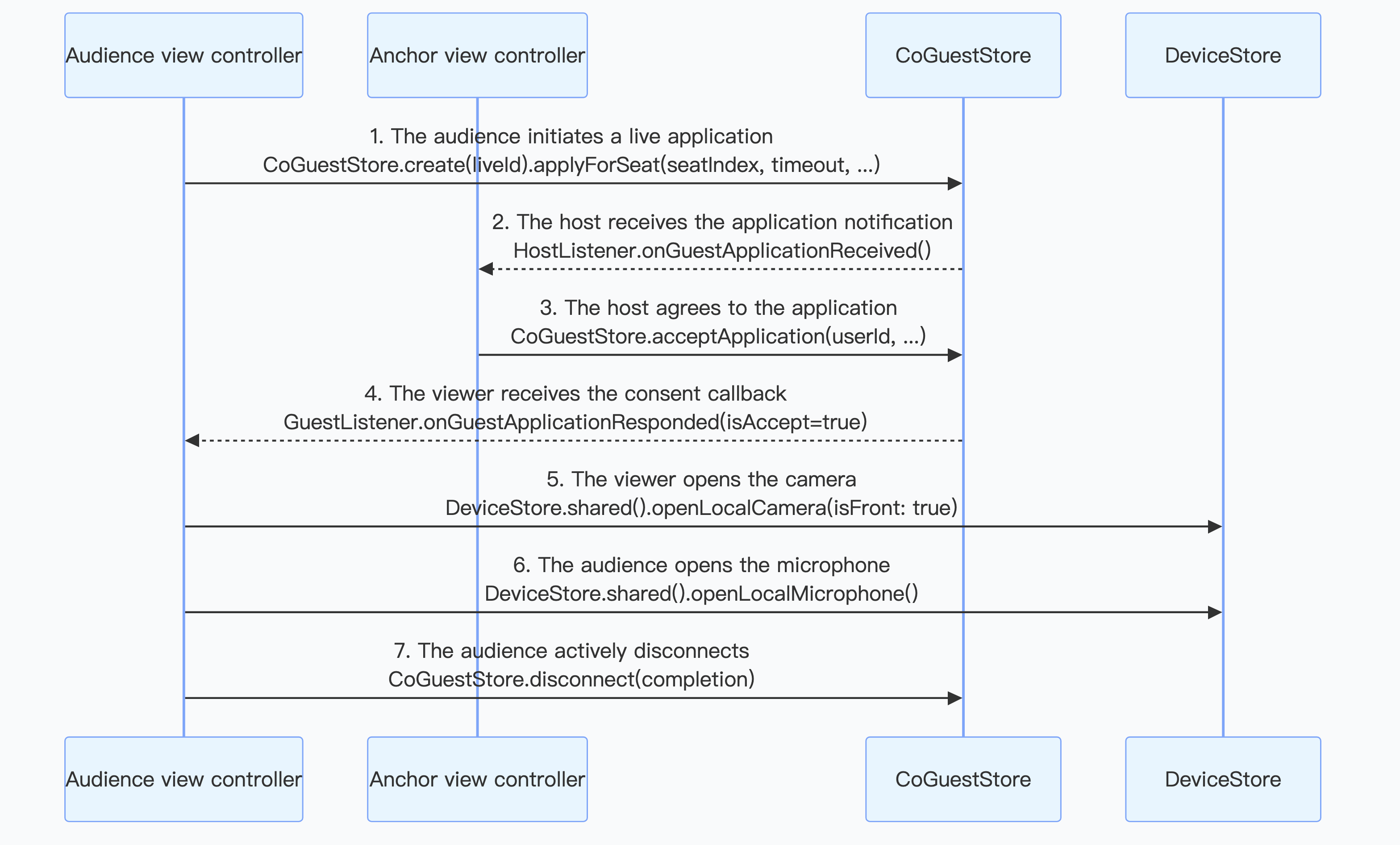
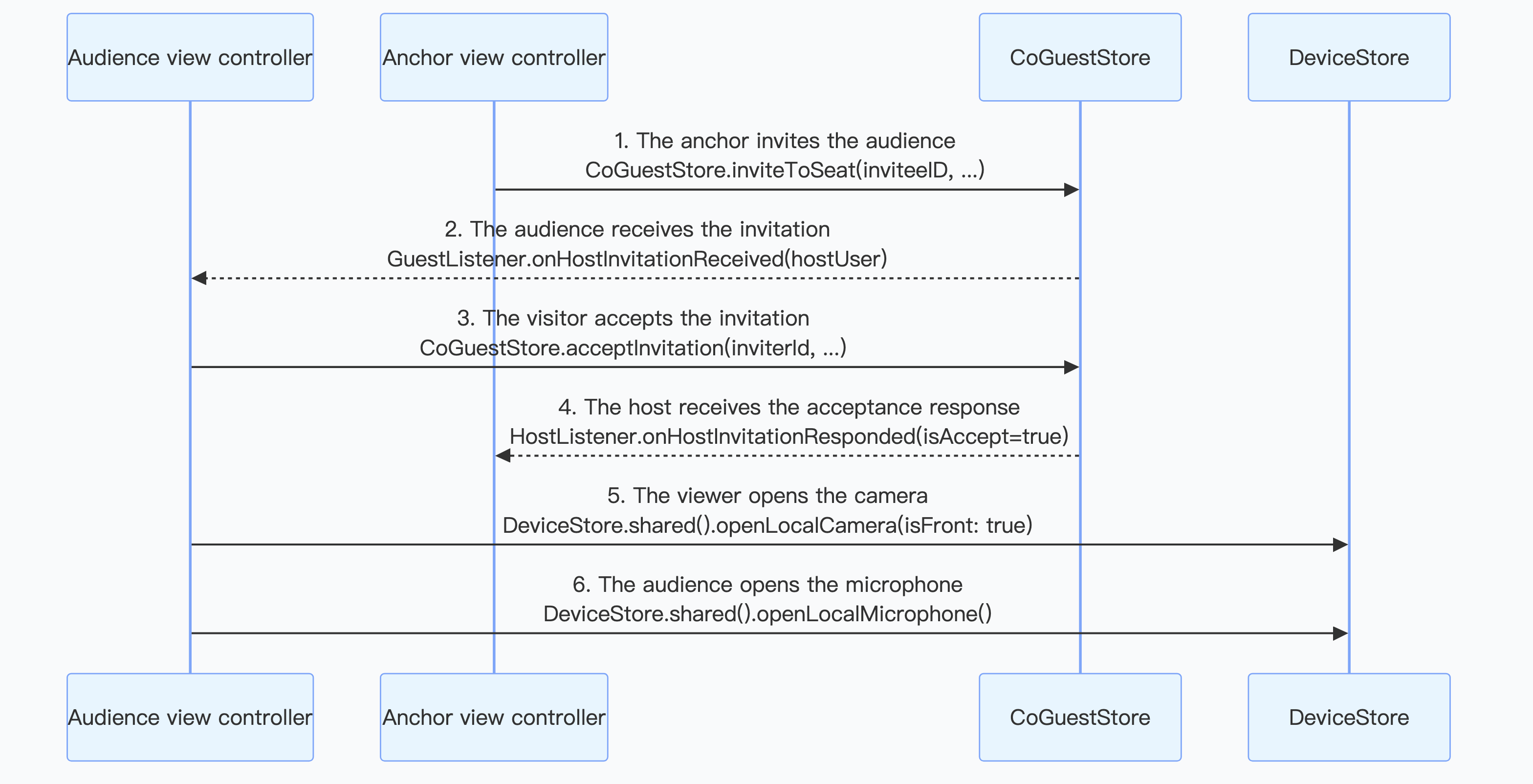
Co-broadcasting is an important feature in live shopping to enhance interactivity, allowing real-time audio and video calls between the audience and host. AtomicXCore provides the CoGuestStore module, specialized to manage the complete business process of audience mic connection. CoGuestStore supports two mainstream microphone-connected scenarios: audience request to speak and invitation to speak.
Audience Request to Speak
The audience proactively initiates a mic connection request, and the host can grant or deny it upon receiving the request.
Invitation to Speak
The host can proactively initiate a mic connection invitation to any audience in the live streaming room, and the audience can grant or deny it upon receiving the invitation.
Note:
For more implementation details about the audience interact via mic feature, see Audience Become Speaker.
Anchor Connection PK Implementation
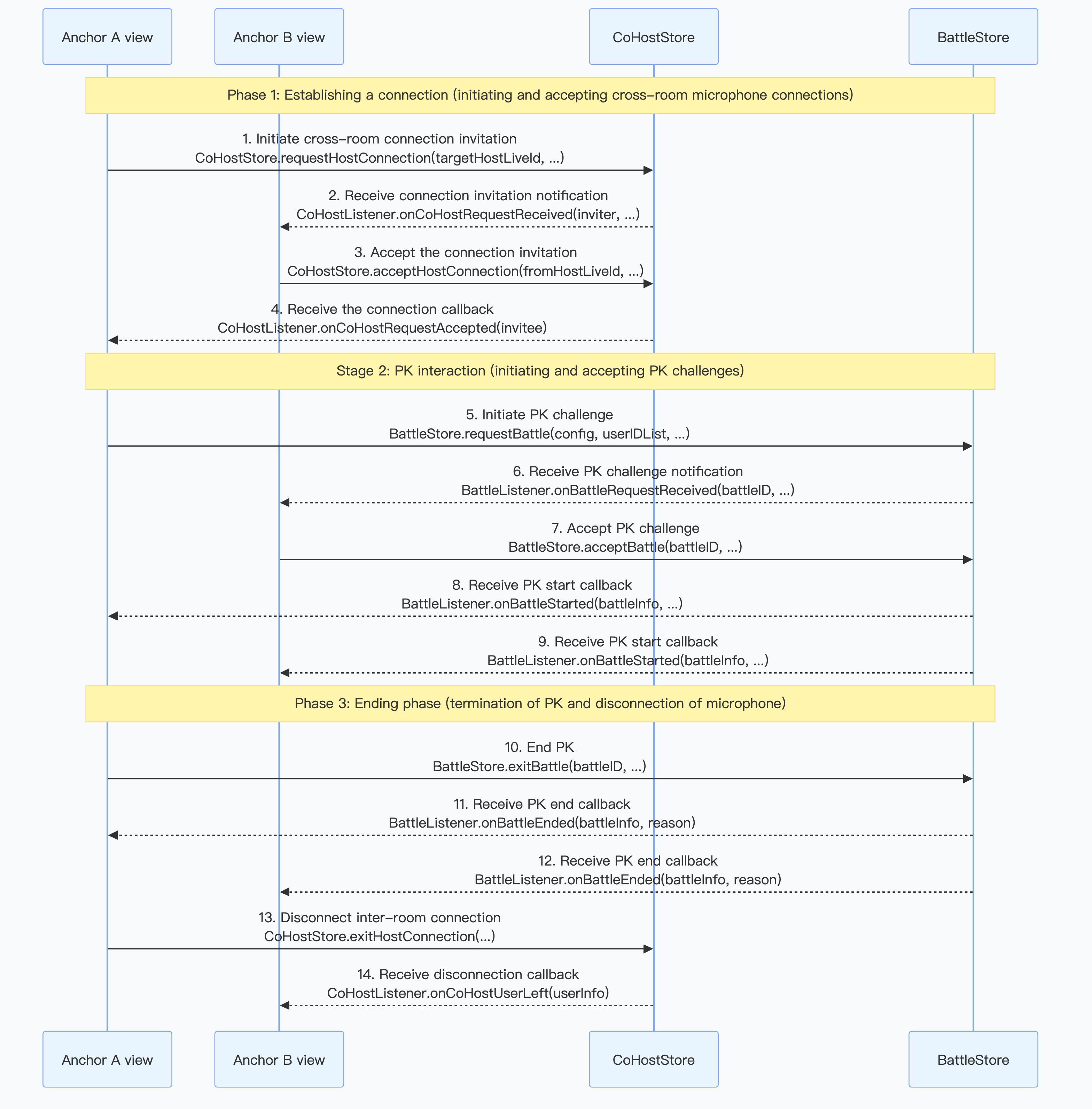
AtomicXCore provided two core modules, CoHostStore and BattleStore, for processing cross-room connection and PK battle.
A complete "anchor connection PK" usually consists of four core stages, and the overall process is as follows:
1. Cross-room connection: Two hosts establish a connection, and the visuals appear in the same view.
2. Initiate PK: Upon success, either party can trigger a PK challenge.
3. PK battle: The two parties perform a PK battle, and the PK score is updated in real time.
4. End PK connection: When finished, the host needs to first end the PK status and then disconnect the cross-room connection in logical order.
Note:
Real-Time Bullet Screen System Implementation
Bullet screen is one of the most important interactive forms in ecommerce live stream. It carries user's instant feedback, product consultation and emotion expression. Use the
BarrageStore module in the AtomicXCore framework to quickly integrate a live stream app with a bullet screen system that has various functions and outstanding performance.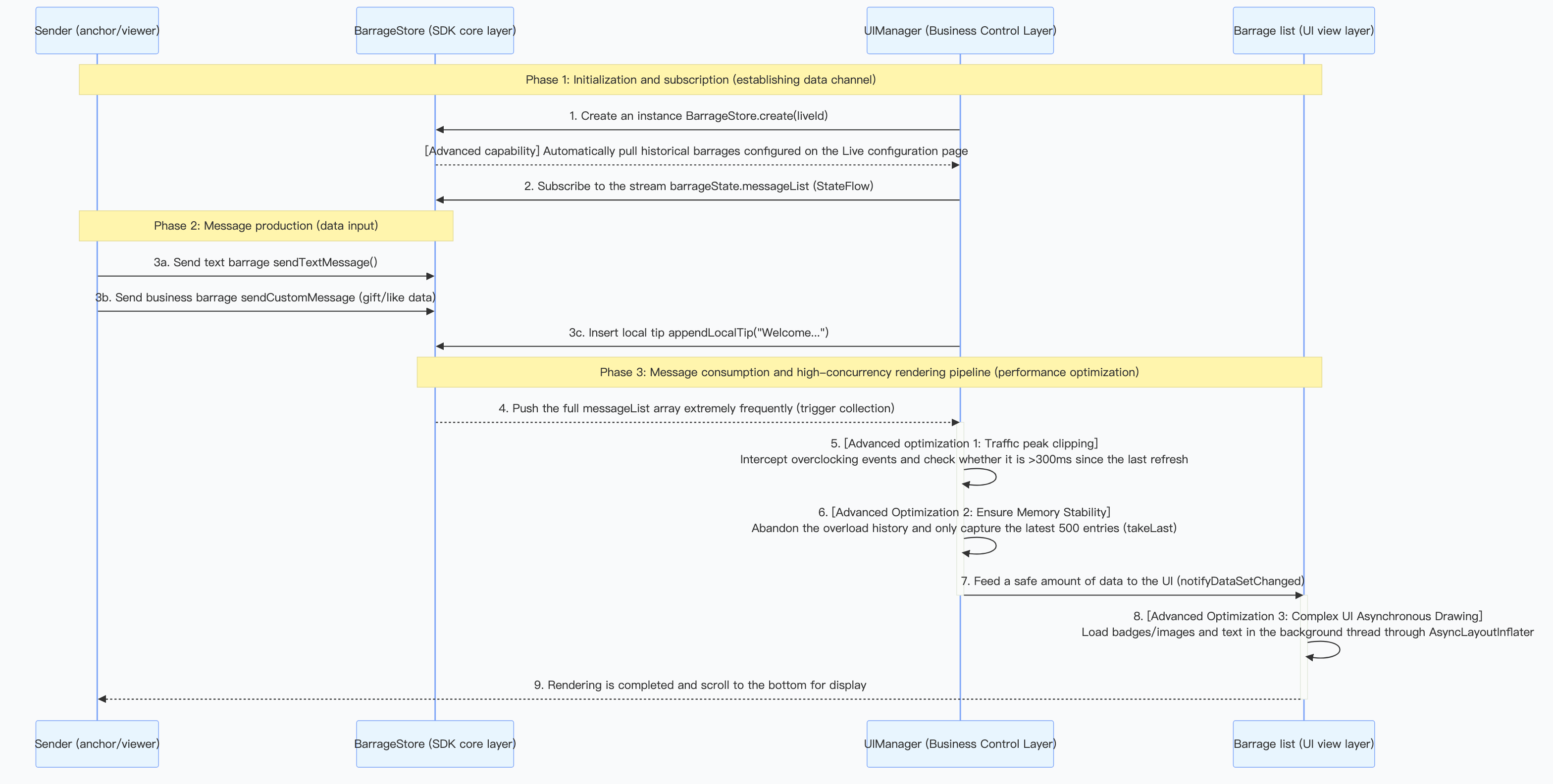
Message Layering
Clients are recommended to split network traffic by message type: text message, custom message, notification, etc.
Type | Purpose | Display Method |
Regular text message | Consultation, interaction, emotional expression | Bullet screen list / Floating screen |
Custom Messages | Gift, product explanation, coupon reminder | Card / Special effect bullet screen |
local prompt | Enter a room, mic connection status, risk control notification | System messages |
User level/identifier
User level and identifier functionality are a crucial part of live streaming interaction scenarios, used to distinguish different user roles, privilege levels, and identity status, thereby achieving differentiated interface display, interactive permissions, and function access control. LiveKit does not provide a basis for the identifier framework by default, but you can refer to the following to implement:
1. In your backend, maintain and store the severity/identity corresponding to each user's UserID based on the required users' severity/identity related logic.
2. Select the message sending API
BarrageStore.sendCustomMessage(). Among them, set data to the level/identity information, etc. obtained from the business backend that you need to display. When you receive the message, parse data as your level/identity information, then render it on the bullet screen list. Below is an example of the user level/identifier message structure:{"businessID": "user_identity","content": "Hello everyone, welcome to the live streaming room.""userIdentity": {"level": 32,"levelName": "diamond","levelIconUrl": "https://your-cdn.com/icons/level_diamond.png","badges": [{"type": "vip","name": "Annual VIP","iconUrl": "https://your-cdn.com/icons/badge_annual_vip.png","color": "#FFD700"},{"type": "fan","name": "Iron Fan","iconUrl": "https://your-cdn.com/icons/badge_fan.png","color": "#FF69B4"}],"nameColor": "#FFD700","bubbleStyle": "golden_frame"}}
Bullet Screen List UI Performance Optimization
Optimizing bullet screen list performance is a critical challenge in high-concurrency live broadcasting scenarios. Recommendation adoption the following policies:
Tuning Policies | Implementation Method | Effect |
Length limit of list | Keep the most recent 500 messages, remove excess from the header | Control Memory Usage |
Batch Rendering | Update the UI in batches every 300ms instead of refreshing one by one | Reduce UI redraw count |
View Reuse | Use the reuse mechanism of RecyclerView/UITableView | Reduce object creation overhead |
Asynchronous loading | Asynchronous drawing of graphic text, custom font, or complex layout views | Avoid main thread blocking |
Note:
For more implementation details and common issues about real-time bullet screen interaction, see Bullet Screen Interaction Feature.
Gift Giveaway System Implementation
The gift system is an important channel to monetize interactive live streaming and also an effective method to activate the communication environment of a live streaming room.
GiftStore is a AtomicXCore module specialized in managing the gift function of live streaming rooms. With it, you can build a complete gift system for your live streaming application, achieving various monetization and interactive scenarios.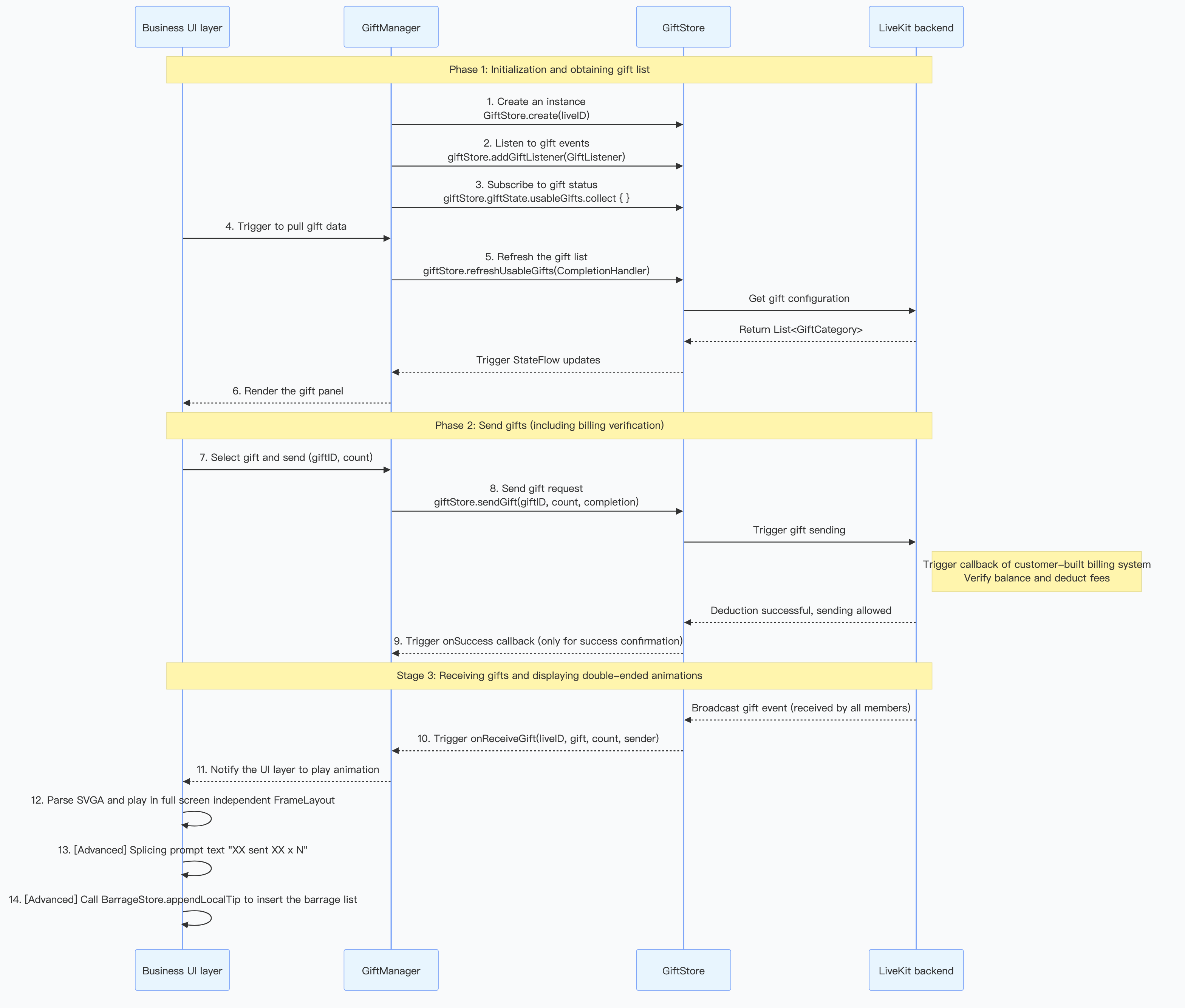
Gift Material Configuration
You need to customize the available gift types, categories, names, icons, prices, and animated effects in the live streaming room to meet operational needs and brand features.
1. Server configuration: Use the server-side REST API of LiveKit to manage gift information, categorization, multilingual, etc. See gift configuration guide document.
2. Client pull: Call
refreshUsableGifts on the client to get configuration data.3. UI display: Use the pulled
List<GiftCategory> data to fill the gift panel.
For highly customized scenarios (for example auction bid, custom effects trigger) that cannot be covered by the built-in gift list in the SDK, you can send custom messages as a supplement through
BarrageStore.sendCustomMessage(). The following is an example of the custom gift message structure:{"type": "live_gift","giftId": "rocket_001","giftName": "rocket","giftCount": 1,"giftValue": 1000,"effectUrl": "https://example.com/effects/rocket.json","senderId": "user_123","senderName": "xxUser","senderAvatar": "https://example.com/avatar.jpg"}
Billing and Gift Sending Deduction Process
When the audience sends gifts, ensure sufficient account balance and complete the actual deduction before triggering the playback of Gift Effects and broadcast.
1. Backend configuration callback: Configure the callback URL of your self-build billing system in the LiveKit backend. See callback configuration document.
2. Client sending: The client calls
sendGift.3. Backend interaction: The LiveKit backend invokes your callback URL, and your billing system executes deduction and returns the result.
4. Result synchronization: If successfully charged, AtomicXCore broadcasts the
onReceiveGift event; if deduction fails, the completion of sendGift receives an error.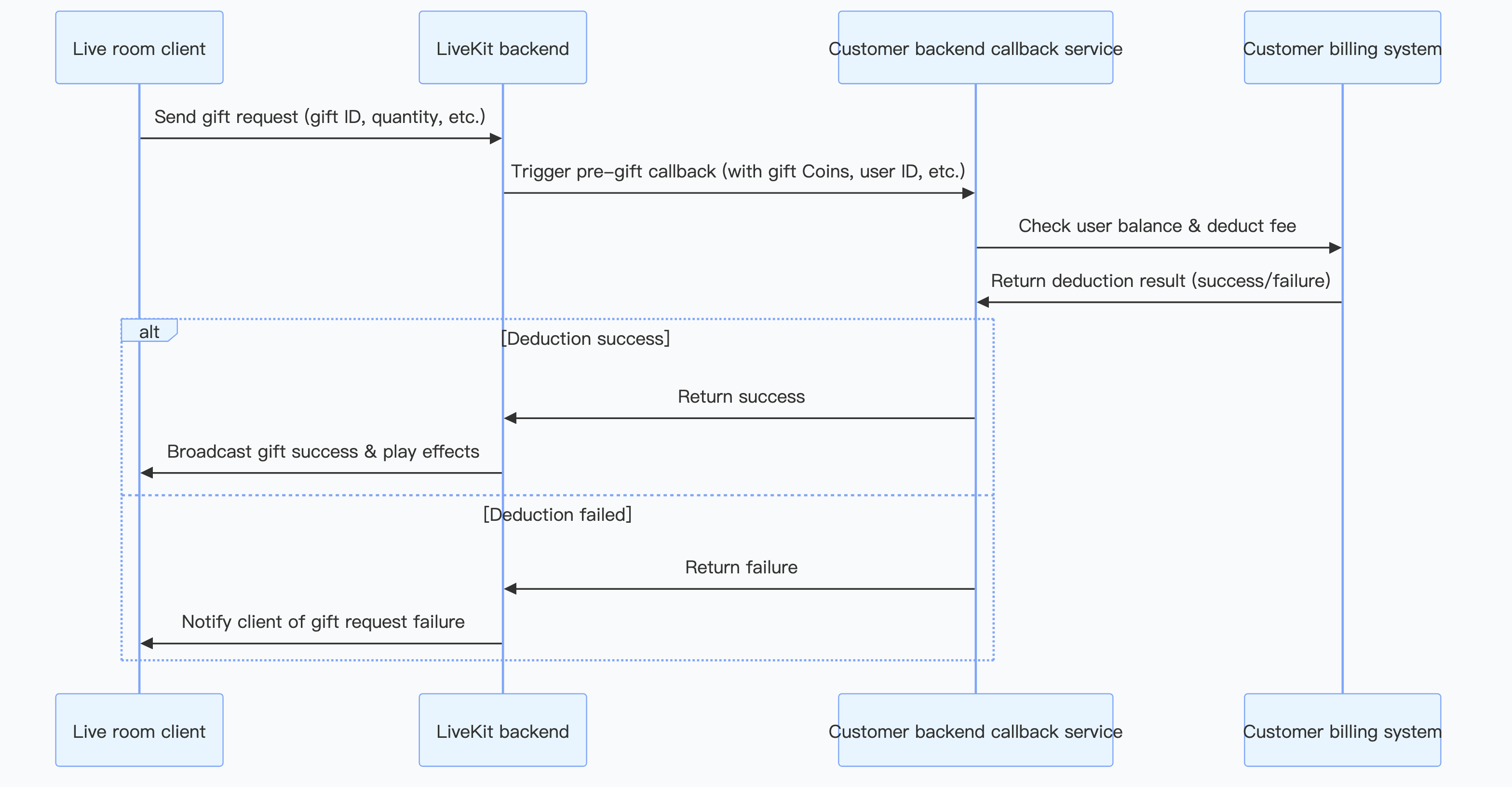
E-commerce Core Features Development Guide
The product management, shopping cart management, order process, and coupon core features involved in this chapter belong to the self-built scope of the business layer. AtomicXCore SDK does not provide corresponding exclusive function modules. Developers need to self-build or utilize the existing Store in AtomicXCore for implementation. The following is an example diagram of the end-to-end process for live streaming business.
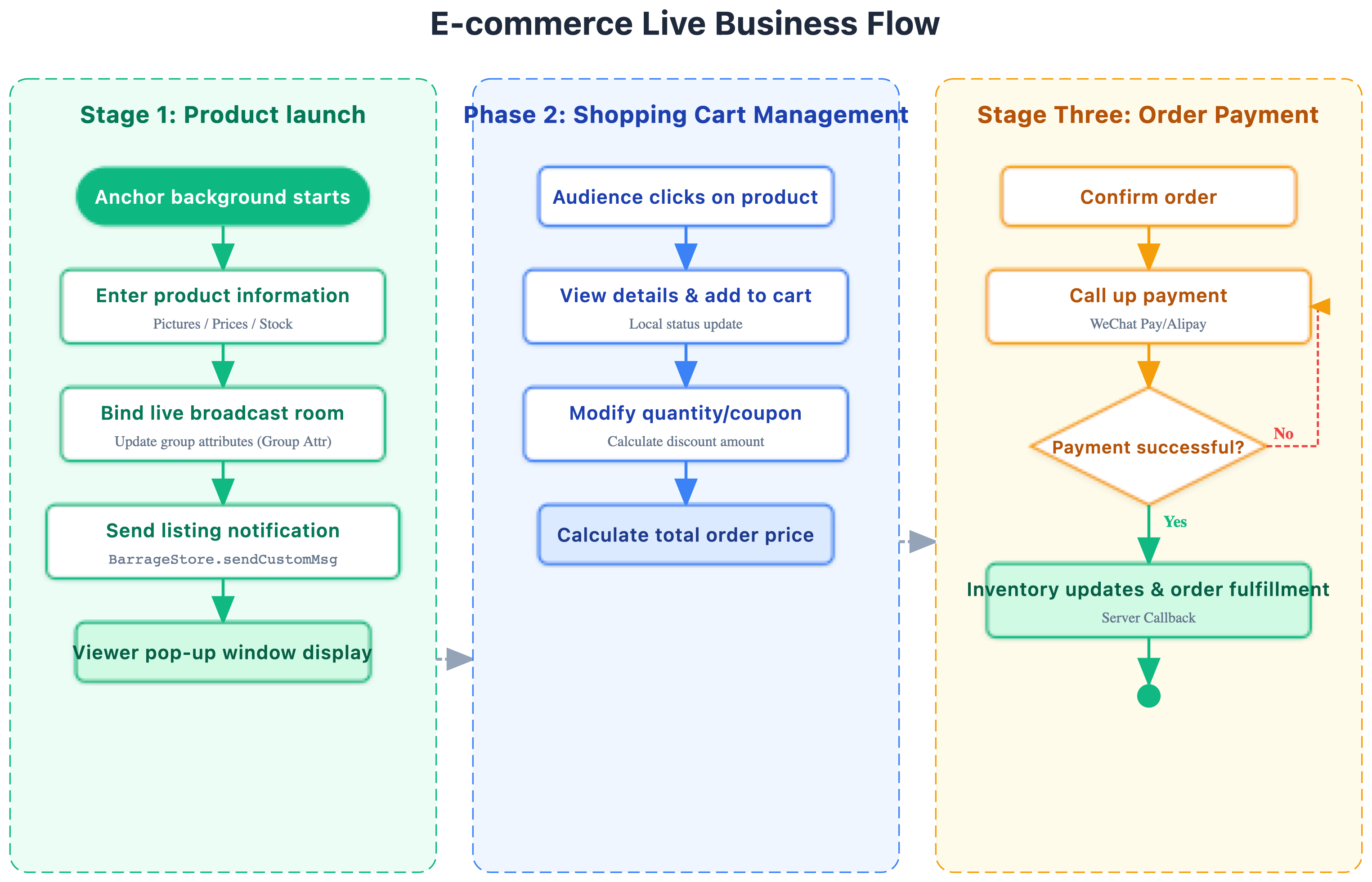
Product List/Shopping Cart
Product list management is the basic feature of product management, mainly including the addition, deletion, modification, and query of products. Normally, various information about products such as product name, description, price, inventory, and images will be stored in the backend database. On the frontend, you can obtain this information through your API interface and display it to users in the form of a list. Of course, for the limited product list in live streaming, you can also choose to reuse the custom metadata (
MetaData) power of AtomicXCore to store and synchronize product list information in the room.Note:
1.
MetaData only stores the mapping relationship between the live streaming room ID and the product list ID. When a user clicks the product list button, your client needs to request the server to display the corresponding product information.2. Inventory and pricing are time-sensitive data. We recommend relying on the server, and the client should not make the final decision.
Product Pop-up Management
During live streaming with goods, as the anchor talks about and lists products, product information typically needs to pop up on the audience's end to prompt them to browse and purchase. The product information pop-up can be implemented by sending custom messages in the live streaming room. The custom messages are parsed and displayed after the audience receives them. You can also implement your own message sending and receiving on your business side.
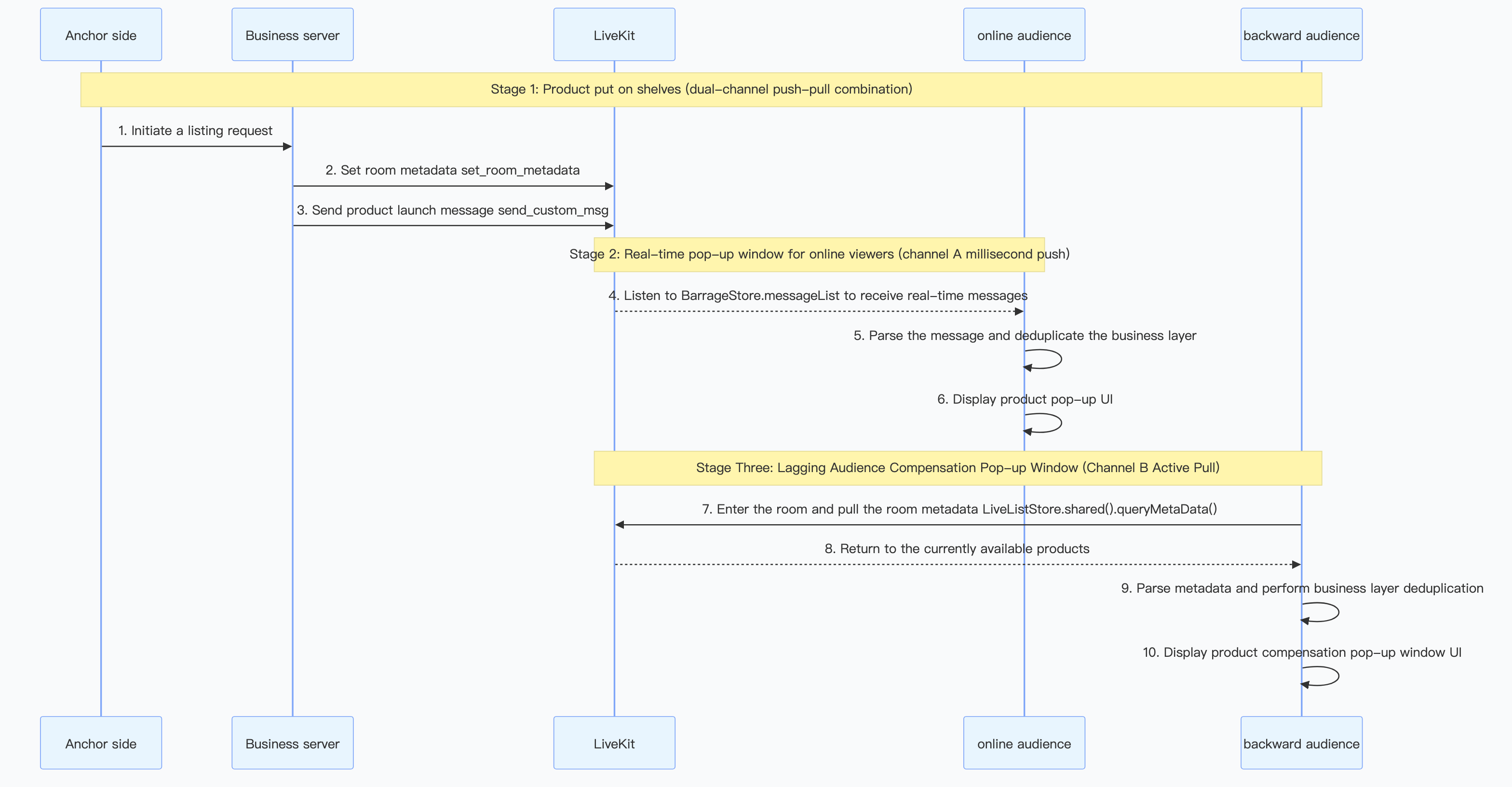
Core Need
When the anchor clicks the "List Popup" during live streaming, product information needs to be pushed to ALL clients and displayed in a pop-up. To meet the following requirements:
Real-timeness: The audience in the live streaming room instantly received the notification.
Reliability: The audience joining midway can likewise get current product information.
Uniqueness: Each audience member is displayed only one popup for the same event, without triggering repeatedly.
Dual-Channel Synchronization Mechanism
1. Channel A - Custom message (push model)
Call the server-side REST API
send_custom_msg to broadcast the product pop-up custom message in the live streaming room. This method has millisecond-level real-timeness, suitable for immediate notification targeting online audiences, but does not support offline storage. Users who enter the room later cannot obtain historical messages. The custom message data structure for the product pop-up is as follows:{"eventId": "evt_prod_001_1773321389000","type": "GOODS_ON_SHELF","goodsId": "prod_001","goodsName": "Vintage Watch","goodsNameZH": "Vintage Watch","goodsNameEN": "Vintage Watch","price": 9900,"priceUSD": 99.0,"priceCNY": 712.8,"imageUrl": "/static/products/watch.png","serverTs": 1773321389000,"startTimestamp": 1773321389000}
2. Channel B - Room metadata (pull model)
Call the server-side REST API
set_room_metadata to write the product listing status to room metadata. This method supports persistent storage throughout the live room lifecycle, suitable for actively pulling live room information after joining, but it is not a real-time push and depends on client-initiated queries. The room metadata data structure for the product pop-up is as follows:{"goods_id": "prod_001","goods_name": "Vintage Watch","goods_name_zh": "Vintage watch","goods_name_en": "Vintage Watch","price": 9900,"price_usd": 99.0,"price_cny": 712.8,"image_url": "/static/products/watch.png","start_timestamp": 1773321389000,"status": "active"}
Note:
The room metadata does not include the
eventId field. The client needs to generate it itself during parsing, with the format attr_{goods_id}_{start_timestamp}. The prefix attr_ is case-sensitive with the custom message's evt_ to eliminate deduplication conflicts.Dual-Channel Collaboration Process
Steps | Operation | Description |
1 | Write to room metadata | Ensure persistent data is in place before users can access it. |
2 | Server/Client sends custom messages | Real-Time Push to the current online audience |
3 | Online audience receive custom message → show popup | Channel A trigger |
4 | New audience entering the room → Query room metadata → Show popup | Channel B trigger |
Product Link Jump and Payment
After selecting products in the live streaming room, the audience needs to click on the product link and jump to the specific E-commerce shop for order confirmation and payment. The E-commerce shop here can be a platform store or an integrated third-party platform store. After the user completes the payment, the payment result is required to update the sales status and inventory information of the product.
Note:
The above product management module is for reference only. In actual applications, you need to design and deploy according to your business needs.
Danmakus Information in Live Rooms Lucky Draw
Live room danmu lucky draw allows users to participate by sending Danmu messages with specific content. The implementation approach involves the backend retrieving danmu message content through a callback request after an in-group message is sent. Senders of messages that meet the specific content criteria are added to the prize pool, otherwise no action is taken. For callback usage, see After a Group Message Is Sent.

Red Packet Flash Sale/Fortune Bag Delivery
Flash sales and red packet delivery are common marketing interactions in ecommerce live streams, effectively improving user engagement and purchase conversion. TUILiveKit (AtomicXCore) does not directly provide this feature, but you can achieve it by combining its underlying communication capability with your backend.
Activity Creation and Notification
The host requests the backend to create a red packet/lucky bag activity. After the backend successfully creates the activity, it sends a notification to the live streaming room via REST API to notify the audience that the activity starts.
User Engagement Logic
The client receives the event notification, parses it, and shows the entry. After user click, it sends a participation request to your business. The backend is responsible for verifying user eligibility, logging participation info, and can also update the number of participants in real time.
Lucky Draw and Results Announcement
When the preset draw time is reached, the backend executes the lucky draw logic. Once completed, the backend broadcasts the winning result to the live streaming room again via REST API.
Reward Delivery
The backend delivers appropriate rewards (such as coupons, points, balance) to the user's account based on the winning result. This step usually connects with your account or marketing system.
Key Technology Points
Custom message: The core of the entire functionality is defining and sending and receiving different types of custom messages, used for synchronizing activity status (such as "Event started", "Result announced"). The client needs to display different UI effects based on the message type.
Backend: ALL activity management, user engagement, lucky draw, and reward logic are processed from the backend to underwrite process security and stability.
Note:
The above red packet/lucky bag module is for reference only. In actual applications, you need to design and deploy according to business needs.
Chat Feature Development Guide
In the ecommerce live stream ecosystem, instant messaging (Chat) not only handles real-time interaction in the live streaming room, but also serves as core infrastructure for private domain operations, customer service, and precision marketing. To maintain clear and efficient architecture, this solution recommends adopting the layered integration strategy:
In the live streaming room interaction: Continue to use the
BarrageStore encapsulated by AtomicXCore to handle bullet screen, likes, gifts, and product listing notifications, ensuring high synchronization between audio and video and messages.Services outside the live streaming room: For merchant customer service, fan community groups, marketing activities, and push reach, consider using directly Tencent Cloud Chat SDK for standalone implementation to get more complete social features support.
It is advisable to create an independent
ChatService module outside the AtomicXCore Store system, responsible for global Chat status listening and message processing outside the live streaming room.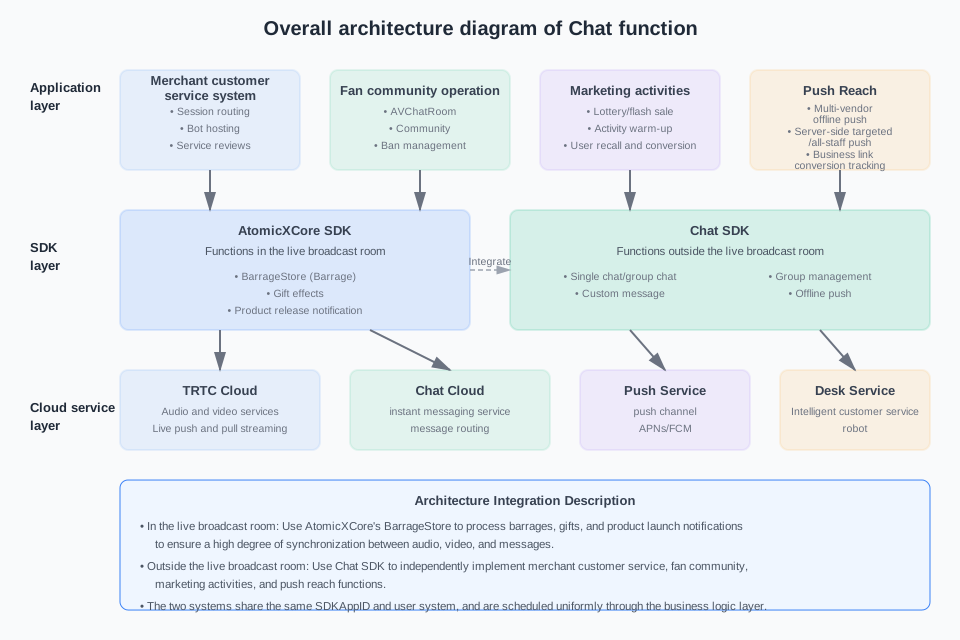
Merchant Customer Service System
Merchant customer service is the key link between connection traffic and conversion. In the ecommerce scenario, users often have the following requests:
Presales inquiry: product specification, inventory inquiry, size recommendation, material description
Order inquiry: logistics progress, shipping time, order status
After-sales service: return and exchange process, quality issue feedback, refund progress
Automated Operations and System Message Scenario
During the first session or key business operations, after the user clicks to consult and enters the chat window, your business server can use the Chat RESTful API to proactively send private chat messages to the user for delivering welcome messages, service guidelines, or transaction notifications, suitable for automated operations and system message scenarios.
When the user enters the order number or specific problem you want to query, the message callback functionality can send the message callback to your server. After querying the information, you can use the Chat RESTful API to proactively send private chat messages to the user in response.
Merchant Manual Reply
Custom Card Info
Buyers and sellers use C2C one-on-one chat sessions to communicate. Order information can be constructed into a custom message via
createCustomMessage and sent by calling sendMessage. The custom message may include order number, product information, price status, and redirect link, which is parsed and rendered as an order card by the client. For details, see C2C client message API description.Fan Community Operation
Community group chat feature significantly improves E-commerce user repurchase rate by building a sticky interaction feature.
Traditional marketing push is one-way, while community group chat creates scenarios where brands and fans, as well as fans with each other, communicate directly. This real-time QA, order sharing, and reputation sharing can greatly enhance users' sense of trust in the brand, and trust is the foundation of repeat purchase.
Create a "time-limited exclusive" communication environment in community groups to stimulate impulse purchases. Within the group, exclusive coupons, flash sale links, and new product previews can be shared frequently and precisely. This "group effect" and "sense of exclusivity" effectively stimulate users' purchase impulses, converting simple shopping needs into prompt consumption actions.
Convert users into community assets to enhance lifecycle value. When users join the community, it means one-time traffic is changed to long-term assets. By maintaining community engagement with daily content, brands can continuously occupy user minds, guide them from first-time purchases to habitual repurchases, and finally maximize long-term value for each user.
Creating a Group and Group Member Management
Use Community group type. The Community type supports a maximum of 100,000 members per group. When your fan base grows, you don't need to worry about group size capacity. You can use Client/Server API to create a group chat, mute, remove users, set administrators, and get the number of online users via Client/Server API, and invite members through Client/Server.
Group Info Configuration
Support obtaining and modifying group basic information such as group name and group notice through the Client/Server API.
Product Shopping Cart
The "Product Showcase" in the upper-right corner of the Group chat can store the mapping relationship between the Group and the product list via Group Attributes. The client reads the Group Attributes and navigates to the corresponding product list page when entering the Group chat. The product system is implemented by your App's business system.
Marketing campaigns
In the live shopping scene, marketing activities are divided into two major categories:
Live stream marketing activities (by live streaming room): such as danmakus lucky draw in live rooms, red packet flash sale/delivery of lucky bags, mainly used to enhance real-time interaction and conversion.
Marketing activities outside live streams (by application): such as marketing notifications, event reminders, and other push reach, focusing on user reactivation and campaign preheating to enhance user engagement.
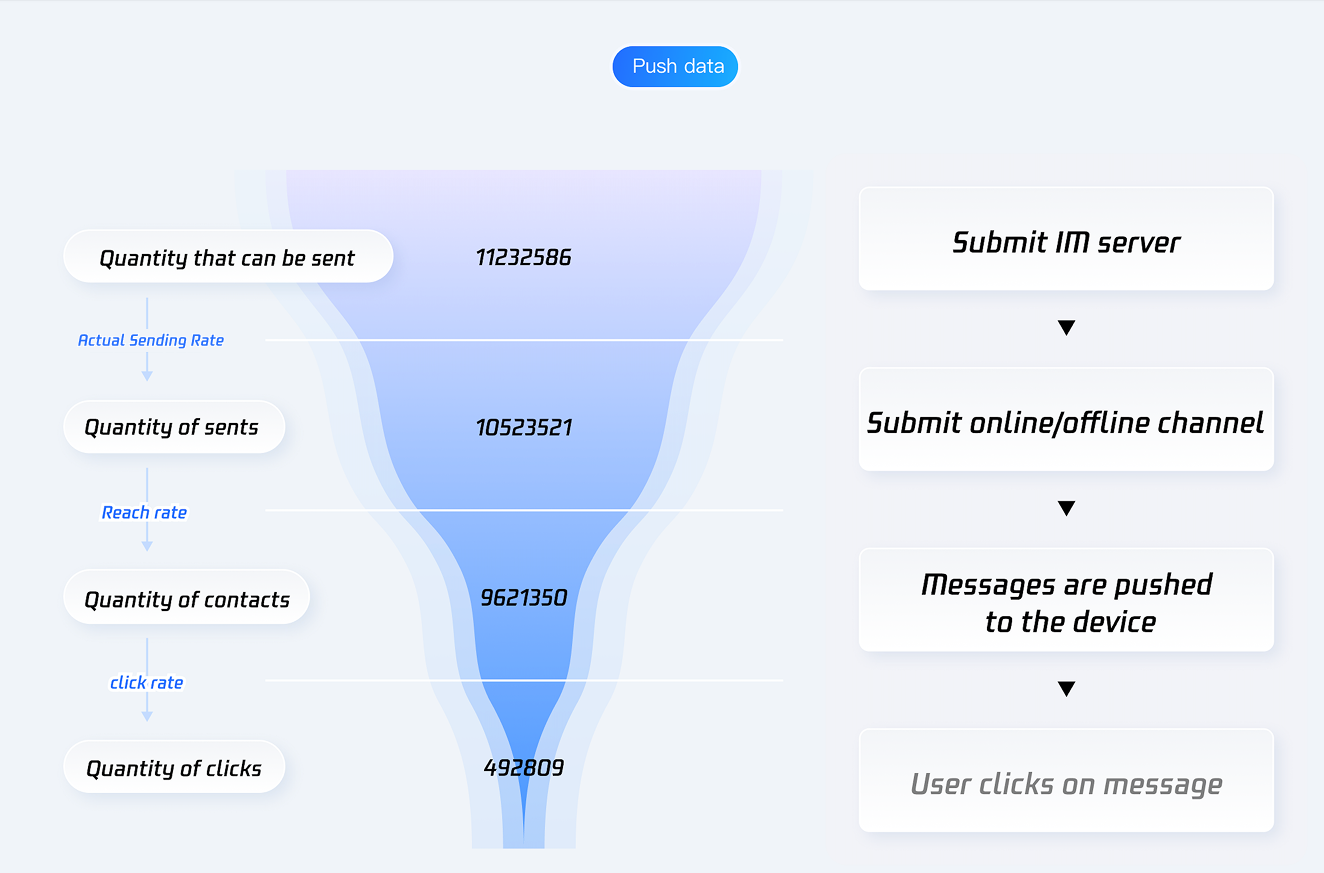
Push Reach
Push is used to reach users out-of-application, support marketing notifications, promotion reminders, order reminders, logistics notifications and other scenarios, and can track push conversion effect.
Integrate the Push product with simple configuration for one-click integration of Push services from multiple vendors. Push notification messages focus on immediacy (timely delivery) and do not support history roam (Push notification messages are not stored in the Chat session system).
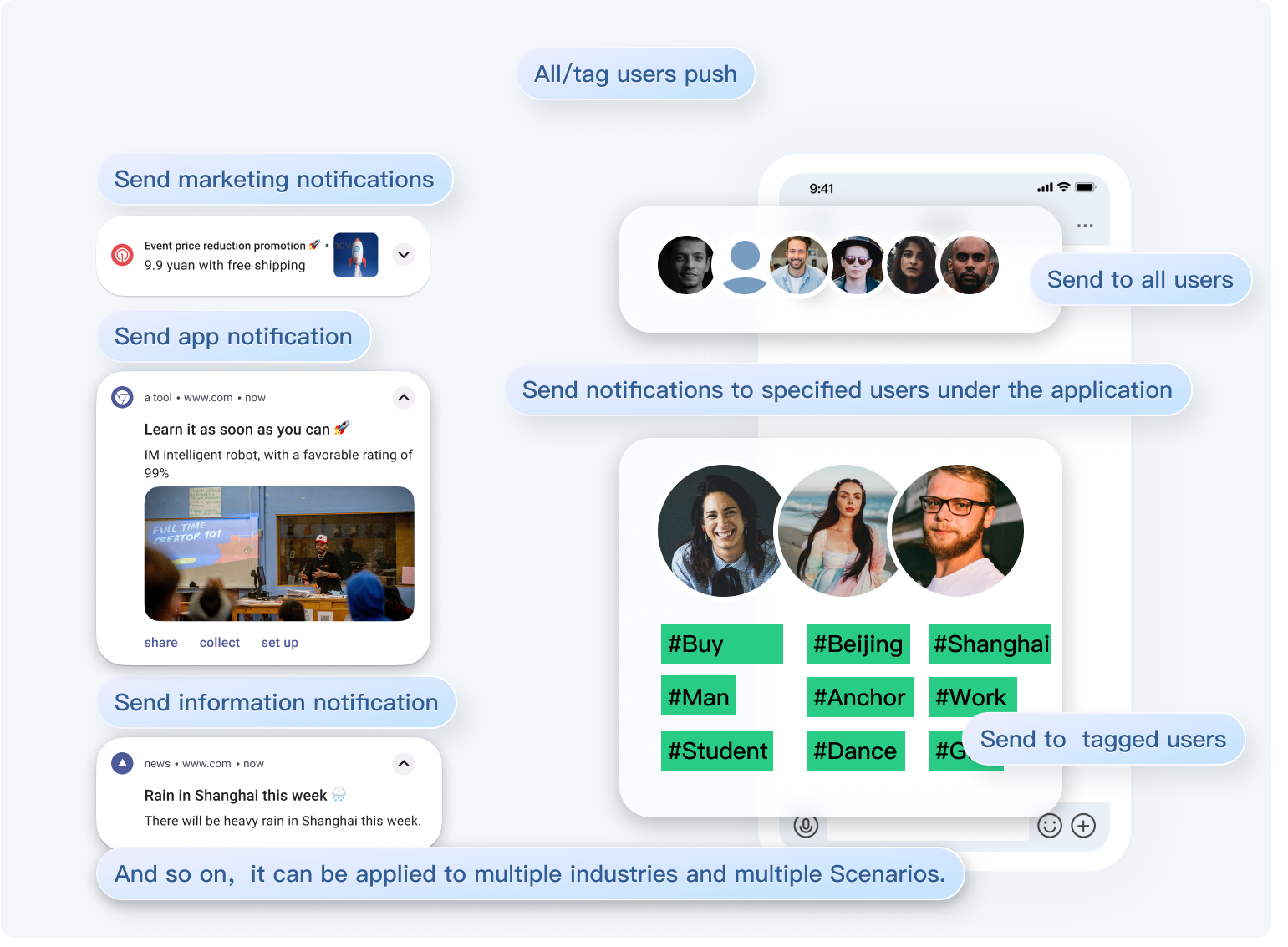
Server Push Operational Messages
Push messages can be delivered through the server push API, supporting push to all users, push by tag, and push to designated users. The server can carry custom business parameters (such as redirect target, business type, activity ID) in the
ext field. For details, see Comprehensive Push Notification Feature - Covering Multi-Platform.Customizable Jump Interface for Client
When the client receives a push message and clicks the notification bar, the component will callback the click event and pass through the offline message. Based on the
ext field, it can go to a specified page (such as group chat, product page, live streaming room) when the user clicks the notification. For details, see Implement Notification Bar Callback.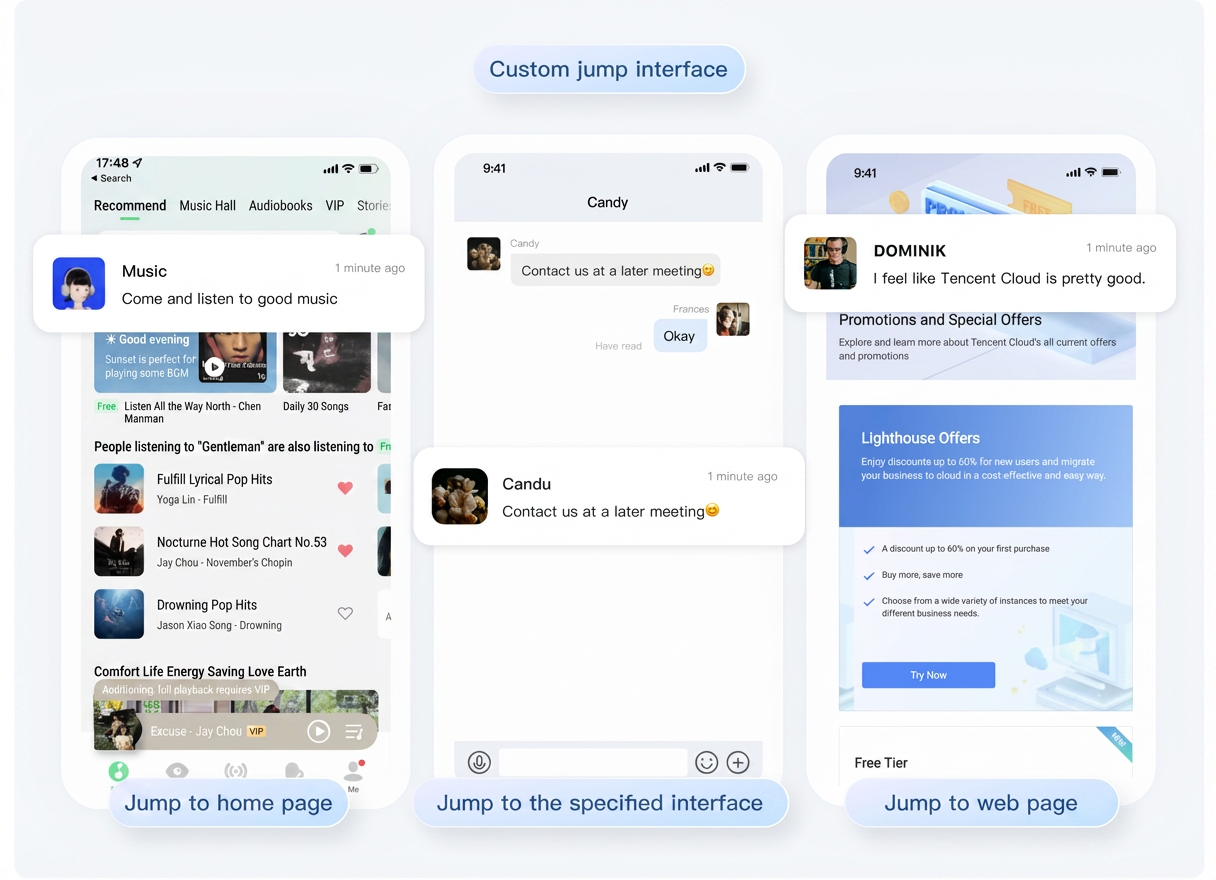
Push Reach Effect Trace
To estimate push effect, the server can integrate the push conversion statistics API to track message reach, click, and subsequent business conversion behavior, forming a complete data analysis link. For more information, see Push Service - Data Statistics.
Advanced Beauty Effects Integration Guide
Beauty product description
In the LiveKit/AtomicXCore system, it is necessary to distinguish between basic beauty filter and advanced beauty effect capability lines.
Basic beauty filter: Use
BaseBeautyStore, suitable for scenarios where only skin smoothing, whitening, and rosy effects are needed. The parameter range is 0 - 9, included in LiveKit's basic capabilities with no additional purchase required for advanced beauty License.Advanced beauty effect: Use
TEBeautyKit, suitable for scenarios requiring enhancement effects like V-face, eye distance adjustment, nose slimming, filters, animated stickers, makeup, and background segmentation. Additional purchase of Beauty AR License is required, and complete resource and authentication configuration as per official documentation.Hence, the live shopping scene should adopt layered integration based on requirements.
1. Basic skin smoothing/whitening/ruddy: Prioritize using
BaseBeautyStore for min cost.2. Advanced face shaping, filters, stickers, and makeup: Integrate
TEBeautyKit additionally on the host side.3. Do not obfuscate the two sets of APIs: After integrating
TEBeautyKit, manage advanced effects through the API and panel of TEBeautyKit, and no longer use BaseBeautyStore.TEBeautyKit adopts an external plug-in architecture, inserting video frames into the "collection → beauty processing → rendering / streaming" chain through camera texture processing callbacks.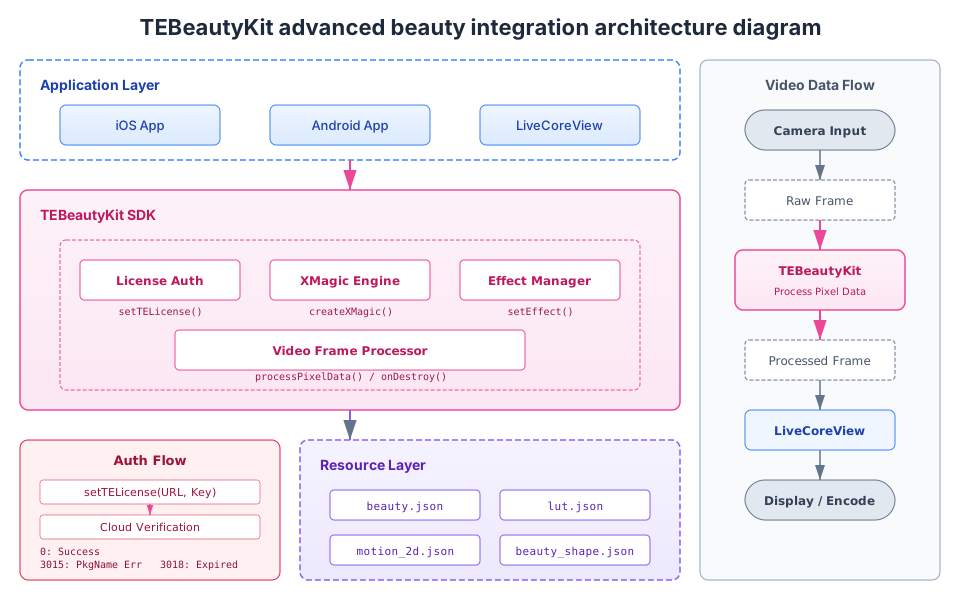
Beauty Effect Feature Modules and Resources List
TEBeautyKit should provide abilities consistent with resource configuration and package authorization. It is recommended to organize by "feature module + necessary resources" method.Functional Module | Typical Capacity | Main Resource / Configuration |
basic beauty filter / beauty shaping | Skin smoothing, whitening, rosy, face slimming, big eyes | beauty.json |
filter | filter style, hue adjust | lut.json + corresponding filter materials |
animated sticker | 2D/3D stickers, gesture stickers | motion_2d.json, motion_3d_gesture.json + corresponding materials |
virtual background / segmentation | background segmentation, background replacement | segmentation.json + corresponding resource |
Panel Icon | Panel Entry and Feature Icon | panel_icon |
LiveCoreView Beauty Effect Integration
LiveCoreView and TEBeautyKit integration essentially encapsulates the official process(...) texture processing into your own live stream rendering link.Recommended Integration Sequence
1. The host creates a
LiveCoreView after entering the preparation page.2. Complete resource preparation, License checksum, and
TEBeautyKit.create(...).3. Call
beautyKit.process(...) in the video processing callback of LiveCoreView.4. Verify effect in the preview state, then re-enter the official streaming state.
5. Sync processing beauty effect lifecycle on webpage suspension, restore, and destruction.
Integration Focus Points
onDestroy() must be called in the GL thread, not allowed to perform thread destruction directly on the main thread, otherwise black screen, white screen or resource leakage may occur.Prioritize troubleshooting beauty effect issues in three types: resource directory, License, texture callback chain.
If device performance is insufficient, reduce default beauty parameters first, then crop advanced special effects, rather than directly overloading the entire host pipeline.
Note:
Advanced beauty requires separate payment. For details, see Beauty AR SDK.
The new version of Live integrates the latest version of advanced beauty function by default, with no need for manual integration.
Ajuda e Suporte
Esta página foi útil?
Você também pode entrar em contato com a Equipe de vendas ou Enviar um tíquete em caso de ajuda.
comentários