Guide to Overseas Direct Connect Construction
Baixar
Modo Foco
Tamanho da Fonte
Overview
This document guides you through the construction of an overseas Direct Connect connection, covering the complete process from preparation to acceptance and operation, and explains the responsible party for each step as well as the connection status in the console.
The construction of an overseas Direct Connect connection is completed through collaboration among three parties: the customer, Tencent Cloud, and the customer's connection provider. It consists of seven stages: ① Preparation → ② Creating a Connection → ③ Resource Preparation and Allocation → ④ Cabling and Commissioning → ⑤ Line Activation → ⑥ Line Testing → ⑦ Acceptance and Operation.
Note:
The connection status in the console transitions as follows: Applying → Evaluating → Constructing → Running.
Process Overview
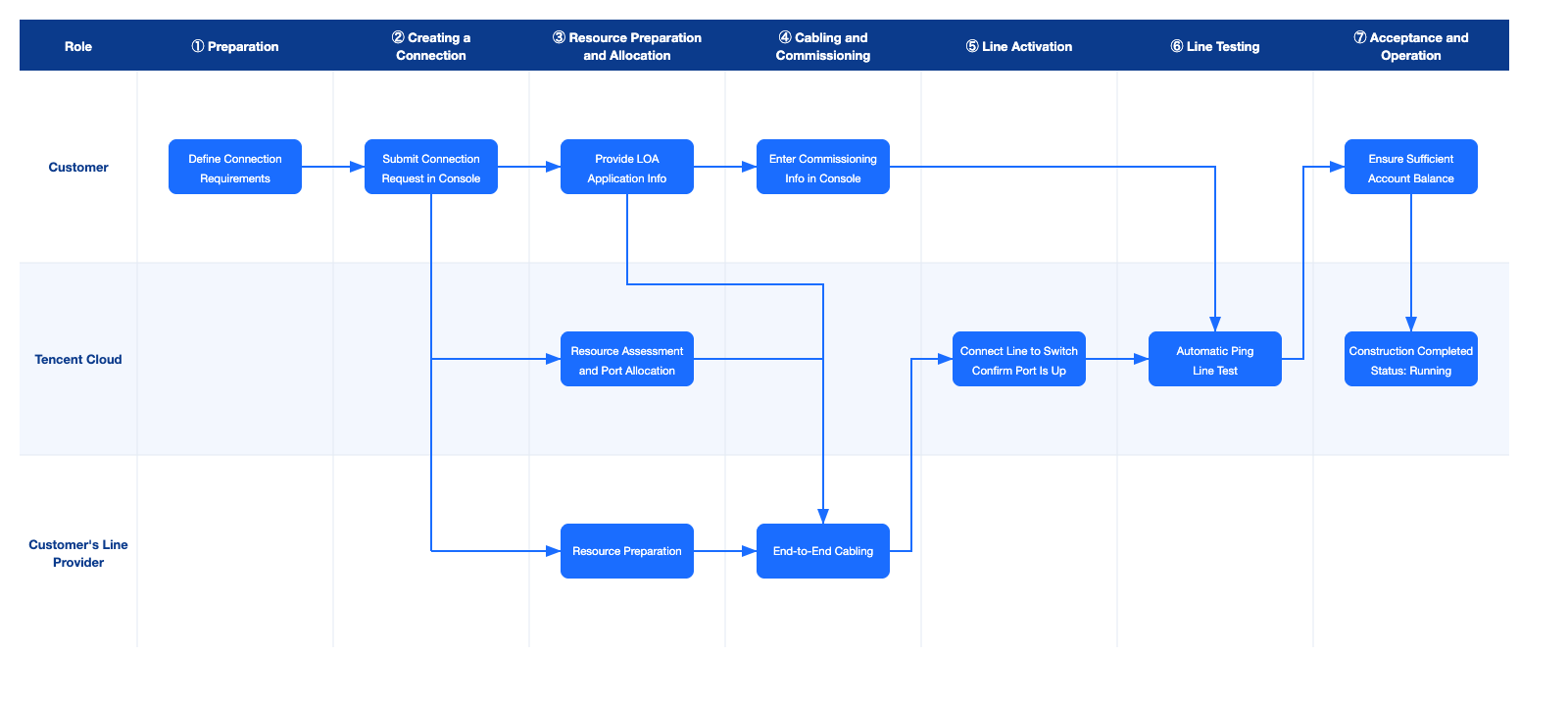
Phase | Responsible Party | Key Action | Connection Status in the Console |
① Preparation | Customer | Confirm the access point and sort out the connection requirements. | Not created |
② Creating a Connection | Customer | Submit a connection creation request in the console. | Applying |
③ Resource Preparation and Allocation | Customer Tencent Cloud Customer's connection provider | The customer provides LOA application info. Tencent Cloud assesses resources and allocates ports. The customer's connection provider prepares resources. | Applying → Evaluating → Constructing |
④ Cabling and Commissioning | Customer Customer's connection provider | The customer's connection provider completes end-to-end cabling. The customer enters commissioning information in the console. | Constructing |
⑤ Line Activation | Tencent Cloud | Connect the line to the switch on this end and confirm that the ports on both ends are UP. | Constructing |
⑥ Line Testing | Tencent Cloud | The system automatically performs Ping tests to verify connectivity and line quality. | Constructing |
⑦ Acceptance and Operation | Customer Tencent Cloud | Confirm that the account balance is sufficient and the connection enters the Running state. | Constructing → Running |
Note:
The construction period of a connection is affected by factors such as resource preparation in your local data center, access points, and connection providers. For the specific period, contact your connection manager for confirmation.
Operation Steps
Step 1. Preparation
Before creating a connection, complete information confirmation and requirement collection first:
1. Confirm the location of your local IDC and select a Tencent Cloud Connection Access Point.
2. Sort out the connection requirements: connection type, bandwidth, cloud port (1G/10G/100G), port type (fiber optic port/electrical port), and so on.
Step 2. Creating a Connection
Log in to the Direct Connect console to apply for a connection. For detailed operations, see Applying for Connection, and follow the instructions to enter the connection name, region, access point, connection provider, cloud port, bandwidth cap, IDC address, contact information, and other details, then submit the application.
After submission, the connection status changes to Applying, and Tencent Cloud will start resource assessment within 3 business days after creation.
Step 3. Resource Preparation and Allocation
1. Customer: Provide LOA application info. An LOA (Letter of Authorization) is used to authorize the customer's connection provider to connect the line to the ODF port at the access point designated by Tencent Cloud. Provide the name of your connection provider to your Tencent Cloud industry architect or business contact. After Tencent Cloud allocates the port and completes the LOA application, the LOA will be returned to you. You then forward the LOA to your connection provider for cabling.
2. Tencent Cloud: Resource assessment and allocation. After receiving the application, Tencent Cloud assesses resources, designs the solution, and allocates switch ports. At this point, the connection status is Evaluating. After port allocation is completed, the status changes to Constructing.
3. Customer's connection provider: Resource preparation. The customer's connection provider simultaneously prepares resources, designs the solution, and conducts engineering investigation. Fees such as ISP leased-line fees and in-house wiring (IHW) rental fees are settled directly between you and the customer's connection provider (not a Tencent Cloud charge).
Step 4. Cabling and Commissioning
Cabling and commissioning information entry can proceed in parallel during this phase.
1. Cabling. The customer's connection provider completes end-to-end cabling from the customer's IDC to the ODF port at the Tencent Cloud access point, based on the ODF port information in the LOA.
2. Enter commissioning information. During cabling, enter the interconnection VLAN, IP address, and other information used for the connection in the console, which will be used for subsequent line activation and automatic testing. Entry point: Log in to the Direct Connect console and click Direct Connect Commissioning next to the target connection ID.
Commissioning Information | Purpose | Source |
Interconnection IP address | Test connectivity between devices on the IDC side and Tencent Cloud side after the line is activated. Automatically deleted after commissioning is complete, without affecting services. | Planned by the customer |
VLAN | Automatically deleted after commissioning is complete, without affecting services. | Planned by the customer and consistent with the VLAN on the connection provider side. |
Circuit ID | Unique identifier of the connection, used for later troubleshooting and locating the line. | Provided by the customer's connection provider |
Fault reporting contact, phone number, and email | Quickly contact the peer for troubleshooting in the event of a line failure. | Provided by the customer's connection provider |
Step 5. Line Activation
1. Tencent Cloud connects the line from the ODF port specified in the LOA to the Tencent Cloud access switch, and connects the connection to the Tencent Cloud-side switch.
2. Confirm that the device interfaces on both the IDC side and the Tencent Cloud side are in the UP state. If a port is not UP, contact your connection manager for troubleshooting.
Step 6. Line Testing
1. The system automatically initiates a Ping test using the interconnection IP address entered in step 4 to verify connectivity and line quality.
2. Test method: First send five 64-byte small packets to confirm basic connectivity, then send 1,000 1,500-byte large packets to evaluate line quality. End commissioning after confirming that the results are normal.
3. If the test fails, your connection manager will contact you for troubleshooting.
Step 7. Acceptance and Operation
1. Ensure that your account has sufficient balance. Otherwise, the connection cannot move to the Running state.
2. After the conditions are met, the connection enters the Running state, and you can deploy Direct Connect services by creating a direct connect gateway, a dedicated tunnel, and configuring the route table.
Notes
LOA and Resource Allocation: The LOA is issued by Tencent Cloud after port allocation is completed. After you receive the LOA, forward it to your connection provider for cabling.
Fee Settlement: Fees for resource preparation, engineering investigation, wiring, and in-house wiring (IHW) rental on the connection provider side are settled directly between you and the connection provider.
Commissioning Information Completeness: Enter the interconnection IP address, VLAN, circuit ID, and fault reporting contact accurately to avoid affecting line testing and subsequent troubleshooting.
Consistent Port Modules on Both Sides: The interface module specifications on the IDC side and the Tencent Cloud side must be consistent. Otherwise, communication failure may occur. If you need to replace the port on the Tencent Cloud side, you must abandon the current process and submit a new application.
Ajuda e Suporte
Esta página foi útil?
Você também pode entrar em contato com a Equipe de vendas ou Enviar um tíquete em caso de ajuda.
comentários