Troubleshooting Mongos Load Imbalance in Sharded Cluster
Download
Focus Mode
Font Size
Business Background
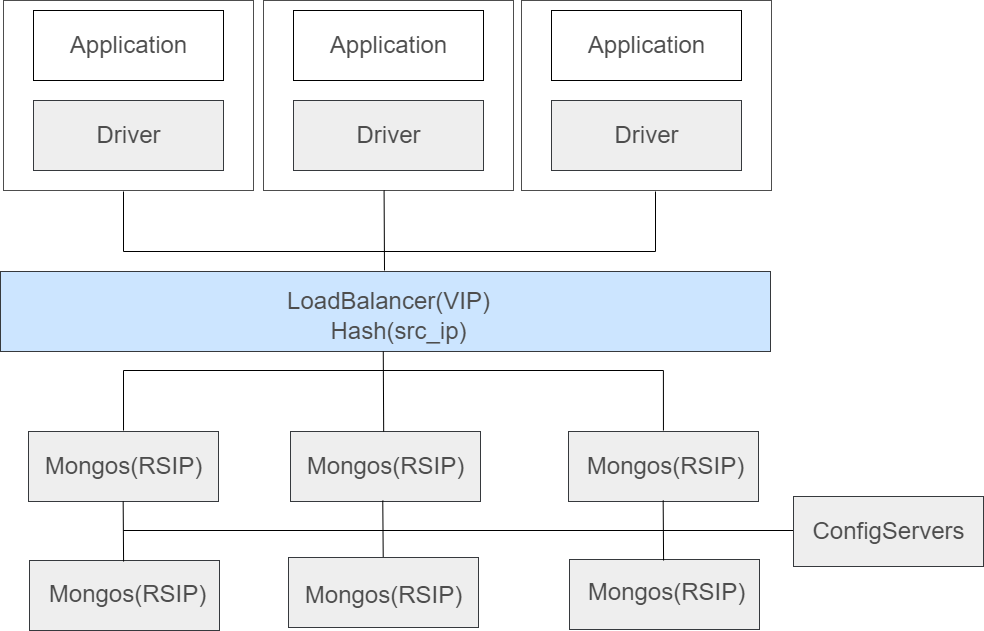
In a TencentDB for MongoDB sharded cluster, multiple mongos nodes are available for receiving connection query requests from all client applications, routing the requests to the corresponding shards in the cluster, and splicing the received responses back to the clients. You can connect the cluster to a load balancer through one or multiple VIPs, so that the traffic is automatically distributed among the mongos nodes to increase the data processing capacity, throughput, availability, and flexibility of the network.
How Load Balancing Works
The client application connects to a load balancer (VIP), which uses a single VIP to mask multiple backend RSIPs (Real Server IP addresses). The TencentDB for MongoDB load balancing service routes requests from different source IP addresses to different Mongos nodes based on a source IP address Hash policy. If an RSIP change occurs in the backend, an automated process updates the mapping between the VIP and RSIPs. This change is transparent to users, and access remains simple.
getMore
If MongoDB could not return all the
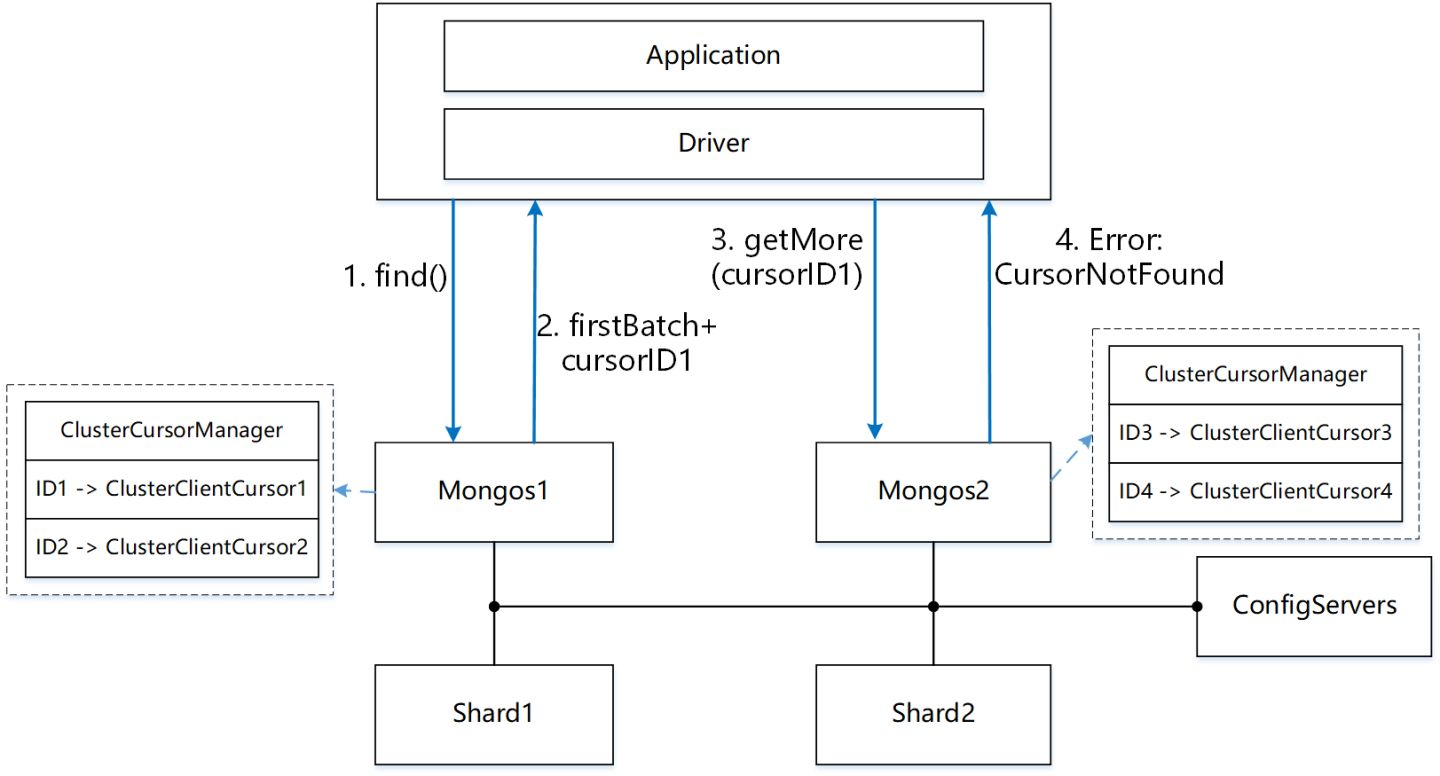
Each Mongos node maintains a global ClusterCursorManager in memory. This manager uses a HashMap to maintain the mapping between cursorID and ClusterClientCursor. Here, cursorID is a random int64 number, and ClusterClientCursor maintains information such as the request's execution plan and current status.
If the query results cannot be returned in a single batch (for example, if they exceed the 16 MB limit), a non-zero cursorID is generated. This ID and the ClusterClientCursor are then registered with the ClusterCursorManager.
If the client needs subsequent results, it can send a getMore request carrying the previously returned cursorID. Mongos will then locate the cached ClusterClientCursor, continue executing the query plan, and return the results. The information for IDs and cursors is stored independently on each Mongos node.
Therefore, you must ensure that the find request and its associated getMore requests are sent to the same Mongos node. If a getMore request is sent to a different Mongos node, a CursorNotFound error will be returned because the Cursor cannot be found, as shown in the following figure.
Transaction operation issue
MongoDB introduced support for distributed transactions in version 4.2. Users can connect to a Mongos node to initiate a transaction. Multiple reads and writes can be performed between startTransaction and commitTransaction/abortTransaction. To maintain context, Mongos records metadata such as the logicalSessionId and txnId carried by each request within the transaction in memory. Consequently, MongoDB's design necessitates that every operation within a transaction be sent to the same Mongos node for execution.
TencentDB for MongoDB load balancing policy
To address the
This policy works well for the production environment with many access IPs. However, when there are only a few access IPs, particularly in stress test scenarios, it tends to cause mongos load imbalance.
Mongos Load Imbalance Solutions
If the default load balancing policy cannot meet your requirements, causing some Mongos nodes to become overloaded, you can adopt the following two connection schemes to optimize load balancing and achieve high availability.
Solution 1: Enable SRV Connection (Recommended)
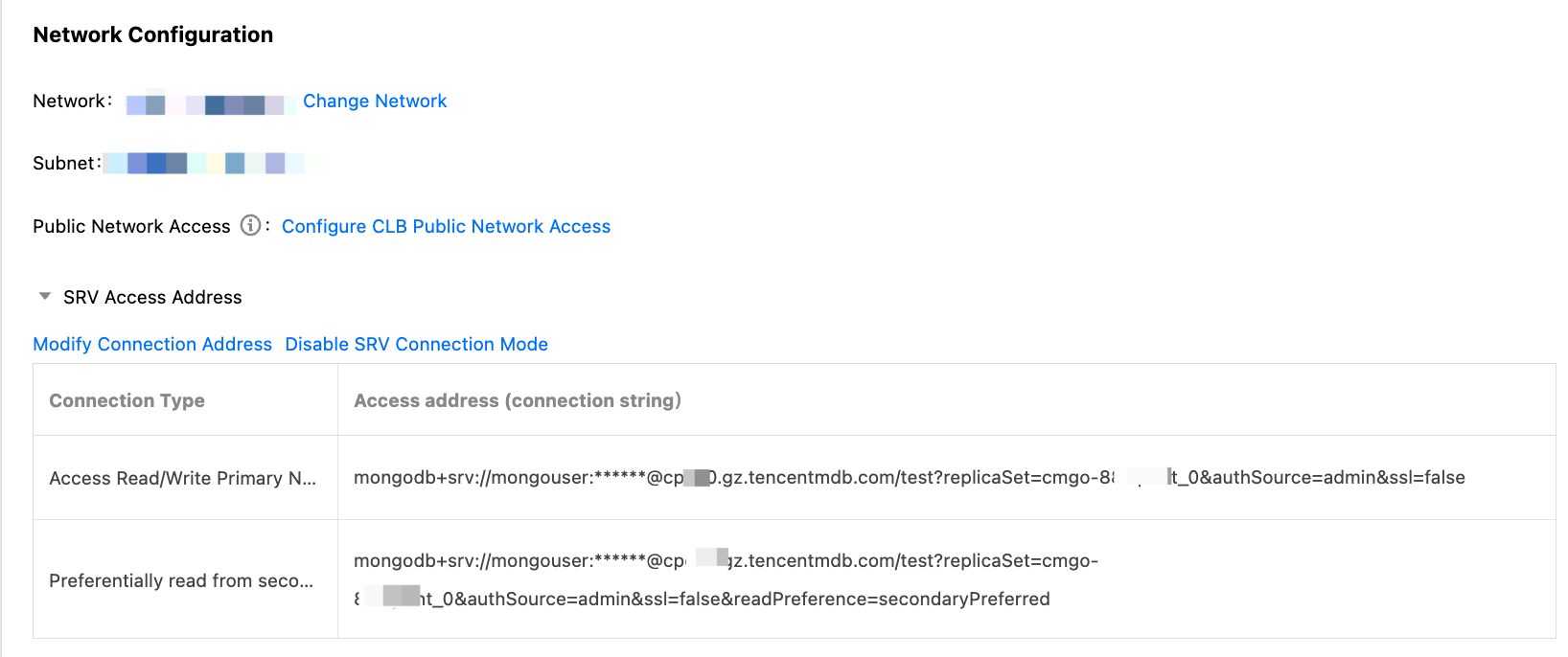
SRV connection is an automatic load-balancing connection scheme based on DNS service. It automatically resolves the addresses of all currently available Mongos nodes or replica set members, enabling the client to automatically achieve load balancing and high availability failover. For specific operations, see Enabling SRV Connection Mode.
Solution 2: Enable Mongos Access Address
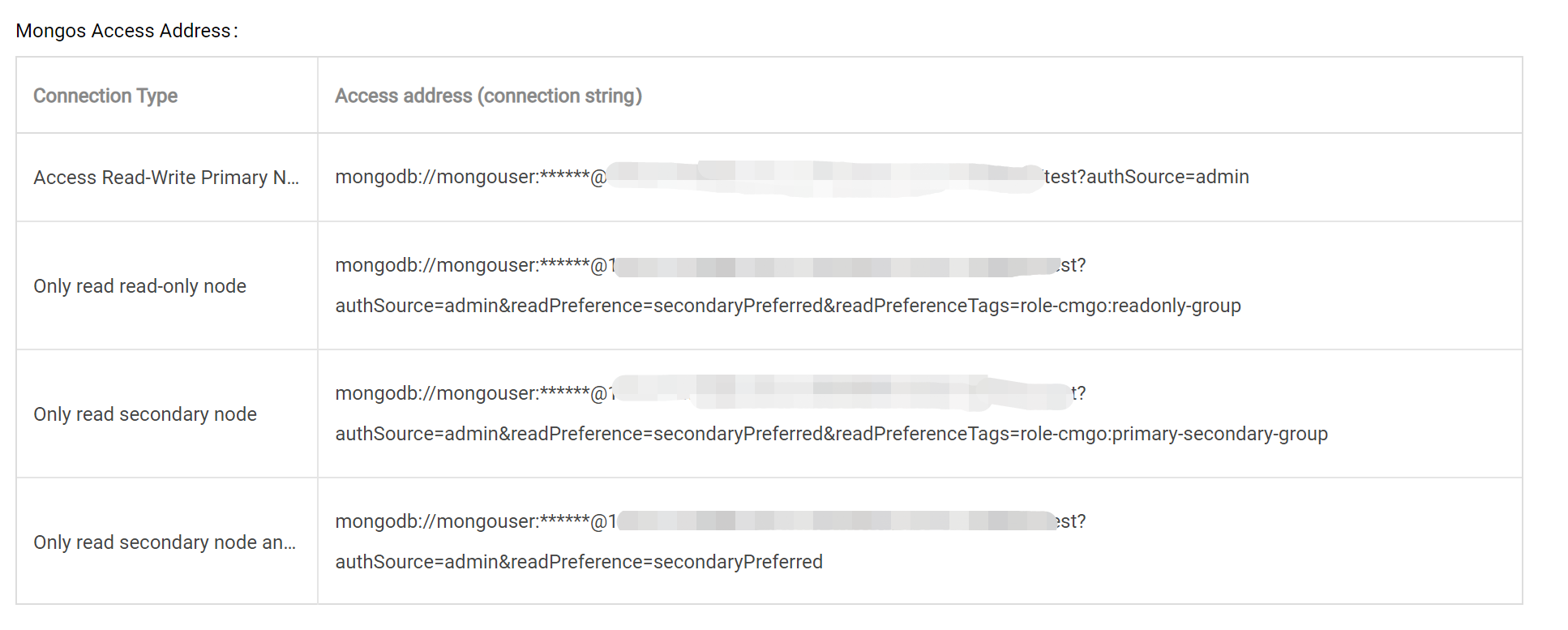
The system assigns a fixed address, consisting of a shared VIP and an independent VPORT, to each Mongos node. Users can flexibly control the request distribution for Mongos. If a Mongos node fails, the system rebinds a new Mongos process. The VIP and VPORT addresses remain unchanged, ensuring the original load balancing access address is unaffected. For specific operations, see Enabling Mongos Access Address.
Note:
To implement traffic balancing, you can directly copy a connection string and configure it in the application used to connect the client to the database SDK to access the corresponding Mongos nodes. For more information on the connection method, see Connecting to TencentDB for MongoDB Instance.
Note: If you have configured all Mongos nodes in the connection string, you must synchronously update the connection string on the application side after you adjust the number of Mongos nodes in the instance.
To implement traffic balancing, you can directly copy a connection string and configure it in the application used to connect the client to the database SDK to access the corresponding mongos nodes. For more information on the connection method, see Connecting to TencentDB for MongoDB Instance. However, as a connection string is long, proceed with caution.
Note: If you have configured all Mongos nodes in the connection string, you must synchronously update the connection string on the application side after you adjust the number of Mongos nodes in the instance.
Help and Support
Was this page helpful?
You can also Contact sales or Submit a Ticket for help.
Help us improve! Rate your documentation experience in 5 mins.
Feedback