tencent cloud

Auto Scaling

Product Introduction
Overview
Strengths
Scenarios
Service Limits
Access Management
Purchase Guide
Getting Started
Creating a Scaling Plan in 5 Minutes
Step 1:Creating a Launch Configuration
Step 2:Creating a Scaling Group
Step 3:Creating a Scaling Policy
Tutorial
Creating Web Services
Creating High-performance Computing Cluster
Creating Servers for Sending Requests
Configuring For High Availability Services
Launch Configuration
Launch Configuration Overview
Creating a Launch Configuration
Viewing Launch Configuration List
Modifying Launch Configurations
Exception Detection
Scaling Groups
Scaling Group Overview
Creating a Scaling Group
Viewing Scaling Group List
Modifying Scaling Groups
Modifying Bound Instances
Adding CLBs
Delete scaling group
Creating Notifications
Creating Scaling Activity Notifications
Specifying Notification Recipients
Expanding and Reducing Capacity
Auto Scaling Lifecycle Hook
Managing Scheduled Actions
Managing an Alarm-triggered Policy
Instance Health Check
Expanding Capacity Manually
Scale-in Process
Viewing Scaling Activities
Suspending and Resuming Scaling
Scale-in Removal Protection
Scaling Activity Cancelled
Scaling Activity Failed
Cooldown Period
Monitoring
Monitor Alarm Metrics
Running Status Check
Scheduled Task
Scheduled Task Execution Time Description
Troubleshooting
Scaling Group Doesn't Work
Scaling Activity Failed
Use Cases
Setting a Fixed Outbound IP Address for Scaling Groups
Deploying Elastic Web Application Service
Enabling Services Upon CVM Start-up
Customer Cases
iCarbonX
API Documentation
History
Introduction
API Category
Making API Requests
Scaling Group APIs
Scaling Group Instances APIs
Launch Configuration APIs
Scheduled Action APIs
Alarm Trigger Policy APIs
Notification APIs
Lifecycle Hook APIs
Instance Refresh APIs
Other APIs
Data Types
Error Codes
FAQs
Contact Us
Glossary
DocumentaçãoAuto ScalingTutorialCreating High-performance Computing Cluster

Creating High-performance Computing Cluster

PDF
Modo Foco
Tamanho da Fonte
Última atualização: 2024-01-08 17:53:29

Use Case

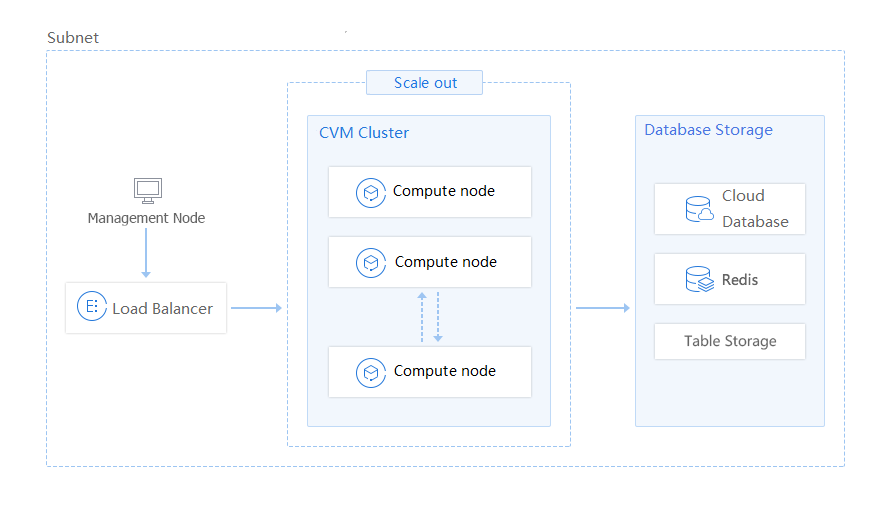
With cloud computing, high performance computing (HPC) can use applications with higher bandwidth and higher computing capacity to address complex scientific, engineering and business issues. However, the problems solved by HPC are usually based on projects, and have huge demand for the high scalability of the cloud platform. The compute node can be configured in a launch configuration (template) for the scaling group. By increasing the desired capacity, multiple compute nodes can be generated with one click for any calculation tasks. After saving the calculation results, you can delete the compute nodes for the task by modifying the desired capacity.
Alt text


Usage

Create a launch configuration for the nodes in the cluster, and place the computing cluster into the scaling group.
There are two ways to use the original data for high performance computing:
Save the data to a snapshot, so that the data disks of the scaled-out CVMs are created based on the snapshot.
Save the data to a data server, so that all the compute nodes in the cluster can be read in the data server.

Benefits of AS

AS can greatly reduce the workload of manual preparation of environments.
There is no need to reserve long-term resources for temporary tasks.

Applicable industries

Weather forecasting
Gene sequencing
Animation rendering, film and TV rendering
Other industries that require high performance computing

Ajuda e Suporte

Esta página foi útil?

comentários