tencent cloud

Auto Scaling

Product Introduction
Overview
Strengths
Scenarios
Service Limits
Access Management
Purchase Guide
Getting Started
Creating a Scaling Plan in 5 Minutes
Step 1:Creating a Launch Configuration
Step 2:Creating a Scaling Group
Step 3:Creating a Scaling Policy
Tutorial
Creating Web Services
Creating High-performance Computing Cluster
Creating Servers for Sending Requests
Configuring For High Availability Services
Launch Configuration
Launch Configuration Overview
Creating a Launch Configuration
Viewing Launch Configuration List
Modifying Launch Configurations
Exception Detection
Scaling Groups
Scaling Group Overview
Creating a Scaling Group
Viewing Scaling Group List
Modifying Scaling Groups
Modifying Bound Instances
Adding CLBs
Delete scaling group
Creating Notifications
Creating Scaling Activity Notifications
Specifying Notification Recipients
Expanding and Reducing Capacity
Auto Scaling Lifecycle Hook
Managing Scheduled Actions
Managing an Alarm-triggered Policy
Instance Health Check
Expanding Capacity Manually
Scale-in Process
Viewing Scaling Activities
Suspending and Resuming Scaling
Scale-in Removal Protection
Scaling Activity Cancelled
Scaling Activity Failed
Cooldown Period
Monitoring
Monitor Alarm Metrics
Running Status Check
Scheduled Task
Scheduled Task Execution Time Description
Troubleshooting
Scaling Group Doesn't Work
Scaling Activity Failed
Use Cases
Setting a Fixed Outbound IP Address for Scaling Groups
Deploying Elastic Web Application Service
Enabling Services Upon CVM Start-up
Customer Cases
iCarbonX
API Documentation
History
Introduction
API Category
Making API Requests
Scaling Group APIs
Scaling Group Instances APIs
Launch Configuration APIs
Scheduled Action APIs
Alarm Trigger Policy APIs
Notification APIs
Lifecycle Hook APIs
Instance Refresh APIs
Other APIs
Data Types
Error Codes
FAQs
Contact Us
Glossary

Scale-in Removal Protection

PDF
Modo Foco
Tamanho da Fonte
Última atualização: 2024-01-08 17:53:30

Introduction

Removal protection allows you to specify CVMs in the scaling group that will not be removed during scale-in. When scale-in occurs, AS will remove other CVMs.
You can enable Removal Protection for one or more instances in a scaling group. You can modify the scaling group or the instance protection configuration at any time.
If a scale-in activity occurs when all the remaining instances in the scaling group are marked with “Removal Protection”, AS will decrease the capacity instead of removing any instances.

Application Scenarios

Usually, the CVMs in a scaling group are stateless and can be removed at any time. However, in the following circumstances, you may need to prevent certain instances from being removed during scale-in:
One CVM for multiple uses: if the CVM in the cluster is also used for other purposes, for example, if it is also used for storing the data generated in the cluster, then this CVM is actually stateful.
Avoid misoperation: if you worry that your business will be affected due to a policy settings error, you can enable Removal Protection for some CVMs. In this way, AS will never remove these CVMs in scale-in, and the tunnel "Request-LB-CVM" will remain unblocked.

Directions

1. Log in to the Auto Scaling console and select Scaling Groups in the left sidebar.
2. On the Scaling Groups page, select the target scaling group ID to go to the details page of the scaling group.
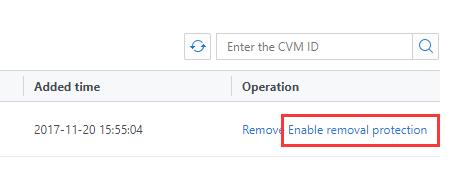
3. Select the Associated Instances tab and click Enable Removal Protection on the right side of the row of the target instance, as shown in the following figure:
4. Click OK in the pop-up box.

Ajuda e Suporte

Esta página foi útil?

comentários