tencent cloud

Auto Scaling

Product Introduction
Overview
Strengths
Scenarios
Service Limits
Access Management
Purchase Guide
Getting Started
Creating a Scaling Plan in 5 Minutes
Step 1:Creating a Launch Configuration
Step 2:Creating a Scaling Group
Step 3:Creating a Scaling Policy
Tutorial
Creating Web Services
Creating High-performance Computing Cluster
Creating Servers for Sending Requests
Configuring For High Availability Services
Launch Configuration
Launch Configuration Overview
Creating a Launch Configuration
Viewing Launch Configuration List
Modifying Launch Configurations
Exception Detection
Scaling Groups
Scaling Group Overview
Creating a Scaling Group
Viewing Scaling Group List
Modifying Scaling Groups
Modifying Bound Instances
Adding CLBs
Delete scaling group
Creating Notifications
Creating Scaling Activity Notifications
Specifying Notification Recipients
Expanding and Reducing Capacity
Auto Scaling Lifecycle Hook
Managing Scheduled Actions
Managing an Alarm-triggered Policy
Instance Health Check
Expanding Capacity Manually
Scale-in Process
Viewing Scaling Activities
Suspending and Resuming Scaling
Scale-in Removal Protection
Scaling Activity Cancelled
Scaling Activity Failed
Cooldown Period
Monitoring
Monitor Alarm Metrics
Running Status Check
Scheduled Task
Scheduled Task Execution Time Description
Troubleshooting
Scaling Group Doesn't Work
Scaling Activity Failed
Use Cases
Setting a Fixed Outbound IP Address for Scaling Groups
Deploying Elastic Web Application Service
Enabling Services Upon CVM Start-up
Customer Cases
iCarbonX
API Documentation
History
Introduction
API Category
Making API Requests
Scaling Group APIs
Scaling Group Instances APIs
Launch Configuration APIs
Scheduled Action APIs
Alarm Trigger Policy APIs
Notification APIs
Lifecycle Hook APIs
Instance Refresh APIs
Other APIs
Data Types
Error Codes
FAQs
Contact Us
Glossary
DocumentaçãoAuto ScalingUse CasesEnabling Services Upon CVM Start-up

Enabling Services Upon CVM Start-up

PDF
Modo Foco
Tamanho da Fonte
Última atualização: 2024-01-08 17:53:29

Overview

This document describes how to enable services at startup for auto scale-out CVMs by modifying the /etc/rc.d/rc.local file. Manual intervention is not expected throughout the scale-out process where auto scaling is used. Therefore, we recommend that you set the service to be started upon starting of the CVM to be automatically added. Such services include:
httpd service
mysqld service
php-fpm service
tomcat service
Other services

Directions

Setting the services to be launched at startup

Note:
This document uses the scale-out CentOS CVMs as an example.
2. Run the following command to open the rc.local file.
vim /etc/rc.d/rc.local
3. Press i to enter the edit mode, and then press to go to the end of the file.
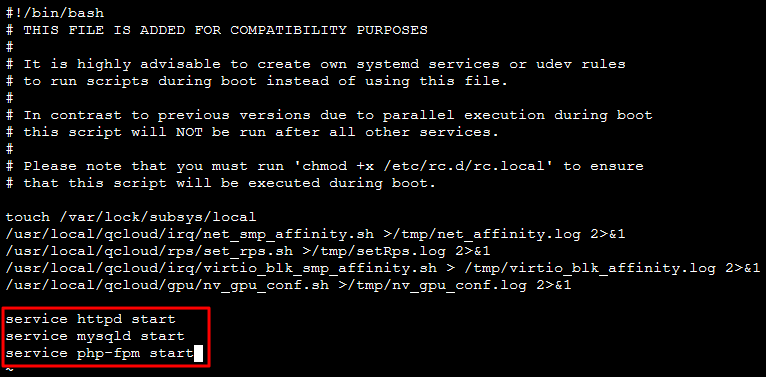
4. Append the following content to the file to set services to be automatically started. This example shows how to set the httpd, mysqld, and php-fpm services to be automatically started. Note that the required services vary by website, set them as needed.
service httpd start
service mysqld start
service php-fpm start
The result should be as follows:


5. Press :wq to save and exit. Then, the website can be automatically accessed after the instance is restarted.

(Optional) Verifying the configuration

Restart the server (with the reboot command, or through the console). After the server is restarted, refresh the page on the website without logging in to the server to check whether a response is returned. If yes, the configuration was successful.

Creating images

You can create an image based on the instance and use this image when creating the launch configuration. For more information, see.
Ajuda e Suporte

Esta página foi útil?

comentários