Managing RO Groups
Baixar
Modo Foco
Tamanho da Fonte
TencentDB for PostgreSQL allows you to create one or more read-only instances to form an RO group, which is suitable for read/write separation and one-primary-multiple-standby application scenarios. This greatly improves the read load capacity of your database.
Prerequisites
You have created a primary instance. For more information, see Purchase Methods.
You have created a read-only instance. For more information, see Overview.
Creating RO Group
Creating RO Group
1. Log in to the TencentDB for PostgreSQL console. In the instance list, click More > Create Read-Only Instance in the Operation column of the target instance to enter the instance purchase page.
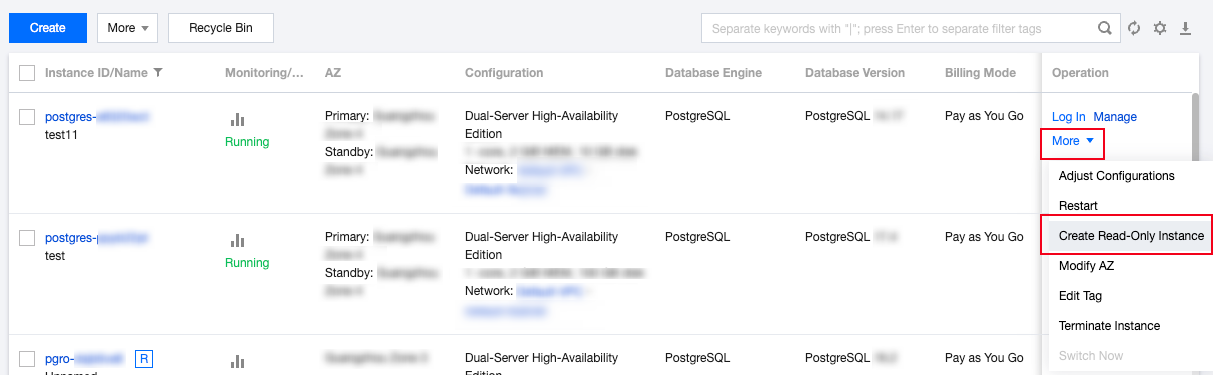
Note:
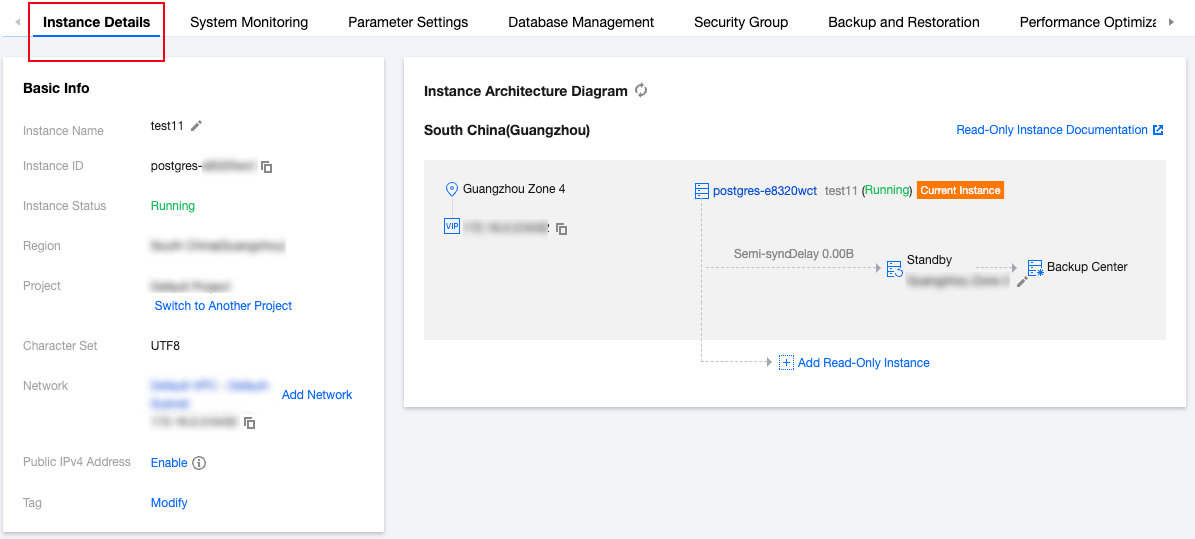
You can also click an Instance ID or Manage in the Operation column to enter the instance management page.
Click Add Read-Only Instance in the Instance Architecture Diagram section on the Instance Details tab to enter the read-only instance purchase page.
Or, click Create on the Read-Only Instance tab to enter the read-only instance purchase page.
2. On the purchase page, select the desired read-only instance configuration, confirm that everything is correct, and click Buy Now.
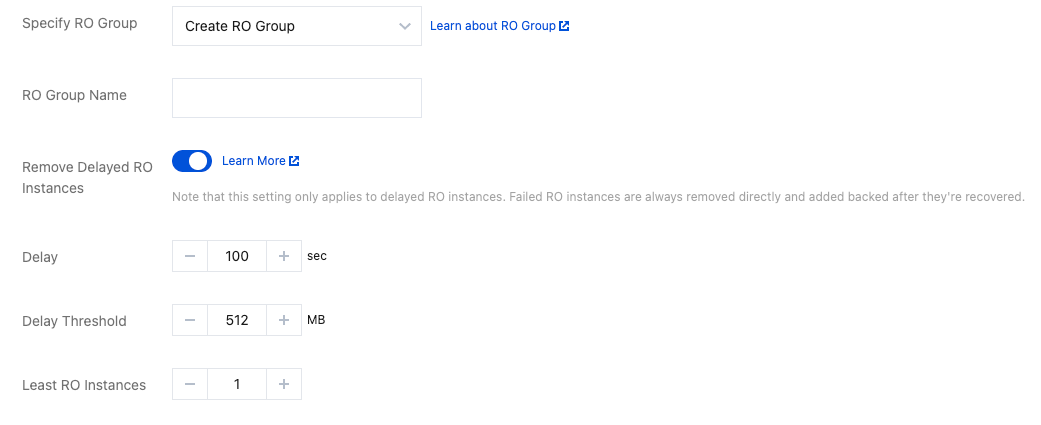
Specify RO Group: Select Create RO Group. If multiple read-only instances are purchased at a time, all of them will be assigned to the newly created RO group. The RO group automatically allocates read weights to each read-only instance and automatically distributes read requests among them based on their read weights.
RO Group Name: The RO group name doesn't need to be unique and can contain up to 60 letters, digits, hyphens, and underscores.
Remove Delayed RO Instances: This option indicates whether to enable the removal policy. A read-only instance will be removed from the RO group when its delay exceeds the threshold, and will rejoin the RO group when its delay drops below the threshold. A removed read-only instance will become inactive, its weight will be set to 0 automatically, and warning notifications will be sent. For more information on how to configure read-only instance removal alarms and recipients, see Alarming Feature.
No matter whether delayed read-only instance removal is enabled, a read-only instance that is removed due to instance failure will rejoin the RO group when it is repaired.
Delay: This sets the delay time for a read-only instance. When the threshold is exceeded, the instance will be removed from the RO group.
Delay Threshold: This sets the delay threshold for a read-only instance. When the data sync log size difference between the primary instance and the read-only instance is above the threshold, the read-only instance will be removed from the RO group.
Least RO Instances: This is the minimum number of instances that should be retained in the RO group. When there are fewer instances in the RO group, even if an instance exceeds the delay threshold, it will not be removed.
3. Return to the instance list. The status of the created instance is Delivering. After the status changes to Running, the read-only instance has been successfully created.
Note:
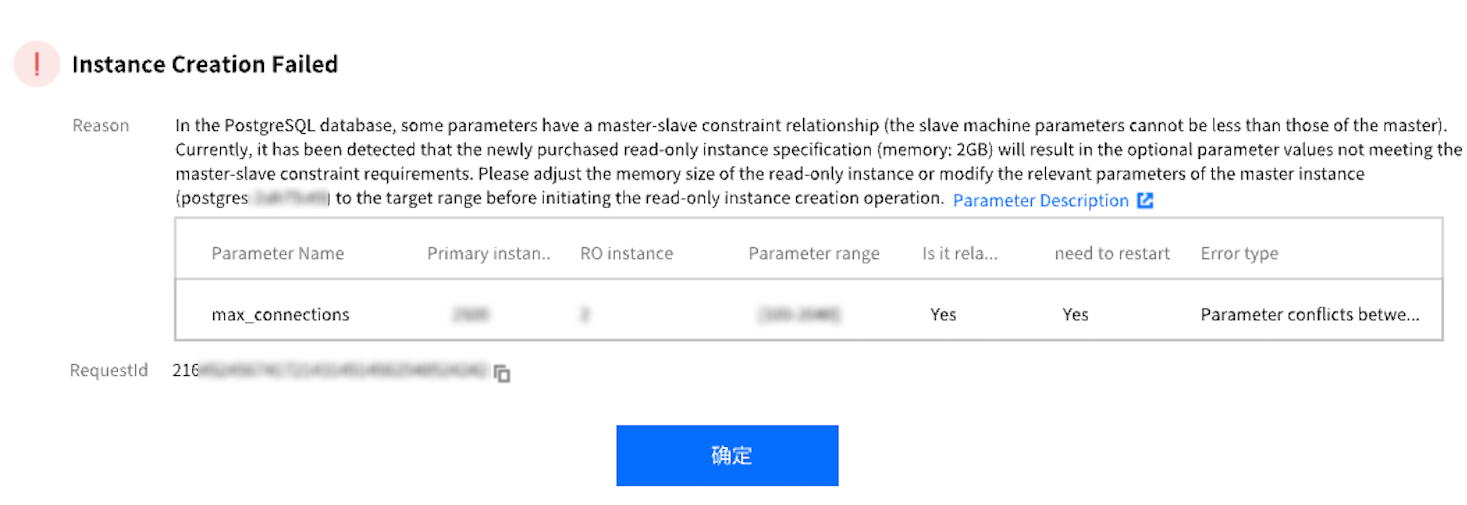
When a read-only instance is associated with the primary instance of a PostgreSQL database, certain parameters on the read-only instance must be set to values equal to or greater than those on the primary node. Otherwise, the read-only instance will fail to start properly. For example, parameters such as `max_connections`, `max_worker_processes`, and `max_wal_senders`. During the creation of a read-only instance, if the selected specifications cannot meet the requirement that the parameter values of the read-only instance are equal to or greater than those of the primary instance, a corresponding prompt will be displayed, as shown in the figure below:
Configuring RO Group
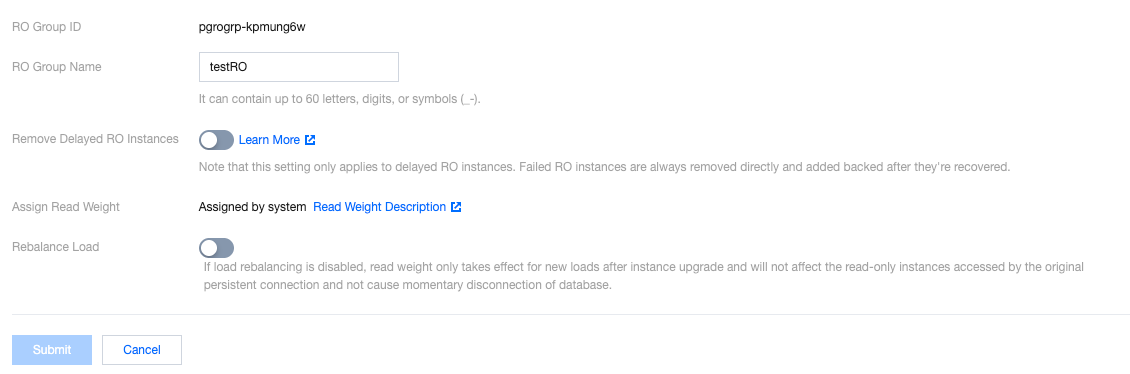
On the RO group configuration page, you can configure the basic information of the group such as name, removal policy, delay threshold, and least read-only instances.
Note:
Read-only instances in an RO group can have different specifications, and read weights are automatically assigned by the system according to instance specifications.
1. Log in to the TencentDB for PostgreSQL console. In the instance list, click a primary instance ID to enter the instance management page.
2. On the instance management page, click the Read-Only Instance tab and click Configuration in the Operation column to enter the RO group configuration page.
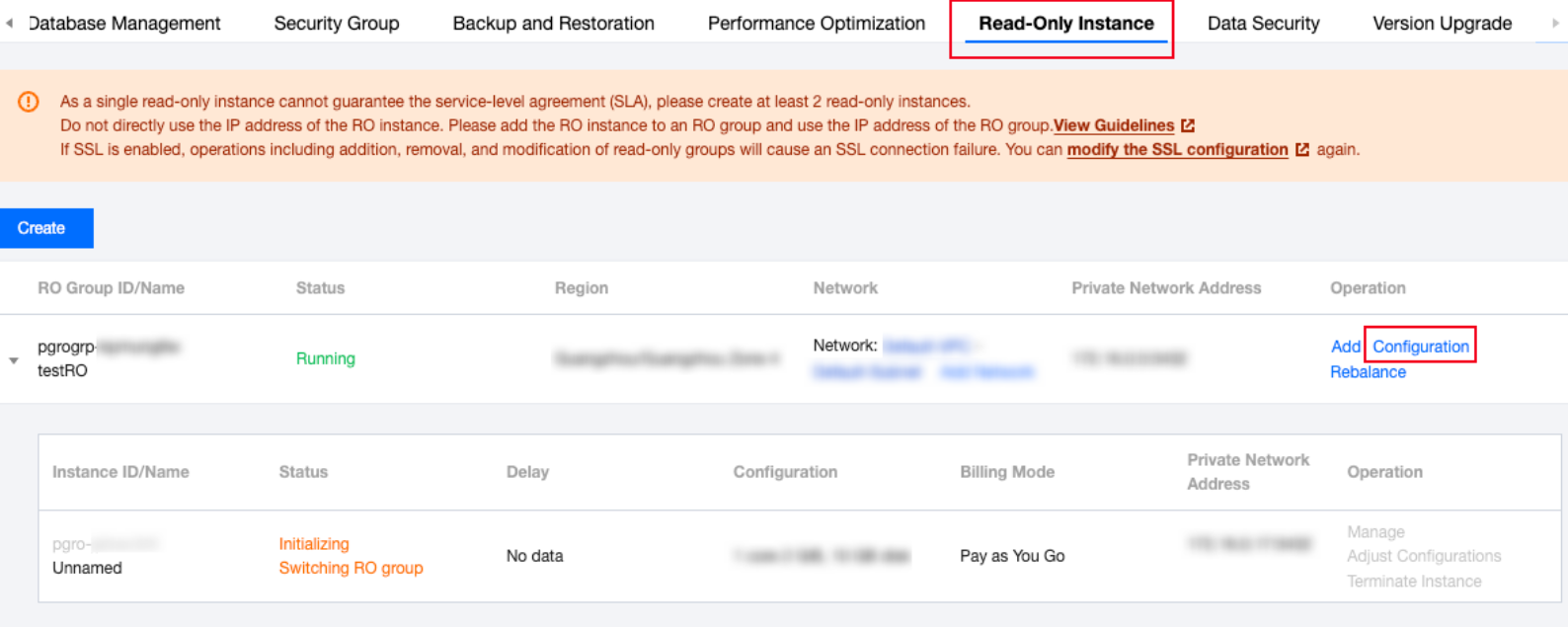
3. On the RO group configuration page, configure the RO group and click Submit.
Assign Read Weight: The traffic of each read-only instance in an RO group will be automatically distributed according to its read weight, which can implement load balancing and reduce the difficulty in managing multiple read-only instance IP addresses. An RO group automatically assigns read weights to each read-only instance. The following table lists the read weights of read-only instances of different specifications:
Specification | Weight |
2 GB memory | 1 |
4 GB memory | 2 |
8 GB memory | 2 |
12 GB memory | 4 |
16 GB memory | 4 |
24 GB memory | 8 |
32 GB memory | 8 |
48 GB memory | 10 |
64 GB memory | 12 |
96 GB memory | 14 |
128 GB memory | 16 |
240 GB memory | 26 |
480 GB memory | 50 |
Rebalance:
If rebalancing is disabled, modifying weight will only affect new loads. The operation has no impact on read-only instances accessed by existing persistent connections and does not cause momentary database disconnections.
If rebalancing is enabled, when the configurations of read-only instances in the RO group are modified, all connections to the RO group will be disconnected, and new connections will be rebalanced according to instance weights.
Deleting RO Group
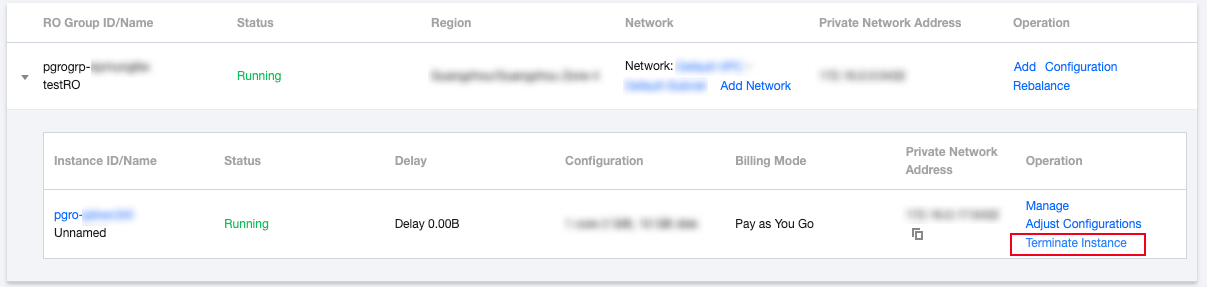
An RO group can be deleted if it has no read-only instances.
1. Log in to the TencentDB for PostgreSQL console. In the instance list, click a primary instance ID to enter the instance management page.
2. On the instance management page, select the Read-Only Instance tab to view all RO groups. You can delete an RO group after confirming that there are no read-only instances in it.
Ajuda e Suporte
Esta página foi útil?
Você também pode entrar em contato com a Equipe de vendas ou Enviar um tíquete em caso de ajuda.
comentários