Enabling and Disabling the Connection Pool Feature
Baixar
Modo Foco
Tamanho da Fonte
This document provides instructions on enabling and disabling the connection pool feature.
Prerequisites
Enabling the Connection Pool Feature
1. Log in to the TencentDB for PostgreSQL console.
2. Locate the target instance in the instance list, click the Instance ID, and go to the instance management page.
3. On the instance management page, select the Database Proxy tab.
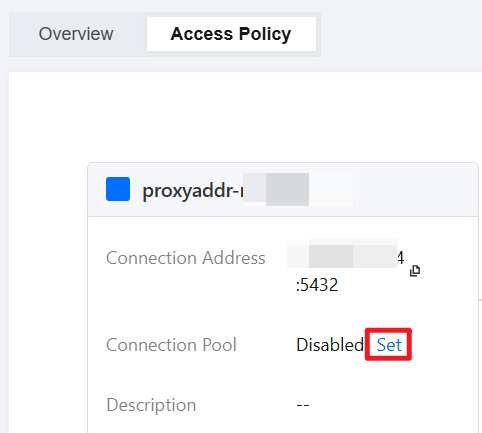
4. Select the Access Policy tab and click Set next to Connection Pool.
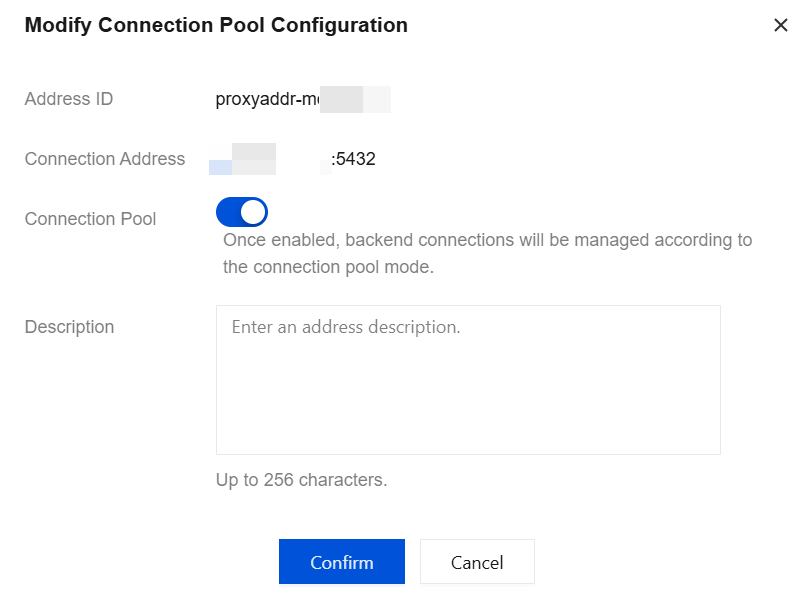
5. In the pop-up dialog box, enable the connection pool feature, enter a description (optional), and click Confirm.
Disabling the Connection Pool Feature
1. Log in to the TencentDB for PostgreSQL console.
2. Locate the target instance in the instance list, click the Instance ID, and go to the instance management page.
3. On the instance management page, select the Database Proxy tab.
4. Select the Access Policy tab and click Set next to Connection Pool.
5. In the pop-up dialog box, disable the connection pool feature and click Confirm.
Ajuda e Suporte
Esta página foi útil?
Você também pode entrar em contato com a Equipe de vendas ou Enviar um tíquete em caso de ajuda.
comentários