This document describes how to delete an existing node pool from a cluster via the TKE console. You can delete idle node pools to reduce the waste of resources.
Prerequisites
You have created an available node pool. For more information, see Creating a Node Pool.
You have opened the “Node pool list” page. For more information, see Viewing a Node Pool.
Directions
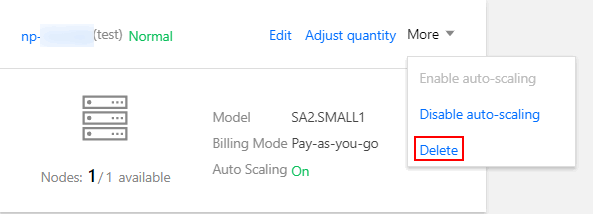
1. On the card page of the desired node pool, choose More -> Delete in the upper-right corner, as shown in the following figure:
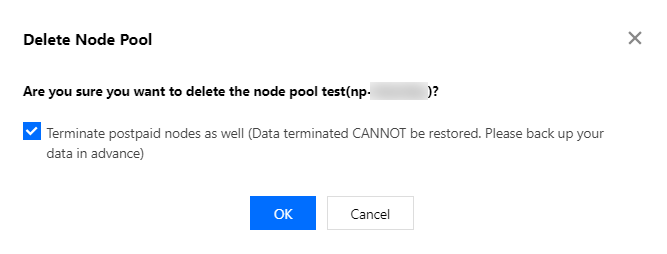
2. In the “Delete node pool” window, specify whether to retain the nodes based on requirements.
Note:
Terminate postpaid node is selected by default. You can clear the option as required.
Once terminated, pay-as-you-go nodes cannot be restored. Proceed with caution and back up data in advance.
3. Click OK and wait until the node pool is deleted.
Relevant Operations
For more information on the features and operations of node pools, see the following documents: