消息过滤
下载
聚焦模式
字号
本文主要介绍 TDMQ RocketMQ 版中消息过滤的功能、应用场景和使用方式。
功能介绍
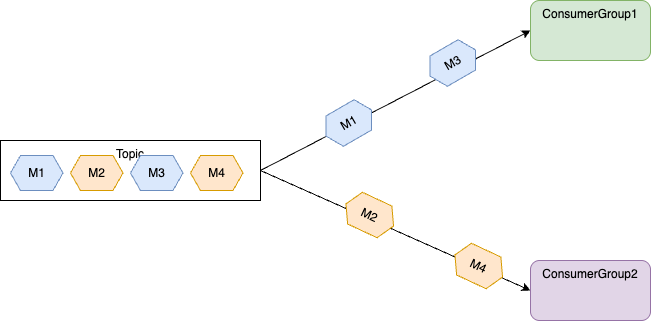
消息过滤功能指消息生产者向 Topic 中发送消息时,设置消息属性对消息进行分类,消费者订阅 Topic 时,根据消息属性设置过滤条件对消息进行过滤,只有符合过滤条件的消息才会被投递到消费端进行消费。
消费者订阅 Topic 时若未设置过滤条件,无论消息发送时是否有设置过滤属性,Topic 中的所有消息都将被投递到消费端进行消费。
应用场景
通常,一个 Topic 中存放的是相同业务属性的消息,例如交易流水 Topic 包含了下单流水、支付流水、发货流水等,这些消息会发送到同一个交易流水 Topic 中,业务若只想消费者其中一种类别的消息,可在客户端进行过滤。
账单系统:只需订阅支付消息。
物流系统:只需订阅物流消息。
库存系统:只需订阅下单消息。
使用方式
目前消息过滤主要支持两种过滤方式,分别是 SQL 过滤和 TAG 过滤。其核心逻辑都是在发送消息的时候,设置一些自定义字段,然后通过消费组订阅的时候指定对应的过滤表达式,消息在服务端进行过滤后,才被消费组消费。
发送消息
说明:
发送消息时,每条消息必须指明 Tag。
String tag = "yourMessageTagA";final Message message = provider.newMessageBuilder()// Set topic for the current message..setTopic(topic)// Message secondary classifier of message besides topic..setTag(tag)// Key(s) of the message, another way to mark message besides message id..setKeys("yourMessageKey-1c151062f96e").setBody(body).build();
订阅消息
订阅所有 Tag:消费者如需订阅某 Topic 下所有类型的消息,Tag 用星号(*)表示。
String consumerGroup = "yourConsumerGroup";String topic = "yourTopic";String tag = "*";FilterExpression filterExpression = new FilterExpression(tag, FilterExpressionType.TAG);// In most case, you don't need to create too many consumers, singleton pattern is recommended.PushConsumer pushConsumer = provider.newPushConsumerBuilder().setClientConfiguration(clientConfiguration)// Set the consumer group name..setConsumerGroup(consumerGroup)// Set the subscription for the consumer..setSubscriptionExpressions(Collections.singletonMap(topic, filterExpression)).setMessageListener(messageView -> {// Handle the received message and return consume result.log.info("Consume message={}", messageView);return ConsumeResult.SUCCESS;}).build();
订阅单个 Tag:消费者如需订阅某 Topic 下某一种类型的消息,请明确标明 Tag。
String consumerGroup = "yourConsumerGroup";String topic = "yourTopic";String tag = "TAGA";FilterExpression filterExpression = new FilterExpression(tag, FilterExpressionType.TAG);// In most case, you don't need to create too many consumers, singleton pattern is recommended.PushConsumer pushConsumer = provider.newPushConsumerBuilder().setClientConfiguration(clientConfiguration)// Set the consumer group name..setConsumerGroup(consumerGroup)// Set the subscription for the consumer..setSubscriptionExpressions(Collections.singletonMap(topic, filterExpression)).setMessageListener(messageView -> {// Handle the received message and return consume result.log.info("Consume message={}", messageView);return ConsumeResult.SUCCESS;}).build();
订阅多个 Tag:消费者如需订阅某 Topic 下多种类型的消息,请在多个 Tag 之间用两个竖线
||分隔。String consumerGroup = "yourConsumerGroup";String topic = "yourTopic";String tag = "TAGA || TAGB";FilterExpression filterExpression = new FilterExpression(tag, FilterExpressionType.TAG);// In most case, you don't need to create too many consumers, singleton pattern is recommended.PushConsumer pushConsumer = provider.newPushConsumerBuilder().setClientConfiguration(clientConfiguration)// Set the consumer group name..setConsumerGroup(consumerGroup)// Set the subscription for the consumer..setSubscriptionExpressions(Collections.singletonMap(topic, filterExpression)).setMessageListener(messageView -> {// Handle the received message and return consume result.log.info("Consume message={}", messageView);return ConsumeResult.SUCCESS;}).build();
使用限制
发送消息只能设置一个 TAG。
多个 Tag 之间为或的关系,不同 Tag 间使用两个竖线(||)隔开。例如 Tag1||Tag2||Tag3,表示标签为 Tag1 或 Tag2 或 Tag3 的消息都满足匹配条件,都会被发送给消费者进行消费。
多个 Tag 的顺序也要保持一致,否则会导致订阅关系不一致,例如 Tag1||Tag2 和 Tag2||Tag1 就是不同的。
发送消息
发送代码和简单的消息没有区别。主要是在构造消息体的时候,带上自定义属性,允许多个。
final Message message = provider.newMessageBuilder()// Set topic for the current message..setTopic(topic)// Message secondary classifier of message besides topic.// Key(s) of the message, another way to mark message besides message id..setKeys("yourMessageKey-1c151062f96e").setBody(body)//一些用于sql过滤的信息.addProperty("key1", "value1").build();
订阅消息
对于消费消息,订阅时需带上相应的 SQL 表达式,其余与普通的消费消息流程无区别。
String consumerGroup = "yourConsumerGroup";String topic = "yourTopic";String sql = "key1 IS NOT NULL AND key1='value1'";//sql表达式FilterExpression filterExpression = new FilterExpression(sql, FilterExpressionType.SQL92);//如果是订阅所有//FilterExpression filterExpression = FilterExpression.SUB_ALL;// In most case, you don't need to create too many consumers, singleton pattern is recommended.PushConsumer pushConsumer = provider.newPushConsumerBuilder().setClientConfiguration(clientConfiguration)// Set the consumer group name..setConsumerGroup(consumerGroup)// Set the subscription for the consumer..setSubscriptionExpressions(Collections.singletonMap(topic, filterExpression)).setMessageListener(messageView -> {// Handle the received message and return consume result.log.info("Consume message={}", messageView);return ConsumeResult.SUCCESS;}).build();
说明
使用限制
由于 SQL 属性过滤是生产者定义消息属性,消费者设置 SQL 过滤条件,计算之后,可能有不同的结果,因此服务端的处理方式如下:
异常情况处理:如果过滤条件的表达式计算抛异常,消息默认被过滤,不会被投递给消费者。例如比较数字和非数字类型的值。
空值情况处理:如果过滤条件的表达式计算值为 null 或不是布尔类型(true 和 false),则消息默认被过滤,不会被投递给消费者。例如发送消息时不存在某个属性,在订阅时过滤条件中直接使用该属性,则过滤条件的表达式计算结果为 null。
类型不符处理:如果消息自定义属性为浮点型,但过滤条件中使用整数进行判断,则消息默认被过滤,不会被投递给消费者。
虽然这种方式是灵活的,但是在消息头中还是不建议设置太多的值,因为总的消息头部属性有大小限制(32K),内置的已经占用了不少。超长之后,可能导致消息发送或者消费异常。
使用建议
合理划分主题和 Tag 标签。
从消息的过滤机制和主题的原理机制可以看出,业务消息的拆分可以基于主题进行筛选,也可以基于主题内消息的 Tag 标签及属性进行筛选。关于拆分方式的选择,应注意以下问题:
消息类型是否一致:不同类型的消息,如顺序消息和普通消息需要使用不同的主题进行拆分,无法通过 Tag 标签进行分类。
业务域是否相同:不同业务域和部门的消息应该拆分不同的主题。例如物流消息和支付消息应该使用两个不同的主题;同样是一个主题内的物流消息,普通物流消息和加急物流消息则可以通过不同的 Tag 进行区分。
消息量级和重要性是否一致:如果消息的量级规模存在巨大差异,或者说消息的链路重要程度存在差异,则应该使用不同的主题进行隔离拆分。
文档反馈