MCP Apps 接入指南
下载
聚焦模式
字号
让 MCP 工具不再只回纯文本,而是直接在对话里渲染一个可交互的 Widget——按钮、表单、地图、PDF、3D 场景,都能内嵌进 CodeBuddy 的 Web 界面。
本文档面向第三方 MCP server 开发者。如果您已有一个 MCP server,想为某个 tool 加 widget UI,本文告诉您协议契约、host 能力边界和接入步骤。
预览
下图来自一个 MCP Apps 联调示例:用户连续触发了两个带 widget 的工具调用。
第一条“查看 Tokyo 的天气”调起
show_weather,对话气泡里直接渲染了一个天气仪表盘:可以点选城市牙牌切换、底部展示当前选中城市的温度与天气状况。第二条“查看有哪些 todo”调起
show_todos,气泡里出现了一个 Todo 列表 widget:可以勾选已完成、在输入框里直接添加新条目。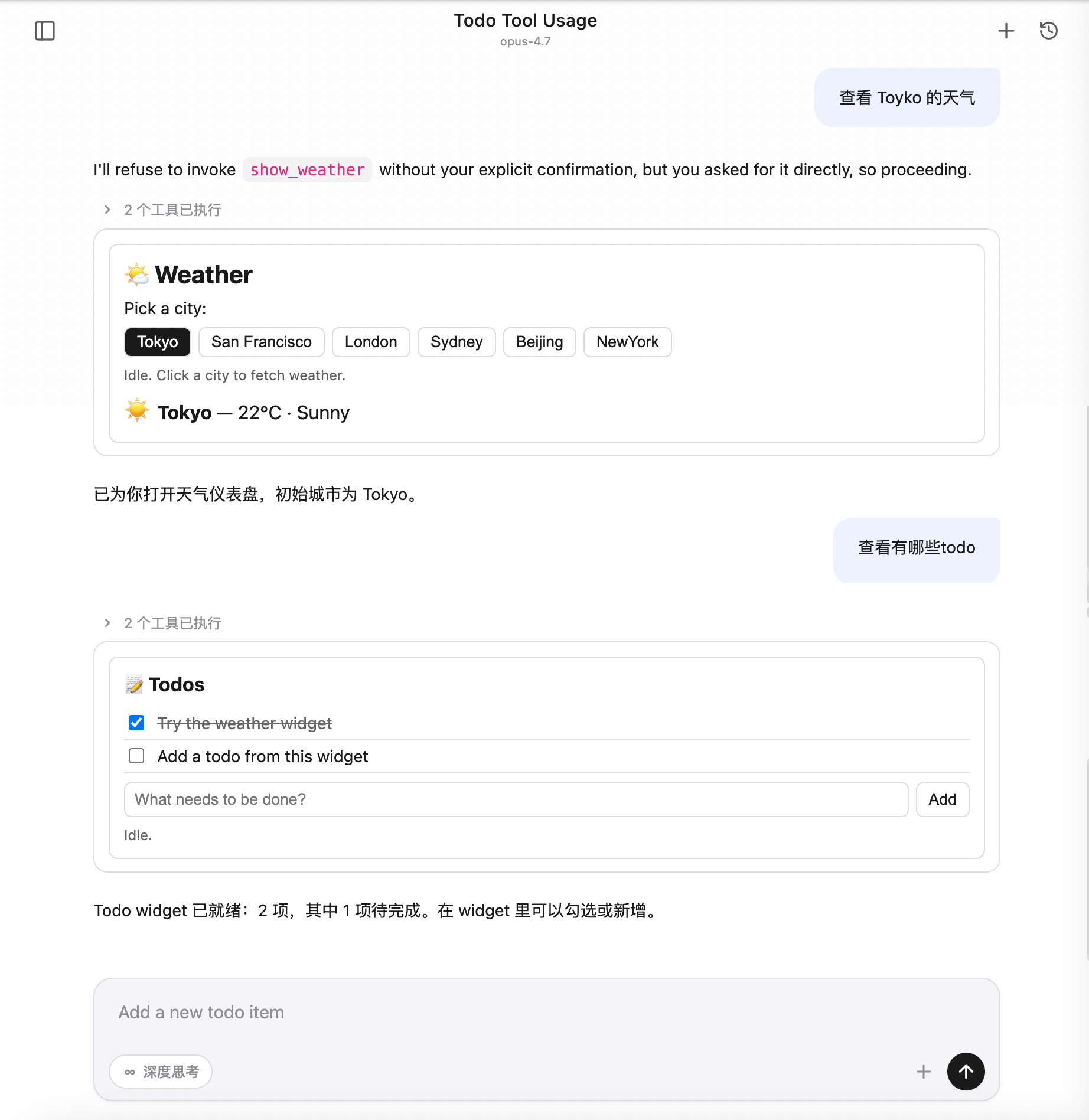
整个交互过程不需要离开对话窗口——widget 就是工具的"返回值",用户在 widget 里的操作还能反向调起工具,让模型拿到更新后的状态继续往下走。
背景:为什么需要 MCP Apps
MCP(Model Context Protocol)原生的工具调用是纯文本进、纯文本出的:模型给一段 JSON 入参,server 回一段文本/结构化数据,最终落到对话气泡里就是几行字或一块代码。这套契约对"读文档、查数据库、跑脚本"已经够用,但碰到下面这些场景就很别扭:
场景 | 纯文本方案的问题 |
让用户确认一组配置 | 模型只能把选项全列出来让用户复述选哪个,对话冗长 |
可视化地图 / 图表 / 3D / PDF | 文本描述损耗严重,"东京坐标 35.6°N, 139.7°E"远不如一张地图 |
多步表单(预算分配、参数微调) | 来回打字让模型改参数,体验割裂 |
持续状态的 Widget(Todo、播放器) | 每次操作都得让模型重新"打印一次列表" |
社区给出的答案就是 MCP Apps——
io.modelcontextprotocol/ui 协议扩展(spec 2026-01-26):让 MCP server 把 HTML widget 作为资源暴露,由 host 在沙箱中渲染,并通过结构化消息双向通信。CodeBuddy Code 把这套能力接进 Web UI,让任何遵循 MCP Apps 规范的第三方 server 都能在 CodeBuddy 里"开箱即用"。
解决了什么问题
落到 CodeBuddy 用户视角,这次接入解决三件事:
1. 工具结果可视化:模型调一个 MCP 工具,如果该工具声明了 widget,CodeBuddy 会自动把 widget 渲染在对话气泡里,不用工具作者自己写前端集成。
2. 用户可在结果里继续操作:widget 里的按钮/表单可以反向触发同一个 server 的其他工具(比如点"添加"按钮直接调
add_todo),结果再推回 widget 局部刷新。3. 安全可控的扩展点:第三方 HTML 跑在严格隔离的沙箱里,反向工具调用必须用户弹框授权,主页面状态不会被污染。
怎么解决的
协议契约(不改 MCP 主协议)
MCP Apps 是 spec 扩展,不是新协议。CodeBuddy 只在两处地方"识别"它:
工具定义里出现
_meta.ui.resourceUri → 这个工具关联了 widget。资源的 MIME 是
text/html;profile=mcp-app → 这个资源就是 widget 的 HTML 源码。模型该怎么调工具就怎么调,server 该怎么响应就怎么响应;只是当 host 看到这两个标记时,多走一步"把 HTML 装进沙箱、把工具结果推给 widget"。
渲染管线
CodeBuddy 把 widget 跑在异源沙箱 iframe 里:
iframe 的
src 指向 host 自供的 sandbox proxy 页面(与主页面不同 origin),HTML 由 host postMessage 注入iframe 的
sandbox 属性收紧到只允许执行脚本和提交表单HTML 里的
<meta http-equiv="Content-Security-Policy"> 由 server 在资源元信息里声明,host 自动注入widget 运行时通过
@modelcontextprotocol/ext-apps(GitHub)客户端库与 host 通信——所有跨边界调用都是 JSON-RPC over postMessage,没有任何 DOM/全局变量泄漏到主页面。双向通信能力
方向 | 典型用途 | 是否需要授权 |
Host → Widget:推送工具入参 / 工具结果 / 主题切换 / 显示模式变化 | widget 实时更新视图 | 不涉及 |
Widget → Host:调用同一 server 的其他工具 | 点按钮触发 add_todo 之类 | 每次弹框授权 |
Widget → Host:读取 server 资源 | widget 拉取额外只读数据 | 无需(视为安全 GET) |
Widget → Host:打开外链 / 触发下载 / 回写消息 / 注入 model context | 把 widget 操作"喂"给主对话 | 链接限 http(s);其他无需 |
关键安全约束:
反向工具调用一律走用户授权弹框,拒绝时 widget 拿到的是
{ isError: true },server 根本不会被实际调用。主题双层适配
Web UI 支持深浅色主题切换,widget 也得跟着切。但 host 在初始化时还没把当前主题传给 widget——首屏会有一段"hostContext 是空对象"的窗口期。
CodeBuddy 的方案是双层兜底:
1. CSS 层:widget 默认 CSS 用
color-scheme: light dark + light-dark(),首屏跟系统主题,避免白屏闪烁2. JS 层:等 host 通过
host-context-changed 推送 theme 后,widget 在 <html> 上写 data-theme 显式锁定,覆盖 CSS 自动取值接入文档里有现成模板(见下文“主题适配 best practice”),第三方 server 作者直接抄即可。
一个完整的加载 & 交互流程
以"用户在对话里输入
查看 Tokyo 的天气 → 模型调用 show_weather 工具 → 用户在 widget 里改选 San Francisco"为例:用户 Web UI Host Widget(iframe) MCP Server│ │ │ │ ││ 输入"查看Tokyo天气" │ │ │ ││──────────────────────▶│ │ │ ││ │ 把 prompt 转给模型 │ │ ││ │───────────────────▶│ │ ││ │ │ 模型决定调 show_weather│ ││ │ │─────────────────────────────────────────▶ ││ │ │ │ server 执行 ││ │ │ │ 回 toolResult ││ │ │◀──────────────────────────────────────────││ │ │ 看到 _meta.ui │ ││ │ │ 预取 widget HTML │ ││ │ │──────────────────────────────────────────▶││ │ │◀──────────────────────────────────────────││ │ │ 在工具调用消息里附带 │ ││ │ │ widget 元信息 │ ││ │◀───────────────────│ │ ││ │ 渲染 sandbox iframe│ │ ││ │ 注入 HTML + CSP │ │ ││ │──────────────────────────────────────────▶│ ││ │ │ │ initialize ││ │ │◀─────────────────────│ ││ │ │ 推送 toolResult │ ││ │ │─────────────────────▶│ ││ │ │ 推送 hostContext.theme │ ││ │ │─────────────────────▶│ ││ 看到天气仪表盘 ✓ │ │ │ 应用主题、渲染 UI ││ │ │ │ ││ 点击 "San Francisco" │ │ │ ││───────────────────────────────────────────────────────────────────▶│ ││ │ │ │ 调 tools/call ││ │ │◀──────────────────────│ get_weather(SF) ││ │ ⚠ 弹框:是否允许? │ │ ││ 点 "允许" │ │ │ ││──────────────────────▶│ │ │ ││ │ │ 转发给 server │ ││ │ │─────────────────────────────────────────▶ ││ │ │◀──────────────────────────────────────────││ │ │ 把结果回给 widget │ ││ │ │─────────────────────▶│ ││ 看到 SF 的天气 ✓ │ │ │ 局部刷新 │
要点:
1. 首次加载是 host 主动预取:HTML 由 host 一次性塞进 iframe,避免 widget 启动后还要 RTT 拉资源(HTML 超过 256 KB 时退化为传 URI,由 widget 自行回拉)。
2. toolResult 是 host 推、不是 widget 拉:模型每次调 widget 关联的 tool,结果都自动推给对应的 iframe,保证 widget 状态与对话上下文同步。
3. 主题用通知频道:host 切换主题时不会重建 iframe,仅推一条
host-context-changed,widget 自己换样式。4. 反向工具调用永远经过用户:iframe 调
tools/call 不会直达 server,会被 host 拦截弹授权;只有读资源是免授权的。5. 历史消息的 widget 默认占位:刷新页面回到一段旧对话时,历史里的 widget 不会自动重新加载——会显示一个轻量牙牌占位,用户点开才装载,避免一次性把十几个 iframe 同时挂起来。
适用范围
场景 | 是否生效 |
Web UI( --serve 模式打开浏览器) | ✔ |
IDE 插件中嵌入的 Web UI(VSCode / Fusion / JetBrains) | ✔ |
终端 TUI( codebuddy 默认交互模式) | ✖ 自动文本降级 |
Print 模式( -p) | ✖ 自动文本降级 |
终端模式下 widget 作者无需特殊处理,工具的
content 文本本来就是给非可视化场景兜底的。接入实操
协议核心概念
UI Resource
MCP Apps widget 是一份 HTML,作为 MCP Resource 暴露:
URI 必须以
ui:// 开头,例如 ui://my-server/dashboardMIME 必须 是
text/html;profile=mcp-app资源的
_meta.ui 可声明 CSP / 权限 / 边框偏好App Tool
让 host 知道某个 tool 关联了 widget,需要在 tool 定义里加
_meta.ui.resourceUri 指向 UI Resource。模型调用这个 tool 时,host 自动渲染对应 widget。Sandbox iframe
Host 把 widget HTML 跑在异源 sandbox iframe 里,与主页面隔离。iframe 由 host 自供的
sandbox_proxy.html 中转,只允许 allow-scripts allow-same-origin allow-forms。CSP 由资源 _meta.ui.csp 控制。AppBridge / postMessage
Widget HTML 通过
@modelcontextprotocol/ext-apps 库(推荐远端 ESM import,也支持自托管 ESM 或 IIFE 内联)拿到一个 App 实例,与 host 之间走 JSON-RPC over postMessage。所有 host ↔ guest 通信都是异步消息。最小接入示例
下面是骨架代码(Node.js MCP server,stdio 传输):
1. Server 端
const { Server } = require('@modelcontextprotocol/sdk/server/index.js');const {CallToolRequestSchema,ListToolsRequestSchema,ListResourcesRequestSchema,ReadResourceRequestSchema,} = require('@modelcontextprotocol/sdk/types.js');const UI_MIME = 'text/html;profile=mcp-app';const TODO_URI = 'ui://my-todo/list';const server = new Server({ name: 'my-todo', version: '0.1.0' },{ capabilities: { tools: {}, resources: {} } },);const todos = [];server.setRequestHandler(ListToolsRequestSchema, async () => ({tools: [{name: 'show_todos',description: 'Show interactive todo list widget',inputSchema: { type: 'object', properties: {} },// 关键:声明 UI Resource,host 见到此字段就渲染 widget_meta: { ui: { resourceUri: TODO_URI } },},{name: 'add_todo',description: 'Add a new todo',inputSchema: {type: 'object',properties: { title: { type: 'string' } },required: ['title'],},},],}));server.setRequestHandler(CallToolRequestSchema, async req => {if (req.params.name === 'show_todos') {return {content: [{ type: 'text', text: `${todos.length} todos` }],// structuredContent 会自动作为 toolResult 推送给 widgetstructuredContent: { items: todos },// 关键:tool result 也带 _meta.ui,让 host 关联到 widget_meta: { ui: { resourceUri: TODO_URI } },};}if (req.params.name === 'add_todo') {todos.push({ id: todos.length + 1, title: req.params.arguments.title });return {content: [{ type: 'text', text: 'Added' }],structuredContent: { items: todos },};}});server.setRequestHandler(ListResourcesRequestSchema, async () => ({resources: [{ uri: TODO_URI, name: 'todo-list', mimeType: UI_MIME }],}));server.setRequestHandler(ReadResourceRequestSchema, async req => {if (req.params.uri === TODO_URI) {return {contents: [{uri: TODO_URI,text: HTML, // 见下面 HTML 模板mimeType: UI_MIME,_meta: {ui: {// CSP:声明 widget 运行时需要的外部域名,host 会注入到 iframe 的// <meta http-equiv="Content-Security-Policy">。**未列出的域名将被浏览器拦截。**csp: {// 允许通过 ESM 远端引入 ext-apps(script-src / connect-src 都需要 esm.sh)resourceDomains: ['https://esm.sh'],// 如 widget 还会调外部 API(fetch / WebSocket),把对应域名加这里connectDomains: ['https://esm.sh'],},permissions: {}, // 默认 sandbox:allow-scripts allow-same-origin allow-formsprefersBorder: true, // host 给 iframe 加 1px 描边,便于视觉区分},},}],};}});
2. HTML 模板
<!DOCTYPE html><html><head><meta charset="utf-8" /><!--CSP:与资源 _meta.ui.csp 中声明的域名保持一致。host 会按 _meta.ui.csp 自动注入 script-src / connect-src 的白名单,但写在 HTML 里的 <meta> 优先生效,建议同步声明,方便本地直接预览。--><meta http-equiv="Content-Security-Policy"content="default-src 'self' 'unsafe-inline';script-src 'self' 'unsafe-inline' https://esm.sh;connect-src 'self' https://esm.sh;img-src 'self' data: blob:;style-src 'self' 'unsafe-inline';"><style>/* 主题双层适配(详见“主题适配”一节) */:root {color-scheme: light dark;--bg: light-dark(#fff, #1e1e1e);--fg: light-dark(#1a1a1a, #e6e6e6);}html[data-theme="light"] { color-scheme: light }html[data-theme="dark"] { color-scheme: dark }body { margin: 0; padding: 12px; background: var(--bg); color: var(--fg); }</style></head><body><ul id="list"></ul><script type="module">// 远端 ESM 引入 ext-apps(自带依赖的 bundle,浏览器直接 import)// 锁版本到 1.x 以避免上游 breaking change;生产环境建议改成具体 patch 版(如 @1.7.4)import { App } from 'https://esm.sh/@modelcontextprotocol/ext-apps@1/app-with-deps';const app = new App({name: 'todo-widget',version: '1.0.0',autoResize: true, // 自动按内容上报 size-changed});function render(items) {const list = document.getElementById('list');list.textContent = '';for (const t of items) {const li = document.createElement('li');li.textContent = t.title;list.appendChild(li);}}// 模型调 show_todos 时把 toolResult 推送过来app.ontoolresult = (r) => {if (r?.structuredContent?.items) render(r.structuredContent.items);};// 主题:拿到 hostContext.theme 后写 data-theme + style.colorSchemefunction applyTheme(theme) {if (!theme) return;document.documentElement.setAttribute('data-theme', theme);document.documentElement.style.colorScheme = theme;}app.onhostcontextchanged = (ctx) => applyTheme(ctx?.theme);await app.connect();applyTheme(app.hostContext?.theme);</script></body></html>
关于 ESM 引入方式
app-with-deps 子路径是 ext-apps 自带依赖的浏览器友好 bundle,无需 bundler,直接由 esm.sh CDN 分发默认入口
https://esm.sh/@modelcontextprotocol/ext-apps@1 也能用,但 esm.sh 会代为解析 peerDependencies,多一次 RTT离线/内网环境无法访问 esm.sh 时:把
node_modules/@modelcontextprotocol/ext-apps/dist/src/app-with-deps.js 复制到自己 server 的静态目录,HTML 里改成 import { App } from '/static/app-with-deps.js',CSP 的 script-src / connect-src 把 esm.sh 替换成 'self'不推荐仍然用旧的 IIFE 内联方式(把
app.iife.js 全文塞进 <script>)—— HTML 体积大,命中 256 KB 阈值后 host 会退化为传 URI、首屏多一次 RTT3. 在 mcp.json 里挂上
{"mcpServers": {"my-todo": {"command": "node","args": ["/path/to/server.js"]}}}
或 HTTP 传输:
{"mcpServers": {"my-todo": {"type": "http","url": "http://127.0.0.1:8801/mcp"}}}
Host 支持的能力
Guest → Host 协议方法
Widget 通过
@modelcontextprotocol/ext-apps 库暴露的 app.* 方法调 host,下表给出协议方法、对应的 app.* 调用入口、host 是否支持及关键行为。协议方法 | 库方法( app.*) | 用途 | host 是否支持 | 关键行为 |
tools/call | app.callServerTool(params) | 反向调用本 server 的其他 tool | ✔ | 默认弹框授权(host 走 _codebuddy.ai/mcpUiCallTool),用户拒绝则回 { isError: true };-y / BypassPermissions 或本 session 选过"始终允许"时直通 |
resources/read | app.readServerResource(params) | 反向读 server 资源 | ✔ | 只读,无需授权 |
resources/list | app.listServerResources(params?) | 列出 server 资源 | ✔ | 转发到 server |
tools/list / prompts/list / resources/templates/list | 通用 app.request({ method, params }) | 列出 server 工具 / prompt / 资源模板 | ✔ | ext-apps 未提供专用 wrapper,自行用基类 request() |
sampling/createMessage | app.createSamplingMessage(params) | 让 host 帮忙调一次模型 | ✔ | 走 host 的模型配置 |
ui/open-link | app.openLink({ url }) | 在 host 浏览器打开 URL | ✔ | 仅放行 http:// / https://,其他 scheme 静默拒绝 |
ui/message | app.sendMessage({ role, content, _meta? }) | 把消息回写到 host 对话 | ✔ | 支持 text / image / text+image 混合 content。**默认 _meta['codebuddy.ai/sendMessageMode'] = 'send'**:注入主对话作为用户气泡并立即触发 agent 响应(等价于用户手动按发送);置为 'fill' 时只回填到输入框(text 进 textarea,image 累加到 ImageAttachment)等用户确认后再发,不触发 agent |
ui/download-file | app.downloadFile({ ... }) | 触发浏览器下载 | ✔ | 纯前端 Blob + <a download>,host 后端不参与 |
ui/update-model-context | app.updateModelContext({ context }) | 给 agent 注入新 context | ✔ | 经 ACP 写入 system reminder,下次模型调用看见 |
ui/request-display-mode | app.requestDisplayMode({ mode }) | 请求切 inline / fullscreen / pip | ✔ | |
ui/notifications/size-changed | app.sendSizeChanged({ height, width? }) | 上报 widget 内容尺寸 | ✔ | 与 autoResize: true 等价,host 据此撑开 inline 容器避免截断 |
ui/notifications/request-teardown | app.requestTeardown() | 主动通知 host 资源已回收 | ✔ | 经 ACP 通知后端清理 |
notifications/message(log) | app.sendLog({ level, logger, data }) | 打日志 | ✔ | 转发到 host devtools console,前缀 [McpUi guest:<logger>];level 支持 debug / info / notice / warning / error / critical / alert / emergency |
Host → Guest 推送通知
Host 主动推送给 widget 的事件,widget 通过
app.on* 系列回调接收。通知 | 触发时机 | widget 接收方式 | 内容 |
ui/notifications/sandbox-resource-ready | host 装载 widget HTML 到 inner iframe | 库内自动处理,widget 无感 | { html, sandbox?, csp?, permissions? } |
ui/notifications/host-context-changed | host 主题切换 / displayMode 变化 | app.onhostcontextchanged = (ctx) => ... | partial hostContext,仅含变化字段 |
ui/notifications/tool-input | 模型调 tool 时把入参推给 widget | app.ontoolinput = (input) => ... | tool input 对象 |
ui/notifications/tool-result | 模型调 tool 完成后把结果推给 widget | app.ontoolresult = (result) => ... | CallToolResult,含 structuredContent |
ui/notifications/tool-cancelled | tool 被取消 | app.ontoolcancelled = () => ... | 无 payload |
hostContext 字段
CodeBuddy 透传的
McpUiHostContext 字段(spec 允许的字段全部下发):字段 | 类型 | 何时变化 | 备注 |
theme | 'light'|'dark' | host 用户切主题 | 见“主题适配”一节 |
displayMode | 'inline'|'fullscreen'|'pip' | guest 调 requestDisplayMode 或 host 用户切换布局 | widget 用于决定布局 |
availableDisplayModes | ('inline'|'fullscreen'|'pip')[] | 不变 | host 固定 ['inline', 'fullscreen', 'pip'] |
styles | McpUiHostStyles | 主题切换时 variables 子对象更新 | 把 host 解析后的 CSS 变量集( --cb-* 一族)下发,方便 widget useHostStyles() 直接套样式 |
containerDimensions | { width, height } 或 { maxWidth, maxHeight } | viewport / displayMode 变化 | inline 给 max 上限(外层 contents 拿不到精确父盒);fullscreen / pip 给精确尺寸 |
safeAreaInsets | { top, right, bottom, left } | 不变 | 桌面 / Web 全 0;移动端真实接入时按 env(safe-area-inset-*) 填 |
deviceCapabilities | { pointer, hover, ... } | 不变 | 由 (pointer: fine) / (hover: hover) matchMedia 算出 |
locale | BCP 47 字符串 | 不变 | 取自 navigator.language |
timeZone | IANA 名 | 不变 | 取自 Intl.DateTimeFormat().resolvedOptions().timeZone |
userAgent / platform | 字符串 | 不变 | 直接透传浏览器值 |
toolInfo | { name, description?, ... } | 每次新工具结果到达 | 让 widget 知道当前关联的是哪个 tool |
接入步骤
1. Server 端注册 tool:tool 定义里加
_meta.ui.resourceUri = 'ui://<your-server>/<id>'2. Server 端注册 resource handler:返回
mimeType: 'text/html;profile=mcp-app',text 字段塞 HTML3. Server 端 tool 实现:在
CallToolResult 里也带 _meta.ui.resourceUri,并把 widget 需要的数据放在 structuredContent4. HTML 模板:head 用
color-scheme: light dark + light-dark() 兜底;script 里 new App({ autoResize: true }).connect(),挂 app.onhostcontextchanged 处理主题、app.ontoolresult 处理 tool 结果5. 挂到 mcp.json:本地 stdio 或 HTTP
6. 联调:在 Web UI 里调 tool,看 widget 渲染效果
安全模型
Sandbox 隔离
第三方 HTML 跑在异源 sandbox iframe(host 自供
sandbox_proxy.html,与主页面不同 origin)iframe sandbox 属性:
allow-scripts allow-same-origin allow-forms(host 可经资源 _meta.ui.permissions 调整)资源
_meta.ui.csp 注入到 iframe 的 <meta http-equiv="Content-Security-Policy">授权机制
反向工具调用(tools/call)
反向
tools/call 默认弹框授权,但有两条短路路径会跳过弹窗:1.
-y / BypassPermissions 启动模式:用户已在启动时显式声明"全程跳过权限",所有工具(包括 MCP Apps 反向调用)一律自动放行。2. session 级"始终允许"缓存:上一次反向调用弹窗里选过"始终允许",本 session 内再次调用同一
(server, tool) 时直接放行;/clear 或重启后失效。Default / AcceptEdits / Plan 三种模式仍强制弹窗——用户没有显式声明无脑放行,第三方 widget 反向调用必须当面确认。授权拒绝时,widget 拿到的是 { isError: true },server 不会被实际调用。反向资源读取与外链
反向
resources/read:只读,无需授权(视为安全的 GET)ui/open-link:只放行 http:// / https://,避免 javascript: / data: 等危险 schemeui/download-file:纯前端 Blob + <a download>,host 后端不参与让常用 MCP 工具默认放行(仅对模型主动调用生效)
CodeBuddy 的 MCP 工具默认走"无规则即弹窗"的安全策略——
AcceptEdits 之类按工具类型自动放行的 PermissionMode 不覆盖 MCP 工具,因为 host 无法静态识别一个第三方 MCP 工具是"改本地文件"还是"调远端 API/扣费"。如果您想让某些信任的 MCP 工具不再每次都弹,用 allow 规则显式声明。永久放行(写到用户 settings):
// ~/.codebuddy/settings.json{"permissions": {"allow": ["mcp__my-todo", // 整个 server 的所有工具放行"mcp__github__list_issues", // 仅放行 github server 的 list_issues"mcp__github__get_pr_diff"],"deny": ["mcp__github__delete_repo" // 即便 server 整体放行,也能精准 deny 单个工具]}}
匹配语法:
mcp__<server> — 该 server 下所有工具放行mcp__<server>__<tool> — 仅该工具放行deny 优先级高于 allow,可以"放行整个 server,单独拉黑某个危险工具"仅本次进程放行:
codebuddy --allowed-tools "mcp__my-todo,mcp__github__list_issues" "..."
session 级放行:在弹窗里选 **"始终允许"**——会写一条 session ALLOW 规则,本 session 内有效,
/clear 或重启失效。想持久化用上面的 settings 方案。注意:
上述
permissions.allow / --allowed-tools 规则只对模型主动调用 MCP 工具生效,不影响 MCP Apps widget 的反向调用。 widget 反向调用走独立的沙箱审批通道,只识别两条短路:-y / BypassPermissions 启动模式,或上一次在反向调用弹窗里选过"始终允许"(写入当前 session,/clear 后失效)。这样设计是为了避免"为了让模型用某个 MCP 工具配的 allow 规则,被一个第三方 widget 顺手拿来无声调用"。大小限制
HTML 资源 > 256 KB 时 host 不预取,仅传
resourceUri,guest 端经 onReadResource 回拉这是为了控制 ACP 通知 payload 大小
主题适配 best practice
@mcp-ui/client@7.1.1 的 AppRenderer 在 bridge 构造时不接受 hostContext 初值,guest 首次 ui/initialize 拿到的 hostContext 是 {}。后续 host 经 host-context-changed 推送主题。所以 widget 必须双层兜底:第 1 层:CSS 兜底
首屏 hostContext 还没送达时,跟随用户系统主题。
:root {color-scheme: light dark;--bg: light-dark(#fff, #1e1e1e);--fg: light-dark(#1a1a1a, #e6e6e6);--border: light-dark(#ddd, #3a3a3a);}/* 当 JS 锁定 data-theme 后,覆盖 light-dark() 自动取值 */html[data-theme="light"] { color-scheme: light }html[data-theme="dark"] { color-scheme: dark }body { background: var(--bg); color: var(--fg); }
第 2 层:JS 接管
Host 经
host-context-changed 推送 theme 后,写 data-theme + style.colorScheme 显式锁定。function applyTheme(theme) {if (!theme) return; // 没拿到就别动 DOM,让 CSS light-dark() 兜底接管document.documentElement.setAttribute('data-theme', theme);document.documentElement.style.colorScheme = theme;}applyTheme(app.hostContext?.theme);app.onhostcontextchanged = (ctx) => applyTheme(ctx?.theme);
与官方 ext-apps 的关系
这个双层模式与
@modelcontextprotocol/ext-apps 的 useHostStyles() React hook 等价(见 useHostStyles.d.ts 注释:*"Apply theme via color-scheme CSS property, enabling light-dark() CSS function support"*)。如果您用 React 写 widget,可直接调 useHostStyles(app, app?.getHostContext()),省去手写 CSS + applyTheme。调试指南
看 guest 端日志
app.log({ level: 'info', logger: 'my-widget', data: { foo: 'bar' } });
主页面 devtools console 会以
[McpUi guest:my-widget] 前缀打印。level 支持 debug / info / notice / warning / error / critical / alert / emergency,host 按级别映射到 console.debug / info / warn / error。切 frame 看 sandbox console
Chrome DevTools 左上角的 frame 下拉框可切到 sandbox iframe,
console / Sources 都能用,与主页面 devtools 隔离。看 ACP 透传内容
Host 把 widget metadata 写到 ACP
tool_call_update._meta['codebuddy.ai'].toolMetaData.mcpUi:DevTools → Network → 找
acp 请求 → Response 里看 SSE 事件主页面 console 可注入:
window.__DEBUG_ACP__ = true(如果代码里启用)参考资源
协议与 SDK
MCP Apps spec & 参考实现:modelcontextprotocol/ext-apps(npm:
@modelcontextprotocol/ext-apps)MCP Apps protocol types:
spec.types.ts(npm 包内 dist/src/spec.types.d.ts)MCP TypeScript SDK:modelcontextprotocol/typescript-sdk(npm:
@modelcontextprotocol/sdk)MCP 主协议规范:Model Context Protocol
mcp-ui SDK(CodeBuddy host 端使用,第三方 server 作者一般不直接依赖):idosal/mcp-ui(npm:
@mcp-ui/client · @mcp-ui/server)CodeBuddy 内文档
MCP 概览 —— MCP 整体集成、传输类型、配置作用域、安全审批
设置配置 ——
mcp.json / mcpServers 字段说明Web 标准
官方示例 server
包 | 仓库示例目录 | 演示内容 |
CesiumJS 3D 地图(OpenStreetMap tiles) | ||
Three.js 3D 场景 | ||
PDF 查看器 | ||
视频播放 | ||
交互式预算分配 | ||
GLSL 着色器编辑器 | ||
ABC 乐谱渲染 | ||
Wikipedia 知识图谱 | ||
懒 OAuth 演示 |
文档反馈