Feature Introduction
Download
Focus Mode
Font Size
CSC displays the overall status of your cloud tenant's Internet boundaries, assisting you with daily boundary management. Cloud boundary analysis maps the paths through which your assets are exposed to the Internet by analyzing the relationships between cloud assets, such as CLB/CDN bindings. It then determines the assets' exposure status to the Internet, which defines the Internet boundaries, by also factoring in asset status and security group policies.
Prerequisites
The public beta is enabled for customers who have purchased CWPP (Flagship Edition). The end date of the public beta is subject to the official website announcement.
Boundary Open Status
CSC sorts out the Internet boundaries based on asset attributes, relationships, and access control status. The boundaries can be categorized by network status as follows:
Network Status | Description |
Fully Open | All addresses on the Internet can access this port. |
Restricted access | Access control is configured on the cloud resource, and only addresses in the allowlist can access this port. |
Inaccessible | The cloud resource is in an abnormal state or powered off, and therefore cannot be accessed. |
Example: A listener on port 80 is created for your CLB asset (IP address: 1.1.1.1). The backend service of the listener consists of two CVMs. The following different scenarios correspond to different exposure statuses:
A rule allowing access from 0.0.0.0/0 to port 80 is configured for the CLB's security group. Both CVMs are in a normal running state.
IP | Port | Open Status |
1.1.1.1 | 80 | Fully Open |
A rule allowing access from 2.2.2.0/24 to port 80 is configured for the CLB's security group. Both CVMs are in a normal running state.
IP | Port | Open Status |
1.1.1.1 | 80 | Restricted access (allowlist: 2.2.2.0/24) |
A rule allowing access from 0.0.0.0/0 to port 80 is configured for the CLB's security group. Both CVMs are in a powered-off state.
IP | Port | Open Status |
1.1.1.1 | 80 | Inaccessible |
Note:
In practice, the factors that determine the exposure status also include the CLB status, listener status, and the CVM's security group rules. All these potential influencing factors are considered conditions for determining the exposure status.
Viewing the Data
1. Log in to the CSC console, and click CSPM in the left navigation pane.
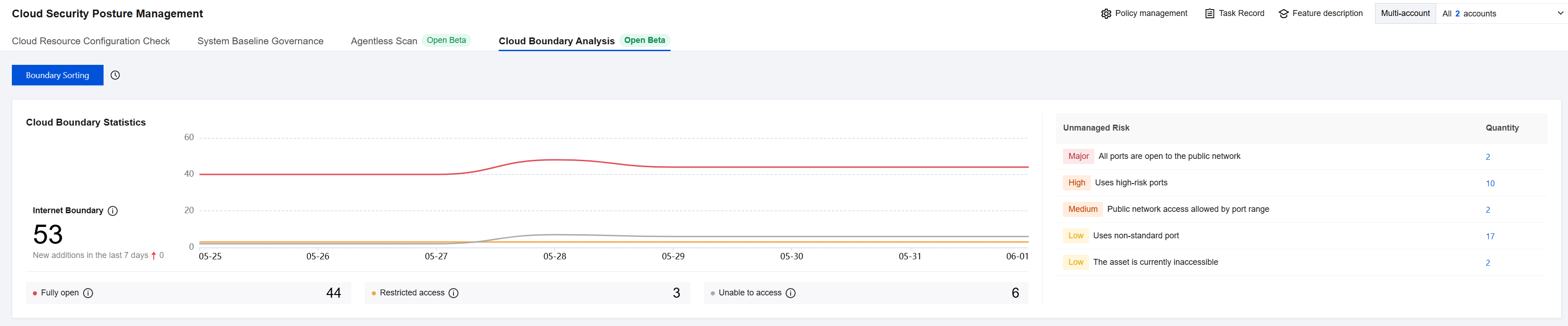
2. In Cloud Security Posture Management > Cloud Boundary Analysis, you can view the relevant data content.
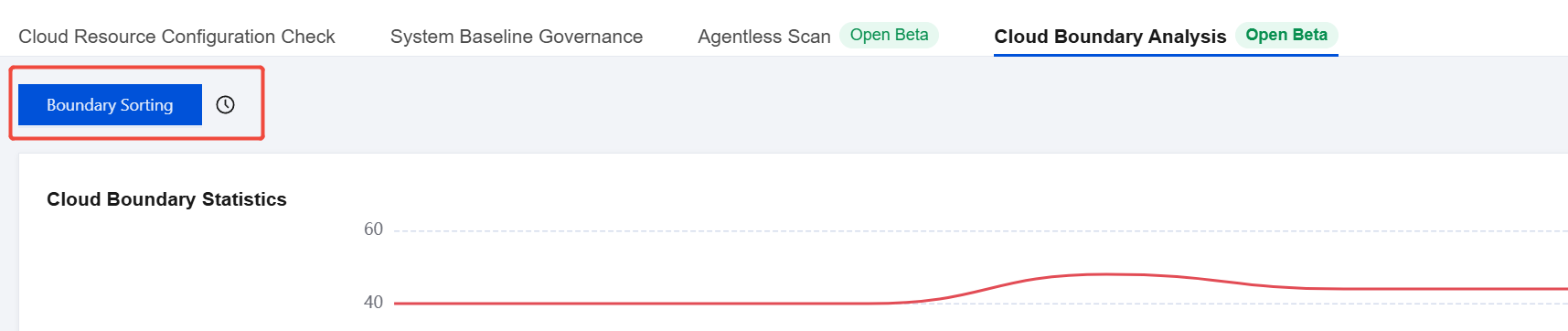
3. On the Cloud Boundary Analysis page, click Boundary Sorting to trigger the boundary sorting task.
Supported Cloud Product Instance Types
Currently, Cloud Boundary Analysis supports the following cloud products. The product categories and names are referenced from the official cloud provider documentation.
Cloud Provider | Product Category | Product Name |
Tencent Cloud | Computing | CVM |
| | Lighthouse |
| Networking | CLB |
| | Elastic IP |
| | ENI |
| | NATGW |
| CDN and Edge | CDN |
| Security | Web Application Firewall (WAF) |
| Database | TencentDB for MySQL |
| | TencentDB for MariaDB |
| | TencentDB for SQL Server |
| | TencentDB for MongoDB |
| | TencentDB for PostgreSQL |
| | TencentDB for Redis® |
| Storage | Object storage |
| Big data | Elasticsearch Service |
| Containers and Middleware | TKE |
Alibaba Cloud | Computing | Elastic Compute Service (ECS) |
| Networking and CDN | Server Load Balancer (SLB) |
| | CDN |
| | Elastic IP |
| | ENI |
| | NAT Gateway |
| | Anycast EIP |
| Big data computing | Elasticsearch |
| Serverless | Function Compute |
| Database | ApsaraDB RDS |
| | TencentDB for MongoDB |
| | Tair (Redis-compatible) |
| Storage | Object Storage Service (OSS) |
| Security | Web Application Firewall (WAF) |
Amazon Web Services | Computing | Amazon EC2 |
| Networking | Elastic Load Balancing (ELB) |
| | Elastic IP |
| | ENI |
| Database | ApsaraDB RDS |
| | Amazon DocumentDB |
| | MemoryDB |
| | ElastiCache |
| Serverless | Lambda |
| CDN | CloudFront |
Help and Support
Was this page helpful?
You can also Contact sales or Submit a Ticket for help.
Help us improve! Rate your documentation experience in 5 mins.
Feedback