This document describes how to reset your instance login password in the ECM console.
Notes
The server will be shut down during password reset. Schedule the time in advance to avoid data loss. We recommend you perform the operation during off-peak hours to minimize the impact.
Requirements of the new password for Linux instance: the password must contain 8–30 characters in at least three of the following character types: uppercase letters, lowercase letters, digits, and special symbols and cannot start with "/".
Requirements of the new password for Windows instance: the password must contain 12–30 characters in at least three of the following character types: uppercase letters, lowercase letters, digits, and special symbols and cannot start with "/" or contain the username.
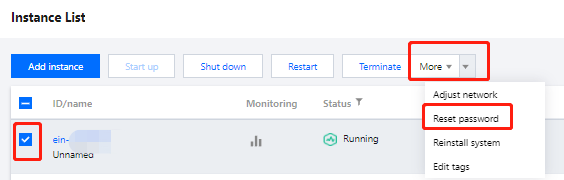
3. On the instance list page, select the target instance and click More > Reset Password.
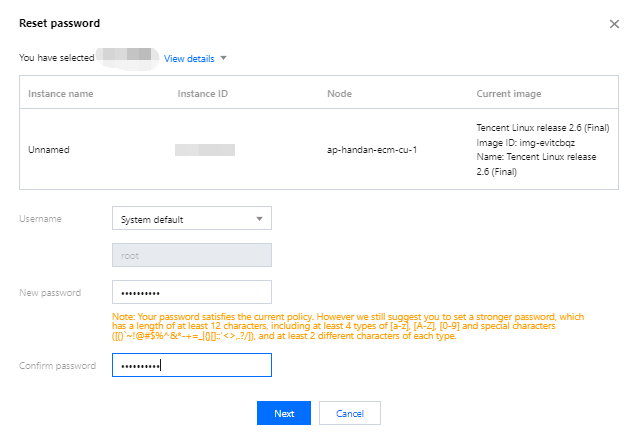
4. In the pop-up window, confirm the username for which you want to reset the password (for example, the username is root in a Linux instance and is Administrator in a Windows instance), enter the new password in New Password and Confirm Password, and click Next as shown below:
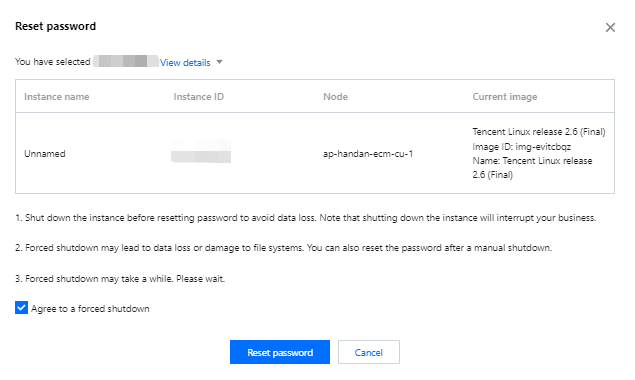
5. Select Agree to a forced shutdown and click Reset Password as shown below: