tencent cloud

Bastion Host

Product Introduction
Overview
Strengths
Scenarios
Differences between SaaS BH Standard Edition and Pro Edition
Purchase Guide
Billing Overview
Purchase Method
Upgrade Subscription Plan
Upgrade Bandwidth
Upgrade Extension Pack
Renewal
Payment Overdue
Refund
Getting Started
First Login of Admin
Admin Manual
First Login of Ops Engineer
Ops Engineer Manual
Operation Guide
Admin Guide
Operations Guide
Practical Tutorial
Blocking High-risk Commands
File Transfer Control
Tracing Security Incidents
Cross-VPC Asset Management
Access Bastion Host O&M Page Via Intranet Domain
Troubleshooting
Windows Resource Login Connection Timeout
Windows Resource Login Prompting Wait Active
Linux Resource Login via Mac Prompting No Matching Host Key Type Found
Windows Resource is Inaccessible for Mac Users
iTerm Client Displaying Unrecognizable Characters to Mac Users During Ops
Unable to Invoke Local XShell or SecureCRT
Ops Members Cannot Receive SMS Verification Code
Ops Members Cannot Load the Account When Logging in to Resources
Linux Resource Login Prompting Host Unreachable
Linux Resource Login Failure Prompting Password Error
FAQs
Usage
Consultation
BH Policy
Privacy Policy
Data Processing And Security Agreement

Webpage Calling Client

PDF
Focus Mode
Font Size
Last updated: 2025-04-18 11:11:07

Overview

Users access and manage hosts through Bastion Host. Below is a detailed instruction on how to access a host.

Prerequisites

The administrator has informed the Ops personnel of the login address.
The administrator has granted host access permissions to the Ops personnel.
The Ops personnel have completed Account Activation.

Directions

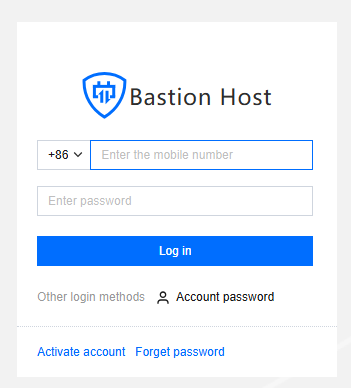
1. Enter the Ops page login address in a browser to open the BH Ops page. Enter your phone number and password to log in to the BH. Alternatively, click Account password to switch to login with account name and password.

2. After entering the BH, choose Services > Asset list in the left sidebar.

3. On the Asset List page, click Access on the right side of the corresponding host.

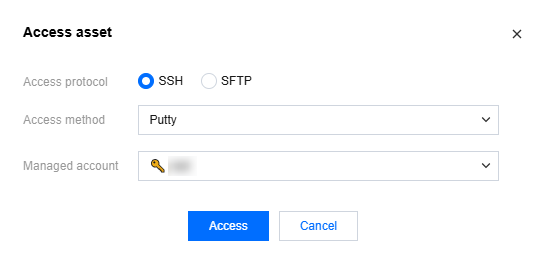
4. In the Access Host popup, select the access protocol, access method, and host account, then click Access to call the corresponding client tool to access the host.
Note
All operations performed to access hosts through the BH will be recorded.


Recommended Client Tool Versions

Platform
Type
Tool
Recommended Versions
Windows
Characters
PuTTY
Release 0.76
SecureCRT
8.3.4
Xshell
Xshell
Graphics
MSTSC
10.0.19041.746
File Transfer
FileZilla
3.55.1
WinSCP
5.17.10.0
Xftp
7.0.0054
macOS
Characters
SecureCRT
9.1
iTerm
3.4.8
Terminal
2.9.5
Graphics
Microsoft Remote Desktop Beta
10.7.0
File Transfer
FileZilla
3.55.1
Transmit
5.7.6

Help and Support

Was this page helpful?

Help us improve! Rate your documentation experience in 5 mins.

Feedback