Firewall Engine Region Migration
Download
Focus Mode
Font Size
1. Log in to CFW console, in the left sidebar, select Firewall Toggle.
2. On the Firewall Toggle page, based on the instance type, switch to NAT Firewall or VPC Firewall (Primary/Secondary).

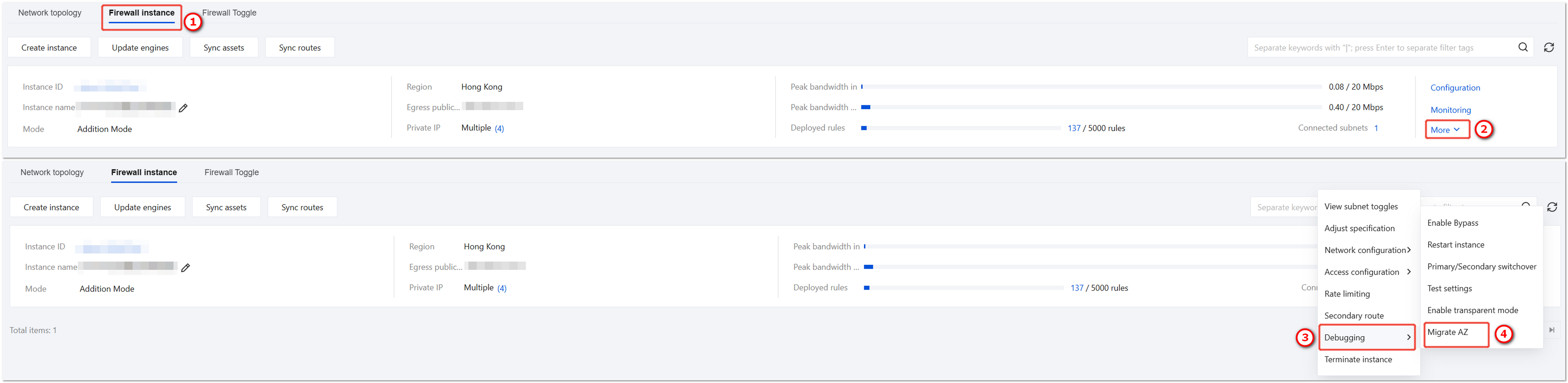
3. On the firewall instance tab, select the engine instance that needs to be migrated to another AZ, click More > Debugging > Migrate AZ.
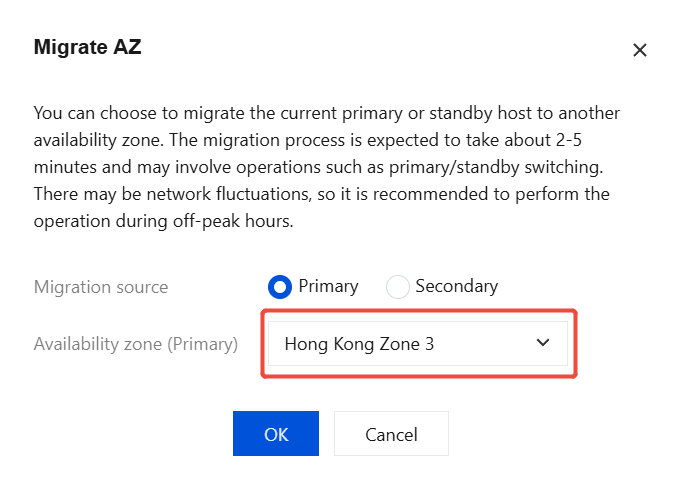
4. In the Migrate AZ dialog box, select a different AZ for the standby instance than the primary instance, click OK to complete the operation.
Note:
During the migration of the primary instance to another AZ, a primary/secondary switchover will occur, causing network jitter. It is recommended to perform primary instance migration during off-peak hours; standby instance migration will not cause any impact.
Help and Support
Was this page helpful?
You can also Contact sales or Submit a Ticket for help.
Help us improve! Rate your documentation experience in 5 mins.
Feedback