Quick Start
Download
Focus Mode
Font Size
This article will introduce how to complete your first API call on the large model service platform TokenHub.
Preparation
Before using the Tencent Cloud large model service platform TokenHub, you need to Singing up for a Tencent Cloud Account and complete Identity Verification.
Steps
Step 1: Sign in to the TokenHub console
Sign in to the TokenHub console. After activating TokenHub by following the on-screen prompts, you can browse and select models in the Model Gallery. For detailed model information, refer to the Model List.
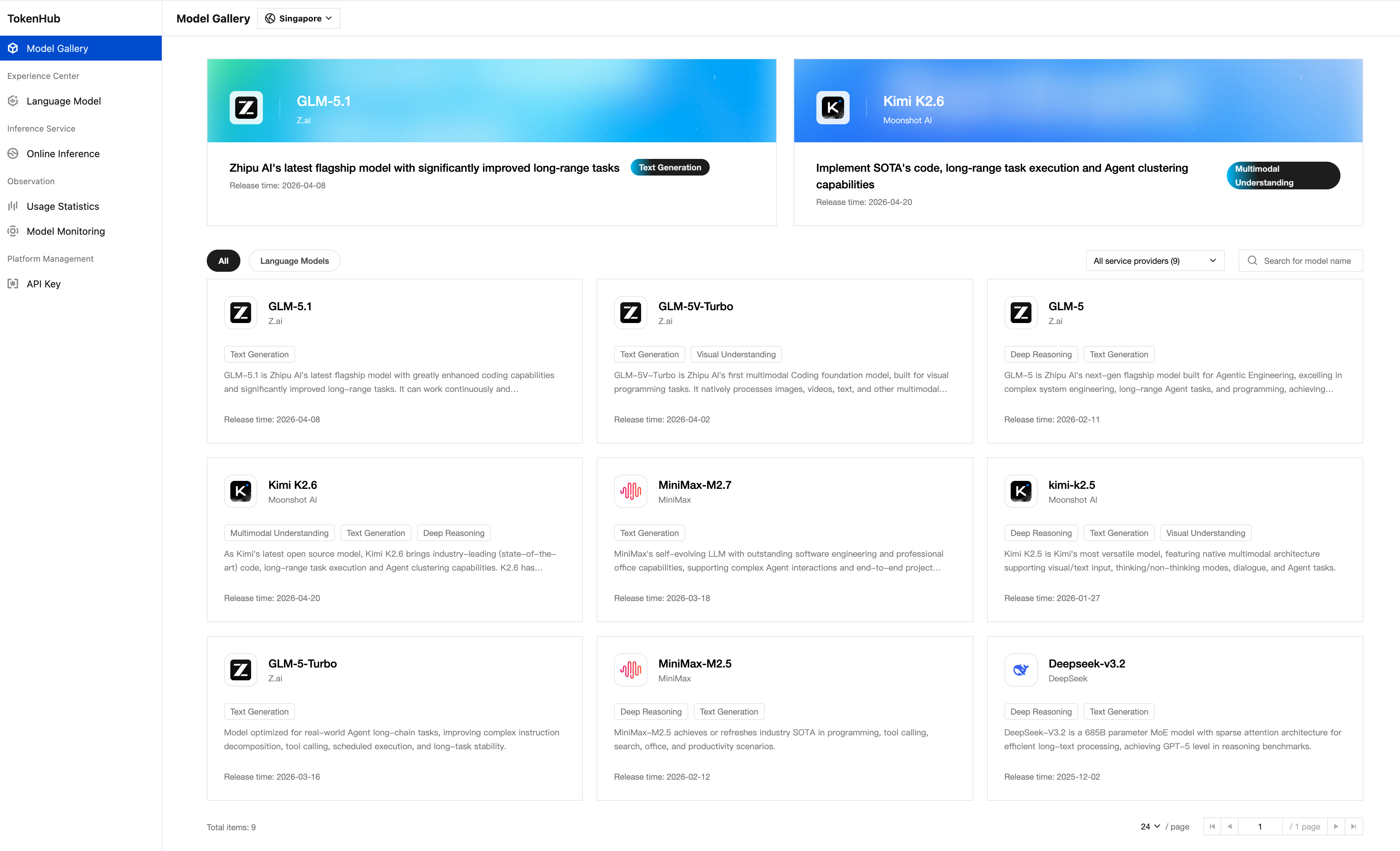
Step 2: Enable pay-as-you-go for the selected model
TokenHub supports pay-as-you-go billing for models. For the models you wish to use, find the target model in the Online Inference list.
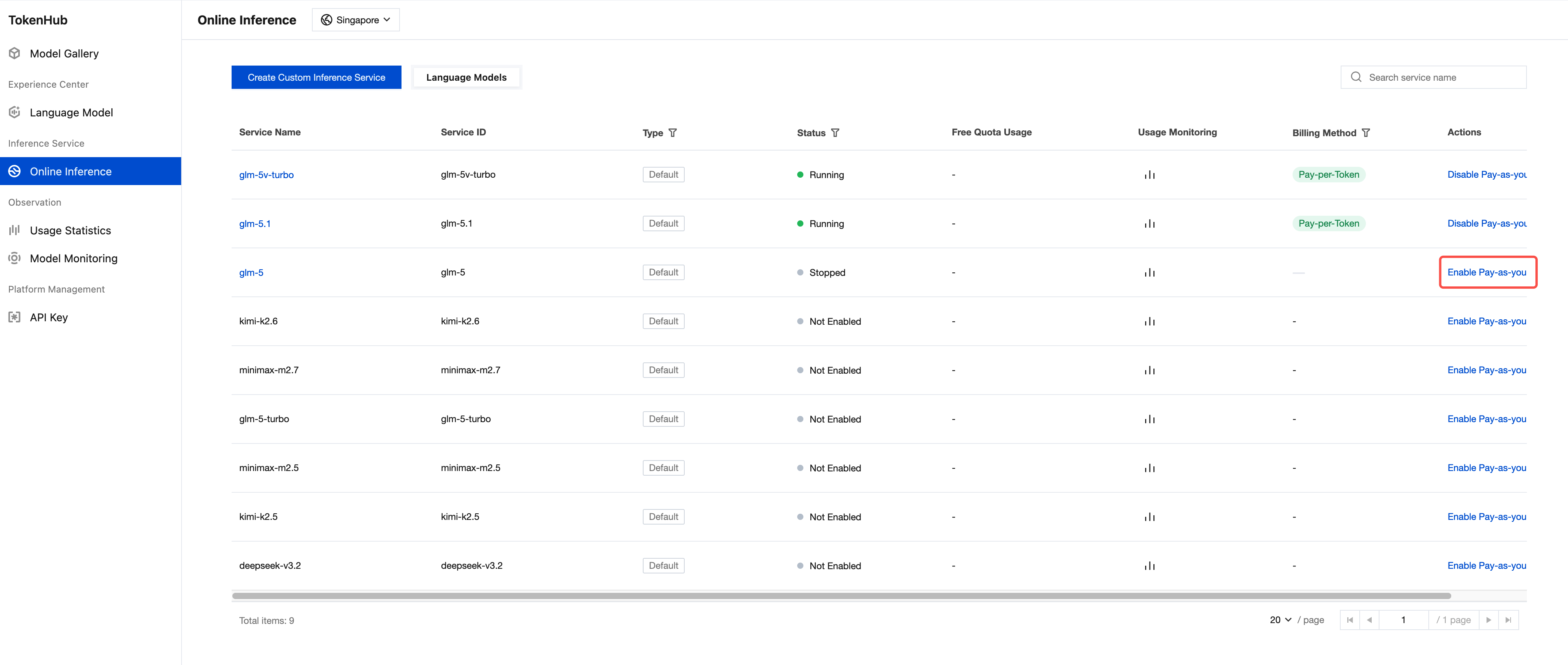
Step 3: Create API Key
Before calling the model API, you need to create an API key for authentication.
1. Go to API Key page.
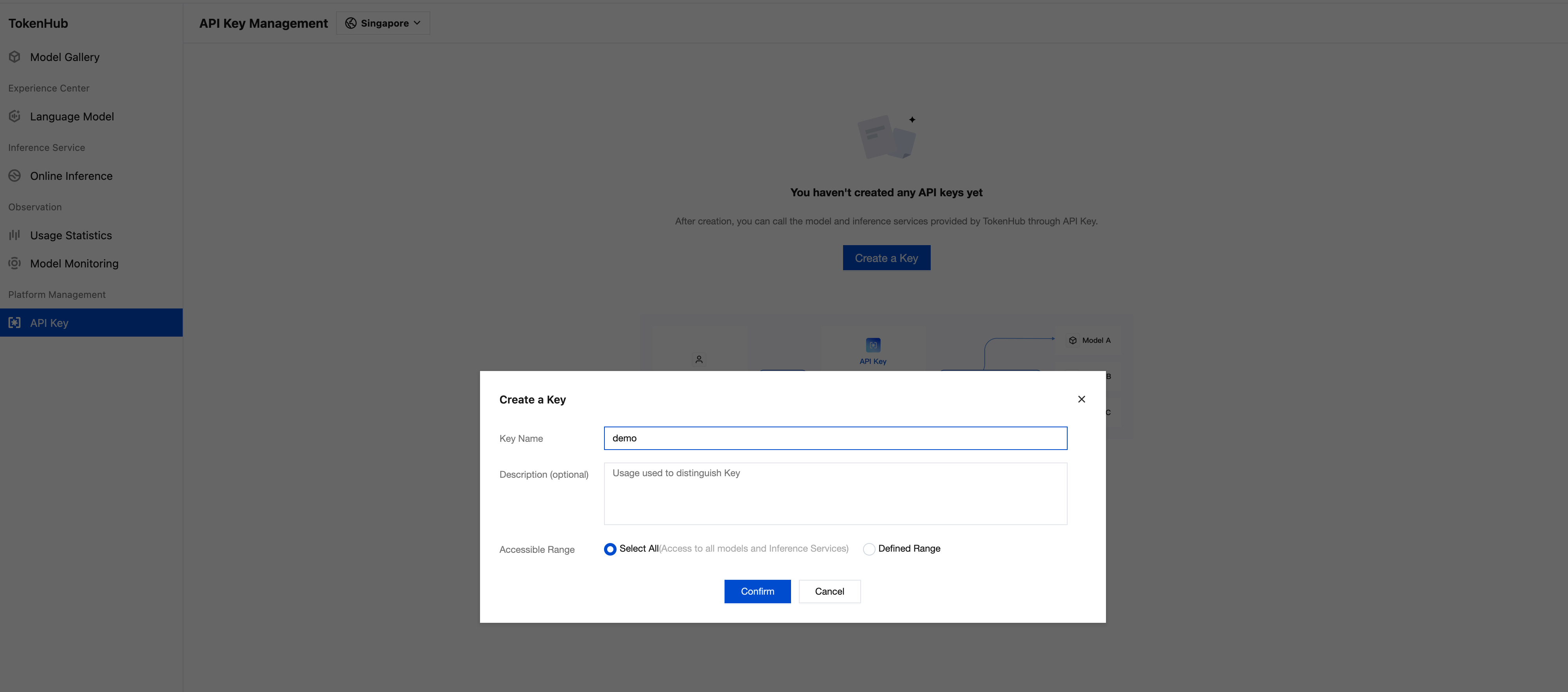
2. After a region is selected at the top of the page, click Create a Key.
3. In the Create a Key dialog, enter the Key Name and set the Accessible Range :
Select All: Grants access to all models and inference services under the current account.
Defined Range: Lets you select specific models and inference services to control access.
4. Click Confirm to to create the API key.
After creation, be sure to copy and securely store the API Key, as this information will be used in subsequent API calls. For more API Key management information, see API Key Management.
Step 4: Call the model via API
TokenHub is compatible with OpenAI API protocol. You can use familiar SDKs and tools to directly access it. API invocation details, see API Integration Guide.
Note:
Please replace
YOUR_API_KEY in the sample code with your actual API KEY.The sample code uses a model in the Singapore region. Replace the model field with the model you want to call.You can find the corresponding model values in Model List under model (API Parameter).
# Replace YOUR_API_KEY with the API KEY created in the previous steps# Replace the model name in the <model> field with the one you want to try outcurl -X POST 'https://tokenhub-intl.tencentcloudmaas.com/v1/chat/completions' \\-H 'Authorization: Bearer YOUR_API_KEY' \\-H 'Content-Type: application/json' \\-d '{"model": "deepseek-v3.2","messages": [{"role": "user", "content": "hello"}],"stream": true}'
from openai import OpenAIclient = OpenAI(# Replace YOUR_API_KEY with the API KEY created in the previous stepsapi_key="YOUR_API_KEY",base_url="https://tokenhub-intl.tencentcloudmaas.com/v1")response = client.chat.completions.create(# Replace the model name in the <model> field with the one you want to try outmodel="deepseek-v3.2",messages=[{"role": "system", "content": "You are a helpful assistant."},{"role": "user", "content": "Hello, please introduce yourself"}])print(response.choices[0].message.content)
import OpenAI from 'openai';const client = new OpenAI({// Replace YOUR_API_KEY with the API KEY created in the previous stepsapiKey: 'YOUR_API_KEY',baseURL: 'https://tokenhub-intl.tencentcloudmaas.com/v1',});async function main() {const response = await client.chat.completions.create({// Replace the model name in the model field with the one you want to try outmodel: 'deepseek-v3.2',messages: [{ role: 'system', content: 'You are a helpful assistant.' },{ role: 'user', content: 'Hello, please introduce yourself' },],});console.log(response.choices[0].message.content);}main();
import java.net.http.*;import java.net.URI;public class MaaSExample {public static void main(String[] args) throws Exception {// Replace YOUR_API_KEY with the API KEY created in the previous stepsString apiKey = "YOUR_API_KEY";// Replace the model name in the model field with the one you want to try outString body = """{"model": "deepseek-v3.2","messages": [{"role": "user", "content": "hello"}]}""";HttpRequest request = HttpRequest.newBuilder().uri(URI.create("https://tokenhub-intl.tencentcloudmaas.com/v1/chat/completions")).header("Authorization", "Bearer " + apiKey).header("Content-Type", "application/json").POST(HttpRequest.BodyPublishers.ofString(body)).build();HttpClient client = HttpClient.newHttpClient();HttpResponse<String> response = client.send(request,HttpResponse.BodyHandlers.ofString());System.out.println(response.body());}}
package mainimport ("bytes""encoding/json""fmt""io""net/http")func main() {// Replace YOUR_API_KEY with the API KEY created in the previous stepsapiKey := "YOUR_API_KEY"body := map[string]interface{}{// Replace the model name in the model field with the one you want to try out"model": "deepseek-v3.2","messages": []map[string]string{{"role": "user", "content": "hello"},},}jsonBody, _ := json.Marshal(body)req, _ := http.NewRequest("POST","https://tokenhub-intl.tencentcloudmaas.com/v1/chat/completions",bytes.NewBuffer(jsonBody))req.Header.Set("Authorization", "Bearer "+apiKey)req.Header.Set("Content-Type", "application/json")resp, err := http.DefaultClient.Do(req)if err != nil {panic(err)}defer resp.Body.Close()result, _ := io.ReadAll(resp.Body)fmt.Println(string(result))}
Next
You can go to the Experience Center to experience the model capabilities online. For details, see the Experience Center.
You can go to Online Inference to manage the model services you are using. For details, see Online Inference.
If you need to view model usage, see Usage Statistics.
Help and Support
Was this page helpful?
You can also Contact sales or Submit a Ticket for help.
Help us improve! Rate your documentation experience in 5 mins.
Feedback