This document describes how to use the CLS Log plugin to report logs containing detailed request and response body messages to the Cloud Log Service (CLS) topic.
Attention:
The cloud-native gateway now supports delivering Access Logs to CLS and modifying the Access Log format. First, evaluate whether the CLS delivery feature meets your requirements. For details, see Delivering Logs to CLS. Then, consider whether to use the plugin method to report logs to CLS. Using the plugin allows you to customize your own Log reporting format and report more fields.
Prerequisites
1. The cloud-native gateway instance has been created. For specific operations, see Create Cloud-Native Gateway.
2. Go to the TSF console. On the Cloud Native Intelligent Gateway page, locate the required instance.
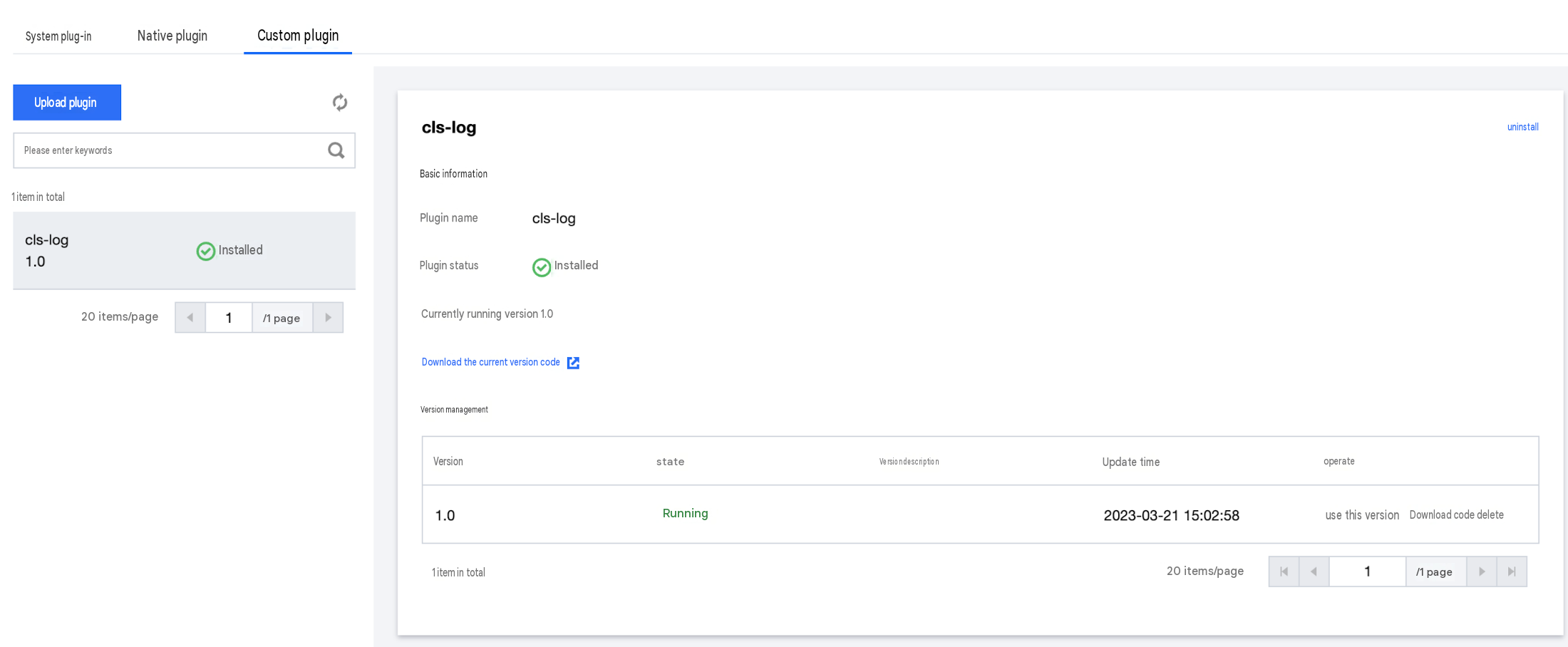
3. Go to the instance details page and choose Plugin Management > Custom Plugins.
Operation Steps
1. Download the CLS Log plugin installation package cls_log.zip.
2. Refer to Plugin Management. In the gateway instance plugin configuration, after uploading and installing the CLS Log plugin, click to start the plugin using this version.
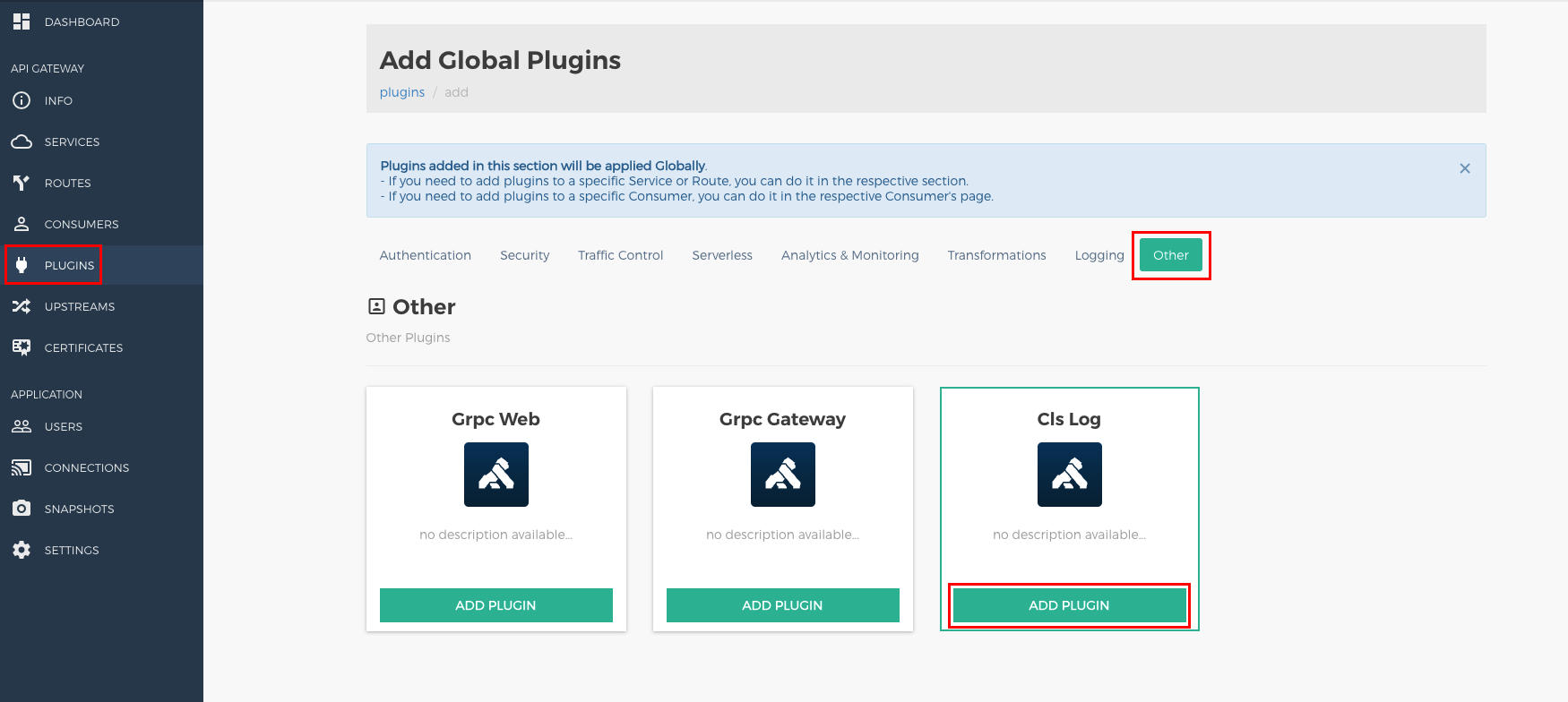
3. Log in to the Konga console. Switch the page to Basic Information > Konga Console. Enable the public network access address. After obtaining the account and password, go to the Konga management console. In the PLUGINS menu, add the CLS Log plugin and enable it globally. For parameter configuration, see the plugin parameters section below.
4. Initiate a request using the gateway IP address, and confirm in the CLS console that logs are correctly reported to the CLS topic. Example logs are as follows:
CLS API Host. Select a domain name address as needed, for example, ap-beijing.cls.tencentyun.com. For details, see CLS doc.
cls_topic
Yes
-
Target CLS topic to which logs are reported.
secret_id
Yes
-
SecretID of the Tencent Cloud account.
secret_key
Yes
-
SecretKey of the Tencent Cloud account.
log_req_body
Yes
false
Whether to record the log field in the request body. When it is enabled, it affects gateway performance.
log_resp_body
Yes
false
Whether to record the log field in the response body. When it is enabled, it affects gateway performance.
max_req_body_size
Yes
10240
Maximum length (in bytes) of the log field in the request body. Bodies whose length exceeds the limit will be truncated.
max_resp_body_size
Yes
10240
Maximum length (in bytes) of the log field in the response body. Bodies whose length exceeds the limit will be truncated.
batch_size
Yes
100
Number of logs reported at a time. It is recommended that the size of logs in a batch does not exceed 8 MB.
retry_count
Yes
3
Maximum number of retries.
mode
No
memory
memory: asynchronously reports logs from the memory queue through the CLS software development kit (SDK). access_log: uses the access_log module with LogListener for collection and reporting, which may be affected by disk performance. If required, submit a ticket to enable it.
fallback_to_access_log
No
false
Whether to downgrade to the access_log reporting mode if a large number of logs are accumulated in the reporting queue when the memory mode is used. If required, submit a ticket to enable it.
Must-Knows
1. The key pair configured in the CLS Log plugin should have the cls:UploadLog policy permission. For details, see Using APIs/SDKs to Upload Data in CLS Access Policy Template.
2. Enabling the CLS Log plugin has slight impact on gateway performance, and the impact is directly proportional to the log size.
3. The CLS Log plugin implements features, such as buffer queue, batch reporting, and retry on failure, ensuring retries during sporadic reporting failures. However, due to the finite size of the buffer queue, logs may be lost during long-term linkage failures.
4. The CLS Log plugin includes common basic log fields. If custom log fields are required, you can develop them based on the plugin.