Cloud Native Gateway provides a plugin management feature. You can manage your system plugins, native plugins, and deploy custom plugins on the console. This document describes the operational steps for related plugin definitions and for developing and deploying custom plugins to Cloud Native Gateway.
Introduction to Plugins
System Plugins
Native Plugins
Custom Plugins
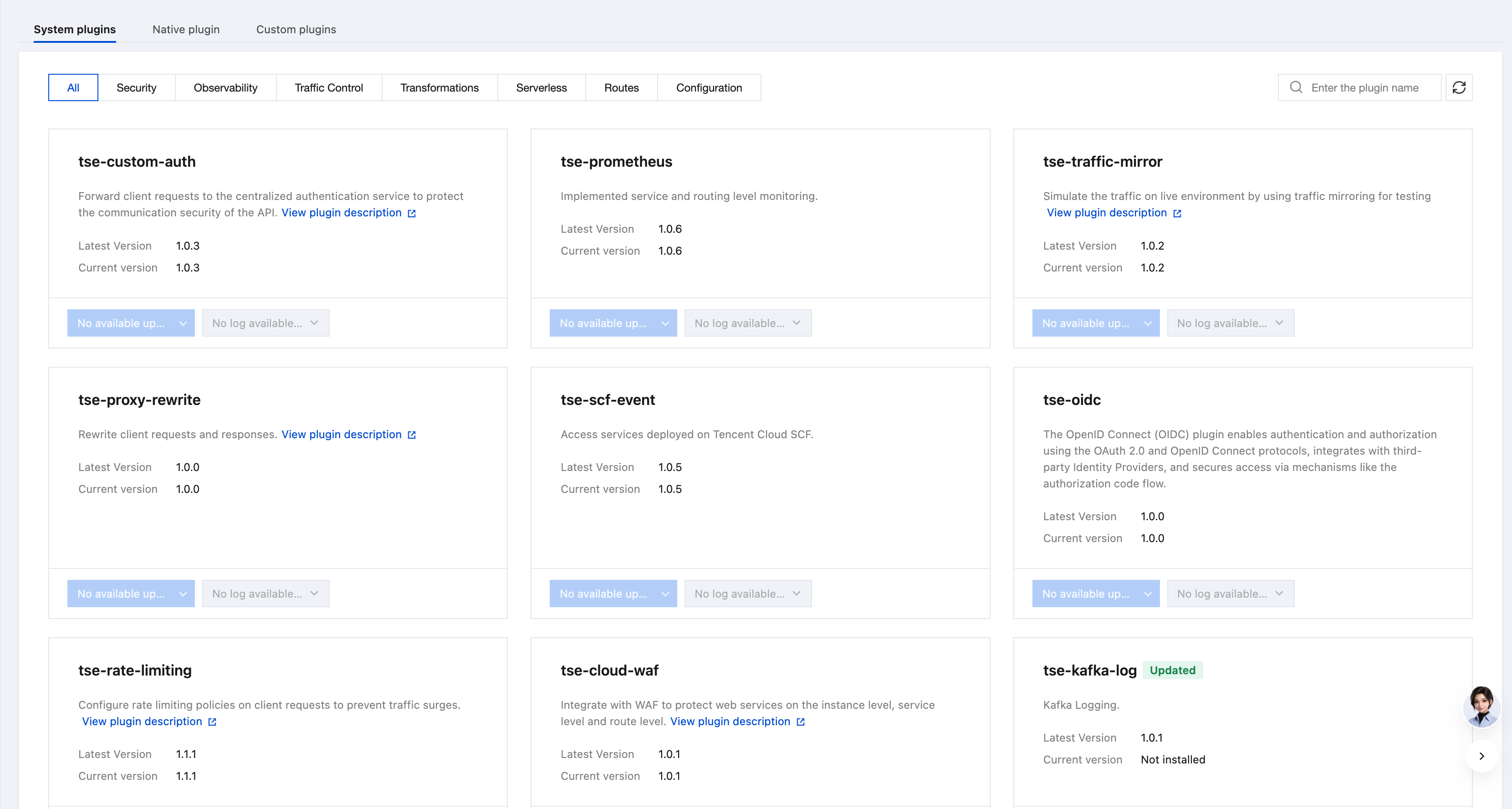
System plugins are enhanced plugins provided by Cloud Native Gateway based on the open-source version.
It is recommended to use the canary policy capability for console services and routes. Canary release.
Native plugins are plugins delivered with the open-source Kong gateway.
Term
Type
Description
acl
Security
This plugin uses an access control list (ACL) group name to add consumers to an allowlist or blocklist to limit their access to services or routes. To use this plugin on a service or route, an identity verification plugin should be enabled on the service or route.
acme
Security
This plugin allows Cloud Native API Gateway to use certificates from Let's Encrypt or other ACMEv2 services, and automatic certificate renewal is supported.
aws-lambda
Serverless
It is used to call AWS Lambda functions from Cloud Native API Gateway. It can be used with other request plugins to protect, manage, or extend features.
azure-functions
Serverless
This plugin calls serverless functions on Azure from Cloud Native API Gateway. It can be used with other request plugins to protect, manage, or extend features.
basic-auth
Authentication and authorization
This plugin uses username and password protection to add basic authentication to services or routes.
bot-detection
Security
This plugin protects services or routes from most common robot attacks and can add custom clients to an allowlist or blocklist.
correlation-id
Request transformation
This plugin uses the unique ID transmitted through the HTTP header to associate requests with responses.
cors
Security
When this plugin is enabled, Cross-Origin Resource Sharing (CORS) can be added to services or routes easily.
datadog
Analysis and monitoring
This plugin records service metrics and routes them to the local Datadog Agent.
file-log
Logs
This plugin writes request and response data to a log file on the disk. It is not recommended to use this plugin in production.
grpc-gateway
Others
This plugin exposes the gRPC service through the HTTP RESTful API. It converts requests and responses to the JSON format and allows users to access the upstream gRPC service through ordinary HTTP requests.
grpc-web
Others
This plugin accesses the gRPC service using the gRPC-web protocol.
hmac-auth
Authentication and authorization
This plugin adds HMAC signature authentication to services or routes to verify the integrity of incoming requests. It verifies the digital signature sent in the Proxy-Authorization or Authorization header (in this order).
http-log
Logs
This plugin forwards request and response data to the HTTP server.
ip-restriction
Security
This plugin adds IP addresses to an allowlist or blocklist to limit their access to services or routes. A single IP address, multiple IP addresses, or a CIDR, such as 10.10.10.0/24 can be configured.
jwt
Authentication and authorization
This plugin is used to verify requests containing the JSON web token with HS256 or RS256 signature. If the token signature is verified in a request, Cloud Native API Gateway forwards the request to the upstream service. Otherwise, it discards the request.
key-auth
Authentication and authorization
This plugin adds key authentication (also known as the API key) to services or routes.
ldap-auth
Authentication and authorization
This plugin uses username and password protection to add LDAP binding authentication to routes. It checks the valid credentials in the Proxy-Authorization and Authorization headers (in this order).
loggly
Logs
This plugin records request and response data to Loggly using UDP.
oauth2
Authentication and authorization
This plugin uses the Authorization Code grant, Client Credentials grant, Implicit grant, or Resource Owner Password Credentials grant to add an OAuth 2.0 authentication layer.
post-function
Serverless
This plugin is used to run Lua code after other plugins run in the access phase.
pre-function
Serverless
This plugin is used to run Lua code before other plugins run in the access phase.
prometheus
Analysis and monitoring
This plugin exposes metrics related to Cloud Native API Gateway and proxied upstream services in Prometheus exposition format, allowing Prometheus Server to capture these metrics.
proxy-cache
Traffic control
This plugin caches response entities based on the configured response code, content type, and request method for each consumer or API.
request-size-limiting
Traffic control
This plugin is used to limit incoming requests whose body size exceeds a specific value (in megabytes).
request-termination
Traffic control
This plugin is used to terminate input requests with the specified status code and message.
request-transformer
Request transformation
This plugin is used to convert requests from the client before sending the requests to the upstream service.
response-ratelimiting
Traffic control
This plugin is used to limit the number of requests that can be sent based on the custom response header returned by the upstream service.
response-transformer
Request transformation
This plugin is used to convert responses from the upstream service before the responses are sent back to the client.
session
Authentication and authorization
This plugin manages browser sessions of APIs proxied by Cloud Native API Gateway. It configures and manages session data storage, encryption, renewal, expiration, and browser cookies.
statsd
Logs
This plugin records log metrics of services and routes to a StatsD server.
syslog
Logs
This plugin forwards request and response data to the syslog server.
tcp-log
Logs
This plugin forwards request and response data to the TCP server.
udp-log
Logs
This plugin forwards request and response data to the UDP server.
zipkin
Analysis and monitoring
This plugin spreads Zipkin distributed trace spans and reports the spans to the Zipkin server.
Cloud Native Gateway Kong provides the capability to extend custom plugins. You can develop your own custom plugins according to the data format specified by Kong to modify data flows and achieve deep integration. For detailed operations, see Using Custom Plugins.
Preparing custom plugin code
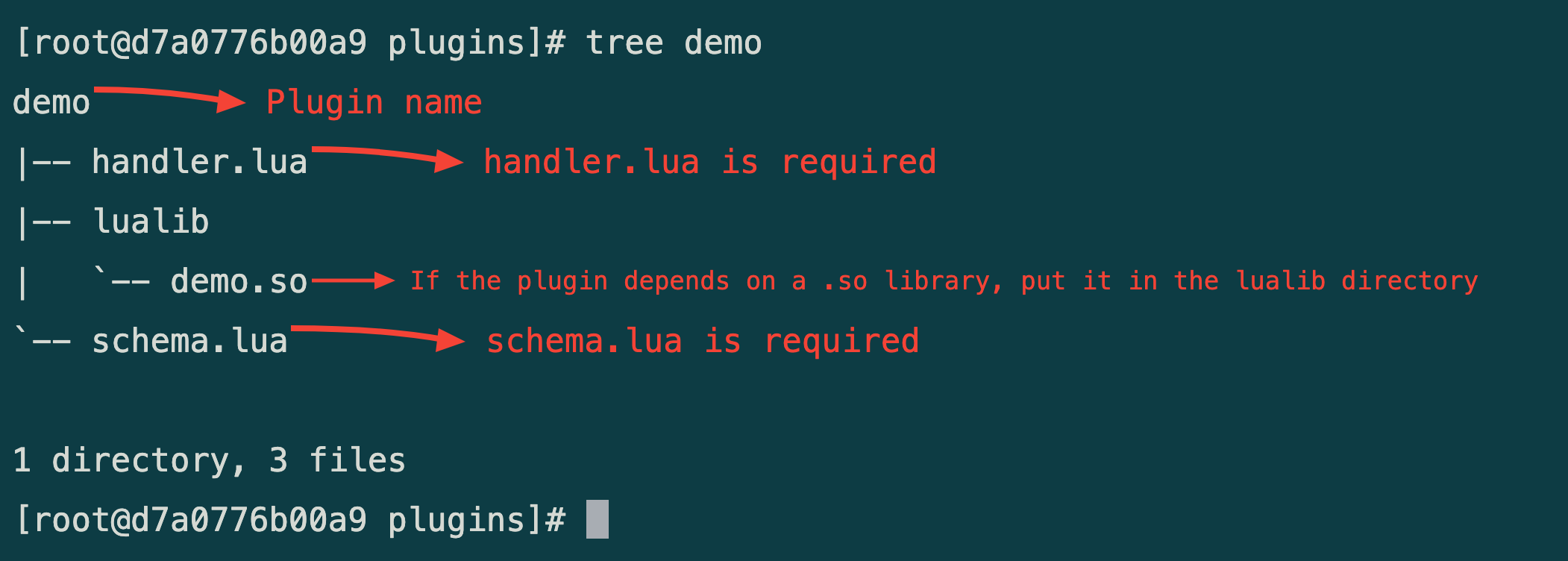
According to the Kong lua plugin development specification: Plugin Development - File Structure - v2.7.x | Kong Docs, custom plugins retain the development specifications of native Kong plugins and also support the capability of so libraries. It is recommended that so libraries be compiled in a CentOS 7 environment.
The following figure shows the reference plugin directory structure.
2. Click Cloud Native Gateway in the left sidebar, select the gateway instance you want to operate, and then go to the instance details page. On the instance details page, select the Plugin Management tab to view information about system plugins, native plugins, and custom plugins.
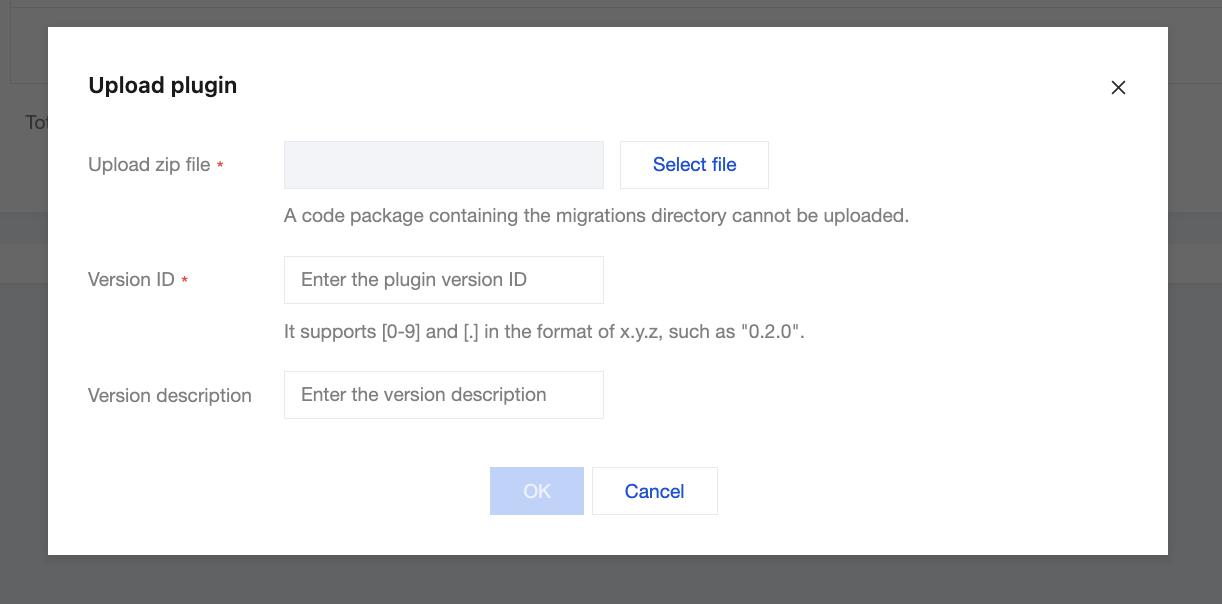
2. On the Plugin Management page, select the Custom Plugins tab and click Upload Plugin.
3. After selecting the plugin, enter the plugin version number and version description, and then click Start Upload. After the upload is complete, click OK to finish the upload.
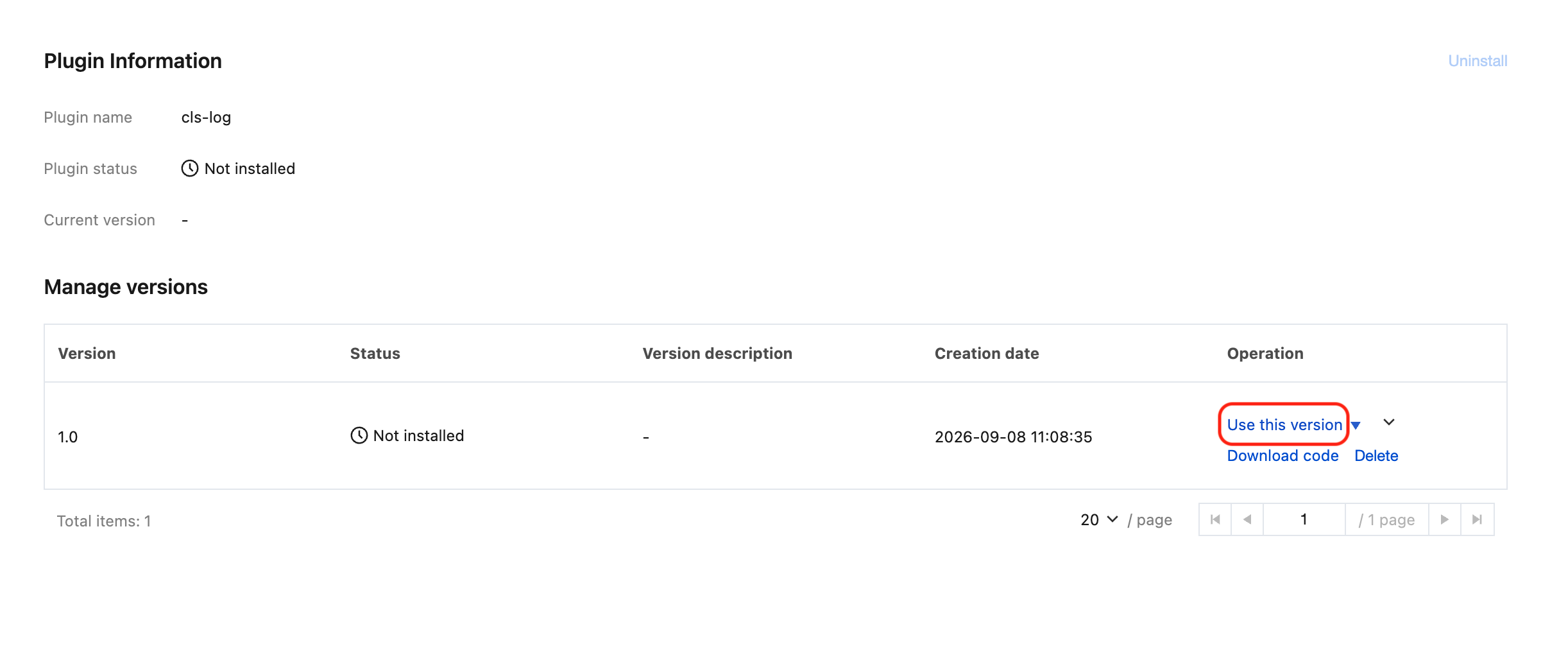
4. After uploading the plugin, click Use This Version. The plugin will then be automatically deployed to all Kong nodes.
5. If you no longer need the plugin, click Uninstall in the top right corner to uninstall the plugin.