tencent cloud

Video on Demand

Release Notes and Announcements
Release Notes
Announcements
Product Introduction
Overview
Product Features
Features
Strengths
Scenarios
Solutions
Professional Edition
Introduction to Video On Demand Professional Edition
Quick Start
Console Guide
Development Guide
Purchase Guide
Billing Overview
Billing Modes
Purchase Guide
Viewing Bills
Renewal
Overdue Policy
Refund Policy
Getting Started
Console Guide
Console Overview
Service Overview
Application Management
Media Management
Package Management
License Management
Real-Time Log Analysis
Practical Tutorial
Media Upload
Smart Cold Storage of VOD Media Asset Files
Video Processing
Distribution and Playback
How to Receive Event Notification
How to Migrate Files from Origin Server to VOD
Live Recording
How to Pull from Custom Origin Servers
How to Use EdgeOne to Distribute Content in VOD
Development Guide
Media Upload
Media Processing
Video AI
Event Notification
Video Playback
Media Encryption and Copyright Protection
Broadcast Channel
CAM
Media File Download
Subapplication System
Error Codes
Player SDK
Overview
Basic Concepts
Features
Free Demo
Free Trial License
Purchase Guide
SDK Download
Licenses
Player Guide
Integration (UI Included)
Integration (No UI)
Advanced Features
API Documentation
Player Adapter
Player SDK Policy
Server APIs
History
Introduction
API Category
Other APIs
Media Processing APIs
Task Management APIs
Media Upload APIs
Media Management APIs
Event Notification Relevant API
Media Categorization APIs
Domain Name Management APIs
Distribution APIs
AI-based Sample Management APIs
Region Management APIs
Data Statistics APIs
Carousel-Related APIs
Just In Time Transcode APIs
No longer recommended APIs
Making API Requests
AI-based image processing APIs
Parameter Template APIs
Task Flow APIs
Data Types
Error Codes
Video on Demand API 2024-07-18
FAQs
Mobile Playback
Fees
Video Upload
Video Publishing
Video Playback
Web Playback
Full Screen Playback
Statistics
Access Management
Cold Storage
Agreements
Service Level Agreement
VOD Policy
Privacy Policy
Data Processing And Security Agreement
Contact Us
Glossary

UGSV

PDF
Focus Mode
Font Size
Last updated: 2024-12-02 18:18:45

Short Video Applications

Background

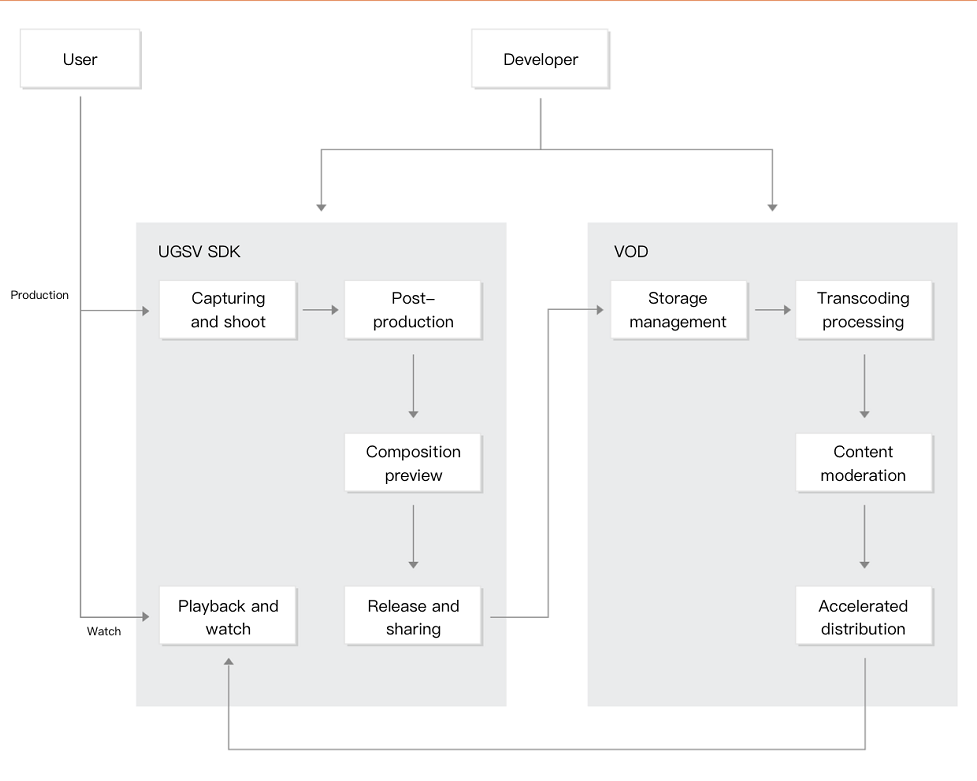
Mobile user generated short video (UGSV) apps have a wide variety of use cases in online shopping, entertainment videos, and video software. Tencent Cloud VOD provides a one-stop UGSV solution covering all stages from video generation, upload, and processing to distribution and playback. This enables you to quickly implement and launch your mobile UGSV app while focusing on your business development.

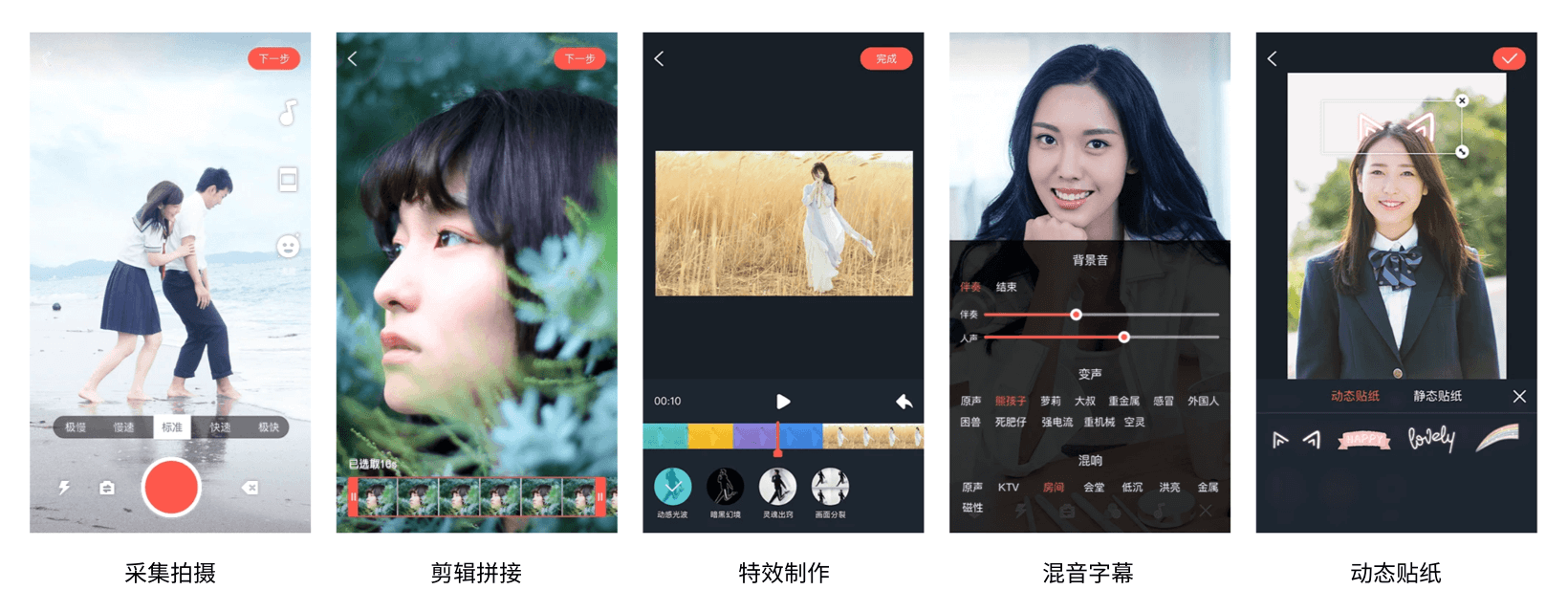
VOD's UGSV SDK provides a rich set of features such as video capturing, editing and splicing, special effect production, reverb and subtitling, and other capabiliies. Combined with VOD's powerful backend capabilities, these make it easy for you to build your own UGSV applications. The UGSV SDK also provides:
Various filters, beauty filter effects, and dynamic stickers which improve the user experience of your application.
Options to quickly bind VOD resource packages to integrate video processing and playback acceleration capabilities.
UGSV demos, open-source code, and comments to help guide you through using the UGSV SDK.

Scheme architecture


Directions

1. Sign up for a Tencent Cloud account and activate the VOD service. For details, see Getting Started - Step 1. Activate VOD.
2. Add a UGSV license and enter the related information into the VOD console to activate the license.
3. Download the application source code and debug, compile, and run it. For details, see Quickly Building UGSV Application.

More Information

For more information on UGSV license fees, see Other Value-Added Services.
For more information on how to build a UGSV application, see Quickly Building UGSV Application.
For the list of UGSV SDK features, see SDK Download.

Help and Support

Was this page helpful?

Help us improve! Rate your documentation experience in 5 mins.

Feedback