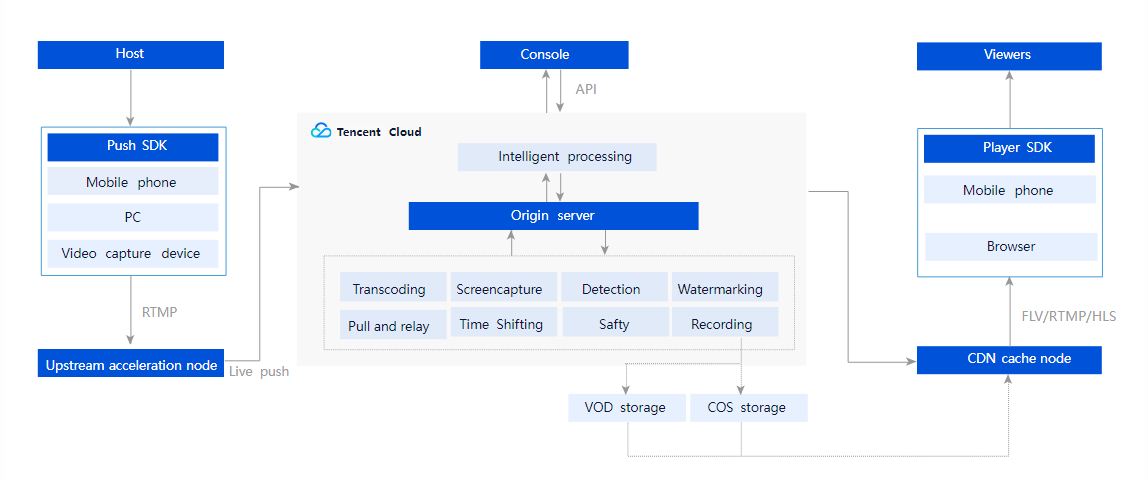
Leveraging Tencent's suite of audio/video media platforms, global network of cache nodes, and leading AI technologies in audio and video, Live Video Broadcasting (LVB) delivers Tencent Cloud’s live streaming capabilities to users. With professional, stable, and agile features such as live push, transcoding, distribution, and playback, LVB provides ultra-low latency, ultra-high image quality, and ultra-high performance even under very high concurrency.
Note
You can use LVB after you activate the CSS service. For more information, see LVB - Getting Started.
Product Architecture
Features
Full suite of features
LVB supports RTMP push, HLS origin servers, and other live streaming sources. It provides a multi-platform live streaming SDK and supports adaptive bitrate streaming, beauty filters, audio processing, instant streaming, stutter reduction, screen recording, and seamless definition switching. Playback is supported on all platforms, and you can also customize your own player.
Global acceleration
Tencent Cloud has over 2,000 CDN cache nodes across all regions of the Chinese mainland, covering not only major internet service providers, but also over a dozen small- and medium-sized ISPs. Outside the mainland, it operates more than 800 cache nodes in over 70 countries and regions across North America, Europe, and Southeast Asia.
Professional video processing
LVB provides cloud-based transcoding and processing services that can handle vast amounts of multimedia data. It can transcode audio and video files to different formats suitable for OTT services or playback on PC and mobile devices. It also offers features such as thumbnail generating, editing, content moderation, and encryption.
Security and hotlink protection
LVB provides all-round protection to prevent unauthorized playback of your videos, including IP blocklists, referrer blocklists, secure HTTPS acceleration, URL encryption, and other live streaming encryption technologies. It also offers a professional digital rights management (DRM) solution to safeguard your video assets.
Intelligent learning
With powerful AI-based recognition technology, LVB can learn and analyze the content of your images or videos. With this technology, LVB can intelligently automate image recognition, speech recognition, content moderation, subtitling, and other video tasks.
Statistics analysis
Based on big data analysis covering scenarios in various industries, LVB enables real-time control of push quality and identification of playback issues. It monitors metrics such as bandwidth, traffic, requests, and concurrent connections in real time and provides detailed statistics to help you scale your business.
Demo
Use our demo to try out LVB features.
iOS
Android
Pricing
LVB services are billed in daily pay-as-you-go mode based on the traffic/bandwidth consumed for push and playback (upstream and downstream usage). For details, see Pricing Overview.