tencent cloud

문서Cloud Log Service

Network Probing Access Guide for iOS/Android Mobile Devices

포커스 모드
폰트 크기
마지막 업데이트 시간: 2025-12-03 11:22:42
The mobile SDK for Cloud Log Service (CLS) supports collecting and reporting information about the client-side local network and server-side network links.

Use Cases

You can trigger the mobile SDK to report server-side network link information based on the following different scenario requirements:
Client-side active triggering:​​ Users can initiate data collection and reporting by clicking Network Probing when they cannot log in, often accompanied by a UUID for troubleshooting purposes.
​In-game event triggering:​​ Collection and reporting are triggered by events, such as during login or when a battle is started. This data is used for statistics of the dashboard data and can also serve as support for troubleshooting player issues.
Server-triggered client reporting: This use case is similar to the client-side active triggering scenario, but with lower timeliness.

Network Probing Methods

The following methods are mainly used for network probing:
Ping (ICMP)
TCP/UDP ping (sends the corresponding protocol)
Traceroute (detects client-to-server links and packet loss on the links)

IOS/Android SDK for Reporting Network Link Logs

Features

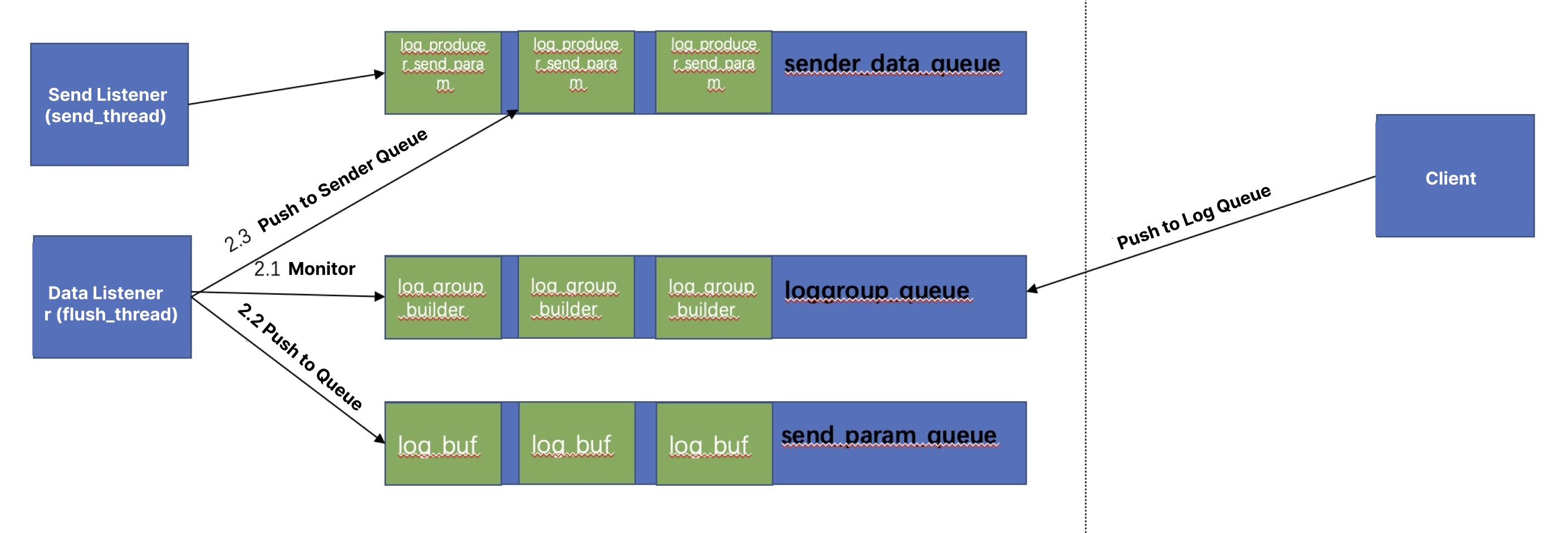
Logs are written asynchronously, ensuring that the client thread remains unblocked.
Aggregation and compression 
Data can be aggregated for upload based on the timeout, number of logs, or log size, and LZ4 compression is supported.
Caching
The maximum cache size can be configured.
Once the upper limit is exceeded, new log entries will fail to be written.
Core reporting architecture


Usage

Use the mobile SDK for iOS to report network link logs (including the demo and usage).
Use the mobile SDK for Android to report network link logs (including the demo and usage).

Log Field Description

Public Fields

Field
Description
Example
access
Network used in this probe.
Wi-Fi
access_subtype
Another network used in this probe. This parameter is available when multiple networks are connected simultaneously.
● Wi-Fi
● Android: 3G/4G/5G
● iOS: Cellula
app_version
Application version number.
1.0.0
device_model
Device mode.
-
me
Mobile user identifier.
-
resolution
Screen resolution.
2476*1440
local_time
Local time.
2023-02-01 20:58:00:332
root
Whether it is a root user.
false
app_id
Application package name.
-
brand
Device vendor information.
google
os
Operating system.
Android
utdid
Device identifier.
-
os_version
Operating system version.
13
reserve6
Specific probed content.
-
reserves
Probing protocol.
● ping
● tcpping
● Traceroute
app_name
Application name.
test
imei
Mobile device identifier.
-
local_timestamp
Local timestamp.
1675256280332

PING Probing

Field
Description
Example
method
Probing method.
ping
host_ip
IP address resolved from the domain name.
192.0.65.112
host
Domain name.
www.tencentcloud.com
max
Maximum latency. Unit: ms.
100.11
min
Minimum latency. Unit: ms.
0.00
avg
Average latency. Unit: ms.
74.51
stddev
Standard deviation of the latency.
20.00
loss
Number of lost PING packets.
1
count
Number of probes. One PING packet is sent each time.
10
size
Number of bytes in the PING packet.
64
responseNum
Number of PING packets returned.
9
interval
PING packet interval. Unit: ms.
200
timestamp
Local timestamp.
1675256419

TCPPING Probing

Field
Description
Example
method
Probing method.
TCPPING
host_ip
IP address resolved from the domain name.
192.0.65.112
host
Domain name.
www.tencentcloud.com
max
Maximum latency. Unit: ms.
100.11
min
Minimum latency. Unit: ms.
0.00
avg
Average latency. Unit: ms.
74.51
stddev
Standard deviation of the latency.
20.00
loss
Number of lost PING packets.
1
count
Number of probes. One PING packet is sent each time.
10
size
Number of bytes in the PING packet.
64
sum
Total probing time. Unit: ms.
219.66
port
TCP port.
88
timestamp
Local timestamp.
1675256419

Traceroute Probing

Field
Description
Example
method
Probing method.
TRACEROUTE
host_ip
IP address resolved from the domain name.
192.0.65.112
host
Domain name.
www.tencentcloud.com
command_status
Probing request status.
success
timestamp
Local timestamp.
1675256419
traceroute_node_results
Results returned from the TRACEROUTE probing node.
See the detailed field description below for the list content.

traceroute_node_results

Field
Description
Example
targetIp
IP address of a certain hop.
43.152.65.112
hop
Number of a certain hop. The hop number starts at 0 for the source. The hop number increases as the packet moves closer to the destination.
1
avg_delay
Average latency.
102
loss
Number of lost probe packets.
33
is_final_route
Whether it is the final path.
true
single_node_list
Returned result of a specific node.
See the following detailed fields for the list.

single_node_results

Field
Description
Example
targetIp
IP address of a certain hop.
43.152.65.112
hop
Number of a certain hop. The hop number starts at 0 for the source. The hop number increases as the packet moves closer to the destination.
1
delay
Probing latency.
102
is_final_route
Whether it is the final path.
true
status
Current probing request status.
CMD_STATUS_FAILED/CMD_STATUS_SUCCESSFUL


도움말 및 지원

문제 해결에 도움이 되었나요?

피드백