tencent cloud

Elastic MapReduce

  • Release Notes and Announcements
  • Product Introduction
  • Purchase Guide
    • EMR on CVM Billing Instructions
    • EMR on TKE Billing Instructions
    • EMR Serverless HBase Billing Instructions
    • EMR Serverless TCBase Billing Overview
  • Getting Started
  • EMR on CVM Operation Guide
    • Planning Cluster
    • Administrative rights
    • Configuring Cluster
    • Managing Cluster
    • Managing Service
    • Monitoring and Alarms
    • TCInsight
  • EMR on TKE Operation Guide
  • EMR Serverless HBase Operation Guide
  • EMR Serverless TCBase Operation Guide
  • EMR Development Guide
    • Hadoop Development Guide
    • Spark Development Guide
    • Hbase Development Guide
    • Phoenix on Hbase Development Guide
    • Hive Development Guide
    • Presto Development Guide
    • Sqoop Development Guide
    • Hue Development Guide
    • Oozie Development Guide
    • Flume Development Guide
    • Kerberos Development Guide
    • Knox Development Guide
    • Alluxio Development Guide
    • Kylin Development Guide
    • Livy Development Guide
    • Kyuubi Development Guide
    • Zeppelin Development Guide
    • Hudi Development Guide
    • Superset Development Guide
    • Impala Development Guide
    • Druid Development Guide
    • TensorFlow Development Guide
    • Kudu Development Guide
    • Ranger Development Guide
    • Kafka Development Guide
    • StarRocks Development Guide
    • Flink Development Guide
    • JupyterLab Development Guide
    • MLflow Development Guide
  • Practical Tutorial
    • Practice of EMR on CVM Ops
    • Data Migration
    • Practical Tutorial on Custom Scaling
  • API Documentation
    • History
    • Introduction
    • API Category
    • Making API Requests
    • Cluster Resource Management APIs
    • Cluster Services APIs
    • User Management APIs
    • Information Query APIs
    • Scaling APIs
    • Configuration APIs
    • Other APIs
    • Cluster Lifecycle APIs
    • Serverless HBase APIs
    • YARN Resource Scheduling APIs
    • Data Types
    • Error Codes
  • FAQs
    • EMR on CVM
  • Service Level Agreement
  • Contact Us

Logging in to Clusters

Download
Mode fokus
Ukuran font
Terakhir diperbarui: 2023-12-27 09:58:34

Logging in Through a Remote Login Tool (on Windows)

This section uses Xshell as an example to describe how to log in to an EMR cluster with a password by using a remote login tool on Windows.

Applicable OS

Windows

Logging in with a password

1. Download PuTTY (a remote login tool on Windows) here and install it.
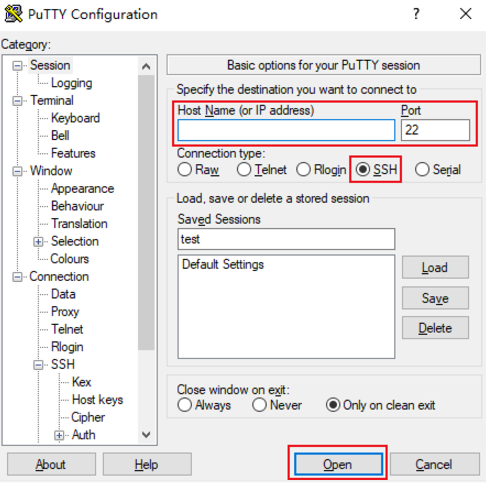
2. Launch the PuTTY client, enter the following in the PuTTY Configuration window, and click Open to create a session as shown below:
Host Name: The public IP address of the EMR cluster, which can be viewed on the list page or details page in the EMR Console.
Port: The port number of the CVM instance, which has to be 22. Please make sure that the port 22 in the CVM instance is opened. For more information, please see Security Group and Network ACL.
Connection type: Select SSH.

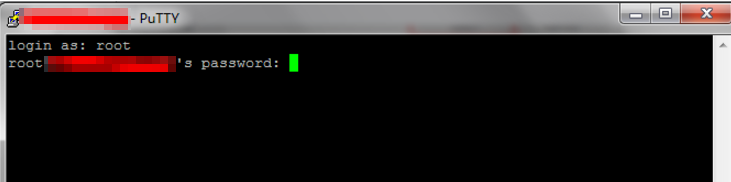
3. In the PuTTY session window, enter the obtained admin account and press Enter.
4. Enter the obtained login password and press Enter to log in as shown below:


Log in Through SSH (on Linux or macOS)

This section describes how to log in to an EMR cluster through SSH on Linux or macOS.

Applicable OS

Linux or Mac OS

Logging in with a password

1. On macOS, launch Terminal and run the following command. On Linux, run the following commands directly:
ssh <username>@<hostname or IP address>
username: The admin account, such as root.
hostname or IP address: The public IP address or custom domain name of your EMR cluster.
2. Enter the obtained password (only the input but not the output is displayed here) and press Enter to log in.
Bantuan dan Dukungan

Apakah halaman ini membantu?

masukan