A bootstrap action involves executing custom scripts during cluster creation so that you can modify the cluster environment, install third-party software, and utilize proprietary data. This action runs the bootstrap script during cluster creation (including cluster scale-out) and cluster termination (including cluster scale-in), except for router nodes.
Currently, you can specify a bootstrap action only for cluster creation and termination in the console. You can also specify a bootstrap action for the scale-out or scale-in process via API. By default, if no bootstrap action is specified via API, the bootstrap action specified for cluster creation is executed during the scale-out process, and the bootstrap action specified for cluster termination is executed during the scale-in process.
1. The bootstrap action specified for cluster creation (including cluster scale-out) can be executed in any of the following circumstances:
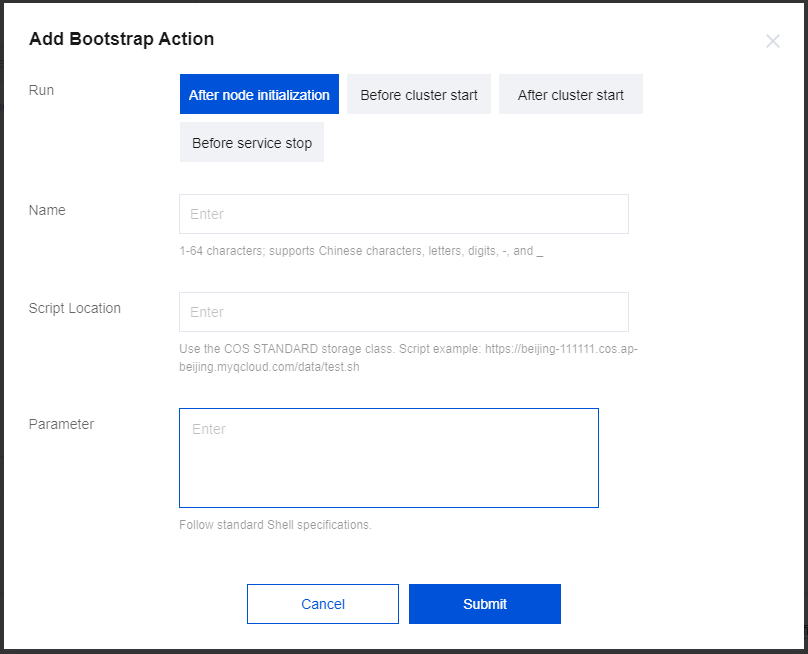
a. After server initialization: After server resource initialization and before EMR cluster software installation.
b. Before cluster start: Before cluster service start.
c. After cluster start: After cluster service start.
2. The bootstrap action specified for cluster termination (including cluster scale-in) can be executed in the following circumstance:
a. Before service deactivation: Before cluster service deactivation.
Bootstrap actions run scripts during cluster creation and scale-out in the order in which the scripts are added. The number of bootstrap actions cannot exceed 16.
Note:
We recommend that you create a small pay-as-you-go cluster first to test whether the bootstrap action works properly, and if yes, create a cluster for actual business.
Directions
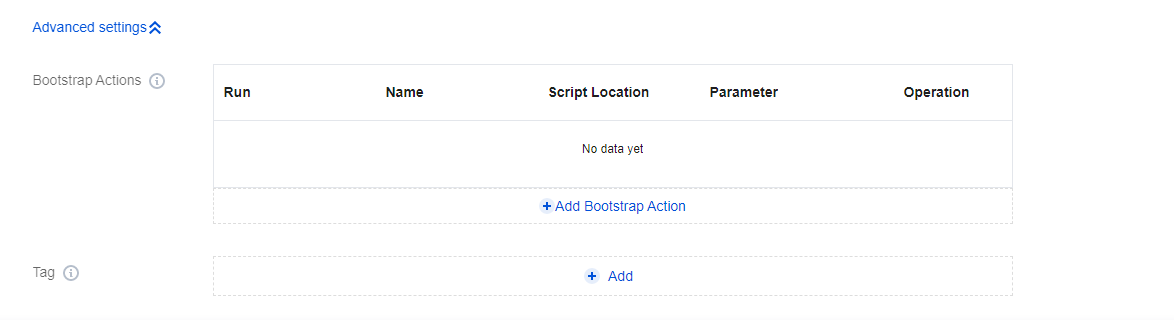
Option 1: Add a bootstrap action when creating a cluster on the purchase page
1. Choose Basic Configuration > Advanced Settings > Add Bootstrap Action to add a bootstrap action.
2. Edit or delete the added bootstrap action as needed.
Select a time for running the script and enter relevant parameters.
Name: We recommend you enter your object name.
Script Location: We recommend you copy the location information from the COS details page. Go to the COS console, click Bucket List, select the target script, and choose Operation > Details.
On the Details page, you can see the object name and object address.
Parameter: This refers to the parameters for running the script. Separate multiple parameters by spaces, and do not add spaces in individual parameters. The total length of Parameter and Name cannot exceed 240 characters.
Option 2: Add a bootstrap action on the Basic information page of the cluster
1. Log in to the EMR console and click the ID/Name of the target cluster in the cluster list to enter the cluster details page. Then, choose Basic information > Bootstrap Actions and click Add Bootstrap Action.
2. Edit or delete the added bootstrap action as needed. Select a time for running the script and enter relevant parameters.
Name: We recommend you enter your object name.
Script Location: We recommend you copy the location information from the COS details page. Go to the COS console, click Bucket List, select the target script, and choose Operation > Details.
Parameter: This refers to the parameters for running the script. Separate multiple parameters by spaces, and do not add spaces in individual parameters. The total length of Parameter and Name cannot exceed 240 characters.
Viewing Bootstrap Result
Currently, you can specify a bootstrap action for scale-out via API but not in the console. If a bootstrap action is specified, it will be executed during scale-out; otherwise, the one specified for cluster creation will be executed.
1. View the bootstrap result in the script's system log.
Logs and script files to be executed are stored in the /usr/local/service/scripts/ directory. The script system log is script_syslog. Naming convention 1: "Execution order" + "" + "Time" + "Script name" + "" + stderr.
The scripts will be executed on all types of nodes, and the script files and log files output by script execution will be stored on each node.
Bootstrap scripts need to be encoded in UTF-8.
2. View the bootstrap result in the Task Center.
Log in to the EMR console, click Task Center on the left sidebar, or enter a cluster, click Task in the top-right corner, and select the target process (creating cluster, scaling out cluster, or initializing node). Then, you can click Run Details in the service initialization step of Task details to view the bootstrap result.