TencentOS MCP Server Details and Usage Guide
Unduh
Mode fokus
Ukuran font
Overview
What Is MCP?
MCP (Model Context Protocol) is an open standard protocol for connecting AI models to external tools and data sources. Through MCP, AI clients such as WorkBuddy, Cursor, Claude Desktop, and CodeBuddy can call external tools in a standardized way to operate real systems and obtain data. For quick start, see Quick Start.
What Is TencentOS MCP Server?
TencentOS MCP Server is a Linux Ops MCP tool designed specifically for TencentOS/OpenCloudOS. It provides AI clients with a complete set of Linux Ops tools through the MCP protocol, including 22 tools covering 10 major Ops scenarios, enabling AI to perform system Ops operations directly through natural language.
You only need to enter a natural language command in the AI client, such as "Check the CPU usage of this machine", and TencentOS MCP Server will automatically call the corresponding Ops tool and return structured diagnostic results.
What Problems Can TencentOS MCP Server Solve?
Traditional Linux Ops relies on manually entering commands and memorizing complex parameters, resulting in low troubleshooting efficiency and high skill requirements for personnel. TencentOS MCP Server addresses the following pain points:
Traditional Approach | MCP Intelligent Ops |
Memorize numerous commands and parameters. | Ask in natural language, and AI automatically invokes tools. |
Manually log in to servers one by one. | One MCP Server manages multiple hosts. |
Command output is difficult to interpret quickly. | Structured JSON output with automatic AI analysis. |
Requires installation of various monitoring agents. | Remote execution over SSH with zero intrusion. |
Troubleshooting processes rely on personal experience. | Built-in AI Ops practice guide |
Architecture Description
Overall Architecture
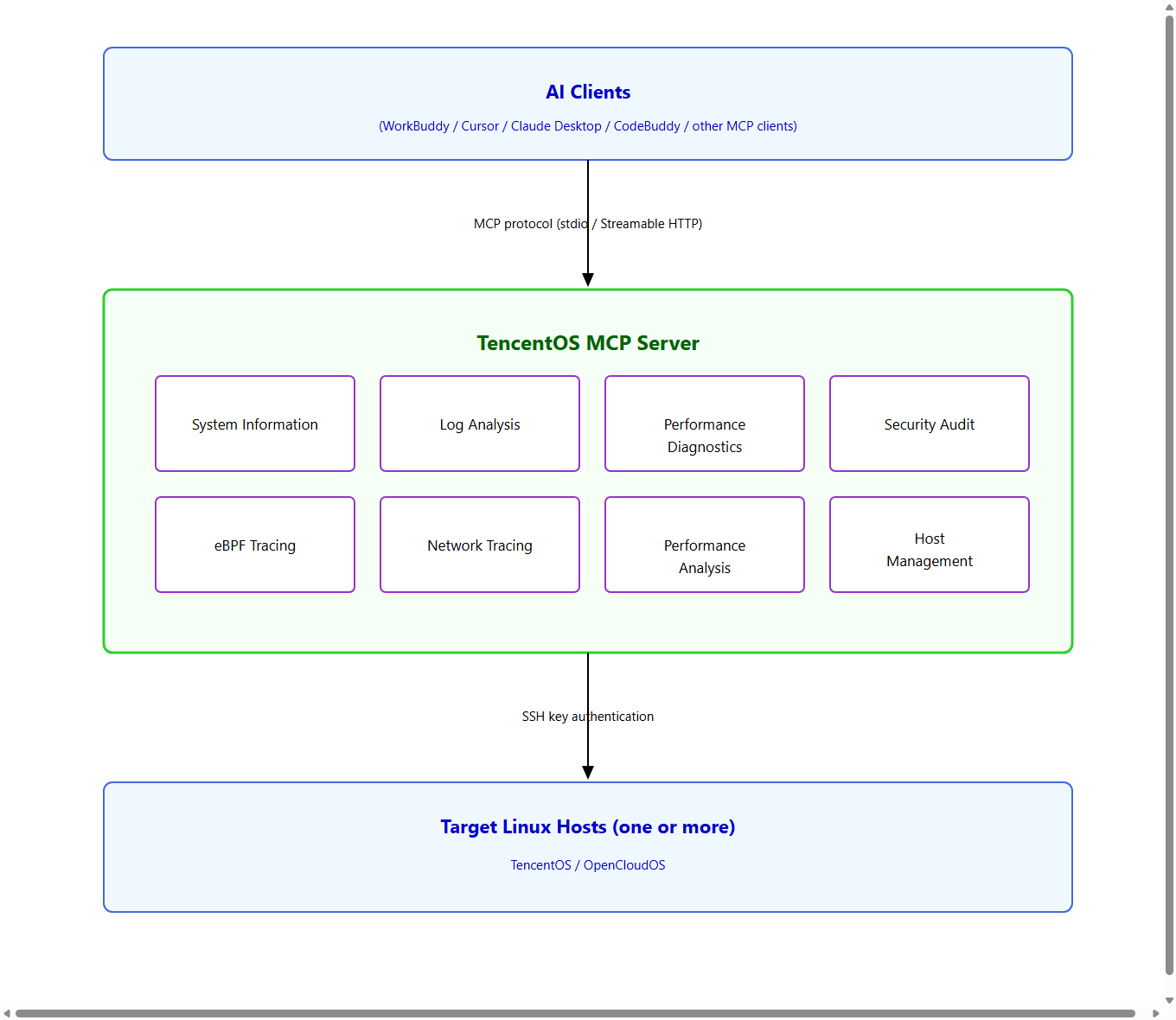
Design Philosophy
AI-Native: All tools return structured JSON that AI can directly parse and reason over.
Zero Intrusion: The target host only needs to have SSH enabled, with no Agent installation required.
Security First: All operations are read-only, with multiple layers of security protection to prevent command injection.
Out of the Box: 22 tools cover common Ops scenarios and are ready to use upon installation.
Features
Overview of 22 tools
TencentOS MCP Server provides 22 out-of-the-box Ops tools covering 10 areas, including system information, service management, process analysis, log viewing, network diagnostics, performance analysis, software package query, security auditing, kernel parameters, and eBPF tracing, to address common Linux Ops issues.
Note: All tools are read-only and do not make any modifications to the system. Hosts can only be added or removed via CLI commands, and the MCP interface provides read-only queries.
System Ops Tools (19)
Category | Tool Name | Capability Description |
System Information | get_system_info | Used to query information such as the OS version, kernel version, host name, architecture, and uptime. |
| get_hardware_info | Used to query information such as CPU, memory, and disk. |
Service management | get_service_info | Used to query information such as running services. |
Process Analysis | list_processes | Used to query information such as the Top N process list sorted by CPU utilization. |
Log viewing | get_journal_logs | Used to query systemd journal log information, with filtering by time/priority/service/keyword supported. |
| get_system_messages | Used to query system message log information, with keyword filtering supported. |
Network Diagnostics | get_listening_ports | Used to query system listening port information. |
Firewall | get_iptables_rules | Used to query iptables firewall rule information (filter/nat/mangle/raw tables, including rule numbers and traffic statistics). |
Performance Analysis | get_perf_overview | Used to query comprehensive performance information across four dimensions: CPU/memory/I/O/network. |
Software Packages | get_package_info | Used to query information such as the version, architecture, and description of a specified software package. |
Security audit | get_selinux_status | Used to query SELinux status and recent AVC denial records. |
| get_login_history | Used to query login success/failure history and security alarm information. |
| get_updateinfo_security | Used to query available security update advisory information (for yum/dnf-based distributions). |
Kernel management | get_sysctl_params | Used to query kernel parameter information, with prefix filtering supported, such as `net.ipv4`. |
| list_kernel_modules | Used to query loaded kernel module information, with name filtering supported. |
eBPF Tracing | get_ebpf_status | Used to query installation status information of eBPF tracing tools (nettrace/perf-prof). |
| ebpf_trace | Used to trace system event information (tcp/bio/exec, based on native kernel interfaces, with no additional tools required). |
Network tracing | nettrace | Used to trace network packet path information (based on eBPF, with nettrace installation required). |
Performance Analysis | perf_prof | Used to analyze system performance bottleneck information (based on eBPF, with perf-prof installation required). |
Host Management Tools (3)
Category | Tool Name | Capability Description |
Host management | list_managed_hosts | Used to query the list information of all managed hosts. |
| get_managed_host | Used to query detailed information of a single host. |
| test_managed_host | Used to test SSH connectivity information of hosts (supports single or batch testing). |
Deep Integration Capabilities of TencentOS
nettrace Network Tracing
nettrace is a TencentOS-specific eBPF-based kernel-level network packet tracing tool that supports four tracing modes:
Mode | Description | Applicable Scenarios |
basic | Concise mode (default), 1 to 2 lines per packet | Quickly locate network issues |
life | Full lifecycle tracing, 14 to 22 lines per packet | Deeply analyze packet forwarding paths |
drop | Packet drop tracing (requires v1.2.9+) | Locate packet loss locations and causes |
diag | Diagnostic mode (requires v1.2.9+) | Comprehensive network fault diagnosis |
Features:
Control the number of captured packets with the
max_packets parameter (default: 50, maximum: 100) to keep the output volume manageable.Supports filtering by protocol (tcp/udp/icmp), source/destination IP address, and source/destination port.
Automatically exit on timeout to prevent prolonged resource occupation.
perf-prof Performance Analysis
perf-prof is a kernel performance analysis tool based on perf_event and eBPF that supports multi-dimensional performance analysis:
Analysis Type | Description | Typical Use |
cpu | CPU utilization analysis (default) | Locate CPU hotspot functions |
syscall | System call tracing | Analyze system call latency |
io | Disk I/O latency analysis | Locate IO bottlenecks |
mem | Memory allocation analysis | Troubleshoot memory leaks |
sched | Scheduling latency analysis | Analyze process scheduling issues |
Dual-Mode Transfer
MCP Server supports two transport modes to accommodate different usage scenarios:
Comparison Item | stdio Mode | Streamable HTTP Mode |
Scenario | Local development, with the client and server on the same machine. | Remote deployment with multi-client sharing. |
Startup Method | The client automatically starts the process, requiring no manual startup. | Manually start the HTTP service on the server first. |
Token Authentication | Not required. | Required. |
Network Requirements | No network required. | Requires listening on a port (default: 8001). |
SSH Remote Management | Supported (connect to a remote host through local SSH). | Supported |
Multiple Clients | Not supported (one-to-one). | Supported (one-to-many) |
SSH Multi-Host Management
Multiple Linux servers can be managed through a single MCP Server.
Run commands remotely with SSH key authentication, without installing any Agent on the target host.
Built-in connection pool management and automatic reconnection mechanism.
Quick Start
This section provides step-by-step guidance on using MCP from scratch.
Step 1: Installing TencentOS MCP Server
The component is preinstalled in the TencentOS AI enhanced image, so no repeated installation is required. On the CVM instance purchase page, choose TencentOS > TencentOS Server 4 AI Enhanced as the public image. For other configuration parameters, see Creating an Instance via the Purchase Page.

Note: This component supports offline installation. If you need to use it in other environments, contact Tencent Cloud personnel to obtain the rpm package.
Step 2: Initial Configuration
1. After logging in to the instance as the root user, run the command to generate a token for AI client authentication. Keep the token confidential to prevent leakage.
tencentos-mcp-server token generate
2. Start the MCP Server service.
systemctl start tencentos-mcp-server
3. Verify the installation locally.
# Verify Service Health Status (HTTP Mode)curl http://127.0.0.1:8001/health
If the returned output is as follows, the service has started normally.
{"status": "healthy","version": "1.0.0","transport": "streamable-http","auth": "enabled","tools_count": 22}
Step 2: Configuring the AI (Agent) Client
Add the following configuration to the configuration file of the agent client (WorkBuddy, Claude Code, and so on):
Note:
For the configuration file paths of common agent clients (WorkBuddy, Claude Code, and so on), see Common Client Configuration File Locations.
{"mcpServers": {"tencentos": {"url": "http://<your server-ip>:8001/mcp","headers": {"Authorization": "Bearer <your-token>"}}}}
Step 3: Adding Managed Hosts (Optional)
Note: If you need to manage other hosts without MCP Server installed from the host where MCP Server is installed, perform this step for unified management.
1. Log in to the instance, and run the command as root on the host where MCP Server is located to generate the key.
# Generate a Key (If you do not have one, ed25519 is recommended)ssh-keygen -t ed25519
2. Transfer the key to the hosts that need to be managed.
# Distribute the Public Key to the Target Host (Using 198.51.100.10 as an Example)ssh-copy-id root@198.51.100.10
3. Add hosts by running the commands for adding hosts and then viewing hosts.
# Add a Host (Automatically Test SSH Connectivity, Using 198.51.100.10 as an Example)tencentos-mcp-server host add 198.51.100.10# View Added Hoststencentos-mcp-server host list
Step 4: Getting Started
You can simply ask questions in natural language in the AI client:
Check the CPU and memory usage of this machine.Which services are abnormal?Check if there have been any OOM events recently.Check the SELinux status and recent login records.Use nettrace to trace TCP packet loss.Analyze the disk I/O performance on 198.51.100.10.
Usage Examples
Scenario 1: System Health Check
Perform a comprehensive health check on this machine.
AI Call:
1.
get_system_info: Obtains basic system information.2.
get_hardware_info: Obtains CPU, memory, and disk status.3.
get_perf_overview: Obtains a performance overview.4.
get_service_info: Checks for abnormal services.Scenario 2: Network Troubleshooting
My Web server 198.51.100.10 is connecting very slowly. Please help me troubleshoot it.
AI Call:
1.
list_managed_hosts: Confirms that the host is managed.2.
get_listening_ports(host="198.51.100.10"): Checks the port listening status.3.
get_perf_overview(host="198.51.100.10"): Checks resource usage.4.
nettrace(dport=80, host="198.51.100.10"): Traces network packets.Scenario 3: Security Audit
Check for any suspicious login activity recently.
AI Call:
1.
get_login_history(count=50, include_failed=True): Obtains the login history.2.
get_selinux_status: Checks the SELinux status.3.
get_updateinfo_security: Views security advisories.Scenario 4: Performance Analysis
Analyze which process is using the most CPU.
AI Call:
1.
list_processes: Obtains the Top N processes.2.
get_perf_overview: Obtains a performance overview.3.
perf_prof(profile_type="cpu", duration=5): Performs CPU hotspot analysis.Scenario 5: Log Analysis
Check the error logs from the last hour.
AI Call:
1.
get_journal_logs(priority="err", since="1 hour ago"): Obtains error-level logs.2.
get_system_messages(grep="error"): Searches for errors in system messages.Scenario 6: Multi-Host Management
Check the connectivity of all managed hosts.
AI Call:
1.
list_managed_hosts: Obtains the host list.2.
test_managed_host: Tests connectivity in batches.CLI Command Reference
Service Management
# Start in HTTP mode on the specified port.tencentos-mcp-server serve --transport streamable-http --host 0.0.0.0 --port 8001# systemd management (use --enable-service when installing the deployment package)systemctl start tencentos-mcp-serversystemctl stop tencentos-mcp-serversystemctl restart tencentos-mcp-serversystemctl status tencentos-mcp-server# View installation informationtencentos-mcp-server info
Token Management
# Generate an API Tokentencentos-mcp-server token generate# Force regeneration (overwrite the existing Token)tencentos-mcp-server token generate --force# Revoke a Tokentencentos-mcp-server token revoke
Note: After regenerating the Token, restart the MCP Server service for the change to take effect.
Host management
# Add a Host (Automatically Test SSH Connectivity)tencentos-mcp-server host add 198.51.100.10# List all managed hoststencentos-mcp-server host list# JSON Outputtencentos-mcp-server host list --format json# Test connectivity to a single host.tencentos-mcp-server host test 198.51.100.10# Test all hosts in batches.tencentos-mcp-server host test-all# Remove a Hosttencentos-mcp-server host remove 198.51.100.10
Health Check
In HTTP mode, the
/health endpoint is provided (no Token required):curl http://127.0.0.1:8001/health
Security Design
TencentOS MCP Server adopts a multi-layered security design and is suitable for production deployment:
Security Aspect | Action | Description |
Operational security. | Read-only by default | All 22 tools are read-only operations, with no write or modification capabilities. |
Input security | Input sanitization | Filter 30+ types of dangerous characters (quotes, tabs, glob, redirection, Unicode control characters, and more). |
| Parameter escaping | Use shlex.quote to perform POSIX shell-safe escaping for all parameter values. |
| Allowlist validation | Enumeration parameters are validated against an allowlist; IP address/port/CPU ranges are validated using regular expressions. |
| Path traversal protection | Prohibit .. and special characters to prevent directory traversal attacks. |
Execution security | Command length limit | Local command length limit: 4096 characters |
| Environment variable cleanup | Clean up dangerous environment variables such as LD_PRELOAD, IFS, and BASH_ENV |
| Timeout process cleanup | Commands are executed in independent process groups, and the entire process group is reclaimed after a timeout. |
| Token Authentication | Bearer Token authentication in HTTP mode, with AES-encrypted Token storage. |
| TLS/HTTPS | Supports SSL certificate configuration and encrypted transmission in production environments. |
Transmission security | Rate limiting | Dual-level rate limiting at both Token and global levels |
Connection security | SSH Host Key verification | Default TOFU policy: trust and record on first connection, then verify subsequent connections to prevent man-in-the-middle attacks. |
| SSH key authentication | Use a certificate-based scheme uniformly; password login is not supported. |
Data security | Audit log | All tool calls are recorded to a JSONL file, including the actual executed commands. |
| Configuration file protection | Tokens are stored encrypted, and key file and configuration file permissions are automatically set to 600. |
MCP Client Configuration
Common Client Configuration File Locations
Client | Configuration File Path |
Cursor | .cursor/mcp.json (in the project directory) |
Claude Desktop (macOS) | ~/Library/Application Support/Claude/claude_desktop_config.json |
Claude Desktop (Windows) | %APPDATA%\\Claude\\claude_desktop_config.json |
CodeBuddy | ~/.codebuddy/mcp.json |
Streamable HTTP Mode Configuration
{"mcpServers": {"tencentos": {"url": "http://<server-ip>:8001/mcp","headers": {"Authorization": "Bearer <your-token>"}}}}
Note: Replace
<server-ip> with the actual server IP address and <your-token> with the Token generated by tencentos-mcp-server token generate.FAQs
Connection Issues
Failed to connect to the remote host over SSH?
You can troubleshoot by following these steps:
1. Confirm that the SSH key has been distributed:
ssh-copy-id root@<IP>2. Confirm that manual SSH connection works:
ssh root@<IP>3. Check key permissions:
ls -la ~/.ssh/id_* (permissions must be less than or equal to 600).4. View detailed errors:
tencentos-mcp-server host test <IP>
How do I manage the case where the SSH port on a remote host is not 22?
You can specify a port when adding a host:
tencentos-mcp-server host add 198.51.100.10 -p 36000
Usage Issues
Does AI prompt that nettrace is not installed when calling the nettrace tool?
nettrace is a TencentOS-specific tool and must be installed manually:
# Run on the target hostyum install nettrace
If the target system does not support nettrace, you can use
ebpf_trace as a lightweight alternative.
Is the service not updated after the Token is regenerated?
Restart the service after regenerating the Token:
systemctl restart tencentos-mcp-server
Note: The MCP feature is currently a Technology Preview version and has not been validated in large-scale production environments. AI-generated diagnostic conclusions and operation suggestions are for reference only. You should verify their correctness and applicability before performing any operations and assume full responsibility for the results. Tencent Cloud shall not be liable for any direct or indirect losses arising from the use of AI Ops skills.
Bantuan dan Dukungan
Apakah halaman ini membantu?
Anda juga dapat Menghubungi Penjualan atau Mengirimkan Tiket untuk meminta bantuan.
masukan