NVIDIA Deployment Practices
Unduh
Mode fokus
Ukuran font
TencentOS Server 4 now provides native support for NVIDIA Driver and CUDA, offering complete RPM binary software packages for your NVIDIA GPU usage, including kernel-level drivers, system management tools, computing libraries, and AI framework adaptation components.
This document guides you through quickly installing and deploying NVIDIA Driver and CUDA on TencentOS Server 4, and seamlessly running upper-layer AI models and applications.
Basic Environment Requirements and Instructions
Supported TencentOS kernel versions: 6.6 kernel (including all minor versions). If you are using TencentOS 2 or 3 series (5.4 kernel), upgrade to TencentOS 4 (6.6 kernel) is recommended.
Supported GPU drivers and corresponding CUDA versions:
Driver Version | Corresponding CUDA Version |
525.147.05 | 12.0.1 |
530.41.03 | 12.1.1 |
535.274.02 | 12.2.2 |
545.29.06 | 12.3.2 |
550.163.01 | 12.4.1 |
555.58.02 | 12.5.1 |
560.35.03 | 12.6.3 |
570.195.03 | 12.8.1 |
575.64.05 | 12.9.1 |
580.95.05 | 13.0.1 |
Supported CUDA versions: 11.8.0, 12.0.1, 12.1.1, 12.2.2, 12.3.2, 12.4.1, 12.5.1, 12.6.3, 12.8.1, 12.9.1, 13.0.1.
Installing the NVIDIA Driver
Installing the TencentOS EPOL Repository
dnfinstallepol-release
Installing the NVIDIA Driver Package
This example uses Nvidia-Driver-570. To install a different version, update the version number in the software package name in the following command by replacing 570 with the target version.
# Install open source modulesdnf install -y kmod-nvidia-570-dkms-open nvidia-570 nvidia-driver-570-open# Install closed-source modulesdnf install -y kmod-nvidia-570-dkms nvidia-570 nvidia-driver-570
Note:
NVIDIA Driver is available in open-source and closed-source versions, so the deployment process consists of two parts: open-source module installation and closed-source module installation.
Closed-source drivers are officially provided by NVIDIA. Their kernel modules come from the closed-source code in NVIDIA's official .run installation package, and they typically offer the latest features and optimized performance, including support for NVIDIA's latest GPU architectures and complete support for graphics APIs such as DirectX and OpenGL. The downside is that they do not open their source code, which may limit their compatibility with the Linux kernel and result in less community support compared to open-source drivers.
Open-source drivers (such as nouveau) are maintained by the community. Their kernel modules come from the open-source code in the open-gpu-kernel-modules repository, allowing better integration with the Linux kernel. Although they may not be as comprehensive as closed-source drivers in terms of features/performance, they excel in certain aspects, such as kernel compatibility.
Installing and Verifying the Items
# Restart the machinesudo reboot# View installed driver software packagesdnf list installed | grep nvidia# View driver informationnvidia-smi
Attention:
Restarting an instance will forcibly terminate running applications and services, or cause file and memory data to be lost. Before restarting, save your data and perform other necessary operations.
Uninstalling the Driver Package (Optional)
To switch the driver version, see the following steps to uninstall the installed driver package.
# Uninstall open source modulesdnf remove -y kmod-nvidia-570-dkms-open nvidia-570 nvidia-driver-570-open# Uninstall closed-source modulesdnf remove -y kmod-nvidia-570-dkms nvidia-570 nvidia-driver-570
Installing CUDA
To accommodate different usage scenarios, the TencentOS team has adopted a new packaging scheme. This scheme splits CUDA into runtime and devel subpackages, enabling fine-grained layered component management. It meets the requirements of lightweight production deployment while supporting a complete development environment for code compilation and model training.
Optimization Direction | Traditional Solution | New Solution |
Package structure | Subdivide subpackages. | Split into runtime/devel subpackages. |
Component layering | Static libraries/tools bundled with runtime | Divide executable files, .so dynamic libraries, header files, and .a static libraries. |
The component scopes corresponding to runtime / devel are as follows:
Type | Component Scope | Applicable Scenarios |
Runtime | Executable files and .so dynamic libraries | Lightweight production deployment |
Devel | runtime, header files, and .a static libraries | Code compilation/model training |
Installing CUDA Components
This example uses cuda-12-8. To install a different version, update the version number in the software package name in the following command by replacing 12-8 with the target version.
Installing the Runtime package:
dnfinstall-ycuda-runtime-12-8
Installing the Devel package:
dnfinstall-ycuda-devel-12-8
Installing and Verifying the Items
# View installed cuda software packagesdnf list installed | grep cuda# View the cuda versionnvcc --version
Support for Multiple Version Coexistence (Optional)
The new packaging scheme resolves the issue of multiple CUDA versions coexisting. You can download multiple CUDA versions and use
update-alternatives to switch between them. To support multiple CUDA versions coexisting, see Installing CUDA and install the required versions in sequence. For example, if CUDA 12.2 and 12.9 are installed at the same time, you can switch between them as follows: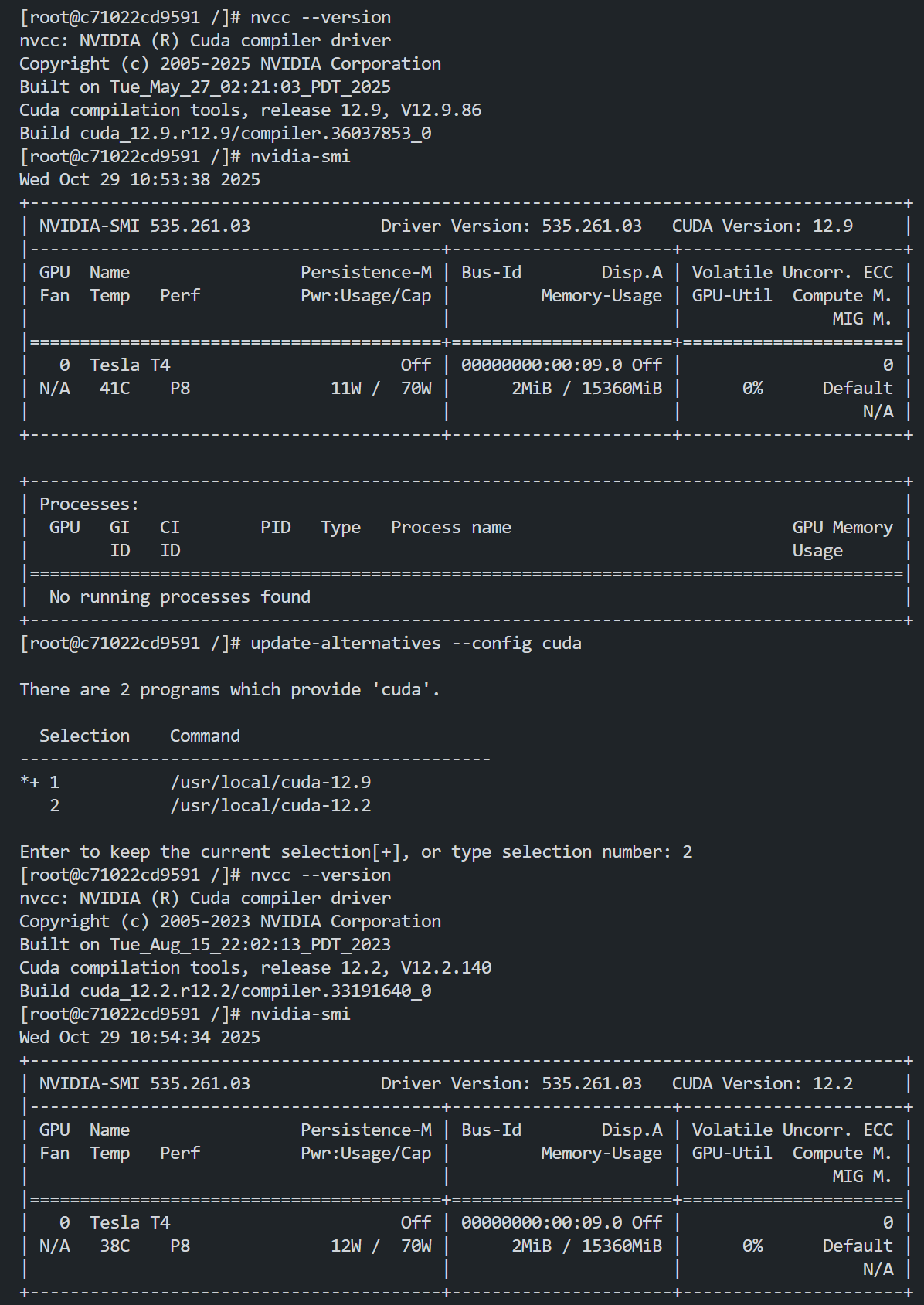
Uninstalling CUDA Components (Optional)
To switch the CUDA version, see the following steps to uninstall the installed CUDA package.
Runtime package:
dnf remove-ycuda-runtime-12-8 cuda-toolkit-12-8-config-common
Devel package:
dnf remove-ycuda-runtime-12-8 cuda-toolkit-12-8-config-common cuda-12-8 cuda-devel-12-8 cuda-toolkit-12-8
Installing and Verifying AI Applications
Running Large Models (Using the vLLM Framework and Qwen as Examples)
Installing uv
# Download uvdnf install pippip install uv# Recommended: Use uv for installation to intelligently resolve dependency conflicts.uv pip install vllm==0.10.0 --system
Starting services
# Start the vllm service and pull a large model (Qwen is used as an example here).vllm serve "Qwen/Qwen3-0.6B"# If the machine has a low configuration, try the following command to start the service.vllm serve "Qwen/Qwen3-0.6B" --gpu-memory-utilization 0.7 --max-model-len 1024 --max-num-seqs 4 --dtype float16 --block-size 16
Results Display:
Example: command line test
# Open a new terminalcurl -X POST "http://localhost:8000/v1/chat/completions" -H "Content-Type: application/json" --data '{"model": "Qwen/Qwen3-0.6B","messages": [{"role": "user","content": "What is the capital of France?"}]}'
Example: Python code deployment and inference
Create a python program with the following content:from vllm import LLM, SamplingParamsfrom transformers import AutoTokenizer# Initialize model parameters.model_path = "Qwen/Qwen3-0.6B" # Replace with the actual model path.llm = LLM(model=model_path,dtype="half", # Enable half-precision inference (FP16).trust_remote_code=True, # Required for Hugging Face models.tensor_parallel_size=1, # Run on a single GPU.gpu_memory_utilization=0.8 # GPU memory utilization control.)# Configure generation parameters.sampling_params = SamplingParams(temperature=0.7,top_p=0.95,max_tokens=256,repetition_penalty=1.1)# Build a conversation template.messages = [{"role": "system", "content": "You are a poet"},{"role": "user", "content": "Write a seven-character quatrain about spring."}]tokenizer = AutoTokenizer.from_pretrained(model_path)prompt = tokenizer.apply_chat_template(conversation=messages,tokenize=False,add_generation_prompt=True)# Run inference.outputs = llm.generate(prompts=[prompt],sampling_params=sampling_params)# Output results.for output in outputs:generated_text = output.outputs[0].textprint(f"Generated result:\\n{generated_text}")
Running Large Models (Using Ollama + Qwen as Examples)
Installation
# Install dependencies.dnf install -y gawk# Download and run the installation script.curl -fsSL https://ollama.com/install.sh | sh
Starting services
# Start the service.ollama serve
Running Qwen Models
# Pull a large model (Qwen is used as an example here).ollama run qwen3:0.6b
FAQs
CUDA Version Displayed by nvidia-smi Inconsistent with the Actual CUDA Toolkit Version
It is normal that the CUDA Version displayed by nvidia-smi differs from the actual CUDA Toolkit version, because the two represent version information at different levels. In the output of the nvidia-smi command, Driver Version is the currently installed driver version, and CUDA Version represents the highest CUDA Runtime API version supported by the driver, not the currently installed CUDA Toolkit version. To view the CUDA Toolkit version, run the
nvcc --version command.cuda-compat Issues (Driver and CUDA Version Compatibility)
In the CUDA ecosystem, each CUDA version has a corresponding driver version that is best suited for it. In fact, every CUDA toolkit is bundled with an NVIDIA display driver package. This driver fully supports all features introduced by that CUDA toolkit version and represents the version pairing that was closely matched during the development of that CUDA version, offering optimal feature compatibility.
For the mapping between CUDA versions and driver versions, see the official release notes. However, in real-world scenarios, if you need to break this established mapping, for example, by running a higher CUDA version on an older driver or running an older CUDA version on a newer driver, compatibility issues will inevitably arise.
To meet the requirement of running higher CUDA versions on older hardware, the official team has specifically released the cuda-compat package for compatibility adaptation. In practice, when this package is used, a higher CUDA version can only call features available in the highest CUDA version supported by the current driver, and cannot use features introduced by CUDA upgrades. From a functional experience perspective, this is similar to downgrading the CUDA version.
The specific conclusions are as follows:
If the driver version is higher than or equal to the CUDA version and cuda-compat is not installed, the system runs normally. If cuda-compat is installed, exceptions may occur.
If the driver version is lower than the CUDA version, cuda-compat must be installed.
Missing Library Files When Running AI Frameworks (vLLM) on Lower CUDA Versions
The core architecture of vLLM is a self-developed high-performance C++/CUDA kernel that is deeply integrated with PyTorch. It is linked to a specific version of the CUDA runtime at compile time and is strongly tied to the CUDA version of PyTorch. Higher versions of vLLM are built against newer versions of PyTorch. Therefore, compiling vLLM in a system CUDA environment of a lower version causes missing key symbols. For details about the error, see the following screenshot:
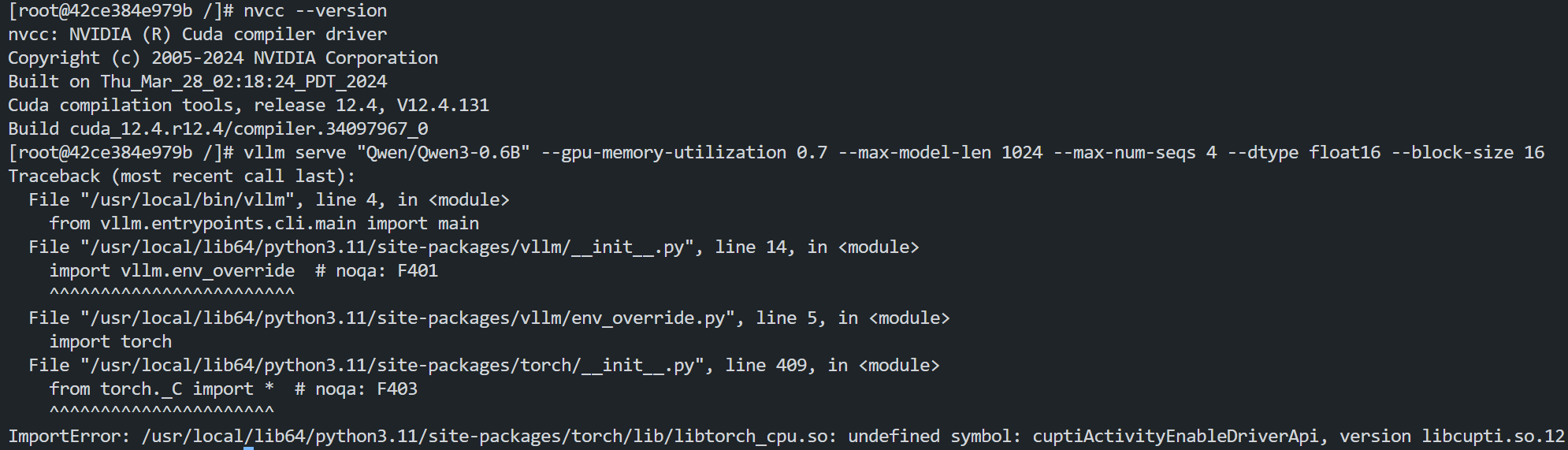
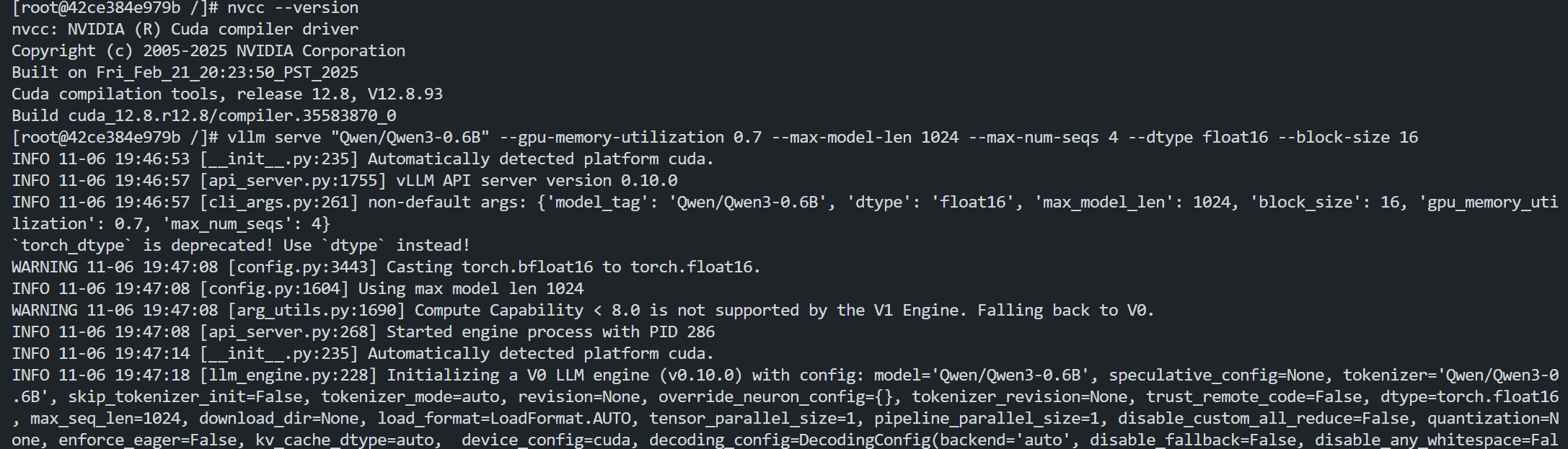
For example, when vLLM is compiled with CUDA 12.2, a CUPTI-related symbol missing issue occurs. Analysis shows that the CUPTI library bundled with PyTorch/Triton contains the required symbols, but the CUPTI library included in CUDA 12.2 lacks them:

When the higher CUDA 12.9 environment is switched to, the test results contain the target symbol and can run successfully:

In the above cases, you can set an environment variable to specify the path where the dynamic linker searches for shared libraries (.so files). When a program that requires a specific version of the CUDA library is run, the system prioritizes searching for library files in this path. The specific command is as follows:
export LD_LIBRARY_PATH=/usr/local/lib/python3.11/site-packages/nvidia/cuda_cupti/lib:$LD_LIBRARY_PATH
Bantuan dan Dukungan
Apakah halaman ini membantu?
Anda juga dapat Menghubungi Penjualan atau Mengirimkan Tiket untuk meminta bantuan.
masukan