Using the LogListener Self-Check Tool in Non-TKE Environments
Must-Knows
Operating System: Only Linux is supported.
Execution Permission: After downloading, you need to grant execute permission by running chmod +x loglistener-check.
Prerequisites: Before running, ensure that LogListener is installed and running on the current machine. If LogListener is not installed, see the Installation and Upgrade Guide. The tool needs to read the LogListener installation directory and configuration files. Therefore, it is recommended to run the tool directly on the machine where LogListener resides.
Network Requirements: The tool needs to access the CLS service during runtime to verify its version and configuration. Ensure that the machine's network can properly access Tencent Cloud-related domains.
Download Tool
Download the collection self-check tool. Download address: https://mirrors.tencent.com/install/cls/loglistener-check/linux/loglistener-check
Using Tikit
Related Commands
Usage of ./loglistener-check:
-h, --help helpfor loglistener
--root_dir string (optional)install loglistener root dir(default is /usr/local/loglistener-*)
--topic string (optional) topic ID
The main parameters are described as follows:
Parameter
Type
Required
Description
--root_dir
string
No
Specifies the LogListener installation root directory. The default value is /usr/local/loglistener-* (the tool automatically matches installation directories under this path pattern).
If you installed LogListener using a custom path, manually specify the complete installation path. For example: if you installed LogListener version 2.7.2 using the default path, its root directory is /usr/local/loglistener-2.7.2.
--topic
string
No
Specifies the ID of the log topic (Topic) to be checked. The Topic ID can be obtained from the log topic list in the CLS console. For detailed operations, see Log Topic.
If this parameter is not specified, the tool checks all log topics associated with the machine. If the parameter is specified, it checks only the collection configurations related to this Topic, resulting in a more precise inspection scope.
Example
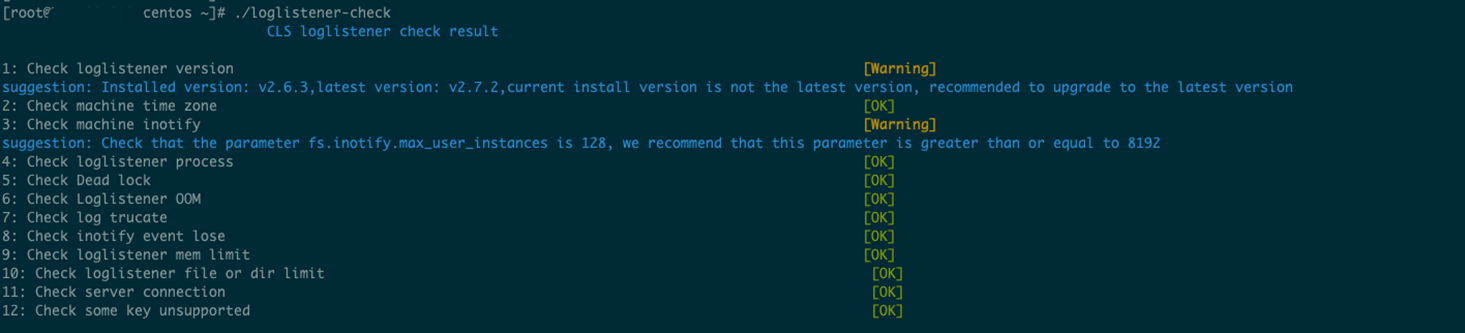
Use the check tool to view the issues it indicates and resolve them based on the provided solutions. For example, the following is a sample check result using default parameters.
Check the result.
The LogListener version installed on the current machine is too low. The check tool has detected a newer version and recommends that you upgrade. The new version fixes many issues and adds numerous new features.
The inotify parameters are not configured according to the recommended values. It is recommended that you modify them; otherwise, log collection might be affected.
Using the LogListener Self-Check Tool in TKE Environments
Must-Knows
Operating System: Linux, macOS, and Windows are supported.
Execution Permission: After downloading, you need to grant execute permission by running chmod +x detect-tool.
Prerequisites: Before running, ensure that you have properly connected to the target TKE cluster via kubectl. The tool relies on the kubeconfig file to access cluster resources.
Network Requirements: The tool needs to access the Kubernetes API Server and CLS service during runtime. Ensure that the network in the runtime environment is unobstructed.
Download Tool
Download the corresponding version of the collection self-check tool for your operating system:
2. In the left sidebar, select Clusters to go to the cluster management page.
3. Locate the cluster you need to connect to, click its ID/Name, and go to the cluster management page.
4. In the left sidebar, click Basic Information to go to the Basic Information page.
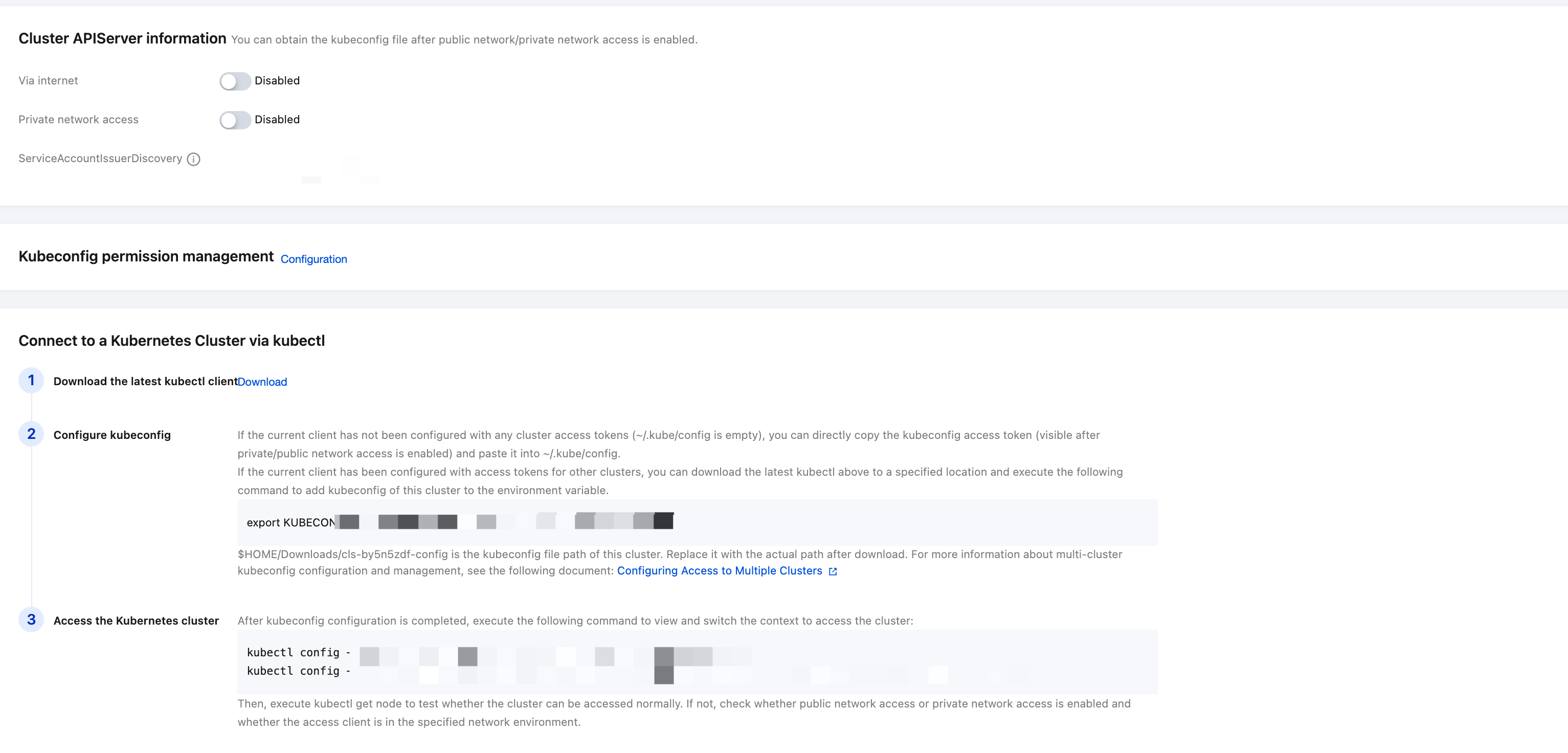
5. In the Cluster APIServer Information section, use kubectl to connect to the TKE cluster according to TKE's instructions. For detailed steps, see Configuring Kubeconfig.
Related Commands
Usage of ./detect-tool:
--kubeconfig string (optional) Path to a kubeconfig file, specifying how to connect to the API server. (default "/root/.kube/config")
--logConfig string (optional) logconfig name
--namespace string (optional) pod name namespace
--pod string (optional) pod name
--topic string (optional) topic id
The main parameters are described as follows:
Parameter
Type
Required
Description
--kubeconfig
string
No
The path to the configuration file used to connect to Kubernetes. The default value is /root/.kube/config. Usually, no special setup or specification is required after kubectl successfully connects to the cluster.
--logConfig
string
No
The name of the LogConfig, which specifies the LogConfig to be detected. Use the kubectl get logconfigs command to view the list of LogConfigs in the current cluster.
--pod
string
No
The Pod name, which specifies the Pod to be detected. If a Pod is specified, the --namespace must also be specified.
--namespace
string
No
Specifies the namespace where the Pod to be detected resides. If a namespace is specified, the --pod must also be specified.
--topic
string
No
Specifies the ID of the log topic (Topic) to be detected, which is used to check the LogConfigs associated with that Topic. A cluster may have multiple LogConfigs associated with the same Topic. The Topic ID can be obtained from the CLS console. For detailed operations, see Log Topic.
Example
Use the check tool to view the issues it indicates and resolve them based on the provided solutions.
Example 1: Specify the collection configuration and check the Pod.