Viewing Data Loading Status
Download
フォーカスモード
フォントサイズ
Scenarios
After loading data into the analysis engine, you need to confirm whether the data is queryable. TDSQL Boundless provides the
SHOW REPLICATION TABLES command and the information_schema.LIBRA_TABLE_STATUS system view to help you check the loading status of data objects. A table's data is ready for querying through the analysis engine only when its AVAILABLE field is set to 1.Prerequisites
Viewing Data Loading Status
Method 1: Viewing via the Console
1. Log in to the TDSQL Boundless console. In the Instance List, click the target Instance ID to go to the Instance Details page.
2. In the Instance Architecture Diagram area, click the Instance ID of the read-only analysis engine to go to the read-only analysis engine details page.
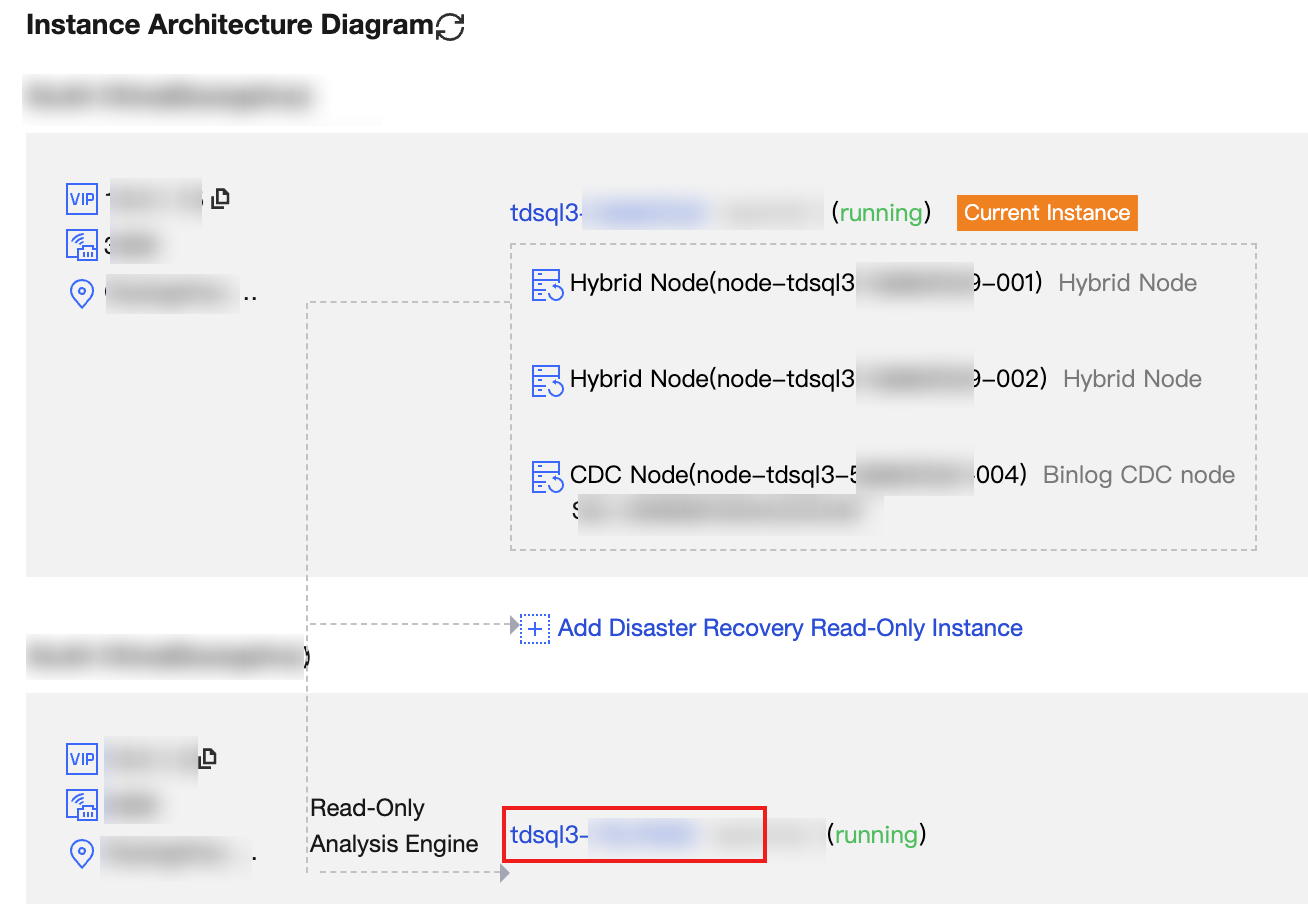
3. On the read-only analysis instance details page, go to the Data Object tab to view object information. You can check the loading status of each table from the object information.

The object information fields displayed on the console are described as follows:
Parameter | Description |
Database Name | The name of the database to which the data object belongs. |
Object Name | The name of the table loaded into the analysis engine. Views can also be loaded into the read-only analysis engine, but view information is not displayed here. To view a view, use the MySQL command. When a large number of objects are loaded, you can search by keyword in the object name through the console. |
Status | The current stage of data loading, including data loading in progress, data loading completed, real-time incremental loading in progress, synchronization exception, and so on. |
Data Load Status | When an object is in the data loading stage, the loading progress of the current table is displayed. |
Incremental Phase Latency | When an object is in the real-time incremental loading stage, the sync latency information of that object is displayed (unit: seconds). |
Other Information | If an exception occurs during data loading, the relevant error information for that object's loading exception is displayed. |
Method 2: Viewing via SQL Commands
Connect to the TDSQL Boundless instance and execute the following SQL command to check the data loading status:
SHOW REPLICATION TABLES;
Or query the system view:
SELECT * FROM information_schema.LIBRA_TABLE_STATUS;
Both methods return the same field information. The fields are described as follows:
Field Name | Type | Description |
DATABASE_NAME | VARCHAR | Database name. |
TABLE_NAME | VARCHAR | Table name. |
REPLICA_ID | VARCHAR | Replica identifier, in the format of r<number>, for example, r1. |
AVAILABLE | TINYINT | Whether the data is queryable. 1 indicates queryable, and 0 indicates not queryable. |
REPLICATION_STEP | VARCHAR | Current data loading stage. |
LAG | BIGINT | Sync latency (seconds). The actual latency value is displayed only during the Change Propagation and Load Data Finish stages; -1 is displayed for other stages. |
MESSAGE | VARCHAR | Additional information. When an exception occurs, the error cause is displayed. |
The values and meanings of the
REPLICATION_STEP field are as follows:STATE Value | Description | AVAILABLE |
UnStart | Data loading not started. | 0 |
Loading Data | Full data loading in progress. | 0 |
Load Data Finish | Full data loading is completed, waiting to go to incremental synchronization. | 1 |
Change Propagation | Real-time incremental synchronization in progress (change propagation). | 1 (when normal) |
Skip | The table is skipped and not loaded. | 0 |
Error | Data loading error occurred. | 0 |
Note:
When the
REPLICATION_STEP is Change Propagation and the AVAILABLE is 0, it indicates that the data of the table in the analysis engine is outdated.Filtering by Conditions
The
information_schema.LIBRA_TABLE_STATUS system view supports filtering with standard SQL WHERE conditions. For example:-- Check the loading status of the specified databaseSELECT * FROM information_schema.LIBRA_TABLE_STATUSWHERE DATABASE_NAME = 'your_database';-- View all tables with abnormal loadingSELECT * FROM information_schema.LIBRA_TABLE_STATUSWHERE REPLICATION_STEP = 'Error';-- View all tables that are ready for querySELECT * FROM information_schema.LIBRA_TABLE_STATUSWHERE AVAILABLE = 1;
Limitations
When table data in the analysis engine is unavailable, queries that do not explicitly specify an engine using HINT are automatically routed to the transactional engine (the TDSQL Boundless primary instance).
フィードバック