HY-3D-Rigging API Guide
ダウンロード
フォーカスモード
フォントサイズ
Introduction
The rigging and skinning API performs rigging and skinning on input human or animal models based on the Hunyuan large model, and outputs a 3D model with skeletal information.
Integration Guide
1. Obtaining an API Key
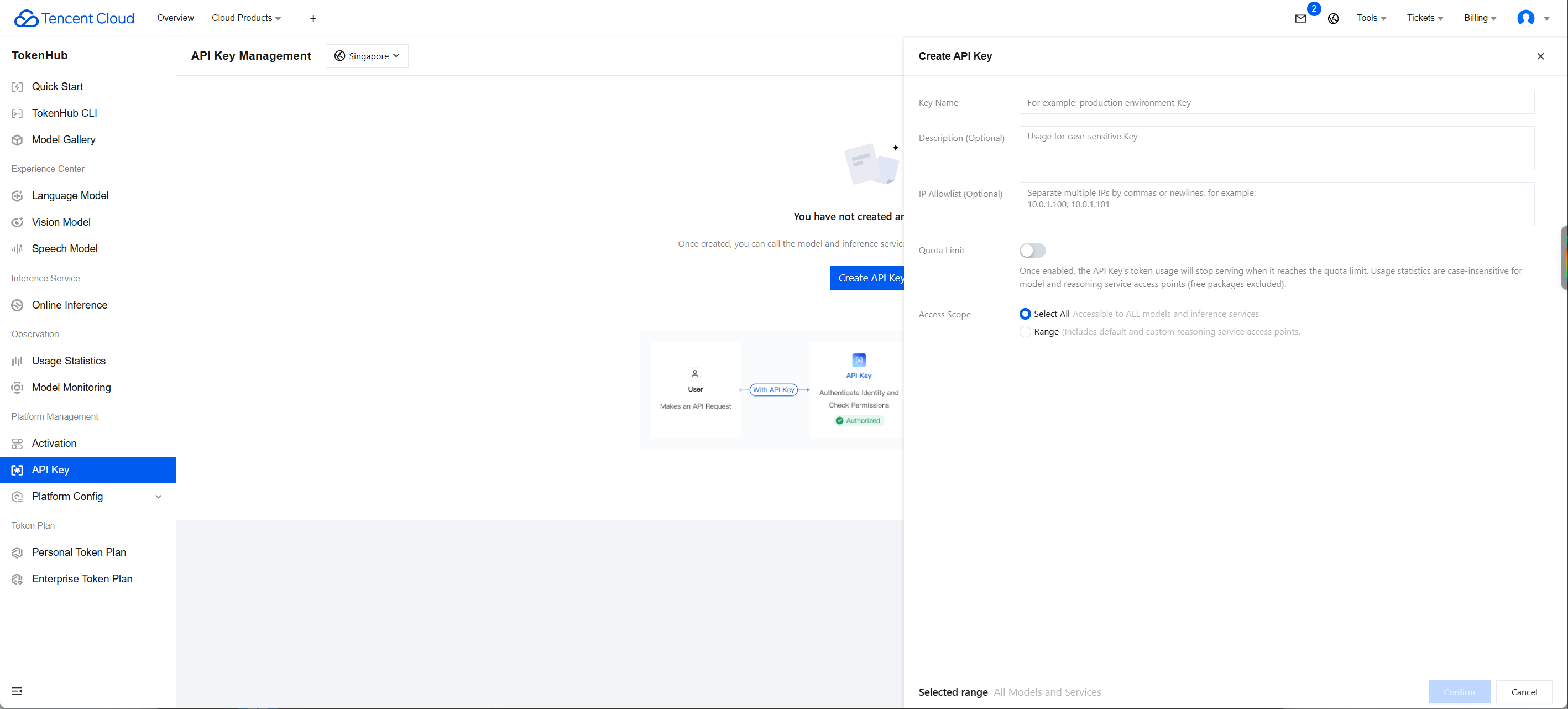
1. Go to the API Key Management page and click Create API Key. For detailed operations, see Create API Key.
2. After creation, be sure to copy and securely store the API Key. This information will be used in the subsequent process of configuring the tool.
Note:
The key of each account can only be queried by that account. Sub-accounts cannot view the key information of the main account. If a sub-account needs to call APIs, it must create its own key information.
If a sub-account cannot be created, the user may not have permission to create keys and needs authorization from the main account. After the main account logs in, click User List, and select Authorize next to the corresponding sub-account. A dialog box for associating policies will appear. Enter the authorization policy name and search, then select the corresponding policy and click Confirm.
Authorization policy: QcloudTokenhubFullAccess
2. Concurrency Quota
One concurrent task is provided by default, meaning that at most one submitted task can be processed at a time. The next task can start only after the previous task is completed.
Concurrent tasks: the maximum number of tasks that can run during the period when the corresponding service is being called. While a task is not completed, the next task cannot be submitted. After the task is completed, the next task can be submitted.
API Documentation
Submitting a Rigging and Skinning Task
Input parameters
Parameter Name | Required | Type | Description |
model | Yes | string | Name of the rigging and skinning model. Default value: hy-3d-rigging. Example value: hy-3d-rigging |
file_3d | Yes | object | Humanoid characters must use a standard pose (A Pose or T Pose) and remain as motionless as possible. The model should not contain components other than the human body (such as mounts and wings). Avoid loose clothing, accessories, and complex hairstyles. For non-humanoid characters, upload a single lifeform model such as a biped, quadruped, or bird. Keep the pose as simple as possible, without exaggerated or complex movements. Motion template generation is not supported. One of the 3D model files is required. Reference value: fbx: A 3D model file in fbx format, with a file size not exceeding 60 MB. glb: A 3D model file in glb format, with a file size not exceeding 60 MB. |
motion_type | No | Integer | Preset motion type. Reference value: 1. Roundhouse kick 2. Left hook 3. Charged attack 4. Throw a charged punch 5. Two-hit combo 6. Two-hit combo 2 7. Step back 8. Take a hit 9. Take a hit - 2 10. Take a hit - 3 11. Get knocked down - 1 12. Get knocked down - 2 13. Land 14. Frustrated 15. Throat slit 16. Jab 17. Continuous strikes 18. Kick 19. Side kick 20. Practice Tai Chi 21. Backflip 22. Squat and twist 23. Walk-1 24. Walk-2 25. Walk-3 26. Standby-1 27. Standby-2 28. Street dance 29. Twist dance 30. Turn left 31. Turn right 32. Jog 33. Jog-2 34. Run 35. Sprint-1 36. Sprint-2 37. Sprint-3 38. Jump in place-1 39. Slide tackle 40. Jump forward 41. Jump forward-2 42. Cross 43. Intimidate 44. Fall forward 45. Right shift. 46. Jump in place-2 47. Turn around 48. Send a shockwave Example value: 1 |
Output parameters
Parameter Name | Type | Description |
id | string | Task id (valid for 24 hours). Example value: 1315932989749215232. |
request_id | string | Unique request id, generated by the server and returned for each request (if a request fails to reach the server for other reasons, no request_id is returned for that request). Provide the request_id of the request when locating issues. |
object | string | Type of the returned object. For 3d jobs, the value is fixed as 3d_job. |
created_at | integer | Task creation time. |
status | string | completed: task succeeded, failed: task failed, in_progress: in progress, queued: queued. Example value: completed. |
Querying a Rigging and Skinning Task
Input parameters
Parameter Name | Required | Type | Description |
model | Yes | string | Name of the rigging and skinning model. Default value: hy-3d-rigging. Example value: hy-3d-rigging |
id | Yes | string | Task id. Example value: 1357237233311637504 |
Output parameters
Parameter Name | Type | Description |
status | string | completed: task succeeded, failed: task failed, in_progress: in progress, queued: queued. Example value: completed. |
request_id | string | Unique request id, generated by the server and returned for each request (if a request fails to reach the server for other reasons, no request_id is returned for that request). Provide the request_id of the request when locating issues. |
object | string | Type of the returned object. For 3d jobs, the value is fixed as 3d_job. |
created_at | integer | Task creation time. |
completed_at | integer | Task completion time. |
data | array of object | List of generated results, including generated 3d model files and related resource information. For details, see the data data structure. |
Examples
Submitting a Rigging and Skinning Task
Input example
curl -X POST 'https://tokenhub-intl.tencentcloudmaas.com/v1/api/3d/submit' \\-H 'Authorization: Bearer YOUR_API_KEY' \\-H 'Content-Type: application/json' \\-d '{"model": "hy-3d-rigging","file_3d": {"url": "https://example.com/test.fbx"},"motion_type": 1}'
Output example
{"id": "14721*****320","request_id": "1f64379-bb*****d75fc12365","object": "3d_job","created_at": 1784885898,"status": "queued"}
Querying a Rigging and Skinning Task
Input example
curl -X POST 'https://tokenhub-intl.tencentcloudmaas.com/v1/api/3d/query' \\-H 'Authorization: Bearer YOUR_API_KEY' \\-H 'Content-Type: application/json' \\-d '{"model": "hy-3d-rigging","id": "14721*****320"}'
Output example
{"request_id": "1f64379-bb*****d75fc12365","object": "3d_job","created_at": 1788492072,"completed_at": 1788492072,"status": "completed","data": [{"type": "fbx","url": "https://vcg-prod-1258344699.cos.ap-guangzhou.tencentcos.cn/auto_rigging/output/1254418*****28-9f58-876386e48d44_0.fbx"}]}
Data Structure
file_3d
Input a 3D model file object.
Parameter Name | Required | Type | Description |
type | No | string | 3D model file type. Example value: fbx |
url | Yes | string | 3D model file URL. |
data
Generate a result object.
Parameter Name | Type | Description |
type | string | Type of the generated result file. Example value: obj. |
url | string | Download URL of the generated result file. |
フィードバック