Tripo-3D API Guide
下载
聚焦模式
字号
This document applies to: tripo-3d-3.1, tripo-3d-p1.
Introduction
The Tripo 3d generation API intelligently generates 3d models based on input text descriptions/images.
Integration Guide
1. Obtaining an API Key
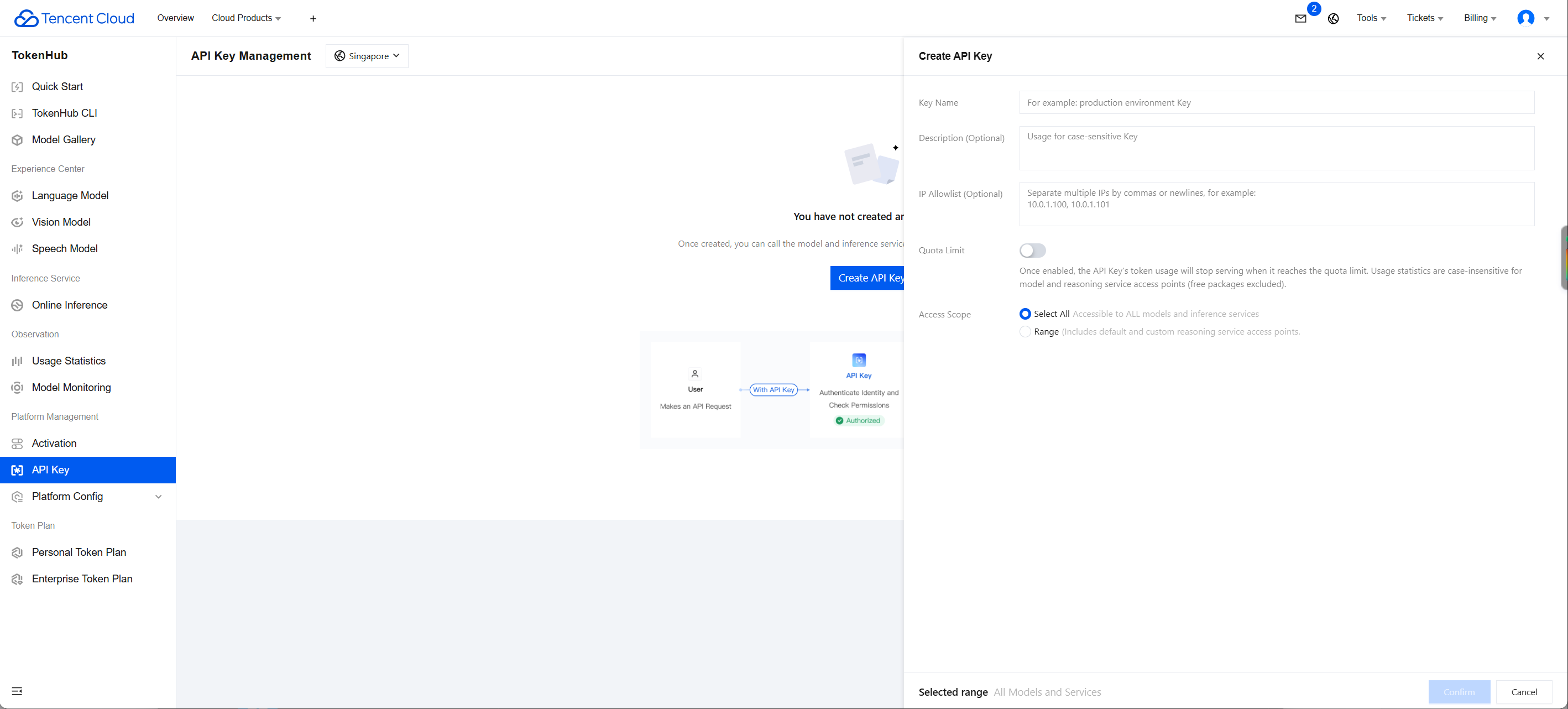
1. Go to the API Key Management page and click Create API Key. For detailed operations, see Create API Key.
2. After creation, be sure to copy and securely store the API Key. This information will be used in the subsequent process of configuring the tool.
Note:
The key of each account can only be queried by that account. Sub-accounts cannot view the key information of the main account. If a sub-account needs to call APIs, it must create its own key information.
If a sub-account cannot be created, the user may not have permission to create keys and needs authorization from the main account. After the main account logs in, click User List, and select Authorize next to the corresponding sub-account. A dialog box for associating policies will appear. Enter the authorization policy name and search, then select the corresponding policy and click Confirm.
Authorization policy: QcloudTokenhubFullAccess
2. Concurrency Quota
Three concurrent tasks are provided by default, meaning that up to three submitted tasks can be processed simultaneously. Tasks that exceed the concurrency limit must wait until the preceding tasks are completed before they can start processing.
Concurrent tasks: the maximum number of tasks that can run during the period when the corresponding service is being called. While a task is not completed, the next task cannot be submitted. After the task is completed, the next task can be submitted.
API Documentation
Submitting a Tripo 3d Generation Task
Input parameters
Parameter Name | Required | Type | Parameter Description |
model | Yes | string | Name of the tripo text-to-3D model. Options: tripo-3d-3.1, tripo-3d-p1. Default value: tripo-3d-3.1. Example value: tripo-3d-3.1 |
prompt | No | string | Text prompt, up to 1024 characters. Takes effect only when the text-to-3D feature is used. Describe the shape, material, style, and dimensions. |
input | No | string | Image source for image-to-3D generation. Takes effect only when the image-to-3D feature is used. Supports PNG, JPEG, and WebP, with a maximum size of 20 MB and a recommended resolution of at least 256 × 256 px. The subject should be clearly visible, with a clean background and minimal occlusion. Example value: https://cos.ap-guangzhou.myqcloud.com/image.jpg |
inputs | No | array of object | Image source for multi-view generation. Takes effect only when the multi-view to 3D feature is used. The subject should be clearly visible with minimal occlusion. The front view cannot be omitted. Other views can be omitted, but at least 2 images are required. All images should capture the same object under consistent lighting. Supported formats: PNG, JPEG, WebP Recommended resolution: at least 256 × 256 px. |
negative_prompt | No | string | Negative prompt, up to 255 characters. Describes content that should not appear in the generated model. Example value: "blurry, low quality, broken mesh". |
image_seed | No | integer | Random seed for the internal text-to-image stage. Controls the reference image generated from the text prompt, and then performs 3d conversion. If not set, a random seed is used each time. Attention: Use this parameter with caution. Different seeds may produce results of varying quality, and a fixed seed may limit the opportunity to explore better generation results. seed value range: -2147483648 to 2147483647. |
model_seed | No | integer | Random seed for geometry generation. Using the same seed and the same input will generate the same 3d mesh. If not set, a random seed is used each time. Attention: Use this parameter with caution. Different seeds may produce results of varying quality, and a fixed seed may limit the opportunity to explore better generation results. seed value range: -2147483648 to 2147483647. |
enable_image_autofix | No | boolean | Whether to automatically optimize the input image before generation. When this feature is enabled, the system enhances low-resolution or low-quality images to improve 3d generation results. The default value is false. |
face_limit | No | integer | Maximum number of faces in the output mesh. If it is omitted, the model uses adaptive topology. When model is tripo-3d-3.1: The face quantity limit is 1,500,000 in standard mode with pure triangular faces, and 2,000,000 in ultra-clear mode. The face quantity limit is 150,000 in standard mode with quad faces (quad: true). Recommended for game assets: 50,000 – 100,000. web/mobile: 10,000 – 50,000. When smart_low_poly: true is enabled, the face quantity limit is independent of the model version and is unified as follows: 500 – 20,000 for triangular faces and 500 – 10,000 for quad faces. When model is tripo-3d-p1: Maximum number of faces in the output mesh. Supported range: 50 – 20,000. If this parameter is omitted, the number of faces is adaptively determined. Best quality recommendation: start with 150 faces for simple models and 250 faces for complex models. Too few faces may lead to lower generation quality. |
texture | No | boolean | Whether to generate textures for the model. Set to false to obtain pure geometry without textures. The default value is true. |
pbr | No | boolean | Enable pbr material textures (base_color, metallic, roughness, normal). When pbr is set to true, texture is automatically forced to true. The default value is true. |
texture_seed | No | integer | Random seed for texture generation. Using the same seed generates the same texture. If not set, a random seed is used each time. To obtain a model with the same geometry but different textures, keep model_seed unchanged and change texture_seed. Attention: Use this parameter with caution. Different seeds may produce results of varying quality, and a fixed seed may limit the opportunity to explore better generation results. seed value range: -2147483648 to 2147483647. |
texture_alignment | No | string | Determine the priority of texture alignment in the 3d model. Takes effect only for single-image and multi-image inputs. Options include: original_image, geometry. original_image: prioritizes visual fidelity with the source image, generating textures more similar to the original image, but may cause slight 3d inconsistency. geometry: prioritizes 3D structural accuracy, making textures better conform to the model's geometry, but may deviate slightly from the original image's appearance. The default value is original_image. |
texture_quality | No | string | Texture quality level. Options include: fast, standard, detailed, extreme. fast: generates the fastest, trading detail for speed. The output texture size is the same as standard. Requires texture version v3.5-20260815. Credits are the same as standard. standard: a balance between quality and speed. detailed: higher fidelity with slower generation speed. extreme: 8k textures with the highest fidelity. It consumes additional credits compared to detailed. The default value is standard. fast is available only with texture version v3.5-20260815. The generation API requires texture_version to be set to this version. |
texture_version | No | string | Independently specify the texture model, decoupled from the geometry model. v3.5-20260815: the latest texture model. Required when texture_quality=fast and delight are used. v3.0-20250812: the default value for v3.x and P-series geometry. v2.5-20250123: the default value for v2.5-20250123 geometry. If omitted, it is automatically derived based on the geometry model according to the table above. |
delight | No | boolean | Remove lighting information from the reference image before texturing. If set to false, the original shading is retained. Supported only by texture model v3.5-20260815; earlier texture versions ignore this parameter. The default value is true. |
auto_size | No | boolean | Whether to automatically scale the generated model to real-world size. When this option is enabled, model dimensions are in meters, suitable for ar/vr or game engine scenarios. The default value is false. |
orientation | No | string | Set the model orientation. Takes effect only for single-image and multi-image inputs. default: automatic orientation. align_image: aligns the model to the viewpoint of the input image. Takes effect only when texture is true. This parameter is invalid when texturing is disabled. The default value is default. |
compress | No | string | Valid when model is tripo-3d-3.1. Compression type. geometry: meshopt compression, reducing file size. |
smart_low_poly | No | boolean | Valid when model is tripo-3d-3.1. Whether to generate a low-poly model with handcrafted style and clean topology. Best suited for simple, non-complex inputs. Complex models may occasionally fail. The default value is false. |
generate_parts | No | boolean | Valid when model is tripo-3d-3.1. Generate editable segmented parts. Incompatible with texture=true, pbr=true, or quad=true. To use this feature, set all three to false. The default value is false. |
export_uv | No | boolean | Controls uv unwrapping during generation. If set to false, generation is faster and file size is reduced. uv unwrapping is handled during the texturing stage. The default value is true. |
geometry_quality | No | string | Valid when model is tripo-3d-3.1. Geometry quality level. standard: a balance between quality and speed. detailed: ultra mode with finer geometric details. The default value is standard. |
Output parameters
Parameter Name | Type | Description |
id | string | Task id (valid for 24 hours). Example value: 1315932989749215232. |
request_id | string | Unique request id, generated by the server and returned for each request (if a request fails to reach the server for other reasons, no request_id is returned for that request). Provide the request_id of the request when locating issues. |
object | string | Type of the returned object. For 3d jobs, the value is fixed as 3d_job. |
created_at | integer | Task creation time. |
status | string | completed: task succeeded, failed: task failed, in_progress: in progress, queued: queued. Example value: completed. |
Querying a Tripo 3d Generation Task
Input parameters
Parameter Name | Required | Type | Description |
model | Yes | string | Name of the tripo text-to-3D model. Options: tripo-3d-3.1, tripo-3d-p1. Default value: tripo-3d-3.1. Example value: tripo-3d-3.1 |
id | Yes | string | Task id. Example value: 1357237233311637504 |
Output parameters
Parameter Name | Type | Description |
status | string | completed: task succeeded, failed: task failed, in_progress: in progress, queued: queued. Example value: completed. |
request_id | string | Unique request id, generated by the server and returned for each request (if a request fails to reach the server for other reasons, no request_id is returned for that request). Provide the request_id of the request when locating issues. |
input | object | |
output | object | |
object | string | Type of the returned object. For 3d jobs, the value is fixed as 3d_job. |
created_at | integer | Task creation time. |
completed_at | integer | Task completion time. |
credits_consumed | number | Number of credits actually consumed by the current task. |
Examples
Submitting a Tripo 3d Generation Task
Input example
curl -X POST 'https://tokenhub-intl.tencentcloudmaas.com/v1/api/3d/submit' \\-H 'Authorization: Bearer YOUR_API_KEY' \\-H 'Content-Type: application/json' \\-d '{"model": "tripo-3d-3.1","prompt": "A cute kitten"}'
Output example
{"id": "14721*****320","request_id": "11f64379-bb0b-46b2-b89f-17d75fc12365","object": "3d_job","created_at": 1784885898,"status": "queued"}
Querying a Tripo 3d Generation Task
Input example
curl -X POST 'https://tokenhub-intl.tencentcloudmaas.com/v1/api/3d/query' \\-H 'Authorization: Bearer YOUR_API_KEY' \\-H 'Content-Type: application/json' \\-d '{"model": "tripo-3d-3.1","id": "14721*****320"}'
Output example
{"status": "completed","input": {"prompt": "A cute kitten","pbr": true,"texture": true,"export_uv": true,"geometry_quality": "standard","texture_alignment": "geometry","model_version": "v3.1-20260211"},"output": {"type": "text_to_model","model_url": "https://vcg-prod-1258344699.cos.ap-guangzhou.tencentcos.cn/**********12.glb","generated_image_url": "https://vcg-prod-1258344699.cos.ap-guangzhou.tencentcos.cn/**********12.png","rendered_image_url": "https://vcg-prod-1258344699.cos.ap-guangzhou.tencentcos.cn/**********12.png"},"credits_consumed": 50,"created_at": 1785989483,"completed_at": 1785989483}
Data Structure
inputs
The input information actually used for this task.
Parameter Name | Required | Type | Description |
front | Yes | string | Front view image. |
back | No | string | Rear view image. |
left | No | string | Left view image. |
right | No | string | Right view image. |
input
The input information actually used for this task.
Parameter Name | Required | Type | Description |
prompt | No | string | Input prompt for text-to-3D generation. |
pbr | No | boolean | Whether to generate pbr material. |
texture | No | boolean | Whether to generate texture maps. |
export_uv | No | boolean | Whether to export uv information. |
geometry_quality | No | string | Geometry model quality actually used for this task. Example value: standard |
texture_alignment | No | string | Texture alignment method Example value: original_image. |
model_version | No | string | Original model version actually used for this task. Example value: v3.1-20260211 |
output
The task result is generated.
Parameter Name | Type | Description |
type | string | Type of the generation task. Example value: multiview_to_model |
model_url | string | Download URL of the generated 3d model file. |
generated_image_url | string | URL of the generated reference image. |
rendered_image_url | string | URL of the rendered preview image of the generated result. |
文档反馈