Distributed Cache supports two deployment modes: standard architecture and cluster architecture. As business data continues to grow, when the standard architecture can no longer meet business requirements in terms of performance or capacity, you can upgrade the instance from standard architecture to cluster architecture, thereby gaining stronger data processing capabilities and larger storage capacity.
Support Notes
The version support for upgrading from the standard architecture to the cluster architecture is as follows:
Upgrade Rule
Description
Same-version architecture upgrade supported
Redis 4.0 or later versions.
Valkey 8.0.
Cross-version architecture upgrade not supported
Version upgrade and architecture upgrade cannot be performed simultaneously. For example, upgrading from Redis 4.0 standard architecture to Redis 5.0 cluster architecture is not supported.
If both version and architecture upgrades are required, complete the version upgrade first, then perform the architecture upgrade.
Redis 2.8 architecture upgrade not supported
Redis 2.8 does not support upgrading to the cluster architecture. If you need to use the cluster architecture, create an instance of the cluster architecture running Redis 4.0 or later versions.
Architecture downgrade not supported
Architecture upgrade is a one-way operation; the cluster architecture cannot be downgraded to the standard architecture.
Cross-AZ upgrade not supported
Currently, changing the availability zone (AZ) during an architecture upgrade is not supported.
Billing Notes
After the standard architecture is upgraded to the cluster architecture, billing will be based on the cluster architecture, resulting in increased costs. For specific pricing, see Pricing Center.
How upgrade works
Starting from Redis 4.0, upgrading from the standard architecture to the cluster architecture (single shard) essentially changes the instance from a slot-unrestricted mode to a slot-based mode. The entire process involves no data migration.
Project
Description
Upgrade duration
It is usually completed within 3 minutes.
Connection impact
Existing connections may experience a brief interruption during the upgrade. Workloads must support automatic reconnection.
Prerequisites (Compatibility Check)
Since the standard architecture and cluster architecture differ in command support, to avoid service disruptions after upgrade, please complete the compatibility check before upgrading:
Command compatibility differences: The cluster architecture adopts distributed data storage. Its primary difference from the standard architecture is whether a single command supports multi-key access. For specific information, see Command Compatibility.
2. Above the instance list on the right, select the region.
3. In the instance list, find the target instance.
4. Click the instance ID to enter the Instance Details page.
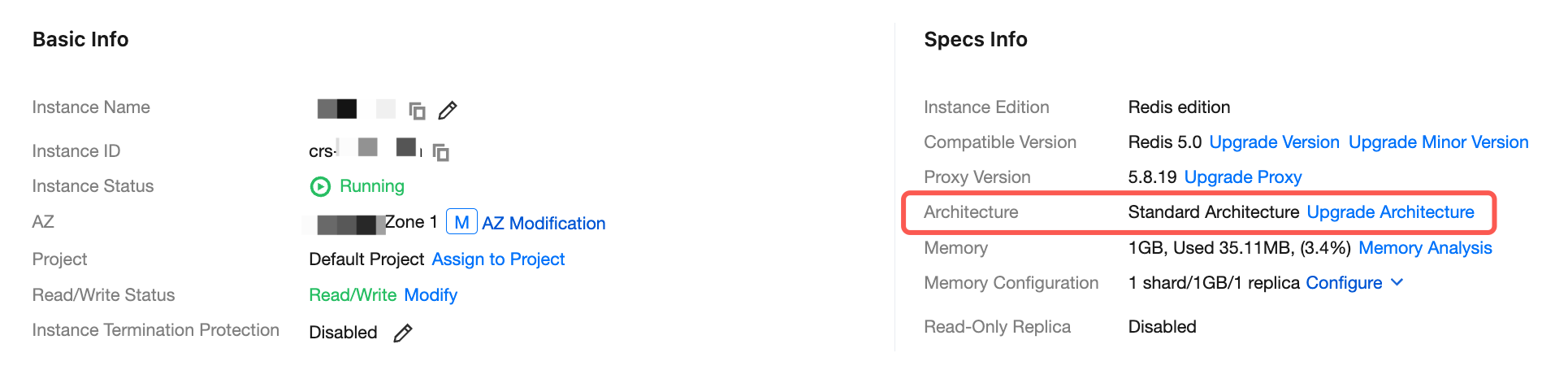
5. In the Specs Info section on the Instance Details page, click Upgrade Architecture after Architecture.
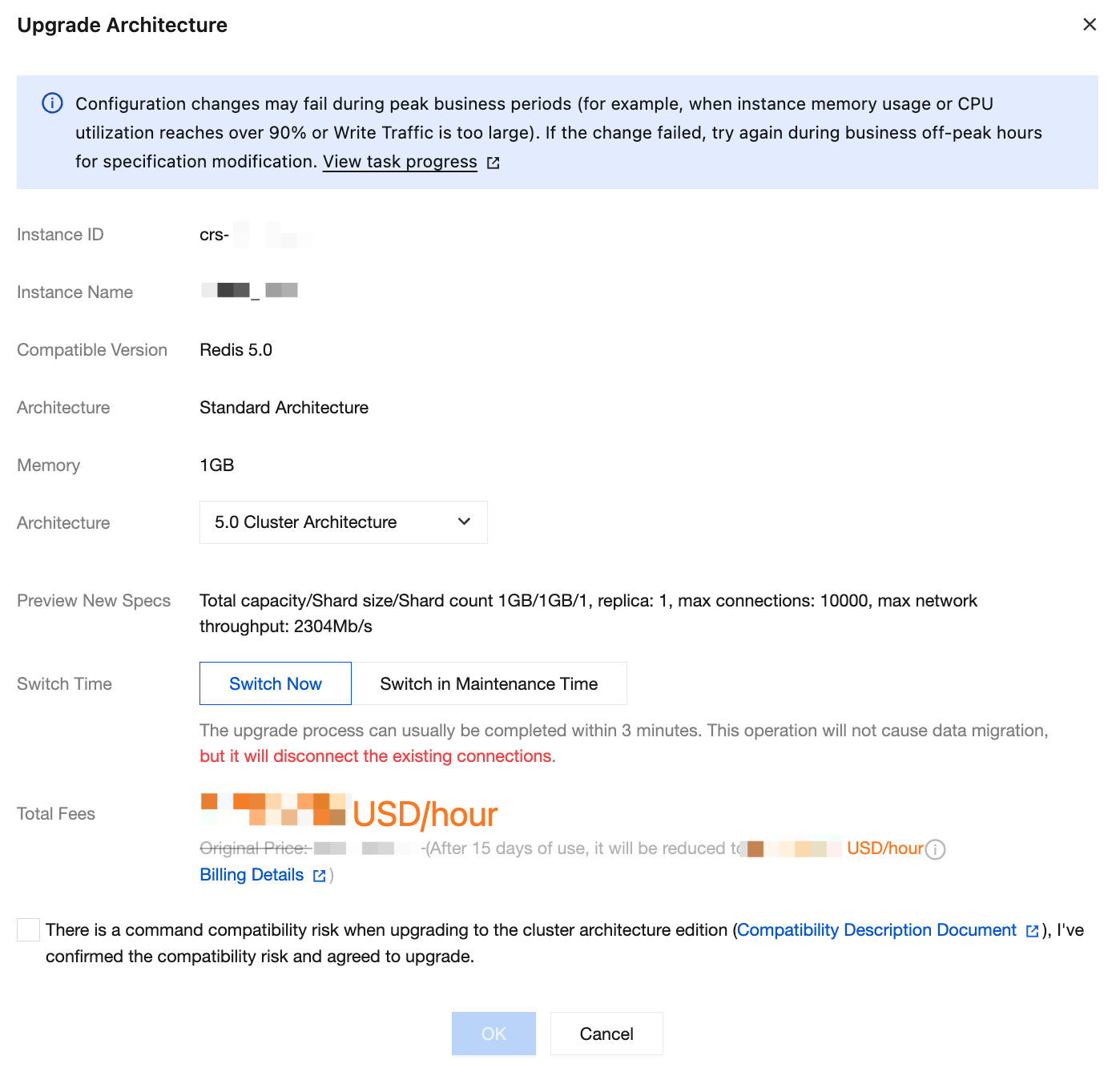
6. In the pop-up window, configure the upgrade parameters according to the table below.
Parameter
Description
Instance ID
ID of the instance to be upgraded.
Instance Name
Name of the instance to be upgraded.
Compatible Version
The current compatible Redis version of the instance to be upgraded.
Architecture
Architecture information of the instance to be upgraded.
Memory
Memory size of the instance to be upgraded.
Architecture
Select the target architecture in the drop-down list. Currently, the standard architecture can be upgraded to the cluster architecture, but the cluster architecture cannot be downgraded to the standard architecture.
Preview New Specs
Preview information of the instance specifications after upgrade.
Switch Time
Switch Now: The switch will be performed immediately.
Switch in Maintenance Time: The switch will be performed during the instance maintenance time. You can modify the Maintenance Time on the instance details page. We recommend that you switch during off-peak hours.
Total Fees
Fees after the architecture upgrade.
Pay-as-you-go: The hourly unit price after instance architecture upgrade. You can click Billing Details to view the billable items and billing formula and confirm the fees.
Monthly subscription: The total fees of the instance before it expires after the architecture is upgraded.
7. Upgrading to the cluster architecture edition carries command compatibility risks. Click Compatibility Description Document to review the risks. After the compatibility risks are confirmed, select There is a command compatibility risk when upgrading to the cluster architecture edtion edi (). I've confirmed the compatibility risks and agreed to upgrade. Then click OK to proceed with the upgrade.
8. On the order page, confirm the order information and the fees to be paid, and hover over
to view the detailed calculation of the fees. After confirming that everything is correct, click Submit Order. Make the payment and return to the instance list. After the Instance Status changes to Running, you can see that the instance architecture has been upgraded to cluster architecture in the instance list or instance details.