Searching Files
ダウンロード
フォーカスモード
フォントサイズ
This article will guide you on how to search for files in the Professional Version through the console.
Preparations
The VOD service has been activated, and a Professional Version application has been created. For instructions on creating a Professional Version application, please refer to Quick Start.
Files have been uploaded. For file upload, please refer to Uploading Files.
Operation Steps
1. Log in to the VOD console, click Application Management on the left sidebar to enter the application list page.
2. Find the application where you need to search for files, click the application name to enter the application storage page.
3. On the application storage page, select the bucket where you need to search for files, click the bucket name to enter its file list page.
4. In the search box at the upper right of the bucket's file list page, enter the file prefix and press Enter to query the file list with the same prefix.
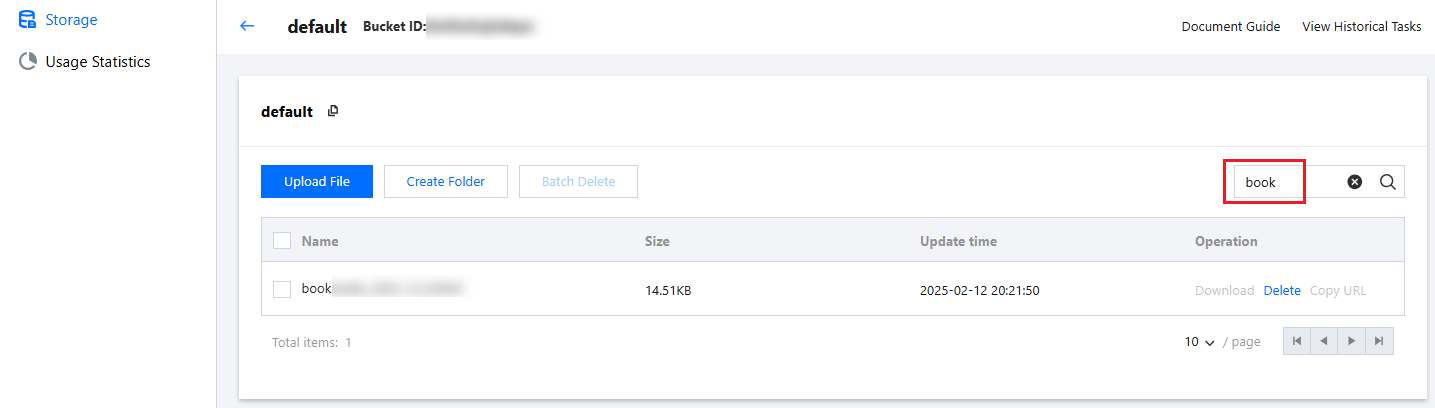
5. To cancel the search, you can clear the content in the search box and press Enter again to display all files.
フィードバック